how to make the scroll button less noisy ?
g400s
If yes, then please continue to read below, otherwise please continue to use until it is so.
This will definitely void the warranty as you're disassemble the mouse.
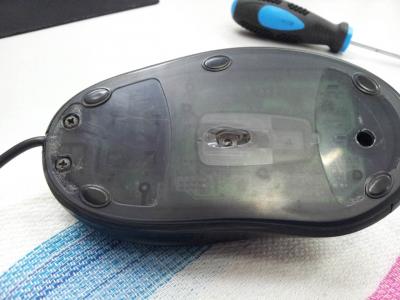
Firstly, unscrew all screws at the bottom, slowly pry open (best use plastic) starts from the back.
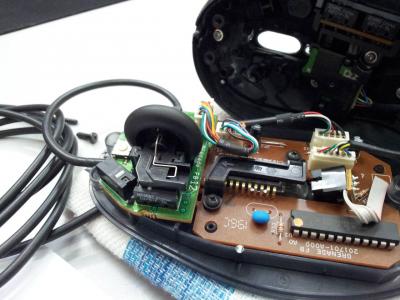
When everything's open you should see the roller part at the front with some steel wire attached to the middle just below the rubber wheel, try turn the roller to check the source of the "noise" come from.
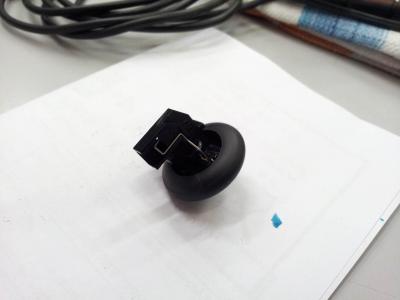
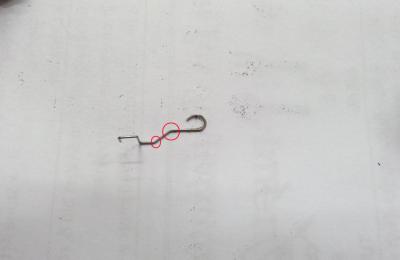
Next, slowly remove the scroll wheel base, and slide away the scroll wheel from the base, you should see the springy wire is bend just slightly higher, use a small head pryer to bend the wire just little more to make it lower than its original angle, try to slide back the wheel and try to scroll it, only bend just slightly (very gently) and test it with wheel attached to check if it's either still heavy, or too light.
Well, when everything is complete, just put it all back, and cover it up, but before screwing the whole mouse back, put it on your normal position and test again, try to get the feel, if it's OK then screw it all back, done, you got yourself a less noisy and less feedback scroll wheel.
Note: If you needs pictures, sorry that I only has MX518 which is 5 gens behind, I think they're the same, but may vary little here and there, they do however share the same design for decade.

Uploaded pictures, speaks thousand words.




 Sep 30 2014, 01:17 PM


 Quote
Quote


 0.0232sec
 0.27
0.27
 6 queries
 GZIP Disabled