

based on the mouse shape you previously used and the features you want.
i recommend :
Logitech G502 << you are able to customize the mouse weight.
Razer Basilisk V2
Gaming Mouse Thread V7, where all gamers gathers
Gaming Mouse Thread V7, where all gamers gathers
|
|
 Jun 17 2020, 10:07 AM Jun 17 2020, 10:07 AM
|
 
Junior Member
125 posts Joined: Mar 2008 
|
based on the mouse shape you previously used and the features you want.
i recommend : Logitech G502 << you are able to customize the mouse weight. Razer Basilisk V2 |
|
|
|
|
|
Jun 22 2020, 07:06 PM
|

Senior Member
1,943 posts Joined: Apr 2005 
|
QUOTE(doomvein @ May 21 2020, 04:03 AM) g703 logitech owner here.warranty already void. Sorry if latedouble click issue.. where to repair?.. dont have money(jobless=mc0) to buy expensive mouse anymore but i cant use cheap mouse also due to heavy gaming( dota/csgo). any pro can suggest similar mouse price below rm200 range.. ?  Just fixed my double click issue on my deathadder chroma. Need to dissemble the mouse from the bottom for mine and expose the PCB and the omron switch for the button. Open it up and clean the copper switch using alcohols like isopropyl alcohol (the thin copper plate that clicks and the copper contact points on the button). Opening up my Razer Deathadder 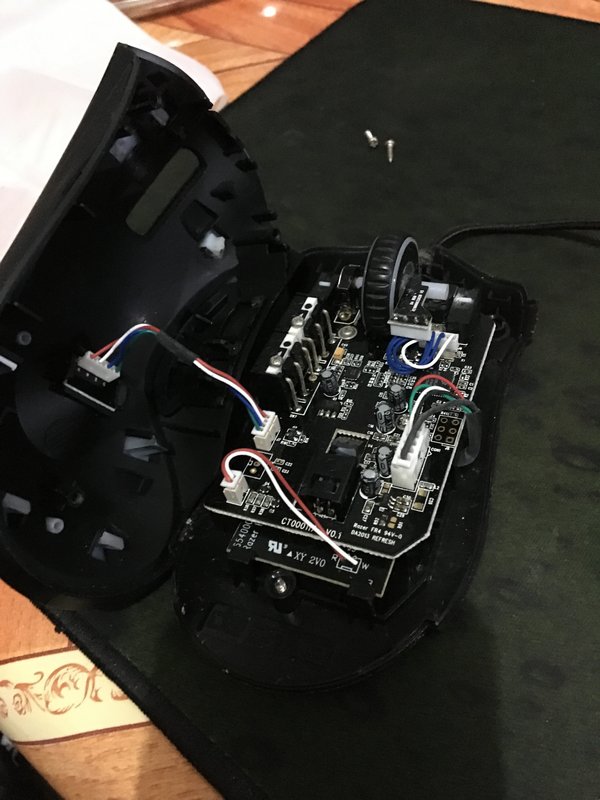 The upper casing of the switch, white button, and the thin copper plate that acts as the bridge for the switch 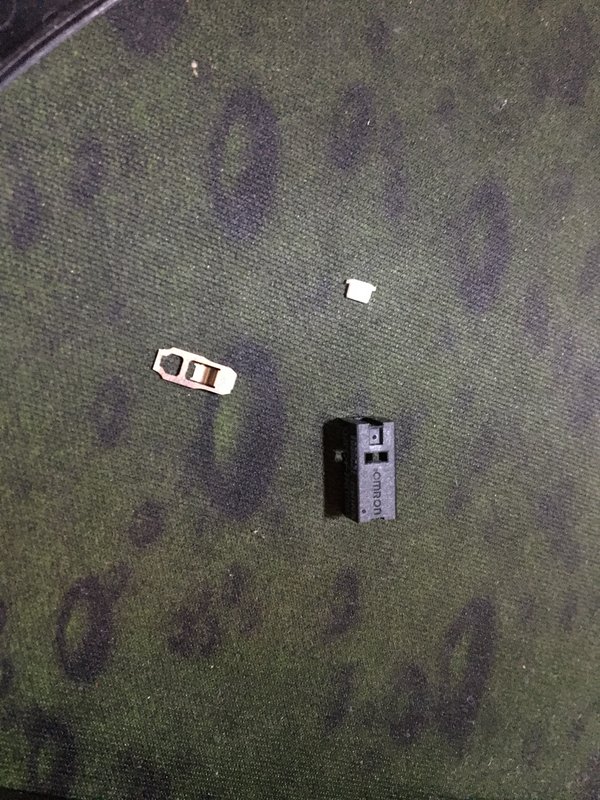 The location of the switch after opened up 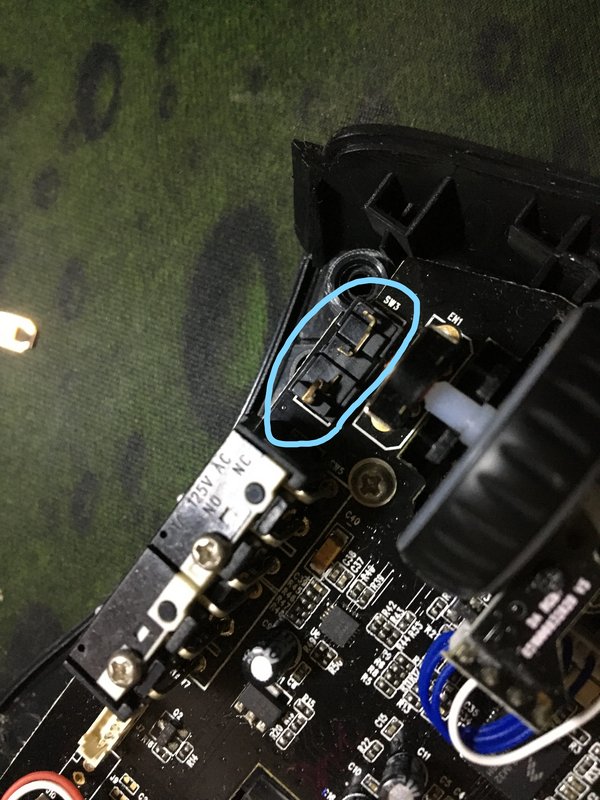 How the switch works Another better way is to probably swap out the switch itself, need to do soldering. This post has been edited by terradrive: Jun 22 2020, 07:10 PM |
|
|
Jun 22 2020, 07:18 PM
|

Senior Member
1,221 posts Joined: Sep 2014 From: Malaysia
|
QUOTE(terradrive @ Jun 22 2020, 07:06 PM) Sorry if late I would open up the switch and then flatten it and it's good to go...... I thought of getting soldering tools, but only for this purpose, it kind of wasted... I bought a bunch of switches so i can replace the plate in case i mess up Just fixed my double click issue on my deathadder chroma. Need to dissemble the mouse from the bottom for mine and expose the PCB and the omron switch for the button. Open it up and clean the copper switch using alcohols like isopropyl alcohol (the thin copper plate that clicks and the copper contact points on the button). Opening up my Razer Deathadder The upper casing of the switch, white button, and the thin copper plate that acts as the bridge for the switch The location of the switch after opened up How the switch works Another better way is to probably swap out the switch itself, need to do soldering.  I am using G603. |
|
|
Jun 22 2020, 07:24 PM
|
|
Senior Member
1,943 posts Joined: Apr 2005
|
QUOTE(StuartLee2015 @ Jun 22 2020, 07:18 PM) I would open up the switch and then flatten it and it's good to go...... I thought of getting soldering tools, but only for this purpose, it kind of wasted... I bought a bunch of switches so i can replace the plate in case i mess up I tried opening mine since I don't want to use it anymore if it still has the double click issues. But then no more problems, saved money for the new mouse lol. I thought of getting the Sensei 310 if this failed. Kinda sucks have to discard this mouse if only one button have issues.I am using G603. But then seems alright if can hire other people to swap in new switches. |
|
|
Jun 22 2020, 07:27 PM
|
|
Senior Member
1,221 posts Joined: Sep 2014 From: Malaysia
|
QUOTE(terradrive @ Jun 22 2020, 07:24 PM) I tried opening mine since I don't want to use it anymore if it still has the double click issues. But then no more problems, saved money for the new mouse lol. I thought of getting the Sensei 310 if this failed. Kinda sucks have to discard this mouse if only one button have issues. Actually, the switches itself isn't faulty... it's just overtime it will have oxidation and kind of what caused double-click.... no mouse that uses omron switches are immune.... But then seems alright if can hire other people to swap in new switches. I've flatten my left and right switches , clean out the switches contact and the plate... and it's good as new. |
|
|
Jun 22 2020, 07:30 PM
|

Senior Member
5,088 posts Joined: Jun 2013 From: Blue Planet
|
im planning to get G502 Hero
anyone here have been using it for awhile? Can give some reviews? |
|
|
|
|
|
Jun 25 2020, 03:48 AM
|

Junior Member
202 posts Joined: May 2008 From: Klang
|
Hi sifus,
Need some help here, am looking for a spare usb charging cable for my Razer Viper Ultimate. Could you recommend on where I can purchase one or any third party brand that is compatible with the unique proprietary plug of the mouse and Dock. Many thanks. Regards, fish@5311 This post has been edited by fish@5311: Jun 25 2020, 03:49 AM |
|
|
Jun 27 2020, 10:11 PM
Show posts by this member only | IPv6 | Post
#1388
|

Senior Member
893 posts Joined: Jan 2011
|
Hi guys, my steelseries sensei raw mouse's scroll keeps on scrolling randomly whenever i scroll. Anyone knows how to fix it?
If not, i'm looking at Zowie mouse to replace my sensei. Which series is the similar design to the sensei? FK series or S series? Thank you!! |
|
|
Jun 30 2020, 10:54 AM
|

Senior Member
3,626 posts Joined: Nov 2007 From: Hornbill land 
|
I just migrated from G502 wired to razer viper ultimate.
Damn! so much difference. Light weight and wireless will make you aim better regardless what skill level you have. |
|
|
Jun 30 2020, 06:24 PM
|

Senior Member
4,947 posts Joined: Nov 2007 
|
QUOTE(mois @ Jun 30 2020, 10:54 AM) I just migrated from G502 wired to razer viper ultimate. Why did you pick the RVU over the GPro?Damn! so much difference. Light weight and wireless will make you aim better regardless what skill level you have. |
|
|
Jun 30 2020, 06:44 PM
Show posts by this member only | IPv6 | Post
#1391
|
|
Senior Member
3,626 posts Joined: Nov 2007 From: Hornbill land
|
QUOTE(Silverfire @ Jun 30 2020, 06:24 PM) Why did you pick the RVU over the GPro? Because im using logitech 502. I want to try back razer. Hence i pick the viper. |
|
|
Jul 14 2020, 11:48 AM
|

Senior Member
2,531 posts Joined: Dec 2007
|
if g402 feels a bit big.. will g502 feel smaller?
|
|
|
Jul 15 2020, 10:09 AM
|

Junior Member
74 posts Joined: Jul 2005
|
My Logitech G102 spoilt after less than one month of usage, cannot turn on. Emailed their support email last three days but still haven't received reply from them yet. Shitty support for a big company like this. I worry how long would it last after repair/replacement for product which said to last for million clicks
|
|
|
|
|
|
Jul 15 2020, 03:19 PM
Show posts by this member only | IPv6 | Post
#1394
|

All Stars
17,467 posts Joined: May 2008 From: Lazada
|
My main working mice is MX Anywhere 2s, and recently bought a Viper Mini. Very like the form factor. Anyone bought Deathadder Mini?
|
|
|
Jul 16 2020, 08:40 PM
Show posts by this member only | IPv6 | Post
#1395
|

Junior Member
131 posts Joined: Nov 2011
|
Right now im using Logitech G903. Its my first wireless mouse. The only complaint for now is the middle click mouse.
|
|
|
Jul 28 2020, 07:30 PM
|
|
Senior Member
4,947 posts Joined: Nov 2007
|
QUOTE(acapniamaxtor @ Jul 16 2020, 08:40 PM) Right now im using Logitech G903. Its my first wireless mouse. The only complaint for now is the middle click mouse. Having a hard time middle clicking?I have the Logitech G304 wireless, G403 wireless and G603 wireless. So far only the G304 is working perfectly fine because I rarely use it. G403 middle click is very tacky and hard to click and some times it doesn't register. G603 having double click issue but most likely due to dirt. And then I had the 1st Corsair M65 wired, thumb button's click broke. Still registers when pressed down hard but no longer clicks. Corsair Ironclaw RGB Wireless worked fine initially but eventually developed double clicking issue (registers an extra or more click before lifting button up) on my right click and some months later happened to the left click too. Returned it and expecting a new one soon. Just got the Corsair Dark Core Pro yesterday and I must say it feels like best built of the bunch. All the buttons are pleasant to click, and I mean ALL, including the 2 thumb buttons and extra 2 index finger buttons. The palm area has a rubber finish to it while the thumb and pinkie resting area might look like they are rubber too, it is not, which comes as a pleasant surprise. For the RGB junkies, this mouse has 8 RGB zones to customise  Oh and did I mention it has a TYPE C charging port? And you get a Corsair branded TYPE C cable? Oh and did I mention it has a TYPE C charging port? And you get a Corsair branded TYPE C cable?  This post has been edited by Silverfire: Jul 28 2020, 07:31 PM |
|
|
Jul 29 2020, 01:10 AM
|

Senior Member
5,464 posts Joined: Jan 2003 From: Über Special Forces Gaming Room
|
QUOTE(StuartLee2015 @ Jun 22 2020, 07:27 PM) Actually, the switches itself isn't faulty... it's just overtime it will have oxidation and kind of what caused double-click.... no mouse that uses omron switches are immune.... Never had problem with any of ny logitech mouse. Only happens to cheaply made razer. I got a copperhead once and sold it off after rma double click.I've flatten my left and right switches , clean out the switches contact and the plate... and it's good as new. |
|
|
Jul 29 2020, 04:07 PM
Show posts by this member only | IPv6 | Post
#1398
|

Senior Member
1,836 posts Joined: Oct 2005 From: Mars
|
QUOTE(SpikeTwo @ Jul 29 2020, 01:10 AM) Never had problem with any of ny logitech mouse. Only happens to cheaply made razer. I got a copperhead once and sold it off after rma double click. What mouse are u using ? regardless cheaply made or what made. what you pay is what you get. I bought a cheapo 1st Player mouse, the worst thing ever. RM59 if not mistaken. Sensor was off but the clicks was nice though. i missed out the logitech sales in april-may... when the g502 was going for only rm189.. My half year old G103 already giving me double clicking issues, luckily the computer allows me to top up and change to G Pro for rm179. Not sure if it's a wise decision but not many choices available at the time. Heard good things about the G Pro wireless , not so much on G Pro wired. Hope this can last me another 5 years. Game On Playas |
|
|
Jul 29 2020, 04:43 PM
Show posts by this member only | IPv6 | Post
#1399
|
|
Senior Member
5,464 posts Joined: Jan 2003 From: Über Special Forces Gaming Room
|
QUOTE(viqq @ Jul 29 2020, 04:07 PM) What mouse are u using ? regardless cheaply made or what made. what you pay is what you get. I bought a cheapo 1st Player mouse, the worst thing ever. RM59 if not mistaken. Sensor was off but the clicks was nice though. Wtf you talking roundabout man? Since when razer is cheapo mouse? You need to learn to differenciate cheaply made and cheap as in price. It should last longer not double click the hell out of me. After the razer shithouse, I got one logitech G9x, another Modern Warfare edition G9X and now mostly using G502. Never have double clicking issues for years now. Sorry I do not use cheap mouse. Logitech lasts so long, maybe I will buy another G502 wireless down the road.i missed out the logitech sales in april-may... when the g502 was going for only rm189.. My half year old G103 already giving me double clicking issues, luckily the computer allows me to top up and change to G Pro for rm179. Not sure if it's a wise decision but not many choices available at the time. Heard good things about the G Pro wireless , not so much on G Pro wired. Hope this can last me another 5 years. Game On Playas |
|
|
Jul 29 2020, 10:58 PM
|
|
Senior Member
1,221 posts Joined: Sep 2014 From: Malaysia
|
QUOTE(SpikeTwo @ Jul 29 2020, 04:43 PM) Wtf you talking roundabout man? Since when razer is cheapo mouse? You need to learn to differenciate cheaply made and cheap as in price. It should last longer not double click the hell out of me. After the razer shithouse, I got one logitech G9x, another Modern Warfare edition G9X and now mostly using G502. Never have double clicking issues for years now. Sorry I do not use cheap mouse. Logitech lasts so long, maybe I will buy another G502 wireless down the road. wow... G502 Wireless looks so nice.... may buy it one day. |
| Change to: |  0.0284sec 0.0284sec
 0.32 0.32
 6 queries 6 queries
 GZIP Disabled GZIP Disabled
Time is now: 8th December 2025 - 01:42 AM |
 Quote
Quote