Welcome Guest ( Log In | Register )

29 Pages « < 22 23 24 25 26 > » Bottom

Outline · [ Standard ] · Linear+

Unifi HyppTV EC6106V5 [UniFi/Streamyx]

views
     
ahhl
post Oct 26 2015, 11:37 AM

Getting Started
**
Junior Member
73 posts

Joined: Jul 2006
just wanted to asked you all why we need to connect to wifi ( from the unifi setting menu) in order to use android. ie play etc install apk. why it wont work with cable. its already connected to the box anyway...
man_evolution
post Oct 27 2015, 10:54 AM

New Member
*
Junior Member
16 posts

Joined: Jan 2006
From: Somewhere around Malaysia


QUOTE(ahhl @ Oct 26 2015, 11:37 AM)
just wanted to asked you all why we need to connect to wifi ( from the unifi setting menu) in order to use android. ie play etc install apk. why it wont work with cable. its already connected to the box anyway...
*
IMHO, some of the android apps not design to use cable connection because its was design to use with mobile phone which only have WIFI & cellular network. Same do with iFlix, I cannot use Ethernet cable to play but need to use WIFI instead. But I can watch Netflix from my android box smoothly with Ethernet cable which is more stable. biggrin.gif
megahertz
post Oct 27 2015, 06:42 PM

i always smiling, problem?
******
Senior Member
1,846 posts

Joined: Apr 2008
QUOTE(man_evolution @ Oct 27 2015, 10:54 AM)
IMHO, some of the android apps not design to use cable connection because its was design to use with mobile phone which only have WIFI & cellular network. Same do with iFlix, I cannot use Ethernet cable to play but need to use WIFI instead. But I can watch Netflix from my android box smoothly with Ethernet cable which is more stable.  biggrin.gif
*
i think its wrong explanation.

the STB box currently connected to special ethernet port( its VLAN network), which for IPTV used only. if u try to connect other port, ur IPTV wont work.
this VLAN is only for IP TV and got blocked internet connection. thats why u need the wifi, so it would create another connection to ur router, which route the internet connection.


ur STB > ethernet > router ( VLAN network, use for IPTV only, which is why it got dedicated connection for IPTV, which wont effect ur bandwidth/speed )
ur STB > wifi > router ( normal connection, thus can use internet )
SUSsupersound
post Oct 27 2015, 07:00 PM

10k Club
********
Senior Member
11,554 posts

Joined: Aug 2009
QUOTE(megahertz @ Oct 27 2015, 06:42 PM)
i think its wrong explanation.

the STB box currently connected to special ethernet port( its VLAN network), which for IPTV used only. if u try to connect other port, ur IPTV wont work.
this VLAN is only for IP TV and got blocked internet connection. thats why u need the wifi, so it would create another connection to ur router, which route the internet connection.
ur STB > ethernet > router ( VLAN network, use for IPTV only, which is why it got dedicated connection for IPTV, which wont effect ur bandwidth/speed )
ur STB > wifi > router ( normal connection, thus can use internet )
*
What if I connect another wireless router on that special LAN port? So that I no need to lay long cables for the IPTV.
man_evolution
post Oct 28 2015, 03:35 PM

New Member
*
Junior Member
16 posts

Joined: Jan 2006
From: Somewhere around Malaysia


QUOTE(megahertz @ Oct 27 2015, 06:42 PM)
i think its wrong explanation.

the STB box currently connected to special ethernet port( its VLAN network), which for IPTV used only. if u try to connect other port, ur IPTV wont work.
this VLAN is only for IP TV and got blocked internet connection. thats why u need the wifi, so it would create another connection to ur router, which route the internet connection.
ur STB > ethernet > router ( VLAN network, use for IPTV only, which is why it got dedicated connection for IPTV, which wont effect ur bandwidth/speed )
ur STB > wifi > router ( normal connection, thus can use internet )
*
That's good point bro..BTW I just use M8S Plus Android box..Not using HyppTV STB currently..I can't use iFlix if Im on the Ethernet..But it can use in WIFI mode only..that's what I mean smile.gif
ahhl
post Oct 28 2015, 05:04 PM

Getting Started
**
Junior Member
73 posts

Joined: Jul 2006
QUOTE(megahertz @ Oct 27 2015, 06:42 PM)
i think its wrong explanation.

the STB box currently connected to special ethernet port( its VLAN network), which for IPTV used only. if u try to connect other port, ur IPTV wont work.
this VLAN is only for IP TV and got blocked internet connection. thats why u need the wifi, so it would create another connection to ur router, which route the internet connection.
ur STB > ethernet > router ( VLAN network, use for IPTV only, which is why it got dedicated connection for IPTV, which wont effect ur bandwidth/speed )
ur STB > wifi > router ( normal connection, thus can use internet )
*
so is it possible to create another vlan for internet connection?
ahhl
post Oct 28 2015, 05:08 PM

Getting Started
**
Junior Member
73 posts

Joined: Jul 2006
QUOTE(megahertz @ Oct 27 2015, 06:42 PM)
i think its wrong explanation.

the STB box currently connected to special ethernet port( its VLAN network), which for IPTV used only. if u try to connect other port, ur IPTV wont work.
this VLAN is only for IP TV and got blocked internet connection. thats why u need the wifi, so it would create another connection to ur router, which route the internet connection.
ur STB > ethernet > router ( VLAN network, use for IPTV only, which is why it got dedicated connection for IPTV, which wont effect ur bandwidth/speed )
ur STB > wifi > router ( normal connection, thus can use internet )
*
so is it possible to create another vlan for internet connection? or can i divert the iptv connection to internet ( instead of wifi to use google play) maybe i can dump hypptv and get another software to watch internet tv
megahertz
post Oct 28 2015, 11:13 PM

i always smiling, problem?
******
Senior Member
1,846 posts

Joined: Apr 2008
QUOTE(man_evolution @ Oct 28 2015, 03:35 PM)
That's good point bro..BTW I just use M8S Plus Android box..Not using HyppTV STB currently..I can't use iFlix if Im on the Ethernet..But it can use in WIFI mode only..that's what I mean  smile.gif
*
u mean iflix on ur android box?this is due iflix apps didnt check for other connection other than wifi/mobile data. its the apps itself, not due android box. but u know, android is initially used for phone/tablet which is got wifi. that why got this issue.

btw im using minix and on new version update, got new feature called fake wifi, which is it faking the apps that this box connected thru wifi, but actually its from ethernet. so this could fixe issue above. biggrin.gif

QUOTE(ahhl @ Oct 28 2015, 05:08 PM)
so is it possible to create another vlan for internet connection? or can i divert the iptv connection to internet ( instead of wifi to use google play) maybe i can dump hypptv and get another software to watch internet tv
*
to create another vlan, ur router must support this feature. same for switch.
let me explain, ur normal internet connection for unifi is inside this VLAN500 , while for IPTV on VLAN600.
the special port( i think red color on unifi wifi router) is only for IPTV, and the rest is for normal internet

if u want ur hyyptb box to connect to internet, u can connect ur box to that normal port, but then, ur IPTV wont work. u need to choose either 1.

if u need both internet and IPTV at the same time using same port, then u need to do VLAN bridging, which i dont think ur current router can support.

the best solution without much config is: ur hyyptb box connected to red port which is IPTV port, and turn on wifi for normal internet use. currently my hyyptv box using this settings.


ahhl
post Oct 29 2015, 08:58 AM

Getting Started
**
Junior Member
73 posts

Joined: Jul 2006
QUOTE(megahertz @ Oct 28 2015, 11:13 PM)
u mean iflix on ur android box?this is due iflix apps didnt check for other connection other than wifi/mobile data. its the apps itself, not due android box. but u know, android is initially used for phone/tablet which is got wifi. that why got this issue.

btw im using minix and on new version update, got new feature called fake wifi, which is it faking the apps that this box connected thru wifi, but actually its from ethernet. so this could fixe issue above. biggrin.gif
to create another vlan, ur router must support this feature. same for switch.
let me explain, ur normal internet connection for unifi is inside this VLAN500 , while for IPTV on VLAN600.
the special port( i think red color on unifi wifi router) is only for IPTV, and the rest is for normal internet

if u want ur hyyptb box to connect to internet, u can connect ur box to that normal port, but then, ur IPTV wont work. u need to choose either 1.

if u need both internet and IPTV at the same time using same port, then u need to do VLAN bridging, which i dont think ur current router can support.

the best solution without much config is: ur hyyptb box connected to red port which is IPTV port, and turn on wifi for normal internet use. currently my hyyptv box using this settings.
*
thanks megahertz.
i am not using unifi router anymore, i am using TP-Link4300. any guide how can i do bridging. i think there a chance i can make it work

i just wondering if i buy another android box, bopy hypptv.apk to my other android box, will hypptv still work?
at the moment with hypptv box, i am using simple tv launcher.apk to launch both hyptv and htv.apk and other android apk.

deenzuffa
post Nov 10 2015, 07:32 AM

New Member
*
Newbie
1 posts

Joined: Jun 2006


QUOTE(selebeq @ Apr 7 2014, 12:36 AM)
Slm, sy tak dapat download Eksploit HyppTV-GAPPS (http://akif.me/gapps-hypptv.zip). mcm xdpt kebenaran access server @ missing file.

Jd saya download Eksploit HyppTV (http://amanz.my/wp-content/uploads/2014/02/EC6106V5-Exploit.zip) saya ikut steps dlm tutorial, tukar nama ke update .zip>transfer ke pendrive FAT32.. tp failed masa tgh recovery di STB. Error:Signature Verification Failed

saya cuba pula tool build-update-signed.bat ,saya masukkan file google play yg telah didownload(https://www.dropbox.com/s/9ahy8zv1lfb1zra/HyppTV-EC6106V5-GApps-All.zip) ke dlm file update.zip>system>file

tp Java failed bila cuba compile:

Signing update.zip to update-signed.zip…
‘java’ is not recognized as an internal or external command,
operable program or batch file.

saya reinstall java (http://www.oracle.com/technetwork/java/javase/downloads/java-se-jre-7-download-432155.html)  tp masih gagal compile file update signed.zip

Saya tertinggal step ke?
*
Bro, yang problem ni dah setel ke? bro buat camane? aku punya pun sama kuar failed signature tu.
salimbest83
post Nov 10 2015, 07:34 AM

♥PMS on certain day♥
*******
Senior Member
8,642 posts

Joined: Feb 2006
From: Jelutong Penang


QUOTE(deenzuffa @ Nov 10 2015, 07:32 AM)
Bro, yang problem ni dah setel ke? bro buat camane? aku punya pun sama kuar failed signature tu.
*
tm dah update .
tak boleh dah pakai cara lama
deenzuffa
post Nov 10 2015, 07:35 AM

New Member
*
Newbie
1 posts

Joined: Jun 2006


QUOTE(MrSpeedy @ Apr 7 2014, 08:29 PM)
Aku dulu ada gak masalah camni.
Tpi lepas aku install JAVA 7 trus ok.

PASTIKAN ANDA TAK RUN SEBAGAI ADMIN (cuma double click macam biasa) BILA NAK COMPILE.
Dan pastikan semua file di-extract terlebih dahulu.
*
bro, how to install JAVA 7? can you explain?
deenzuffa
post Nov 10 2015, 10:30 AM

New Member
*
Newbie
1 posts

Joined: Jun 2006


QUOTE(matai shang @ Aug 22 2015, 09:52 PM)
can anyone help me?  rclxub.gif  sad.gif
*
Same with me. Please somebody help us to solve this problem.
roommate
post Nov 28 2015, 12:17 AM

Casual
***
Junior Member
383 posts

Joined: Jul 2005
From: anywhere u want =)


Hurm.. my STB EC6106V5 just got updated and none of my aps are working. Try to reinstall the exploit thingy, and its not working.

Hoping someone can help to exploit the STB again.
WaCKy-Angel
post Nov 28 2015, 12:18 AM

PeACe~~
*********
All Stars
21,962 posts

Joined: Dec 2004
From: KL


same as mine
weiheng
post Nov 28 2015, 04:39 PM

I'm Lovin' it
******
Senior Member
1,513 posts

Joined: Jan 2003

can we flash to older version and install the exploit again?
deschan100
post Nov 28 2015, 10:02 PM

Getting Started
**
Junior Member
121 posts

Joined: Jun 2010
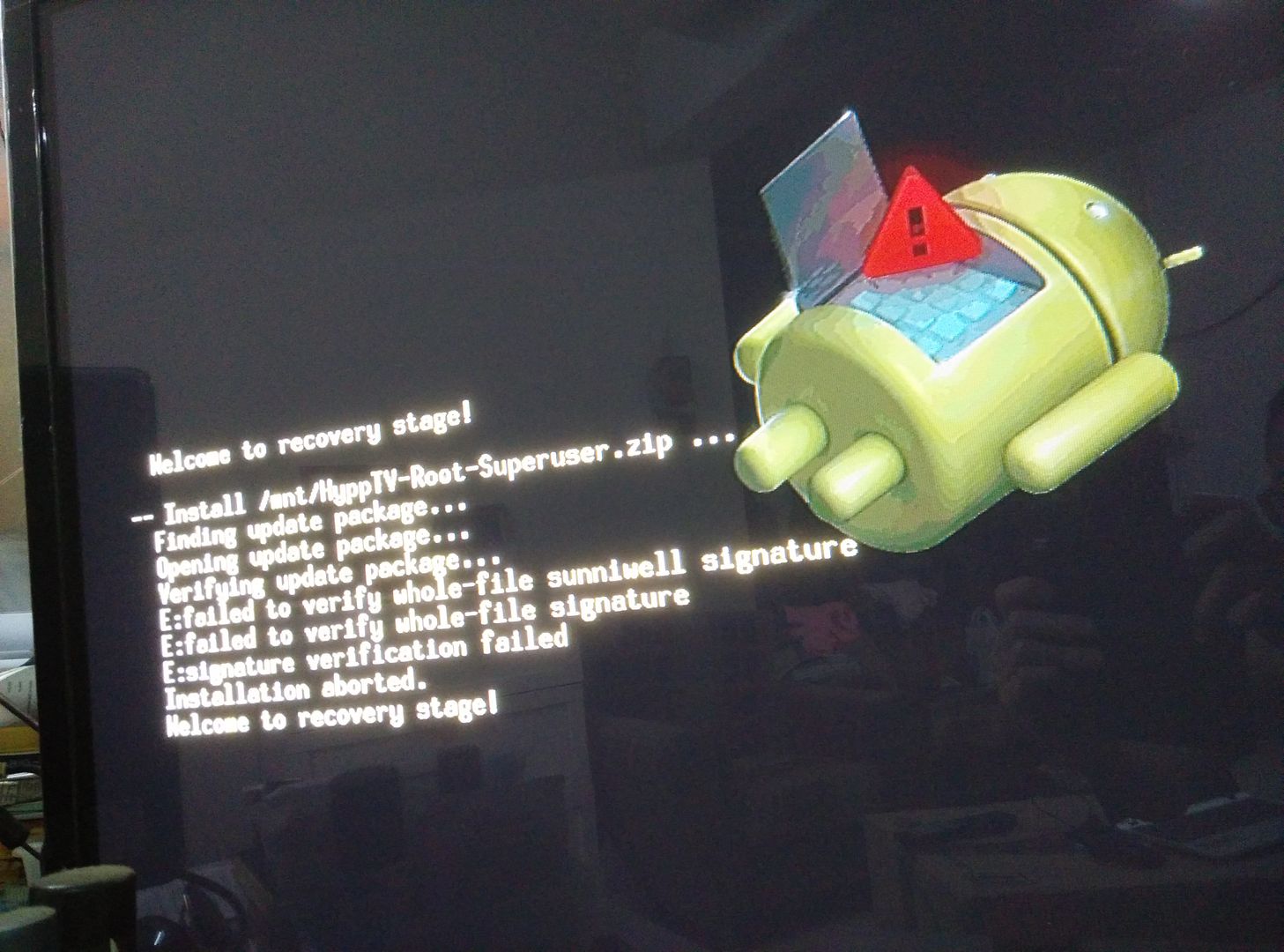
user posted image

Can any one help this...?

Actually my huawei EC0106V5 ROOT BEFORE, and successful install SHOWBOX N CLOUDTV.

but today my tv box auto update when i on power and start.

after all the apps unable to access.

and i try to reinstall, it show above message.
cynix008
post Dec 3 2015, 04:50 PM

New Member
*
Junior Member
40 posts

Joined: Jun 2011
same issue happened the other day, any fix for this signature thingy?

mySathia
post Dec 7 2015, 08:12 PM

New Member
*
Newbie
3 posts

Joined: Jul 2008


QUOTE(deschan100 @ Nov 28 2015, 10:02 PM)
user posted image

Can any one help this...?

Actually my huawei EC0106V5 ROOT BEFORE, and successful install SHOWBOX N CLOUDTV.

but today my tv box auto update when i on power and start.

after all the apps unable to access.

and i try to reinstall, it show above message.
*
same problem here... anyone knows how to overcome this...
vmad.gif i lost my apps & cloudTV not working... try to reinstall and gives Signature failed...
i heard TM have updated with a crypt signature and requires new key
if anyone has solution please advise..
mytoyagain
post Dec 8 2015, 12:19 PM

New Member
*
Junior Member
23 posts

Joined: Nov 2011
Me either, my STB box auto updated few weeks ago, all installed apk doesn't work anymore. sad.gif

29 Pages « < 22 23 24 25 26 > » Top
 

Change to:
| Lo-Fi Version
0.2530sec    0.13    6 queries    GZIP Disabled
Time is now: 9th December 2025 - 05:57 AM