Has anyone tried XBMC on Xiaomi Box Pro?
The specs are pretty impressive for +rm200 android box
http://www.mi.com/hezis
2gb of ram, quad core Cortex-A9 2GHz + support 802.11 ac wifi also
XBMC / KODI users club, An Open Source Media Center
XBMC / KODI users club, An Open Source Media Center
|
|
 Jul 13 2014, 03:11 PM Jul 13 2014, 03:11 PM
Return to original view | Post
#1
|
 
Senior Member
4,454 posts Joined: Apr 2006 
|
Has anyone tried XBMC on Xiaomi Box Pro?
The specs are pretty impressive for +rm200 android box http://www.mi.com/hezis 2gb of ram, quad core Cortex-A9 2GHz + support 802.11 ac wifi also |
|
|
|
|
|
Jul 14 2014, 03:12 PM
Return to original view | Post
#2
|
|
Senior Member
4,454 posts Joined: Apr 2006
|
QUOTE(Xnet @ Jul 13 2014, 04:19 PM) Worth a try with that kind of price Buying directly from taobao, also found a thread at xiaomi.eu that focuses on rooting + installing/configuring xbmc on this box.Whois selling  |
|
|
Jul 22 2014, 10:19 AM
Return to original view | Post
#3
|
|
Senior Member
4,454 posts Joined: Apr 2006
|
QUOTE(skeelee @ Jul 21 2014, 09:57 AM) Ya, go for it, sit back and enjoy. Hi, how's the transfer speed when copying files to your NAS RPi? Do you usually get around 9-10 MB/s?I had been using a RPi as NAS since RPi was launched. On Unifi 5Mbps, streaming 1080p movies with DTS/DD is a breeze, but for DTS-HDMA, I need to turn off all running programs at the RPi. Not a problem really. For XBMC, I tried OpenELEC and RaspBMC on another RPi; streaming of vides is good because of its capable graphic processor, but the overall response is laggy. Anyway I already have my HTPCs doing the job so I don't use RPi for XBMC. Another RPi with camera is used as security camera accessible from the network and internet. Going to get the new model B+ soon. |
|
|
Jul 22 2014, 11:16 AM
Return to original view | Post
#4
|
|
Senior Member
4,454 posts Joined: Apr 2006
|
QUOTE(skeelee @ Jul 22 2014, 10:42 AM) I hardly transfer files to or from the RPi NAS. Just tried it and get about 7 to 8MB/s copying to it, but only about 4MB/s copying from it over the network. I see, that speed is quite acceptableOn the rare occasions when I want to copy files from the RPi NAS to another harddisk or thumbdrive, I connect them directly to the RPi so that the copying is not through the network but within the RPi. From what I've read, some experienced slow speed as low as 1MB/s which is even worse, Is your partition set as NTFS or Ext4/3? Seems like most users recommend use ext4 for better transfer speed  Do you use your RPi other than NAS? Like as download manager from usenet/torrents/direct links. |
|
|
Jul 22 2014, 11:45 AM
Return to original view | Post
#5
|
|
Senior Member
4,454 posts Joined: Apr 2006
|
QUOTE(skeelee @ Jul 22 2014, 11:34 AM) WD Mybook 3TB setup as ext4 and samba for NAS on an RPi Model B. On the same box are Transmission for Txxxxxxx, and aMuled for eD2K. I never really understood how eD2k works If you connect your 3TB ext4 formatted drive to your pc with windows, Would you still be able to get that sweet USB3.0 transfer speed? Planning to get the the B+ raspberry model soon, and still waiting for xiaomi box pro to test xbmc on it |
|
|
Aug 6 2014, 02:42 PM
Return to original view | Post
#6
|
|
Senior Member
4,454 posts Joined: Apr 2006
|
QUOTE(arslow @ Aug 6 2014, 01:39 AM) My router's on the left side of my TV, while the fire TV is on the right Do you get >5800 kbps netflix from using the native app in firetv or the one in xbmc? hmm, updates on the server, that's definitely a good thing, especially since doing that would mean everytime i enter xbmc, it would already be updated with whatever recently downloaded items by nzbdrone and sickbeard. Exactly, that was the main reason i completely looked away from those random android boxes. Minix x8h is limited to 480p 1750kbps right now. I would be smacking my head if I went and get that  definitely enjoying 5800kbps super HD with the Fire TV now  And how to know some android box limits netflix to 480p only? |
|
|
|
|
|
Aug 25 2014, 10:14 PM
Return to original view | Post
#7
|
|
Senior Member
4,454 posts Joined: Apr 2006
|
QUOTE(karhtan @ Aug 25 2014, 08:31 PM) Hi recently I just installed XBMC Gotham to my Xiaomi TV box, having problem of black screen with audio. Is anybody experience this before? Try installing the nightly versionthanks Which mibox do you have? The mibox pro? |
|
|
Aug 28 2014, 03:47 AM
Return to original view | Post
#8
|
|
Senior Member
4,454 posts Joined: Apr 2006
|
QUOTE(karhtan @ Aug 25 2014, 11:09 PM) yes, the mibox pro, I tried to switch the video acceleration to software decoding. I was able to watch youtube (video + audio) nut after I installed fusion and Mash up even with software acceleration on I lost all streaming video (including youtube) except audio. Have you rooted it?Shall I wait for the "Kodi" version? It should be able to play your videos on hw accelaration without any problems once xbmc is granted permission So far it can play my 1080p/720 mkv movies collection just fine, might need connect to lan connection for better streaming speed My only problem is sometimes xbmc stops playing the movie , but I can still resume it again Gonna try the latest nightly build, the one i have installed on my mibox pro is from last month. Btw, did you manage to get the xiaomi wifi router? Cheapest ac wifi router yet This post has been edited by alucard89: Aug 28 2014, 03:53 AM |
|
|
Feb 2 2015, 06:52 PM
Return to original view | Post
#9
|
|
Senior Member
4,454 posts Joined: Apr 2006
|
Just wanna ask, for you guys who are using XBMC with android box and harmony remote
Have you tried to configure it to use more buttons on the harmony remote, since most remotes that comes with android box only include basic controls Based on this thread, looks like it can be done http://www.freaktab.com/showthread.php?957...oard-with-IR%29 |
|
|
Feb 14 2015, 08:20 PM
Return to original view | Post
#10
|
|
Senior Member
4,454 posts Joined: Apr 2006
|
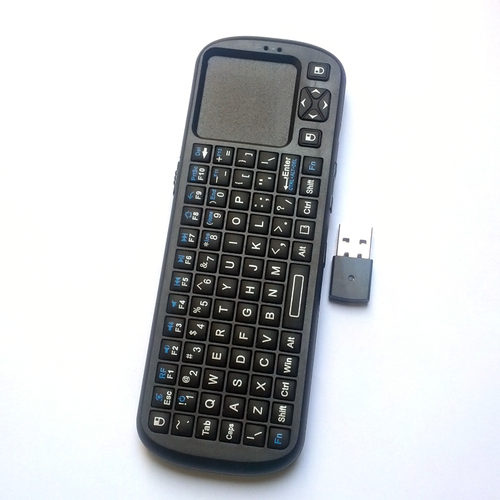
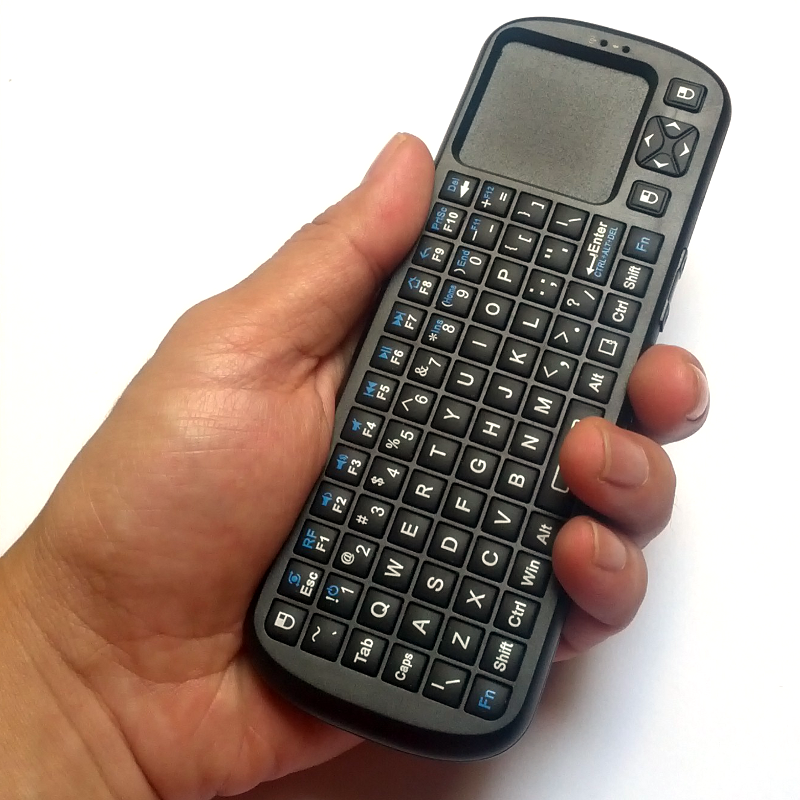
QUOTE(WhitE LighteR @ Feb 13 2015, 04:24 PM) yea i have this problem with those mark with mx also... mx i believe stands for mexican aka spanish language. Anyone got fix for those mx channels?what android device you using? Also, what's the best mini keyboard with touchpad for HTPC rite now? I've already checked some of the remote/mini keyboard/air mouse on lelong, particularly with rii mini models but some users complained about the touchpad not working so well? This post has been edited by alucard89: Feb 14 2015, 08:23 PM |
|
|
Feb 14 2015, 11:36 PM
Return to original view | Post
#11
|
|
Senior Member
4,454 posts Joined: Apr 2006
|
QUOTE(kherel77 @ Feb 14 2015, 09:36 PM) Does it support multitouch, can you scroll on a webpage with 2 fingers?Also, what do you think about air mouse? Yay or nay when you have to swing it around in front of the screen? This post has been edited by alucard89: Feb 14 2015, 11:36 PM |
|
|
Feb 15 2015, 07:01 PM
Return to original view | Post
#12
|
|
Senior Member
4,454 posts Joined: Apr 2006
|
QUOTE(coo|dude @ Feb 15 2015, 03:44 PM) Guys, is there any way to save a XBMC/KODI profile and load it on another machine? This includes all the repo/add-ons previously configured. There's an addon called xbmc backup, it's in the programs section I think.It can backup all your settings/addons and also your database (depends which one you wanna keep) |
|
|
Feb 15 2015, 07:08 PM
Return to original view | Post
#13
|
|
Senior Member
4,454 posts Joined: Apr 2006
|
QUOTE(kherel77 @ Feb 15 2015, 12:44 AM) Never try multitouch as the touchpad quite small. But it have scroll button at the side (same functioning with page-up, page-down @ keyboard) It does look tedious swinging it then having to type, although you get a bit of workout done . . My first plan is get that air mouse, but i feel weird to sway it around  ....personal reference i think. ....personal reference i think.Which kodi version are you using? I wanna test the openelec or kodibuntu since it boots up kodi directly. |
|
|
|
|
|
Feb 16 2015, 05:51 AM
Return to original view | Post
#14
|
|
Senior Member
4,454 posts Joined: Apr 2006
|
QUOTE(houseman @ Feb 15 2015, 08:40 PM) sorry for the amateur question, planning to get an android tv box, any recommendations? minix, himedia or mi tv box? Are you only planning to only use Kodi on that?If so, have you thought about the getting the new Raspberry Pi 2? Still a cheaper option than the android box and performs equally as powerful http://forum.kodi.tv/showthread.php?tid=21...6814#pid1926814 |
|
|
Mar 4 2015, 09:24 AM
Return to original view | Post
#15
|
|
Senior Member
4,454 posts Joined: Apr 2006
|
QUOTE(FieldEngineer @ Mar 2 2015, 01:32 PM) Hi. On Ebay ranging around 400-500+Been reading alot of forum and look like Kodi ran in Fire Tv is more stable rather than Nexus Player. I'm replacing my Kodi+ATV2 which I used to stream from my MybookLive NAS. Could you guys suggest where can I purchase Fire TV? Thanks Are you gonna use Fire TV purely for Kodi or other android apps? Have you considered Raspberry Pi2? Cheaper and performs equally as powerful |
|
|
Mar 4 2015, 10:10 PM
Return to original view | Post
#16
|
|
Senior Member
4,454 posts Joined: Apr 2006
|
QUOTE(FieldEngineer @ Mar 4 2015, 08:02 PM) Purely for Kodi. I actually never bothered with the 1st raspberry pi since its low spec probably wasn't sufficient enough to run xbmc smoothly.I have a Rasberry Pi. It was underpower & was not a true media player which is not elegant in product form. Thus would not go with Rasberi Pi2. But the rpi2 truly is more powerful as advertised and I'd say the perfornance is quite similar to using kodi on pc. Custom skin like aeon nox runs smoothly and so far plays everything well. Biggest file I tested was 28gb 1080p and I was pleasantly suprised how it played with no issues. Using rPi2 with Openelec btw. This post has been edited by alucard89: Mar 4 2015, 10:11 PM |
|
|
Mar 11 2015, 03:32 PM
Return to original view | Post
#17
|
|
Senior Member
4,454 posts Joined: Apr 2006
|
QUOTE(WildChai @ Mar 11 2015, 10:37 AM) » Click to show Spoiler - click again to hide... « » Click to show Spoiler - click again to hide... « » Click to show Spoiler - click again to hide... « Need a little help here. I currently have a dedicated "old" pc as a download/NAS-ish server. A media player is connected to this server to stream movie via LAN. And ipads with KODI for my parents...AZ drama and Genesis fans I would like to know what is the best option to get KODI on my tv? 1) Media players...Fire TV..(always wanted to get one) but still need a wireless keyboard for some links that need to enter password. 2) Dedicated HTPC connect directly to the TV? i guess this has more flexibility to install KODI and stream downloaded movies directly but the HTPC would have to be near vicinity of the tv. If your TV supports CEC, you can directly control Kodi using tv remote as well. As for typing links, well there's always the kodi remote control app that you can grab from playstore/google play without having to spent extra for new keyboards. |
|
|
Mar 11 2015, 04:57 PM
Return to original view | Post
#18
|
|
Senior Member
4,454 posts Joined: Apr 2006
|
QUOTE(WildChai @ Mar 11 2015, 04:42 PM) i was reading about the new pi...it's powerful. need to get a case though. hmmm...anyone here in the forum tried already? only place i know can get it is throught RS website Look around youtube for video demos with kodi on rpi2, you'd be impressed how smooth it's running with latest kodiDefinitely a massive upgrade compared to the older models. Element14 sells the case too, or can you just build your own case with Legos You can get cheaper case at Aliexpress, cost around like rm7~13 |
|
|
Mar 11 2015, 05:31 PM
Return to original view | Post
#19
|
|
Senior Member
4,454 posts Joined: Apr 2006
|
QUOTE(WildChai @ Mar 11 2015, 05:12 PM) BAHAHA! Legos! good idea...it would look awesome. unless my kids rips it apart and thrashes it...lol. Saw some cool ones from USA...malas wanna pay shipping and wait too long for it. There's always superglue hahaDon't need to bother buying from US, unless it's the fancy case you're looking for from adafruit.com With aliexpress, it's usually free shipping and you'll get your item within 2 weeks You could consider grabbing ir remote/receiver for rpi if you're unsure that your tv properly supports cec. i bought one myself, my panasonic tv does support cec with bravialink but sometimes it works, sometimes no response. For me it usually happens when I switched to a different hdmi input (like astro) or turn off the tv. |
|
|
Mar 11 2015, 06:03 PM
Return to original view | Post
#20
|
|
Senior Member
4,454 posts Joined: Apr 2006
|
QUOTE(WildChai @ Mar 11 2015, 05:36 PM) superglue? superglued stuff means nothing to toddlers...they WILL destroy it. lol flirc is a bit pricey, there's always mini keyboards that works with rpi that doesn't cost too muchreceiver like flirc? so cool...every remote can use. will try out the rasp first. There's also a guide where you can use any remote in your house to control rpi here using the GPIO pins on the pi I bought this one, still waiting for the delivery I mostly focus on ir since I already have a Logitech Harmony remote, that way I can just program other remote setting to the harmony. This post has been edited by alucard89: Mar 11 2015, 06:04 PM |
|
Topic ClosedOptions
|
| Change to: |  0.0580sec 0.0580sec
 0.53 0.53
 7 queries 7 queries
 GZIP Disabled GZIP Disabled
Time is now: 4th December 2025 - 10:05 AM |
 Quote
Quote