Welcome Guest ( Log In | Register )

Bump Topic Topic Closed RSS Feed

Outline · [ Standard ] · Linear+

 XBMC / KODI users club, An Open Source Media Center

views
     
alucard89
post Mar 12 2015, 11:53 PM

Look at all my stars!!
*******
Senior Member
4,454 posts

Joined: Apr 2006
QUOTE(jaan76 @ Mar 11 2015, 10:45 PM)
Bro have you compared or used other media players, would be interested to know how the performance compare to other devices? Does RPi support HD Audio (DTS-HDMA, DD HD etc) also how is the performance while playback of Bluray ISO or BDMV folder over LAN?
This is the only device i have never tested or used and would be happy to buy if it supports the above.
*
For BDMV/Bluray iso file, you can check it out here
Skip to 7:00 for the video playback


rPi2 can still decode Dolby TruHD to 7.1 pcm
You can check this post for more explanation

http://forum.kodi.tv/showthread.php?tid=21...4201#pid1914201
alucard89
post Mar 20 2015, 02:28 PM

Look at all my stars!!
*******
Senior Member
4,454 posts

Joined: Apr 2006
QUOTE(Matrix @ Mar 20 2015, 11:58 AM)
Hi. There is one thing i always don't understand about KODI/XBMC.

Sometimes the movies says has "Local Subtitles is Available" when i try to download subtitles from the various provider. However, i never see the local subtitles by default and i don't know how to activate/select the local subtitle instead of downloading external subtitles.

How do i do that?

Thanks.
*
1) It could be subtitles that's only displayed when there's foreign language in the movie

2) You can enable subs in the audio option (Menu-> Audio during playback). Better yet you can assign keys to toggle/enable subs on your keyboard/remote instead of going thru the menus.
alucard89
post Mar 20 2015, 03:25 PM

Look at all my stars!!
*******
Senior Member
4,454 posts

Joined: Apr 2006
QUOTE(Matrix @ Mar 20 2015, 02:33 PM)
Oh, i didn't know can do that. How to assign the keys? I will check the Menu->Audio option during playback.
*
You'll need to edit your keymap file (keyboard.xml)

You can check out the default command control for your keyboard here

http://kodi.wiki/view/Keyboard_controls#De...yboard_controls

And you can modify them based on the functions (action id) that you want from here

http://kodi.wiki/view/Keymap


alucard89
post Apr 9 2015, 04:11 PM

Look at all my stars!!
*******
Senior Member
4,454 posts

Joined: Apr 2006
QUOTE(WildChai @ Apr 9 2015, 11:01 AM)
hey,

did you get your remote from aliexpress yet? Does all the buttons work inside KODI? I am currently using my TV remote but once powered off cannot turn it ON unless I unplug/replug the usb.
*
Yes, it works out of the box without having to configure anything
I don't use the remote control that comes with it since only the GPIO IR module that matters
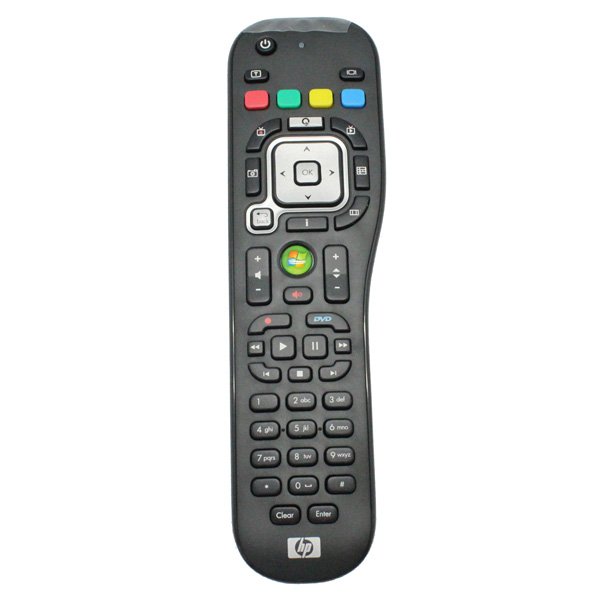
So I just use my HP MCE remote since it has additional buttons and added it to my harmony settings

» Click to show Spoiler - click again to hide... «


You can try setting CEC to "Ignore" when the TV is switched off, that way it doesn't power off the rpi.
Plus, rpi doesn't really use much power when turned on 24/7

This post has been edited by alucard89: Apr 9 2015, 04:18 PM
alucard89
post Apr 11 2015, 04:24 PM

Look at all my stars!!
*******
Senior Member
4,454 posts

Joined: Apr 2006
QUOTE(WildChai @ Apr 11 2015, 03:03 PM)
By pressing the TV off button,  it doesn't affect the rpi at all. Have you tried the bundled remote at all? Would you mind testing it? If all main function works... I will get it.  Also might help other forummers here looking for rpi kodi remote.

Getting another rpi for my dad. Parents pau my bandwidth kau kau liao.  Haha. Donating some money to dknight for his work for azdrama. That guy's a life saver.
*
The bundled remote works just fine, any other remote can be configured to work with openelec rpi.
Seems like RC6 remote like my hp mce remote works without having to setup anything.
Btw, you do need to place the gpio ir module like this to get it to receive ir signals properly

» Click to show Spoiler - click again to hide... «


This post has been edited by alucard89: Apr 11 2015, 04:26 PM
alucard89
post Apr 16 2015, 04:17 PM

Look at all my stars!!
*******
Senior Member
4,454 posts

Joined: Apr 2006
QUOTE(WildChai @ Apr 14 2015, 04:53 PM)
Gonna get it...i read on one of the description on lelong...it says works up to 8 feet only? that's a very short distance.
my tv is like more than 10feet away.
*
I'll give it a test if goes beyond 10 ft, my tv distance is just around 7 ft from the couch.
alucard89
post Apr 17 2015, 03:54 PM

Look at all my stars!!
*******
Senior Member
4,454 posts

Joined: Apr 2006
QUOTE(WildChai @ Apr 14 2015, 04:53 PM)
Gonna get it...i read on one of the description on lelong...it says works up to 8 feet only? that's a very short distance.
my tv is like more than 10feet away.
*
Just tested at around 10ft I'd say and it works well, rpi still receiving ir signal, more than that I don't have enough space to walk further away lol
alucard89
post Apr 30 2015, 09:26 PM

Look at all my stars!!
*******
Senior Member
4,454 posts

Joined: Apr 2006
QUOTE(tharmaraj @ Apr 30 2015, 05:48 PM)
greetings guys and happy holidays...  cool2.gif

how do I setup Rpi2 on a AV receiver? is CEC needs to be enabled? my AV receiver is DENON and how should I correctly connect the HDMI cables?

do i need to configure my KODI after setup the cables?

thanks and appreciate for your guidance.

cheers
Raj
thumbup.gif
*
Just enable cec on your rpi2 and you should be able to control kodi with your tv remote. I'd recommend that you connect the hdmi out from your DEVON to the ARC hdmi port on your tv so you can control the receiver volume directly.

If you wanna customize the function for your remote buttons, you can edit the remote.conf in the kodi userdata folder.

This post has been edited by alucard89: Apr 30 2015, 09:30 PM
alucard89
post May 3 2015, 11:39 AM

Look at all my stars!!
*******
Senior Member
4,454 posts

Joined: Apr 2006
QUOTE(WildChai @ May 1 2015, 01:03 PM)
Got my remote earlier this week... Happy happy buka.... Aiks... No battery. Haha. Got battery n hooked it up.... Niceeeeee.

Turned the remote around.. MADE IN MALAYSIA. Bought this from hk. Haha. Made a circle back home. Now gonna get another rpi for my dad.
All buttons working fine except... It can't turn the rpi ON if it's turn off. There's nothing in the openelec setting page though. Any ideas?
*
RPI doesn't really have standby mode, which is why that option is not available on the menu.
Even if you manage to send a command to shut it down, you'd still have to manually turn in on since it doesn't really have power switch.
Since it doesn't really consume much power (<50 cent per month based on tnb tarif? any electrician can clarify this) I just leave it on 24/7
alucard89
post May 4 2015, 09:12 PM

Look at all my stars!!
*******
Senior Member
4,454 posts

Joined: Apr 2006
QUOTE(WildChai @ May 3 2015, 12:11 PM)
That would be awesome. In church. Cannot watch now.
I thought so too.. But sometimes hands too fast accidentally hit power off button. Gotta reset the player.

Need to cut off the power button on the remote.
*
Since it's pretty close to the pause button, you could just change the function for the power key
Try adding this in the remote.xml file in your keymap userdata folder.

CODE
<keymap>
 <FullscreenVideo>
   <remote>
     <power>PlayPause</power>
     <teletext>NextSubtitle</teletext>
     <language>subtitledelay</language>
      <title>CodecInfo</title>
   </remote>
 </FullscreenVideo>
</keymap>

alucard89
post May 7 2015, 10:57 PM

Look at all my stars!!
*******
Senior Member
4,454 posts

Joined: Apr 2006
QUOTE(tharmaraj @ May 6 2015, 06:15 PM)
i have tried all solution in order to get my Rpi2 work with my Denon Amp and nothing works. the screen always refresh/goes blank and comeback and no image. connecting directly to TV no issues.

icon_question.gif
*
Probably openelec not compatible with your ht system?
Have you tried booting other os like raspbian/osmc and test the display output on your Devon amp?
alucard89
post May 9 2015, 09:37 PM

Look at all my stars!!
*******
Senior Member
4,454 posts

Joined: Apr 2006
Seems like if I'm not on msia ip address,I can only view astro awani.
Anyway I can view the rest of the local channels (tv1/tv2/tv3)?
Do I need to use vpn software like softether?
alucard89
post May 13 2015, 02:29 PM

Look at all my stars!!
*******
Senior Member
4,454 posts

Joined: Apr 2006
QUOTE(aerobowl @ May 12 2015, 08:55 AM)
few pages back saw a link of this pi remote control link:
http://www.aliexpress.com/item/Free-shippi...1807714579.html

would like to ask if rpi2+openelec, does this remote kit work by plug and play? or need some configuration before it will work? as the remote seems is designed for pi so curious will it work straight on pi 2 as well
*
It works out of the box with openelec, not sure with OSMC.
Any RC6 remote wil work with ir module without having to configure anything. For keypad numbers, you'll need to edit the remote.xml file to include the numbers since the default remote doesn't have number buttons.

Also, if you want to use a different remote ( not the default one), you'll have to configure it with lirc to add the remote.
alucard89
post May 16 2015, 06:58 PM

Look at all my stars!!
*******
Senior Member
4,454 posts

Joined: Apr 2006
QUOTE(arvinddakshen @ May 16 2015, 05:37 PM)
Hi Guys, Need help. My Kodi clock is not being updated correctly. Shows 7.30am 1970 everytime it boots up. running on Rpi 2, Unifi 5Mb. I have set region to Australia (12h). updated the OpenElec time server to pool.ntp.org but still unable to update the time accordingly. Due to wrong time I cant search for movies in Genesis.

Much appreciate if the super seniors could assist me.
*
Which timeserver? Is it the first one, I added pool.ntp.org to that one and that fixed the clock for me.


This post has been edited by alucard89: May 16 2015, 07:01 PM
alucard89
post May 26 2015, 09:29 AM

Look at all my stars!!
*******
Senior Member
4,454 posts

Joined: Apr 2006
QUOTE(yanhui95 @ May 26 2015, 07:09 AM)
was thinking of buying an amazon firestick, it's on sale now in UK. Apparently it can run KODI.
How difficult is it to stream live tv? I have a netflix account also, but would love to have live sports. Pay-per-view here is expensive and i'm using only a 24inch monitor, wouldn't want to pay for TV licensing.
*
How exactly does TV licensing work in UK now? Do you get charged based on your income or something?
You might wanna place your router as close as possible to the stick since there's no LAN port especially when you're streaming huge mkv files.

This post has been edited by alucard89: May 26 2015, 09:42 AM
alucard89
post May 26 2015, 09:30 PM

Look at all my stars!!
*******
Senior Member
4,454 posts

Joined: Apr 2006
QUOTE(yanhui95 @ May 26 2015, 09:23 PM)
students need to pay £170 a year to watch tv, which is pretty reasonable compared to damn astro lol. not sure about working adults.
Hmm, wouldn't be streaming mkv files, would only use it to watch netflix and live tv if it is possible. not sure about the legality of it. Apparently it is gray area in the matter of law and it's fine for now. However, i would like to know if like streams are smooth etc.
*
Oh wow, it was still lot cheaper in Malaysia when it was still implemented back then
Well, since you're in UK, I bet the broadband service there is a lot better than screamyx here assuming you're subscribing to gigabit speeds
So you should have no problem streaming on that stick.
alucard89
post May 26 2015, 09:31 PM

Look at all my stars!!
*******
Senior Member
4,454 posts

Joined: Apr 2006
QUOTE(tryingtolearn @ May 26 2015, 07:13 PM)
hi, im new to kodi. just wondering how do i change the posters let say for an anime series? i cant seem to find an option. some series it has the poster, but no image for the seasons, how do i add in those as well?

Thanks.
*
You can access the thumbnail option by navigating to the thumbnail section in menu (press C).
alucard89
post May 27 2015, 02:07 AM

Look at all my stars!!
*******
Senior Member
4,454 posts

Joined: Apr 2006
QUOTE(voncrane @ May 27 2015, 12:19 AM)
Not just movies, it's got TV Shows as well. Think of it as a growing Netflix for Malaysia. I've got my eye on them.
*
They've got Kopitiam complete season on their archives, so they automatically got my support. I can't even find this anywhere now.
RM8/monthly is quite cheap also.
alucard89
post May 29 2015, 03:52 PM

Look at all my stars!!
*******
Senior Member
4,454 posts

Joined: Apr 2006
QUOTE(ieian81 @ May 29 2015, 09:57 AM)
Hi,

Anyone here channeling Astro Beyond HD through their Open Elec?

Looking to set that up, and first advice needed:-

Which TV Tuner Card to buy that supports HD and works out of the box with Open Elec?
*
Check out the wiki, there's a complete list for the tuners

http://wiki.openelec.tv/index.php/Supported_TV_Tuners

I'm actually quite interested in this, has anyone successfully tried using TV tuner with Astro Beyond and manage to display the channels on Kodi?
alucard89
post May 30 2015, 08:47 AM

Look at all my stars!!
*******
Senior Member
4,454 posts

Joined: Apr 2006
QUOTE(ieian81 @ May 29 2015, 08:24 PM)
Yeah I saw that list.

Just thought of getting recommendation from users here who have successfully set up before on which model will they recommend.

I have seen the video on Youtube. Astro Beyond HD on Kodi can be done.

Need the TV Tuner and the Stripper to remove the HDCP.
*
Just saw the video demo, pretty cool
Btw, have you ever tried OSMC?

3 Pages < 1 2 3 >Top
Topic ClosedOptions
 

Change to:
| Lo-Fi Version
0.0626sec    0.79    7 queries    GZIP Disabled
Time is now: 5th December 2025 - 09:44 PM