Welcome Guest ( Log In | Register )

20 Pages « < 10 11 12 13 14 > » Bottom

Outline · [ Standard ] · Linear+

 Lenovo S650, Nice Budget Phone Actually

views
     
wongsf
post Apr 11 2014, 07:13 AM

Getting Started
**
Junior Member
187 posts

Joined: Sep 2010
QUOTE(one_guy @ Apr 10 2014, 10:19 PM)
Good news...
Today S650 with Vibe 1.5, Android 4.4 Kitkat already..
http://www.vibeui.com/xiazai_s650_nk.html
*
You installed already?

epo
post Apr 12 2014, 11:10 AM

Enthusiast
*****
Senior Member
892 posts

Joined: Jan 2003
From: Sg Buloh


What the diff between :-

VIBEROM_V1.0_1415_ST_S650
and
VIBEUI_V1.5_1415_3_DEV_S650

This isn't scatter file meaning need to flash via recovery ?
epo
post Apr 12 2014, 01:01 PM

Enthusiast
*****
Senior Member
892 posts

Joined: Jan 2003
From: Sg Buloh


QUOTE(wongsf @ Apr 11 2014, 07:13 AM)
You installed already?
*
I'm tried to flash via TWRP but hit an error...
I believe bcoz of my current rom is javum rom (not stock)...
Will flash stock rom 1st before proceed again...

Also read from p780 forum, to install vibe rom, must from CN rom, cannot from ROW rom...
Still waiting confirmation on this...

This post has been edited by epo: Apr 12 2014, 01:20 PM
yewfatt
post Apr 12 2014, 03:40 PM

Regular
******
Senior Member
1,468 posts

Joined: Sep 2004


i just bought the phone from direct D and it came with vibe rom. how to change the country name to english when there is a call coming in ?


if i install the 4.4 rom, how to get back those gapps?

This post has been edited by yewfatt: Apr 12 2014, 04:27 PM
sanderz
post Apr 12 2014, 07:51 PM

Vista Outside
*******
Senior Member
3,586 posts

Joined: Apr 2008
From: Desert


QUOTE(epo @ Apr 12 2014, 01:01 PM)
I'm tried to flash via TWRP but hit an error...
I believe bcoz of my current rom is javum rom (not stock)...
Will flash stock rom 1st before proceed again...

Also read from p780 forum, to install vibe rom, must from CN rom, cannot from ROW rom...
Still waiting confirmation on this...
*
Yes, must switch to China ROM first, if you are on ROW and flash the Vibe ROM on it directly, there's a chance your device will not boot and corrupts your /nvram folder (thus losing your IMEI).

QUOTE(yewfatt @ Apr 12 2014, 03:40 PM)
i just bought the phone from direct D and it came with vibe rom. how to change the country name to english when there is a call coming in ?
if i install the 4.4 rom, how to get back those gapps?
*
I suggest you go for light gapps, because by default the /system partition is almost full.
http://forum.xda-developers.com/showthread.php?t=2608800

How much you bought it?

This post has been edited by sanderz: Apr 12 2014, 07:52 PM
yewfatt
post Apr 12 2014, 07:58 PM

Regular
******
Senior Member
1,468 posts

Joined: Sep 2004


QUOTE(sanderz @ Apr 12 2014, 07:51 PM)
Yes, must switch to China ROM first, if you are on ROW and flash the Vibe ROM on it directly, there's a chance your device will not boot and corrupts your /nvram folder (thus losing your IMEI).
I suggest you go for light gapps, because by default the /system partition is almost full.
http://forum.xda-developers.com/showthread.php?t=2608800

How much you bought it?
*
bought it for 419 today.

but how to install the light version of gapps? i only got lenovo recovery. install from there?
sanderz
post Apr 12 2014, 08:02 PM

Vista Outside
*******
Senior Member
3,586 posts

Joined: Apr 2008
From: Desert


QUOTE(yewfatt @ Apr 12 2014, 07:58 PM)
bought it for 419 today.

but how to install the light version of gapps? i only got lenovo recovery. install from there?
*
You must flash a China based ROM if you are on stock ROW ROM. Then only install the Vibe 1.5 through recovery. If you have custom recovery such as CWM, then just flash the Gapps, optional you will need to flash the SuperSU zip also for root access.
chidori
post Apr 12 2014, 08:43 PM

ㅅ_ㅅ 보노보노 ㅇ_ㅇ
*****
Senior Member
832 posts

Joined: Jan 2003
From: ~Welcome to CafeBono~

QUOTE(yewfatt @ Apr 12 2014, 07:58 PM)
bought it for 419 today.

but how to install the light version of gapps? i only got lenovo recovery. install from there?
*
may i know where you get if for rm419?

that's a very good deal indeed thumbup.gif
the cheapest i able to find is around 500(ap) and 600(ori) cry.gif
nakTT
post Apr 12 2014, 09:54 PM

Fair Price Advocate
******
Senior Member
1,604 posts

Joined: Jun 2007
QUOTE(yewfatt @ Apr 12 2014, 07:58 PM)
bought it for 419 today.

but how to install the light version of gapps? i only got lenovo recovery. install from there?
*
Good price. From where bro? What colour?
yewfatt
post Apr 12 2014, 10:29 PM

Regular
******
Senior Member
1,468 posts

Joined: Sep 2004


QUOTE(nakTT @ Apr 12 2014, 09:54 PM)
Good price. From where bro? What colour?
*
bought at direct D, silver colour, ap


QUOTE(sanderz @ Apr 12 2014, 08:02 PM)
You must flash a China based ROM if you are on stock ROW ROM. Then only install the Vibe 1.5 through recovery. If you have custom recovery such as CWM, then just flash the Gapps, optional you will need to flash the SuperSU zip also for root access.
*
i currenlty on vibeUL 4.4 rom. but is not rooted or have any CWM, just the plain normal lenovo recovery.

How can i go about it?

This post has been edited by yewfatt: Apr 12 2014, 10:31 PM
yewfatt
post Apr 12 2014, 10:31 PM

Regular
******
Senior Member
1,468 posts

Joined: Sep 2004


double post <sorry>

This post has been edited by yewfatt: Apr 12 2014, 10:32 PM
sanderz
post Apr 12 2014, 11:00 PM

Vista Outside
*******
Senior Member
3,586 posts

Joined: Apr 2008
From: Desert


QUOTE(yewfatt @ Apr 12 2014, 10:29 PM)
bought at direct D, silver colour, ap
i currenlty on vibeUL 4.4 rom. but is not rooted or have any CWM, just the plain normal lenovo recovery.

How can i go about it?
*
Did you try to root it before using vRoot? After rooted, you can install MobileUncleTools to flash some custom recovery.
http://lenovo-forums.ru/index.php?app=foru...al_id=&langid=2

Choose the first one (CN).

Else, method 2, by using fastboot:
http://lenovo-forums.ru/topic/3499-%D1%80%...be-x-mini-s650/

You will require some skills tongue.gif
Rudd
post Apr 13 2014, 12:11 AM

Look at all my stars!!
*******
Senior Member
4,043 posts

Joined: Jul 2010

QUOTE(epo @ Apr 12 2014, 11:10 AM)
What the diff between :-

VIBEROM_V1.0_1415_ST_S650
and
VIBEUI_V1.5_1415_3_DEV_S650

This isn't scatter file meaning need to flash via recovery ?
*
android version diff.
jelly bean vs kit kat
epo
post Apr 13 2014, 01:34 AM

Enthusiast
*****
Senior Member
892 posts

Joined: Jan 2003
From: Sg Buloh


.

This post has been edited by epo: Apr 13 2014, 04:41 AM
epo
post Apr 13 2014, 04:40 AM

Enthusiast
*****
Senior Member
892 posts

Joined: Jan 2003
From: Sg Buloh


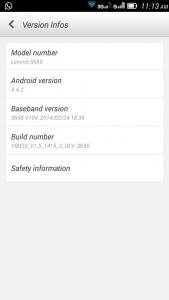
Here is a tutorial to flash VIBEUI ROM running KitKat (4.4.2) on Lenovo S650 :-
If ur current ROM is ROW , follow 01-22
If ur current ROM is CN , follow step below 05-22
If ur current ROM is VIBE, follow step 13-22

Download all items below :-
1.Flash_Tool
2.S650_S119_131014
3.VRoot
4.TWRP_v2.6.3.0_CN
5.4.4.2_GApps
6.SuperSU_v1.94
7.VIBEUI_V1.5_1415_3_DEV_S650_NK_W_A291

Copy item 5,6,7 into ur ext sdcard

Install USB drivers 1st...
» Click to show Spoiler - click again to hide... «


How to Flash...
» Click to show Spoiler - click again to hide... «


01. Off ur hp and take out the battery
02. Extract and Flash "S650_S119_131014-Lang_Fix"
03. Once finished, close flash_tool app and disconnect usb cable
04. Insert battery and turn it on, let it boot once
05. Root using "VRoot"
06. Install "MobileUncle MTK Tools" from Play Store
07. Off ur hp and take out the battery
08. Run flash_tool again
09. Extract and Flash "TWRP_v2.6.3.0_S650_CN"
10. Press F9 and answer YES (Don't press F8)
11. Once finished, close flash_tool app and disconnect usb cable
12. Insert battery and turn it on
13. Click 10x "Build Number"
14. Enable "USB debugging"
15. Reboot in Recovery via "MobileUncle MTK Tools"
16. Wipe dalvik cache , cache and data
17. Install "VIBEUI_V1.5_1415_3_DEV_S650_NK_W_A291"
18. Install "GApps"
19. Install "SuperSU"
20. Wipe dalvik cache and cache again
21. Reboot
22. Once ur hp boot, press + for English

List of apps can be disabled in Titanium Backup :-
youyue
lenovostore
secureit
shareit
syncit
mobileassistant
lenote
gameworld
sinaweather
lenovoservice
tutorial
usercenter
browser (replace with ur own browser)

mynet
Kindly pin above steps in 1st page

This post has been edited by epo: Apr 13 2014, 02:32 PM


Attached thumbnail(s)
Attached Image Attached Image Attached Image Attached Image
yewfatt
post Apr 13 2014, 02:14 PM

Regular
******
Senior Member
1,468 posts

Joined: Sep 2004


thx bro for the help. biggrin.gif
epo
post Apr 13 2014, 02:31 PM

Enthusiast
*****
Senior Member
892 posts

Joined: Jan 2003
From: Sg Buloh


QUOTE(yewfatt @ Apr 13 2014, 02:14 PM)
thx bro for the help. biggrin.gif
*
No prob...
nakTT
post Apr 13 2014, 05:34 PM

Fair Price Advocate
******
Senior Member
1,604 posts

Joined: Jun 2007
QUOTE(epo @ Apr 13 2014, 04:40 AM)
Here is a tutorial to flash VIBEUI ROM running KitKat (4.4.2) on Lenovo S650 :-
If ur current ROM is ROW , follow 01-22
If ur current ROM is CN , follow step below 05-22
If ur current ROM is VIBE, follow step 13-22

Download all items below :-
1.Flash_Tool
2.S650_S119_131014
3.VRoot
4.TWRP_v2.6.3.0_CN
5.4.4.2_GApps
6.SuperSU_v1.94
7.VIBEUI_V1.5_1415_3_DEV_S650_NK_W_A291

Copy item 5,6,7 into ur ext sdcard

Install USB drivers 1st...
» Click to show Spoiler - click again to hide... «


How to Flash...
» Click to show Spoiler - click again to hide... «


01. Off ur hp and take out the battery
02. Extract and Flash "S650_S119_131014-Lang_Fix"
03. Once finished, close flash_tool app and disconnect usb cable
04. Insert battery and turn it on, let it boot once
05. Root using "VRoot"
06. Install "MobileUncle MTK Tools" from Play Store
07. Off ur hp and take out the battery
08. Run flash_tool again
09. Extract and Flash "TWRP_v2.6.3.0_S650_CN"
10. Press F9 and answer YES (Don't press F8)
11. Once finished, close flash_tool app and disconnect usb cable
12. Insert battery and turn it on
13. Click 10x "Build Number"
14. Enable "USB debugging"
15. Reboot in Recovery via "MobileUncle MTK Tools"
16. Wipe dalvik cache , cache and data
17. Install "VIBEUI_V1.5_1415_3_DEV_S650_NK_W_A291"
18. Install "GApps"
19. Install "SuperSU"
20. Wipe dalvik cache and cache again
21. Reboot
22. Once ur hp boot, press + for English

List of apps can be disabled in Titanium Backup :-
youyue
lenovostore
secureit
shareit
syncit
mobileassistant
lenote
gameworld
sinaweather
lenovoservice
tutorial
usercenter
browser (replace with ur own browser)

mynet
Kindly pin above steps in 1st page
*
Thread starter should stick this post on the first page!!!!
one_guy
post Apr 14 2014, 10:42 PM

Ethuasiast!!
*****
Senior Member
926 posts

Joined: Oct 2005
From: Johor&Penang


Haha...good, someone already post the tutorial... :-)
nakTT
post Apr 15 2014, 07:26 PM

Fair Price Advocate
******
Senior Member
1,604 posts

Joined: Jun 2007
QUOTE(one_guy @ Apr 10 2014, 10:19 PM)
Good news...
Today S650 with Vibe 1.5, Android 4.4 Kitkat already..
http://www.vibeui.com/xiazai_s650_nk.html
*
But it is a development version instead of the stable one.

20 Pages « < 10 11 12 13 14 > » Top
 

Change to:
| Lo-Fi Version
0.0307sec    0.91    6 queries    GZIP Disabled
Time is now: 18th December 2025 - 10:49 PM