Welcome Guest ( Log In | Register )

Bump Topic Topic Closed RSS Feed
25 Pages « < 8 9 10 11 12 > » Bottom

Outline · [ Standard ] · Linear+

P2P BitComet Thread, Latest:0.99, info at 1st post

views
     
TStan_pang
post Dec 6 2006, 04:16 PM

Look at all my stars!!
*******
Senior Member
3,110 posts

Joined: Jun 2005


QUOTE(afosz @ Dec 6 2006, 03:36 PM)
@tan_pang
dwnld using 2 dif bt client can?i used bitlord try to open progress dwnld from bitcomet but cant hash check..end up starting at 0% again,before that file almost like 60% smthg.. (forgot which bt client i use to open the file tongue.gif)
*
juz can use 1 bt client to download same task at 1 time only
except if both of them are different file...

i stop bitcomet when using tuotu
stop tuotu when using bitcomet biggrin.gif

sometimes when bitcomet cant download, will use tuotu and vice-versa

maybe the speed increase becoz when everytime i restart the task, can connect to different peer...

This post has been edited by tan_pang: Dec 6 2006, 04:17 PM
TStan_pang
post Dec 6 2006, 05:40 PM

Look at all my stars!!
*******
Senior Member
3,110 posts

Joined: Jun 2005


QUOTE(super macgyver @ Dec 6 2006, 04:21 PM)
since 0.79 is lack of option & setting, i keep using 0.70 better, as speed is stillstable at around 55kbps.
*
this sentence mean what??
juz only v0.70 can get this speed??
or v0.79 too??

edit the version that you use back to v0.70...
QUOTE(coolmast3r @ Dec 6 2006, 05:28 PM)
whoa..i didnt know there is a dedicated thread for BC user..

add me in, i'm using 0.60 stable bersion.. thumbup.gif.. i tried some newer version, but..thanks..i'll stick to this one..sweat.gif
*
updated
go to 1st post and check is it in correct verion
and you are the 20th to get into the list rclxms.gif
TStan_pang
post Dec 6 2006, 06:39 PM

Look at all my stars!!
*******
Senior Member
3,110 posts

Joined: Jun 2005


QUOTE(coolmast3r @ Dec 6 2006, 05:43 PM)
thanx alot bro.. laugh.gif
i didn't expect the fast reply from u..
yes, that's the correct version which i'm using.. 0.60..
no problem, i've been using BC since v 0.52 if i'm not mistaken..

but they seems to remove some option in the newer version, that's why i'm sticking with this version..
just need to alter the max connection setting on winxp manually.. (www.lvllord.de)
other than that, hassle-free..

owh, i'm the 20th ka? rclxm9.gif
hehe..tahnx again bro! notworthy.gif
*
if you want more option
i think v0.70 is more than any other version

about v0.60......
i think this version still got bug with DHT, and this version got Boss Key?? brows.gif
coz v0.57 didnt have boss key, now wondering start from what version got boss key settings...
TStan_pang
post Dec 6 2006, 07:05 PM

Look at all my stars!!
*******
Senior Member
3,110 posts

Joined: Jun 2005


QUOTE(aimleeds @ Dec 6 2006, 06:52 PM)
i got one question here, recently i downloaded a movie. but it stop at 99.9% because there is no one seeding. i want to ask, is there any software that i can use to play the uncomplete movie? i tried VLC but cant work, i tried previewing using the bitcomet, but it didnt work too..
*
try Gom player
it can skip anywhere that is corrupt and play it

some incomplete video that i cant watch by MPC can use Gom player to play it
thats why i like it (but juz for watching incomplete video only)
QUOTE(royalz @ Dec 6 2006, 06:55 PM)
hey can u guys help me out?my dwl speed always lower than upload speed ..i can get around 30kbps ... anyone noe how to solve dis?
*
please refer to the previous page (page 43)

This post has been edited by tan_pang: Dec 7 2006, 04:16 PM
TStan_pang
post Dec 7 2006, 07:12 PM

Look at all my stars!!
*******
Senior Member
3,110 posts

Joined: Jun 2005


QUOTE(storm721984 @ Dec 7 2006, 12:40 AM)
Here is another testing and so-called fun thing i did with BitComet and this is seriously cool to see this crazy speed~  laugh.gif

Let me repeat again that this is STRICTLY NOT A REAL DOWNLOAD SPEED
as the transfering was done with a local connection under a wired connection

» Click to show Spoiler - click again to hide... «

*
i advice you not to do this again
becoz the download speed is too fast
and it maybe will affect to your hdd
make your hdd got fragment
or got logical/physical dmg...
QUOTE(yelsew @ Dec 7 2006, 03:47 PM)
Thanks for the recommendation, been looking for such program  notworthy.gif

Just notice u are creating the list of bc users... add me in then, still using 0.70  smile.gif
*
the list aledi updated
try check for any mistake...

This post has been edited by tan_pang: Dec 7 2006, 07:13 PM
TStan_pang
post Dec 7 2006, 10:20 PM

Look at all my stars!!
*******
Senior Member
3,110 posts

Joined: Jun 2005


QUOTE(diablo69 @ Dec 7 2006, 10:09 PM)
bc user here... got one question... one of my files just stop at 89%... no matter wat type also same... .avi or .rar.... wat could be da problem... even fresh download on another computer also stuck...
*
http://www.p2pforums.com/viewtopic.php?p=134861#134861

QUOTE(extract from the link above)
This problem is usually caused by some NAT Routers corrupting the data and affects most, if not all, BitTorrent clients. Make sure you're using the latest firmware (check your manufacturer's website for official firmware and installation instructions). People who get this problem usually get it on nearly every torrent.

Possible solution 1:
Click Options > Preferences > Advanced > Connection and change "Maximum Connections per task" & "Connections to keep per task" to 1, then resume the torrent.

it is to reject other peer that didnt have your file, and keep connect to other peer that have your file. once reject, you wont connect to him again.

Possible solution 2:
Select the torrent task in BitComet then click the Files section (bottom left in the main window). If it contains any of the following file types, right click them and select Priority > Disabled:
desktop.ini
thumbs.db
after that, hash-check and try download again

This may fix it because these files are hidden system files that are specific to each system, so if somebody mistakenly included them in the torrent there will be a constant file overwriting battle between BitComet and windows.

Possible solution 3:
Make sure the following is disabled in your router:
DMZ Mode (where all packets are forwarded a single machine by default)
Game Mode (very few routers support this function, so you probably won't be able to find this option)

Possible Solution #4:
Disable/bypass your routers NAT and connect directly to the internet - so you can download the last piece of data without your NAT messing it up. Consult your routers user guide on how to do this.

Still hasn't fixed it? It may be time to buy a new router.
TStan_pang
post Dec 8 2006, 07:19 PM

Look at all my stars!!
*******
Senior Member
3,110 posts

Joined: Jun 2005


QUOTE(Joshua_0718 @ Dec 8 2006, 07:00 PM)
What do actually seeding mean? Means the person got full download and just leave it to let us download?

One more thing, after we download finish 100%, the green round icon will be there. What is that symbol actually mean?
*
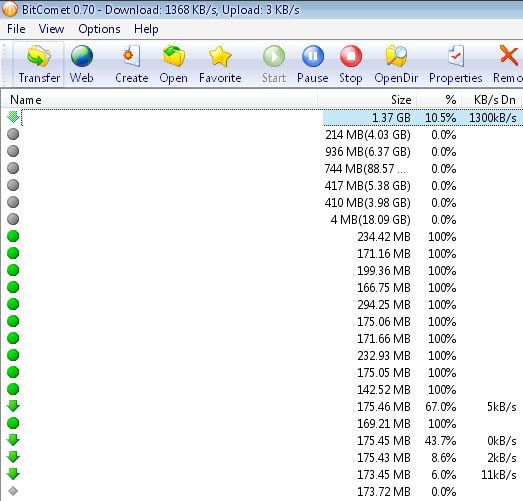
yes!! seeding is to upload when you having fully complete file

other symbol??
green dot = aledi 100%
gray dot = havent finish download (when you are NOT downloading that file)
green down arrow = downloading that torrent task
red up arrow = seeding that task
yellow color dot = hash-checking that torrent file
red cross = task cannot be download (usually coz by the hdd cannot write the file, close any program that opening the file related to the torrent should do the trick)

any other missing?? smile.gif

This post has been edited by tan_pang: Dec 8 2006, 07:21 PM
TStan_pang
post Dec 8 2006, 07:50 PM

Look at all my stars!!
*******
Senior Member
3,110 posts

Joined: Jun 2005


QUOTE(Joshua_0718 @ Dec 8 2006, 07:28 PM)
So... Once 100%, bitcomet will automatic upload the seed(the green dot appear)?
Do uploading seed will affect our connection speed?
*
yes, after 100%, it will automatically upload
seeding will juz affect your upload
i dun see it affect my download
coz i try to upload with 16kBps and still can download by http with 50kBps speed smile.gif

but in bt torrenting, you are advice to limit your upload so that your upload wont choke your download, and coz your download become slower...

FYI, you are better to enable "Hash-check again when the task download finished" under Preferences > Task > BT task (in v0.79)

This post has been edited by tan_pang: Dec 8 2006, 07:54 PM
TStan_pang
post Dec 8 2006, 09:41 PM

Look at all my stars!!
*******
Senior Member
3,110 posts

Joined: Jun 2005


QUOTE(Joshua_0718 @ Dec 8 2006, 09:05 PM)
Another question. If I actually limit my upload speed from the beginning, will it actually limit or make my download speed slower?

Enabled with your advice. Thanks
*
it is base on how much you limit to
if your upload limit is still too high, then it still will affect your download

you can change the upload limit when downloading any task
then you can see the different of your download speed
QUOTE(Joshua_0718 @ Dec 8 2006, 09:38 PM)
I would like to ask. If I am now using Bitcomet downloading, and now I planning to change to utorrent. How I am going to continue downloading my file? FYI, the download folder I put in another drive which is F drive. Pls help
*
i think i aledi update this question's answer in 1st post smile.gif
TStan_pang
post Dec 8 2006, 09:52 PM

Look at all my stars!!
*******
Senior Member
3,110 posts

Joined: Jun 2005


QUOTE(Joshua_0718 @ Dec 8 2006, 09:44 PM)
I planning to put my upload speed at 3kB/s. But I found that my downloading speed together dropping also.  sweat.gif

So, it is best for me let it be unlimited?

Anyway, I unistall bitcomet. But once I click a new torrent, the bitcomet software still appear  sweat.gif  Why?
*
you juz set to 3kBps?? shocking.gif
then you better dun use BT dry.gif

i suggest you to set the upload limit to 15kBps (512kbps) or 30kBps (1Mbps)

but now maybe higher upload limit will get better download
coz someone said that if we put higher upload limit, then we can find more local peer to increase the download...

btw, are you sure that you aledi uninstall the BitComet completely??
try go check the BitComet installed directory, and delete all the file inside

This post has been edited by tan_pang: Dec 8 2006, 09:53 PM
TStan_pang
post Dec 9 2006, 10:46 AM

Look at all my stars!!
*******
Senior Member
3,110 posts

Joined: Jun 2005


QUOTE(Joshua_0718 @ Dec 9 2006, 03:35 AM)
I changed from bitcomet to utorrent. Surprisingly seeing faster 10x. Bitcomet I download only around 5kB/s, while on utorrent will be around 50kB/s.  shocking.gif

But once I letting my utorrent run, my I.E, MSN, Firefox all very slow. What is the best advice to limit the download speed for every client?
*
1st post is very useful smile.gif
try find your solution at there first
only then post your problem at here
TStan_pang
post Dec 9 2006, 07:35 PM

Look at all my stars!!
*******
Senior Member
3,110 posts

Joined: Jun 2005


QUOTE(ibu1980 @ Dec 9 2006, 03:45 PM)
i was using bitcomet 0.59 all these years until the so called throttling..

recently formatted pc and thought of trying latest version.. 0.79..

and to my surprise.. download speed is very very fast now biggrin.gif
*
my situation last time also same like you
where after i reformat the pc, the speed back
but now turn to sux...
still can download with some torrent with many local peer
but not to less famous torrent...

btw, aledi add your name to the 1st post with v0.79 smile.gif
TStan_pang
post Dec 10 2006, 08:50 PM

Look at all my stars!!
*******
Senior Member
3,110 posts

Joined: Jun 2005


QUOTE(emy_xvidia @ Dec 10 2006, 08:34 PM)
BitComet 0.79 seems to improve the download speed especially at night but not consistence but better than Tuotu old version... it's whether TM lift up the throttle every night or the new BitComet manages to slightly bypass the throttling... anyone experience the same as me?
*
hmm...
i wondering what is the used of the "DHEv2"
but i dun think it is the new way to bypass the throttle...

and i dun think the tmnuts will lift up the throttle when at night
becoz they wont do it juz for us...

i think it is largely becoz of less people online
and that make your bt can go fast only at night
becoz of bt has been set to the lowest priority by the traffic shaping device...
TStan_pang
post Dec 10 2006, 09:15 PM

Look at all my stars!!
*******
Senior Member
3,110 posts

Joined: Jun 2005


QUOTE(emy_xvidia @ Dec 10 2006, 08:55 PM)
yeah, maybe you are right... there is no way TM gonna lift that throttling up even for a second... unsure.gif  sad.gif  but i'm satisfied with my BitComet 0.79 performance... i'm gonna tweak it soon so i will get the best performance... pray for my success... hahaha...  tongue.gif  biggrin.gif
*
good luck for your settings
but i dun think there is many settings in BitComet v0.79

btw, i have add your name in the name list in first post with BitComet v0.79 as the version you are using
TStan_pang
post Dec 11 2006, 03:59 PM

Look at all my stars!!
*******
Senior Member
3,110 posts

Joined: Jun 2005


QUOTE(super macgyver @ Dec 11 2006, 03:25 PM)
tan_pang, wat is ur bt speed now with 0.79? i prefer with 0.70 stable around 56kbps.
*
based on torrent... sweat.gif

i think nothing more that need to say
coz if many local peer, speed fast
not many remote peer, speed slow
everyone of us aledi know it, right??
TStan_pang
post Dec 12 2006, 09:54 AM

Look at all my stars!!
*******
Senior Member
3,110 posts

Joined: Jun 2005


QUOTE(super macgyver @ Dec 11 2006, 11:16 PM)
yup, but my 0.70 alwiz need around 20minutes on all my seed to scrimb to 56kbps from 2kbps.  sweat.gif
*
of coz need some time to get 56kBps from 2kBps
becoz you also need time to connect to peer...
so that you can get the download
TStan_pang
post Dec 12 2006, 08:33 PM

Look at all my stars!!
*******
Senior Member
3,110 posts

Joined: Jun 2005


QUOTE(zwiezack @ Dec 12 2006, 08:09 PM)
Want to ask. I'm live in campus. Seem my bitcomet does not work. Maybe got firewall behind. Any ideas that i can through this firewall?  biggrin.gif  sweat.gif
*
sorry...
about the campus router or firewall settings...
i dunno anything about it
therefore, cant help

btw, i notice that my BitComet used memory max is 30,000+ kb only
maybe becoz of the throttle that make me cant connect to many peer
and less memory to used

should i say "thank you" to tmnuts??
TStan_pang
post Dec 13 2006, 12:13 PM

Look at all my stars!!
*******
Senior Member
3,110 posts

Joined: Jun 2005


QUOTE(cashboy @ Dec 13 2006, 12:00 PM)
which ports give good download speed? i cant download single file at max speed,just can get max speed if dl many files at once. doh.gif  mad.gif
*
that is not the port problem
but you got a "great news" from tmnuts

you has been throttle!!!!!!
if you still got problem after choose any port no. between 49152 and 65534
then you are confirm throttle

btw, port no. didnt affect much for your download
as long as the port you chosen did not use by any application
TStan_pang
post Dec 14 2006, 10:11 AM

Look at all my stars!!
*******
Senior Member
3,110 posts

Joined: Jun 2005


QUOTE(Teddyking @ Dec 14 2006, 08:29 AM)
maybe can use the software to boost up the speed.

http://www.wangrong1002.com/
*
QUOTE(cashboy @ Dec 14 2006, 09:10 AM)
what software is that? not so understand in chinese.. sounds like a speeder
*
i also dunno what is that sweat.gif
although i study chinese before
but dunno what that webpage mean...

@cashboy
make sure you aledi port forward
after that, check is the peer who give you download is Malaysia IP??

This post has been edited by tan_pang: Dec 14 2006, 10:13 AM
TStan_pang
post Dec 15 2006, 11:34 PM

Look at all my stars!!
*******
Senior Member
3,110 posts

Joined: Jun 2005


WOH~~
BitComet v0.80
who had tried it??

25 Pages « < 8 9 10 11 12 > » Top
Topic ClosedOptions
 

Change to:
| Lo-Fi Version
0.0480sec    0.21    7 queries    GZIP Disabled
Time is now: 3rd December 2025 - 07:25 PM