Welcome Guest ( Log In | Register )

Bump Topic Topic Closed RSS Feed
129 Pages « < 17 18 19 20 21 > » Bottom

Outline · [ Standard ] · Linear+

 Sony Xperia Z / ZL Official V~10 Thread, JB 4.3 & KitKat 4.4 It`s Comming Yo

views
     
ChuanHong
post Dec 12 2013, 10:30 PM

I <3 Xperia
*******
Senior Member
4,412 posts

Joined: Jan 2013


QUOTE(kakikubesi @ Dec 12 2013, 10:17 PM)
More review please...how about ram usage,memory, small app n etc?
*
small apps i can at least opened 5 apps in once.. Great improve here

total ram can be use is 1.77+gb ram.. after installed fb and others nearly 800MB ram free..

camera can install AR effects, motionshot, social live..
mafioso
post Dec 12 2013, 10:33 PM

 
*******
Senior Member
6,155 posts

Joined: Jul 2012
From: Today, 00:01 AM
QUOTE(kakikubesi @ Dec 12 2013, 10:24 PM)
Haha
Looks like new camera have improvement..i.think la...
*
on xda i saw that we can download camera enhancements from the play store..

https://play.google.com/store/apps/develope...nications&hl=en

1. ar effect - https://play.google.com/store/apps/details?...aaddon.areffect
2. motiongraph - https://play.google.com/store/apps/details?...ngraphforxperia

i think lar.. laugh.gif
kakikubesi
post Dec 12 2013, 10:39 PM

.....
******
Senior Member
1,274 posts

Joined: May 2009


QUOTE(mafioso @ Dec 12 2013, 10:33 PM)
Can put at 1st page for reference..

mafioso
post Dec 12 2013, 10:43 PM

 
*******
Senior Member
6,155 posts

Joined: Jul 2012
From: Today, 00:01 AM
QUOTE(kakikubesi @ Dec 12 2013, 10:39 PM)
Can put at 1st page for reference..
*
pm or tag OP lo. laugh.gif
ChuanHong
post Dec 12 2013, 10:43 PM

I <3 Xperia
*******
Senior Member
4,412 posts

Joined: Jan 2013


Ahhhh.. SO cute!!! Brown and Cony in my hostel room..

I love Cony so much.. She so cute..Attached Image

This post has been edited by ChuanHong: Dec 12 2013, 11:33 PM
ChuanHong
post Dec 12 2013, 11:41 PM

I <3 Xperia
*******
Senior Member
4,412 posts

Joined: Jan 2013


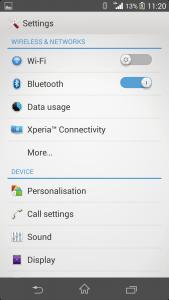
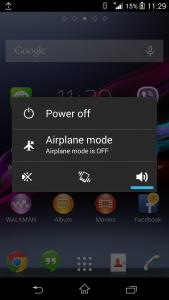
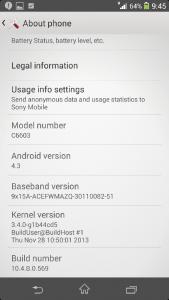
Screenshot for XPeria ZL 4.3 update.. hope these can give u all clear image

This post has been edited by ChuanHong: Dec 12 2013, 11:50 PM


Attached thumbnail(s)
Attached Image Attached Image Attached Image Attached Image Attached Image Attached Image Attached Image Attached Image Attached Image Attached Image Attached Image
delsoo
post Dec 12 2013, 11:49 PM

Look at all my stars!!
*******
Senior Member
3,187 posts

Joined: Nov 2013
QUOTE(ChuanHong @ Dec 12 2013, 10:30 PM)
small apps i can at least opened 5 apps in once.. Great improve here

total ram can be use is 1.77+gb ram.. after installed fb and others nearly 800MB ram free..

camera can install AR effects, motionshot, social live..
*
can you post some screen shot on your phone here?? hmm.gif
monocle
post Dec 13 2013, 12:14 AM

Look at all my stars!!
*******
Senior Member
2,645 posts

Joined: Jun 2012
QUOTE(ChuanHong @ Dec 12 2013, 11:41 PM)
Screenshot for XPeria ZL 4.3 update.. hope these can give u all clear image
*
how is the haptic feedback sync with typing?
ChuanHong
post Dec 13 2013, 12:17 AM

I <3 Xperia
*******
Senior Member
4,412 posts

Joined: Jan 2013


QUOTE(monocle @ Dec 13 2013, 12:14 AM)
how is the haptic feedback sync with typing?
*
i would say almost at the same time.. typing sound was different with previous..
Pacmangoku
post Dec 13 2013, 12:31 AM

lë Fantôme
*****
Senior Member
828 posts

Joined: Apr 2012
From: Edge of Tomorrow
QUOTE(ChuanHong @ Dec 12 2013, 11:41 PM)
Screenshot for XPeria ZL 4.3 update.. hope these can give u all clear image
*
Thanks for the preview. Hope it comes to XZ soon.
ChuanHong
post Dec 13 2013, 12:40 AM

I <3 Xperia
*******
Senior Member
4,412 posts

Joined: Jan 2013


After some time of playing around on my ZL 4.3 build, here is what i want to conclude here:

1. Advantages/Improvement
-Option to add One-hand typing
- Camera features like Z1 in 4.2.2, which got AR effects, MotionShot, Social Live and others.
- Camera burst shot increase the resolution in high speed. Previous is around 1MP now is on 9MP. which is great.
- Small apps can be open several apps at the same time.
- Theme can be additional download in playstore.
- Brightness toggle now is appear in bar mode. Can increase/decrease by own preference. Previous if press it, will only get 100% or 25% brightness. If need set 50% need enter settings and adjust
- Manual mode seems improve quality of photo. Not so significant photo processing in my attempts.. Superior auto and scene mode was still processing the photo and make it grainier..
- Self timer in camera settings will present the options once u choose. E.g. Set 10 seconds for self capture, after capture was still 10 seconds on next capture.. no need always reset again..
- Performance in overall seems smooth.. not much complaints.. I won't do benchmarks, coz i doesn't believe it in real practices.. just wont lag.. Temporary all function are works nicely..
- Photo widgets changed newer.

2. Disadvantages:
- Capture image while in video recording was still in 1MP only. which not so good for me. Superior auto was fixed on 9MP which cant be adjust by users.
- Burst mode only can be actived in superior auto mode
- Backup data in 4.2.2 was cannot be used in 4.3.. Beware of it.
- No screenshot option in power menu

This post has been edited by ChuanHong: Dec 13 2013, 12:41 AM
mafioso
post Dec 13 2013, 01:21 AM

 
*******
Senior Member
6,155 posts

Joined: Jul 2012
From: Today, 00:01 AM
QUOTE(ChuanHong @ Dec 13 2013, 12:40 AM)
After some time of playing around on my ZL 4.3 build, here is what i want to conclude here:

1. Advantages/Improvement
-Option to add One-hand typing
- Camera features like Z1 in 4.2.2, which got AR effects, MotionShot, Social Live and others.
- Camera burst shot increase the resolution in high speed. Previous is around 1MP now is on 9MP. which is great.
- Small apps can be open several apps at the same time.
- Theme can be additional download in playstore.
- Brightness toggle now is appear in bar mode. Can increase/decrease by own preference. Previous if press it, will only get 100% or 25% brightness. If need set 50% need enter settings and adjust
- Manual mode seems improve quality of photo. Not so significant photo processing in my attempts.. Superior auto and scene mode was still processing the photo and make it grainier..
- Self timer in camera settings will present the options once u choose. E.g. Set 10 seconds for self capture, after capture was still 10 seconds on next capture.. no need always reset again..
- Performance in overall seems smooth.. not much complaints.. I won't do benchmarks, coz i doesn't believe it in real practices.. just wont lag.. Temporary all function are works nicely..
- Photo widgets changed newer.

2. Disadvantages:
- Capture image while in video recording was still in 1MP only. which not so good for me. Superior auto was fixed on 9MP which cant be adjust by users.
- Burst mode only can be actived in superior auto mode
- Backup data in 4.2.2 was cannot be used in 4.3.. Beware of it.
- No screenshot option in power menu
*
what do you mean by that? hmm.gif

as in those things we do with our gmail account wont be backed up?
like installing apps, google keep, etc?

and for the brightness toggle/bar mode.. do you mean its like samsung's can just drag left/right? or still must tap then an overlay box will appear? nod.gif

ChuanHong
post Dec 13 2013, 01:31 AM

I <3 Xperia
*******
Senior Member
4,412 posts

Joined: Jan 2013


QUOTE(mafioso @ Dec 13 2013, 01:21 AM)
what do you mean by that? hmm.gif

as in those things we do with our gmail account wont be backed up?
like installing apps, google keep, etc?

and for the brightness toggle/bar mode.. do you mean its like samsung's can just drag left/right? or still must tap then an overlay box will appear? nod.gif
*
1. The backup like msg, call log, bookmarks in browser and others by the sony stock backup & restore apps wont works. not about the google backup..

2. yes.. brightness toggles drag left-right.. please check my screenshot on above..
mafioso
post Dec 13 2013, 01:38 AM

 
*******
Senior Member
6,155 posts

Joined: Jul 2012
From: Today, 00:01 AM
QUOTE(ChuanHong @ Dec 13 2013, 01:31 AM)
1. The backup like msg, call log, bookmarks in browser and others by the sony stock backup & restore apps wont works. not about the google backup..

2. yes.. brightness toggles drag left-right.. please check my screenshot on above..
*
owh..

but for 1. if i backup with a 3rd party software like "sms backup & restore", it will restore right? laugh.gif

2. opps i must've missed it..

3. i also noticed now messaging they're using google hangouts? hmm.gif or you set google hangouts as default? hmm.gif
but the messaging app by sony is there..

This post has been edited by mafioso: Dec 13 2013, 01:39 AM
ChuanHong
post Dec 13 2013, 01:46 AM

I <3 Xperia
*******
Senior Member
4,412 posts

Joined: Jan 2013


QUOTE(mafioso @ Dec 13 2013, 01:38 AM)
owh..

but for 1. if i backup with a 3rd party software like "sms backup & restore", it will restore right? laugh.gif

2. opps i must've missed it..

3. i also noticed now messaging they're using google hangouts? hmm.gif or you set google hangouts as default? hmm.gif
but the messaging app by sony is there..
*
im using stock msg apps. hmm, these im not sure.. haha.. maybe u can try it out in future..
mafioso
post Dec 13 2013, 01:48 AM

 
*******
Senior Member
6,155 posts

Joined: Jul 2012
From: Today, 00:01 AM
QUOTE(ChuanHong @ Dec 13 2013, 01:46 AM)
im using stock msg apps. hmm, these im not sure.. haha.. maybe u can try it out in future..
*
oic becuz based on ur screenshots, you're using google hangouts as the messaging app laugh.gif

the stock sony messaging app is still there right? becuz i used xposed to make it look tablet-mode so that it split into two screens laugh.gif
ChuanHong
post Dec 13 2013, 02:08 AM

I <3 Xperia
*******
Senior Member
4,412 posts

Joined: Jan 2013


QUOTE(mafioso @ Dec 13 2013, 01:48 AM)
oic becuz based on ur screenshots, you're using google hangouts as the messaging app laugh.gif

the stock sony messaging app is still there right? becuz i used xposed to make it look tablet-mode so that it split into two screens laugh.gif
*
yaya.. just now only apply it in hangout.. hahaha.. coz saw can active it
kakikubesi
post Dec 13 2013, 03:05 AM

.....
******
Senior Member
1,274 posts

Joined: May 2009


Good review...no reason for me to change to z1. Haha
nk3371
post Dec 13 2013, 09:13 AM

4 only ah?
****
Senior Member
536 posts

Joined: Nov 2006
From: Kuala Lumpur


DONE!

A bit battery hogging I think.
Unplugged it from wall charger around 7:30AM.
Mobile Data was ON since then till now, battery is around 89% already. shocking.gif

Maybe because of the previous custom ROM was better at power management I'm not pretty sure.
Attached Image
SiIverStar
post Dec 13 2013, 10:15 AM

Alone~Decent
*****
Senior Member
988 posts

Joined: Jun 2010
From: Damansara KL


QUOTE(kakikubesi @ Dec 13 2013, 03:05 AM)
Good review...no reason for me to change to z1. Haha
*
B4 i bought this phone..already compare with z1..
I choose xz ..cause thin...z1 to bulk for me and heavy abit..
For camera..less use..so dont care as long we can see the pic..
For spec z1 is better...but xz spec already overkill for me..
Never feel lag or hang when play games and surfing etc..
Only i hate is battery drain so fast..

129 Pages « < 17 18 19 20 21 > » Top
Topic ClosedOptions
 

Change to:
| Lo-Fi Version
0.0303sec    0.68    6 queries    GZIP Disabled
Time is now: 10th December 2025 - 09:16 AM