

QUOTE(ahlong @ Dec 9 2013, 12:42 PM)
already install it but still cant 

If you already install wide-dhcpv6-client and still didn't get a prefix from the server, then your exchange is probably not IPv6-enabled yet.Unifi TMnet Streamyx/Unifi & IPv6, Now live!
|
|
 Dec 9 2013, 01:01 PM Dec 9 2013, 01:01 PM
Return to original view | IPv6 | Post
#81
|
 
Elite
4,541 posts Joined: Jan 2003 From: BSRPPG51 Access Concentrator  
|
QUOTE(ahlong @ Dec 9 2013, 12:42 PM) already install it but still cant If you already install wide-dhcpv6-client and still didn't get a prefix from the server, then your exchange is probably not IPv6-enabled yet. |
|
|
|
|
|
Dec 9 2013, 01:11 PM
Return to original view | IPv6 | Post
#82
|
|
Elite
4,541 posts Joined: Jan 2003 From: BSRPPG51 Access Concentrator
|
QUOTE(nymerine @ Dec 9 2013, 12:06 AM) Hmm, whenever I turned on my ipv6, my ipv6 traffic didnt go through my ipv6 enabled ssh tunneling, instead it just directly connected to any ipv6 enabled sites. Tried with my OpenVPN as well, only ipv4 traffic going through tunneling/VPN. Is there any way to fix this? When you set the local port for the SSH port forwarding, you did use the 'Dynamic Auto' right? Else you won't get IPv6 SSH tunneling at all.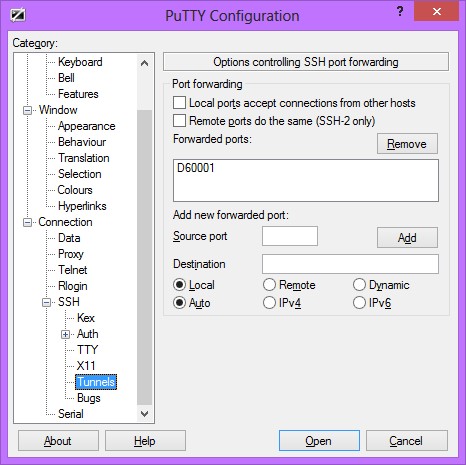 |
|
|
Dec 15 2013, 11:48 AM
Return to original view | IPv6 | Post
#83
|
|
Elite
4,541 posts Joined: Jan 2003 From: BSRPPG51 Access Concentrator
|
QUOTE(XeactorZ @ Dec 15 2013, 01:57 AM) why by default my ipv6 showing no internet access ? this is normal, you do not have to worry about this.until I go ipv6 website test, then only show got internet what wrong ? on l7 router, already enable ipv6 @@ |
|
|
Dec 15 2013, 04:07 PM
Return to original view | IPv6 | Post
#84
|
|
Elite
4,541 posts Joined: Jan 2003 From: BSRPPG51 Access Concentrator
|
QUOTE(XeactorZ @ Dec 15 2013, 03:38 PM) so is unifi issue or computer issue ?? Computer issue. |
|
|
Dec 16 2013, 12:07 AM
Return to original view | IPv6 | Post
#85
|
|
Elite
4,541 posts Joined: Jan 2003 From: BSRPPG51 Access Concentrator
|
QUOTE(XeactorZ @ Dec 15 2013, 11:47 PM) lol but sometimes automatically showing ipv6 got internet No, just leave it be and it will fix itself.any solution to fix it ? |
|
|
Dec 16 2013, 12:25 PM
Return to original view | IPv6 | Post
#86
|
|
Elite
4,541 posts Joined: Jan 2003 From: BSRPPG51 Access Concentrator
|
QUOTE(Raki @ Dec 16 2013, 11:16 AM) I'm sorry, do you mean IPv6 would only be accessible after 10-15 minutes of authenticated into screamyx ? hmm.. so almost all (if not all of them) custom firmware like DD-WRT, OpenWRT & Tomato are not RFC6204-compliant then. Damn, did we have to use the likes of D-Link DIR-615 or Innacomm W3400V6 just to get flawless IPv6 with TM?If so, no. I can access IPv6 sites immediately after login. I think the problem might be becuz the OS still retains the previous IPv6 address. (becuz a different prefix is dynamically delegated each time you connect to TM). In theory, "ipconfig /release6" and "ipconfig /renew6" into command line should solve the problem. But in my case, it doesnt work so my workaround is to go to the network's Properties and uncheck"Internet Protocol Version 6 (TCP/IPv6) to disable IPv6. Than go back and reenable it .  Side note: I modified the script cuz there was a logic error |
|
|
|
|
|
Dec 30 2013, 07:20 AM
Return to original view | IPv6 | Post
#87
|
|
Elite
4,541 posts Joined: Jan 2003 From: BSRPPG51 Access Concentrator
|
QUOTE(AjkR06 @ Dec 29 2013, 04:57 PM) Yes, as shown in the below screenshots... Oh, this problem again? It is highly likely pMTU problems. Lower IPv6 MTU to 1450, or 1280 if you have Android devices in the network.» Click to show Spoiler - click again to hide... « But when I try to access international website which able to support IPV6 and IPV4 simultaneously, I only get time out/connection to server lost message from my browser... Youtube - accessible, but video won't load at all Wikipedia and Facebook - connection to server lost Here is my router settings (TP Link TD-W8968) » Click to show Spoiler - click again to hide... « |
|
|
Feb 7 2014, 07:40 PM
Return to original view | IPv6 | Post
#88
|
|
Elite
4,541 posts Joined: Jan 2003 From: BSRPPG51 Access Concentrator
|
QUOTE(amirsubhi @ Feb 6 2014, 03:14 PM) Does anyone have use the new 6.9 router OS for mikrotik Because it was broken in 6.8.I notice in the change log, they fix IPv6-Prefix assigning What's new in 6.9 (2014-Jan-31 11:18): *) lcd - added option to change the color-scheme; *) updated bootloader firmware; *) ppp: fixed RADIUS accounting; *) ppp: fixed IPV6-Prefix assigning; *) ppp: fixed dial-on-demand; |
|
|
Feb 9 2014, 03:52 PM
Return to original view | IPv6 | Post
#89
|
|
Elite
4,541 posts Joined: Jan 2003 From: BSRPPG51 Access Concentrator
|
It should be the MTU problem.
|
|
|
Mar 6 2014, 03:20 PM
Return to original view | IPv6 | Post
#90
|
|
Elite
4,541 posts Joined: Jan 2003 From: BSRPPG51 Access Concentrator
|
You should try resetting your TCP/IP stack.
|
|
|
Mar 7 2014, 07:41 AM
Return to original view | IPv6 | Post
#91
|
|
Elite
4,541 posts Joined: Jan 2003 From: BSRPPG51 Access Concentrator
|
QUOTE(Anime4000 @ Mar 7 2014, 12:45 AM) How? It can be done using the 'netsh' command via an elevated command prompt. btw, I choose right option? [attachmentid=3881062] The option is correct, you can also try SLAAC though. |
|
|
May 25 2014, 07:02 PM
Return to original view | IPv6 | Post
#92
|
|
Elite
4,541 posts Joined: Jan 2003 From: BSRPPG51 Access Concentrator
|
The reason why Facebook/Youtube can be slow when IPv6 is enabled is because the MTU is too high. I use the MTU of 1280 in ND setting so that those websites will be easily accessible, plus solve the problem where some Android devices. 1452 is definitely not low enough for all devices.
|
|
|
May 26 2014, 11:10 AM
Return to original view | IPv6 | Post
#93
|
|
Elite
4,541 posts Joined: Jan 2003 From: BSRPPG51 Access Concentrator
|
QUOTE(Kanuki @ May 26 2014, 11:02 AM) What's ND Setting? Neighbour Discovery. |
|
|
|
|
|
May 26 2014, 11:22 AM
Return to original view | IPv6 | Post
#94
|
|
Elite
4,541 posts Joined: Jan 2003 From: BSRPPG51 Access Concentrator
|
I'm not familiar with TomatoUSB, but you can try changing that value.
|
|
|
May 26 2014, 11:35 AM
Return to original view | IPv6 | Post
#95
|
|
Elite
4,541 posts Joined: Jan 2003 From: BSRPPG51 Access Concentrator
|
QUOTE(Kanuki @ May 26 2014, 11:32 AM) What router are you using? I use routerOS. MTU is set at ND setting, because its dialer does not support IPv6. |
|
|
May 26 2014, 07:05 PM
Return to original view | IPv6 | Post
#96
|
|
Elite
4,541 posts Joined: Jan 2003 From: BSRPPG51 Access Concentrator
|
QUOTE(#aten @ May 26 2014, 05:45 PM) may i ask how you find the proper value for ipv6 MTU? No, I just arbitrarily choose that value after researching why Jelly Bean Android phones has big red connectivity problems at http://test-ipv6.com/ test page.i know for ipv4 we can ping its fragment to get desired results e.g ping -f -l 1472 google.com until you get the results without 'Packet needs to be fragmented but DF set.' how about ipv6 maybe you can share? |
|
|
Sep 3 2014, 01:35 PM
Return to original view | IPv6 | Post
#97
|
|
Elite
4,541 posts Joined: Jan 2003 From: BSRPPG51 Access Concentrator
|
QUOTE(kupang @ Sep 2 2014, 10:32 PM) what really went wrong with my settings for DLink DSL-2730E .. ? In the picture above, where did you get the 'IPv6 Address Pool' value?I don't see any settings that writes DHCPv6-PD my PC is getting the local IPv6 from the router but cannot connect the net using IPv6 DHCPv6 [attachmentid=4118518] |
|
|
Sep 4 2014, 12:04 AM
Return to original view | IPv6 | Post
#98
|
|
Elite
4,541 posts Joined: Jan 2003 From: BSRPPG51 Access Concentrator
|
QUOTE(kupang @ Sep 3 2014, 06:55 PM) I got it through IPv6 generator website... You should have let the router obtain a prefix from the exchange, not by auto generating it.am doing it the wrong way .. ? |
|
|
Oct 5 2014, 05:52 PM
Return to original view | IPv6 | Post
#99
|
|
Elite
4,541 posts Joined: Jan 2003 From: BSRPPG51 Access Concentrator
|
QUOTE(tch9 @ Oct 4 2014, 05:58 PM) Hi there! For Barrier Breaker, you use the subnet assigned to your PPPoE interface for the computers/smartphones connected in your LAN.i'm currently running OpenWRT BarrierBreaker final version on DIR-615. i'm able to get ipv6 address for my wan interface starting with 2001:E68 however i'm not able to get ipv6 address starting with 2001:E68 for my lan. does this mean that my place does not support ipv6 yet? any help will be appreciated. Thanks! |
|
|
Oct 6 2014, 12:56 AM
Return to original view | IPv6 | Post
#100
|
|
Elite
4,541 posts Joined: Jan 2003 From: BSRPPG51 Access Concentrator
|
QUOTE(tch9 @ Oct 5 2014, 08:13 PM) Hi there! Sorry, I do not have the router anymore, so I do not really remember how to do it.Thanks for the reply. can you help to explain what steps are needed for configurations in Barrier Breaker? i have tested with dir-615 stock firmware version 7.19 and confirmed that ipv6 is working on my area. many thanks! |
| Change to: |  0.0512sec 0.0512sec
 0.71 0.71
 7 queries 7 queries
 GZIP Disabled GZIP Disabled
Time is now: 3rd December 2025 - 09:11 PM |
 Quote
Quote


