Your Mac run what OS X version?
Unifi TMnet Streamyx/Unifi & IPv6, Now live!
Unifi TMnet Streamyx/Unifi & IPv6, Now live!
|
|
 Oct 25 2013, 11:34 PM Oct 25 2013, 11:34 PM
Return to original view | IPv6 | Post
#41
|
 
Elite
4,541 posts Joined: Jan 2003 From: BSRPPG51 Access Concentrator  
|
Your Mac run what OS X version?
|
|
|
|
|
|
Oct 25 2013, 11:54 PM
Return to original view | IPv6 | Post
#42
|
|
Elite
4,541 posts Joined: Jan 2003 From: BSRPPG51 Access Concentrator
|
Then if you tell routerOS to advertise DNS servers via RA OS X should picked it up automatically. Windows just ignore those advertisement.
|
|
|
Oct 26 2013, 12:14 AM
Return to original view | IPv6 | Post
#43
|
|
Elite
4,541 posts Joined: Jan 2003 From: BSRPPG51 Access Concentrator
|
QUOTE(maxiscool @ Oct 26 2013, 12:00 AM) Thanks once again, change the settings at ND. Now MAC able to pull DNS automatically. OSX Lion and above, all Linux distros should be OK too. Windows doesn;t therefore Ipv4 stack has to be enabled at all times there, or need to install rdnssd-win32.Can give a brief on which MAC onwards this will work? Ubuntu linux will works? For Windows, no solution? To use IPv6 with routerOS, i need to manually input v6 DNS?  |
|
|
Oct 26 2013, 12:27 AM
Return to original view | IPv6 | Post
#44
|
|
Elite
4,541 posts Joined: Jan 2003 From: BSRPPG51 Access Concentrator
|
QUOTE(maxiscool @ Oct 26 2013, 12:22 AM) Thanks @asellus for the explanation. OK, will try with Linux once perform the installation. If Mikrotik actually comes around and actually implement a fully working DHCPv6, then there should be no problem. We will not probably see this until version 7 though. For windows, is that limited to RouterOS and Windows or other router will be perform good? Even latest Windows 8.1 will not be resolving this issue? If you use a router with fully-working DHCPv6 like OpenWRT Barrier Breaker, then IPv6 DNS will be configured automatically in Windows. |
|
|
Oct 26 2013, 07:19 PM
Return to original view | IPv6 | Post
#45
|
|
Elite
4,541 posts Joined: Jan 2003 From: BSRPPG51 Access Concentrator
|
Anyone here knows if TM uses any other IPv6 transit providers other than Hurricane Electric?
|
|
|
Oct 26 2013, 10:40 PM
Return to original view | IPv6 | Post
#46
|
|
Elite
4,541 posts Joined: Jan 2003 From: BSRPPG51 Access Concentrator
|
2401:3400:2000:1::17 isn't in Singapore right, because tracert sure looks like it.
|
|
|
|
|
|
Oct 27 2013, 08:50 AM
Return to original view | IPv6 | Post
#47
|
|
Elite
4,541 posts Joined: Jan 2003 From: BSRPPG51 Access Concentrator
|
The then IPv6 routing isn't really efficient then, just like for Facebook and Yahoo. That's why streaming videos from Facebook isn't really smooth here.
Very few IPv6 websites in US can be connected via non-HE transit, sees only C&W, Cogent and Atrato (EU). |
|
|
Nov 5 2013, 11:09 PM
Return to original view | IPv6 | Post
#48
|
|
Elite
4,541 posts Joined: Jan 2003 From: BSRPPG51 Access Concentrator
|
QUOTE(andrew9292 @ Nov 5 2013, 06:43 PM) How would the configuration be in OpenWRT? There are so many options & methods, have tried it for a day and still no go. Even broke the DHCP and probably some other stuff, now i'm back with TM's router. Assuming that you use Barrier Breaker, all you need to do is to run a DHCPv6-PD client on '@wan' interface, assuming of course the PPPoE interface runs on 'wan' interface. No need to get a second /64 prefix, because OpenWRT can actually use the /64 supplied to the 'wan' interface for all supporting devices in your network.I'm using TM's DIR615 as a VLAN Bridge, stripped the v.500 there. With a DIR615-C2 on OpenWRT to simply dail PPPoE via the bridge. That's for IPv4. So what direction should i be heading? What packages to download and what to input? I'm not a network guy i just follow online instructions really well  If i get it correctly, what i need to do is configure it for Dual-Stack as we're running ipv6 concurrently with v4. And TM uses SLAAC with DHCPv6 to assign addresses. The address needs to be routed to clients via something like radvd, something like a DHCP for ipv6? Anything else needed? 6to4 / 6rd? At one point i managed to get TM's ipv6 assigned address. But there was no network connectivity, some routing somewhere didnt work out... I'm veri confused  Any detailed guides or ideas?  Kinda work the opposite way of routerOS. |
|
|
Nov 6 2013, 12:06 AM
Return to original view | IPv6 | Post
#49
|
|
Elite
4,541 posts Joined: Jan 2003 From: BSRPPG51 Access Concentrator
|
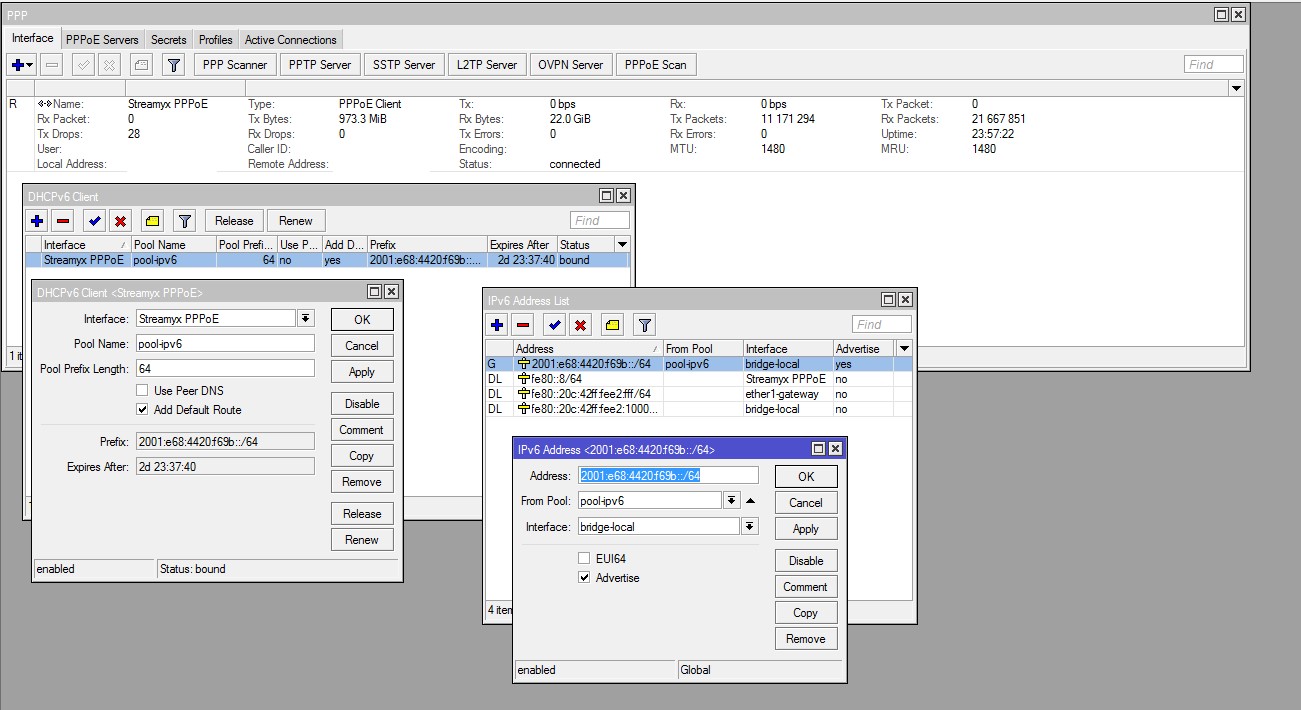
QUOTE(Sharingan @ Nov 5 2013, 11:28 PM) @asellus Yes, that's how I do it. And actually is the only way to do it.Did u run successfully run Mikrotik with TM DHCP-PD ? Kinda wondering how's ur config looks like since i'm trying hard to follow the code and till now still return NULL . Well to be exact, i did get the address but i can't ping to ipv6.google.com nor www.kame.net . My current setup: Virtualbox 4.1.24 2 x Physical NIC Mikrotik 5.25 ADSL 4M Streamyx Few hours ago i did tried on pfSense 2.1-RELEASE , same condition met . Can't ping to both address at all and this time i'm quite sure that all my firewall rules are set for accept and forwarded properly. If else fails, i'll go back to tunnelbroker setup. Thanks for the attention and insights. » Click to show Spoiler - click again to hide... « Assuming you already have the PPPoE connection up and running, then:- 1. In 'IPv6 ---> DHCP client', add a DHCPv6 client on your PPPoE interface, give a name of the pool that will contain the /64 prefix given by TM. 2. Then, in 'IPv6 ---> Addresses', add a '::/64' address, specifying the pool name you have just created in step 1 above, run it on the interface you wanted it to run, and enable the 'Advertise' option. With this, all devices connected to the interface you have specified at step 2 above should get IPv6 address(es) via SLAAC. |
|
|
Nov 6 2013, 12:34 AM
Return to original view | IPv6 | Post
#50
|
|
Elite
4,541 posts Joined: Jan 2003 From: BSRPPG51 Access Concentrator
|
QUOTE(Sharingan @ Nov 6 2013, 12:16 AM) @asellus Something that looks like below:-Ah the no.2, i did try that and yes i did get the address via SLAAC. Hmm must be my rules then. Would you mind compare mine with you then please, CODE /ipv6 firewall filter add action=accept chain=input connection-state=established disabled=no \ in-interface=ether1 add action=accept chain=forward connection-state=established disabled=no \ in-interface=ether1 add action=accept chain=input connection-state=related disabled=no \ in-interface=ether1 add action=accept chain=forward connection-state=related disabled=no \ in-interface=ether1 add action=accept chain=input disabled=no dst-port=546 in-interface=ether1 \ protocol=udp src-address=fe80::/16 add action=drop chain=input disabled=no in-interface=ether1 add action=drop chain=forward disabled=no in-interface=ether1 add action=accept chain=input comment="Allow established connections" \ connection-state=established disabled=no CODE /ipv6 firewall filter add action=accept chain=input comment="Router - Allow IPv6 ICMP" disabled=no protocol=icmpv6 add action=accept chain=input comment="Router - accept UDP traffic on port 546" disabled=no protocol=udp dst-port=546 in-interface="Streamyx PPPoE" add action=accept chain=input comment="Router - Accept established connections" connection-state=established disabled=no add action=accept chain=input comment="Router - Accept related connections" connection-state=related disabled=no add action=drop chain=input comment="Router - Drop invalid connections" connection-state=invalid disabled=no add action=accept chain=input comment="Router- UDP" disabled=no protocol=udp add action=accept chain=input comment="Router - From our LAN" disabled=no in-interface=bridge-local add action=drop chain=input comment="Router - Drop other traffic" disabled=no add action=drop chain=forward comment="LAN - Drop invalid Connections" connection-state=invalid disabled=no add action=accept chain=forward comment="LAN - Accept UDP" disabled=no protocol=udp add action=accept chain=forward comment="LAN - Accept ICMPv6 " disabled=no protocol=icmpv6 add action=accept chain=forward comment="LAN - Accept established Connections" connection-state=established disabled=no add action=accept chain=forward comment="LAN - Accept related connections" connection-state=related disabled=no add action=accept chain=forward comment="LAN - Internal traffic" disabled=no in-interface=bridge-local add action=log chain=forward comment="LAN - Log everything else" disabled=no log-prefix="Log IPv6" add action=reject chain=forward comment="LAN - Drop everything else" connection-state=new disabled=no in-interface="Streamyx PPPoE" reject-with=icmp-no-route |
|
|
Nov 6 2013, 10:33 PM
Return to original view | IPv6 | Post
#51
|
|
Elite
4,541 posts Joined: Jan 2003 From: BSRPPG51 Access Concentrator
|
QUOTE(Sharingan @ Nov 6 2013, 08:36 PM) @maxiscool The rules are copy-pasta from http://www.mikrotik-routeros.com/2011/12/i...routeros-v5-10/Hey there buddy, well i haven't figure it out yet since i'm quite confused as to @asellus config. In the statement that asellus pasted, i noticed that there's a bridge interface . Not sure on how to achieve this or what interface to bind/group with into the bridge. Will dig deeper later on since i'm quite handful with other task atm. I'm sure prasys or wkKay wouldn't mind shedding some light on this situation. @asellus , Sorry for the late reply, i'm still figuring it out your full config atm and as i mentioned in this post, atm i'm kinda got my hands full with other tasks to complete. But if you wouldn't mind to shed some light on your full config please , it would really help us Mikrotik users here. Thanks . Basically it is the adaptation of the default IPv4 firewall rules in routerOS, with the exception that all ICMPv6 traffic and UDP traffic at port 546 are allowed. It has a bridge interface because my Routerboard is a wireless router. |
|
|
Nov 6 2013, 10:38 PM
Return to original view | IPv6 | Post
#52
|
|
Elite
4,541 posts Joined: Jan 2003 From: BSRPPG51 Access Concentrator
|
QUOTE(yangchee98 @ Nov 6 2013, 10:01 PM) Anyone here using tplink TL-WR1043ND router? I think the latest default firmware of that router does not support IPv6. You need third-party firmware like OpenWRT to make it support TM's IPv6 dual-stack service.http://ipv6test.google.com/ says : No problems detected. You don’t have IPv6, but you shouldn’t have problems on websites that add IPv6 support. Anyone using this router care to teach me how to enable ipv6 ? 
Barrier Breaker is the easiest although Attitude Adjustment is possible too. Beta Barrier breaker builds does not have a webgui though, therefore you have to be comfortable at using command-line. |
|
|
Nov 7 2013, 12:01 AM
Return to original view | IPv6 | Post
#53
|
|
Elite
4,541 posts Joined: Jan 2003 From: BSRPPG51 Access Concentrator
|
QUOTE(andrew9292 @ Nov 6 2013, 11:38 PM) I cant seem to get IPv6 dns advertisments / address resolving properly from OpenWrt BB. This is Windows' problem, not OpenWRT. Do not ever disable TCP/IP IPv4 stack in Windows, because Windows will ignore IPv6 DNS addresses sent by the router. Windows will always use the DNS server(s) provided by the DHCPv4 (not the RA) to get the AAAA records for IPv6-enabled domains. If you disable the IPv4 stack, you will not have any domain-resolving ability at all.1. If enabling ONLY IPv6 in windows and flush the dns cache, I wont be able to resolve to ipv6 addresses. Eg... ping ipv6.google.com will fail. But ping 2404:6800:4001:800::1014 will pass. 2. If set custom IPv6 DNS with into windows settings ONLY IPv6 enabled, can resolve. You have to use DHCPv6 server or use manual configuration in Windows (not feasible because TM gives out dynamic prefixes) if you really want to live with IPv6-only stack in Windows. |
|
|
|
|
|
Nov 10 2013, 07:54 AM
Return to original view | IPv6 | Post
#54
|
|
Elite
4,541 posts Joined: Jan 2003 From: BSRPPG51 Access Concentrator
|
QUOTE(UserU @ Nov 10 2013, 01:47 AM) Here's the image. I must have missed out something. The image is really empty like that? If yes, with no link-local address, your TCP/IP stack has big problems.[attachmentid=3714075] |
|
|
Nov 10 2013, 12:45 PM
Return to original view | IPv6 | Post
#55
|
|
Elite
4,541 posts Joined: Jan 2003 From: BSRPPG51 Access Concentrator
|
QUOTE(UserU @ Nov 10 2013, 10:15 AM) Not empty actually, just censored out the IPs, that's all. Just put the uncensored version here, nothing sensitive like MAC address is going to be shown there anyway.Checked the Local Area Connection Settings, IPv6 is not connected too. |
|
|
Nov 10 2013, 04:11 PM
Return to original view | IPv6 | Post
#56
|
|
Elite
4,541 posts Joined: Jan 2003 From: BSRPPG51 Access Concentrator
|
QUOTE(UserU @ Nov 10 2013, 01:40 PM) Here are the images. If that happens then either there are no IPv6 at all at your router, or that the router did not advertise the prefix on the network. Can you look at the webgui for the D-Link?[attachmentid=3714523] [attachmentid=3714528] |
|
|
Nov 10 2013, 06:22 PM
Return to original view | IPv6 | Post
#57
|
|
Elite
4,541 posts Joined: Jan 2003 From: BSRPPG51 Access Concentrator
|
QUOTE(UserU @ Nov 10 2013, 04:57 PM) I checked the DIR-615 dashboard, SETUP > IPv6 panel there: If that's the case, then the router has not retrieved any prefix from TM. Is this UNIFI?[√] Enable IPv6 WAN Connection My IPv6 connection is PPPoE, shared with IPv4. However, I checked the STATUS > IPv6 on the dashboard and: |
|
|
Nov 10 2013, 11:44 PM
Return to original view | IPv6 | Post
#58
|
|
Elite
4,541 posts Joined: Jan 2003 From: BSRPPG51 Access Concentrator
|
QUOTE(UserU @ Nov 10 2013, 08:48 PM) Yes, its UniFi. Does the router run the latest firmware version? |
|
|
Nov 11 2013, 06:05 AM
Return to original view | IPv6 | Post
#59
|
|
Elite
4,541 posts Joined: Jan 2003 From: BSRPPG51 Access Concentrator
|
QUOTE(UserU @ Nov 11 2013, 02:04 AM) Yep, its running on 7.17. If that's the case, then your exchange probably haven't enabled IPv6 yet. |
|
|
Nov 11 2013, 04:10 PM
Return to original view | IPv6 | Post
#60
|
|
Elite
4,541 posts Joined: Jan 2003 From: BSRPPG51 Access Concentrator
|
QUOTE(UserU @ Nov 11 2013, 01:40 PM) So it means that this is only rolled out for Streamyx, and not UniFi yet? Some UNIFI users already has IPv6, maybe only at your exchange it did not happen yet. |
| Change to: |  0.0464sec 0.0464sec
 0.40 0.40
 7 queries 7 queries
 GZIP Disabled GZIP Disabled
Time is now: 3rd December 2025 - 12:28 PM |
 Quote
Quote