Welcome Guest ( Log In | Register )

Bump Topic Topic Closed RSS Feed
11 Pages « < 7 8 9 10 11 >Bottom

Outline · [ Standard ] · Linear+

 Panasonic Viera TV Fan Club V.4, Plasma, LCD & LED models.

views
     
cdspins
post Nov 15 2013, 12:38 PM

Look at all my stars!!
*******
Senior Member
2,714 posts

Joined: May 2008


QUOTE(nicholas1007 @ Nov 15 2013, 11:42 AM)
With bigger hanger. More holes on my walls....
*
Some of the bracket hole can be used back... depending on your bracket model... it is just the thickness of the bracket and is width height changes only... but not too sure lah... once you hang the TV, there will be no more holes brows.gif
cdspins
post Nov 15 2013, 12:39 PM

Look at all my stars!!
*******
Senior Member
2,714 posts

Joined: May 2008


QUOTE(Bishop @ Nov 15 2013, 12:23 PM)
I plan to use back my 40" hanger if I get a 60". Can ar? Feels strong enough.
*
Check the spec of the bracket... normally it stated the KG it can support... actually the new TV is getting lighter than the previous plasma... so most of the time can use back
cdspins
post Nov 18 2013, 07:07 PM

Look at all my stars!!
*******
Senior Member
2,714 posts

Joined: May 2008


QUOTE(lchee @ Nov 18 2013, 05:18 PM)
I cannot play MKV files on my ST50.  You guys experience the same?
*
No problem ah, mkv rclxms.gif .... but I play through network stream from NAS
I did play some low res series thorough thumb drive before but I think it is mp4
cdspins
post Nov 18 2013, 07:08 PM

Look at all my stars!!
*******
Senior Member
2,714 posts

Joined: May 2008


QUOTE(idoblu @ Nov 18 2013, 11:18 AM)
65ST60 lo tongue.gif
*
Please let us know the shop name and the location mah... share to everybody.
I bet a lot of peoples is interested with that kind of price.
cdspins
post Nov 20 2013, 09:36 PM

Look at all my stars!!
*******
Senior Member
2,714 posts

Joined: May 2008


QUOTE(lchee @ Nov 20 2013, 11:25 AM)
Previously i was trying to play MKV files located at my PC shared drive from the TV using the Viera media centre and it couldn't play the file.  Then I put the MKV file into a thumb drive and connect it to the TV USB and it can play the video file.  Funny how it dont work from media centre option (via wifi) but it can work from the usb option.

However, I cannot get the subtitle to show.  The MKV file has two subtitle option, subtitle 1 and subtitle 2.  I cannot show any subtitle and there is no options to select subtitle either.  Anyone can help?
*
Hmm... I try to help.
The MKV files located at PC shared drive, are you able to locate from the viera media centre? Normally when I lauch, it will have video, photo, music option, then as MKV is video, will select video and then the files to be played.

wifi or LAN, if you setup correctly, it can play MKV files, not issue.

To turn on subtitle, press the option button on TV remote, then select subtitle, you should be able to select no subtitle, subtitle 1 and subtitle 2 as indicate
cdspins
post Nov 20 2013, 09:40 PM

Look at all my stars!!
*******
Senior Member
2,714 posts

Joined: May 2008


QUOTE(WhitE LighteR @ Nov 20 2013, 04:40 PM)
Yea. I prefer a Full HD tv unfortunately
*
With the same budget,
If possible go with Full HD, then select the biggest size within the budget, can temporary ignore SMART or 3D
cdspins
post Nov 21 2013, 01:32 PM

Look at all my stars!!
*******
Senior Member
2,714 posts

Joined: May 2008


QUOTE(cucubud @ Nov 21 2013, 11:31 AM)
lchee, you tried all the buttons but you missed the one I mentioned.

To select the subtitle, you need to press the button below the YELLOW button (on the remote).
*
Your remote is slightly different from mine, for my case, the OPTION button will do. There can select audio, video, subtitle and etc settings
cdspins
post Nov 21 2013, 01:33 PM

Look at all my stars!!
*******
Senior Member
2,714 posts

Joined: May 2008


QUOTE(audiocool @ Nov 21 2013, 01:25 PM)
anyone of you experience USB overcurrent on your LED TV after plug in 2.5 portable hardisk and how to solve this ?
*
Wow... you got yourself a very difficult situation. How you confirm that it is USB overcurrent? There is a warning sign?
cdspins
post Nov 21 2013, 11:10 PM

Look at all my stars!!
*******
Senior Member
2,714 posts

Joined: May 2008


QUOTE(eymc @ Nov 21 2013, 07:01 PM)
sorry my bad..
RM9075 just corrected it.

ok ...breakdown

TV -7850
bracket 150
3 years extended warranty - 1075

total =9075
*
You didn't ask for the camera.. ha ha.. ask them throw that one in as well... then complete set rclxm9.gif

cdspins
post Nov 21 2013, 11:12 PM

Look at all my stars!!
*******
Senior Member
2,714 posts

Joined: May 2008


QUOTE(pennykia @ Nov 21 2013, 04:53 PM)
join the club smile.gif
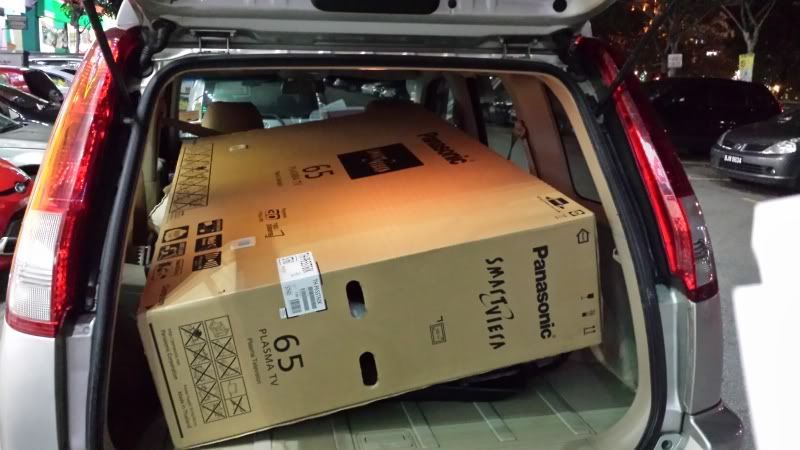
never thou my car can fit in lol.....

user posted image
*
You pay cash or credit card?
If cash... then this is the real CASH and CARRY rclxms.gif


cdspins
post Nov 22 2013, 12:31 PM

Look at all my stars!!
*******
Senior Member
2,714 posts

Joined: May 2008


QUOTE(lchee @ Nov 22 2013, 12:18 PM)
Thanks.  Clearly my vision failed me because I did not see the word "below".  I manage to view mkv file with subtitle now.  Will proceed to download movies in mkv now that allow me to select subtitle from now on.  Thanks again.
*
Haha... good for you finally manage to get the subtitle up.
Just sharing yo, for those mkv files without subtitle, or don't have the subtitle you want (etc, chinese/indian/malay), actually you can embeded easily using mkvmerge if you have the srt file.
cdspins
post Nov 22 2013, 12:33 PM

Look at all my stars!!
*******
Senior Member
2,714 posts

Joined: May 2008


QUOTE(eymc @ Nov 22 2013, 12:25 AM)
hahaha...this deal also talk until neck long dee....
that smart pen is not inclusive in the package of the tv.
it is sold separately, so I guess camera is really out of the question.

I think for now....its da best deal.
I went to at least six shops...this is the DEAL !!

as for warranty....its based on your tv set and the bar code.
yes duration is now till 2018. Anything just call Panasonic service center
no need call hoe huat. Hoe huat just help to register the set online with Panasonic.

my old set 50v20 , have burnt board issue, just call them , they will come change it in less then 10 minutes.
beres. all they ask is the tv serial number.

so..time to enjoy !!! kekeke
*
Good for you bro. The bestest deal in town.. haha..

mind to share the bestest price?


cdspins
post Nov 23 2013, 08:59 PM

Look at all my stars!!
*******
Senior Member
2,714 posts

Joined: May 2008


QUOTE(winners8 @ Nov 23 2013, 02:30 PM)
Brothers, pardon for my ignorance, but what's the difference between Senq and SenHeng?  rclxub.gif
Thought of getting the PANASONIC THL50ET60K but don't know to get from which shop better?
*
Senq and SenHeng is the same company.
SenHeng is the traditional type shoplot electrikal shop while Senq normally opens in Malls and newer area where there are alot of display set to let customer view, check and experience thumbup.gif
cdspins
post Nov 23 2013, 09:01 PM

Look at all my stars!!
*******
Senior Member
2,714 posts

Joined: May 2008


QUOTE(cucubud @ Nov 22 2013, 09:02 PM)
Wow, that was quick! How much you paid for it?
I think the pen is not bundled. Optional item.
*
Yes, the Pen is optional item and it not bundle together with the 65ST60k unlike the 2 pair of 3D glasses.
It comes with its own packaging

But usually if you buy from Panashop or some bigger electrikal shop, they will try to bundle it in.
cdspins
post Nov 24 2013, 08:34 PM

Look at all my stars!!
*******
Senior Member
2,714 posts

Joined: May 2008


QUOTE(pspfan @ Nov 24 2013, 10:13 AM)
1borneo.. 310hr running time
*
310 hour is just nice....the colour will be good
cdspins
post Nov 24 2013, 09:05 PM

Look at all my stars!!
*******
Senior Member
2,714 posts

Joined: May 2008


QUOTE(pspfan @ Nov 24 2013, 10:13 AM)
1borneo.. 310hr running time
*
Come to think of it 5999 for 65ST60 is very very good price yo drool.gif
cdspins
post Nov 25 2013, 12:46 PM

Look at all my stars!!
*******
Senior Member
2,714 posts

Joined: May 2008


QUOTE(ktek @ Nov 25 2013, 11:29 AM)
my ST50 just kena 1 vertical line at right side. suspect this whole line red pixel is dead
*
Hope that it is still under warranty...
cdspins
post Nov 25 2013, 12:47 PM

Look at all my stars!!
*******
Senior Member
2,714 posts

Joined: May 2008


QUOTE(cucubud @ Nov 24 2013, 10:18 PM)
He bought the 60ST60 not the 65ST60.
*
Ooo. blink.gif I see. Still good deal lah..
cdspins
post Nov 25 2013, 07:18 PM

Look at all my stars!!
*******
Senior Member
2,714 posts

Joined: May 2008


QUOTE(Lancer93 @ Nov 25 2013, 04:57 PM)
Cash lar, dun wan accept card...but I nego for downpayment card, balance cash...
*
RM7000 brand new unit, that is a very good deal oh rclxms.gif Good for you.
The pen I use it twice now, also put aside.. ha ha.. but maybe if I got kids then they can scribble lah.. haha
cdspins
post Nov 26 2013, 12:47 PM

Look at all my stars!!
*******
Senior Member
2,714 posts

Joined: May 2008


QUOTE(sameday @ Nov 26 2013, 11:24 AM)
Ya, me too, looking for lobang.. the best I ask now offering RM8100, quite away fr budget and also i try to use some credit card point to offset some payment.
*
RM8100 is a bit on the high side.... try to negotiate lower, most of the time, you can get lower price if you pay by cash thumbup.gif

11 Pages « < 7 8 9 10 11 >Top
Topic ClosedOptions
 

Change to:
| Lo-Fi Version
0.1126sec    0.64    7 queries    GZIP Disabled
Time is now: 24th December 2025 - 05:52 AM