Welcome Guest ( Log In | Register )

Bump Topic Topic Closed RSS Feed
127 Pages « < 20 21 22 23 24 > » Bottom

Outline · [ Standard ] · Linear+

 NVIDIA GeForce Community V12

views
     
rav3n82
post Aug 3 2013, 11:38 AM

I find your lack of faith disturbing!
*******
Senior Member
7,084 posts

Joined: Feb 2011
From: Penang


QUOTE(D.Sync @ Aug 2 2013, 08:35 PM)
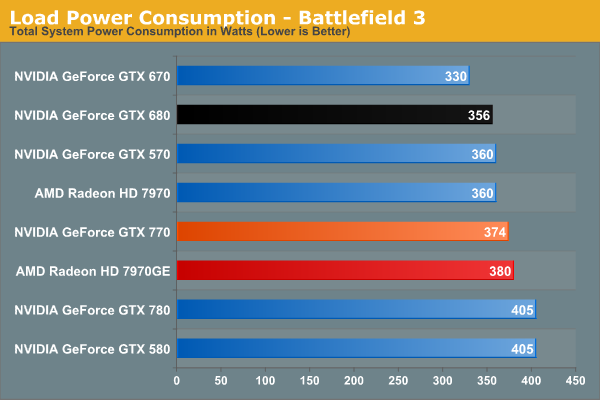
It would be better if you have at least a decent PSU with 80 Silver or more with 750W. GTX 770 consumed around 350 - 400W on full load.
*
I would like to add on, the correct way to say is, a sytem with GTX 770 consumes around 350 - 400W on full load. tongue.gif The card itself is only rated at a max TDP of 230W. Nvidia recommended a minimum 600W PSU for the GTX 770.
» Click to show Spoiler - click again to hide... «

RowanPaladin
post Aug 3 2013, 12:03 PM

On my way
****
Senior Member
671 posts

Joined: Apr 2011


QUOTE(primaroti @ Aug 3 2013, 11:22 AM)
this is just backplate or...
*
It's direct from EVGA from their GTX770 promo. I bought the card and just had to register with their site.
yoyoman
post Aug 3 2013, 01:13 PM

Enthusiast
*****
Senior Member
965 posts

Joined: Nov 2008
anyone gtx760 temperature hit 80c? mine hitting 80c damn
stringfellow
post Aug 3 2013, 01:20 PM

Ultrawide | 4K | VR
********
Senior Member
11,305 posts

Joined: Jan 2003
QUOTE(yoyoman @ Aug 3 2013, 01:13 PM)
anyone gtx760 temperature hit 80c? mine hitting 80c damn
*
GPU Boost 2.0 does that, the card will ramp up the GPU and memory clock until it hits the temperature target it is set to and stays there. And by default, that temperature target is 80C, Want it cooler, bring the temperature target down, that will either ramp down the GPU/memory clock to match that lower temperature target or you can manually ramp up fan speed to lower the temperature.

http://www.techpowerup.com/reviews/NVIDIA/...X_Titan/30.html
yoyoman
post Aug 3 2013, 01:21 PM

Enthusiast
*****
Senior Member
965 posts

Joined: Nov 2008
Yeah put my fan to 60%, hope it wont hurt my card!
stringfellow
post Aug 3 2013, 01:24 PM

Ultrawide | 4K | VR
********
Senior Member
11,305 posts

Joined: Jan 2003
It WANTS to hit 80C if you set it to GPU Boost temperature target of 80C. Hurting it will only be possible if you clock it past the DEFAULT 80C temp target.

This post has been edited by stringfellow: Aug 3 2013, 01:30 PM
yoyoman
post Aug 3 2013, 02:02 PM

Enthusiast
*****
Senior Member
965 posts

Joined: Nov 2008
Ok thanks for the help! boost my confident 2.0
marfccy
post Aug 3 2013, 02:25 PM

Le Ponyland!!!
*******
Senior Member
4,254 posts

Joined: Nov 2011


QUOTE(stringfellow @ Aug 3 2013, 01:24 PM)
It WANTS to hit 80C if you set it to GPU Boost temperature target of 80C. Hurting it will only be possible if you clock it past the DEFAULT 80C temp target.
*
he can always set the temp target lower as well if hes really unsecure about reaching 80C
raydenex
post Aug 3 2013, 03:48 PM

"Updated my journal."
****
Senior Member
588 posts

Joined: Jan 2003
From: Penang | Puchong | Malacca


80c is not damaging at all. I set my temperature target to 90c and let the GPU Boost 2.0 do it's magic.. even with the auto ramp up of core clock it never exceeds 86c. This is on a GTX 780 with Nvidia reference cooler.
yoyoman
post Aug 3 2013, 04:43 PM

Enthusiast
*****
Senior Member
965 posts

Joined: Nov 2008
Thanks for all the help guys! Happy fragging with 2.0!
Zzorro
post Aug 3 2013, 05:31 PM

*retirementâ„¢
******
Senior Member
1,023 posts

Joined: Mar 2012
From: Land of Malay legendaryâ„¢

QUOTE(yoyoman @ Aug 3 2013, 05:43 PM)
Thanks for all the help guys! Happy fragging with 2.0!
*
u can try this... thumbup.gif
all max setting in bf3 play on few hour max temp below 60c


Attached thumbnail(s)
Attached Image
yoyoman
post Aug 3 2013, 05:51 PM

Enthusiast
*****
Senior Member
965 posts

Joined: Nov 2008
wow 100% flying jet

Ok the problem come. Is it my CPU bottlenecking my gpu performance? i see people out there getting 80fps average or 60fps on farcry3 but i get 40 only.

CPU: PhenomIIx4 810 (2.6ghz)
RAM:4gb
Mobo: MA790GP-UD4H
PSU:OCZ 600w
GPU:Leadtek gtx760

resolution use: 1600x900

and not even max out the game ( very high setting on fc3 with 2AA or No) HBAO

This post has been edited by yoyoman: Aug 3 2013, 08:34 PM
primaroti
post Aug 3 2013, 08:06 PM

Mess With Me Die Like Rest
*******
Senior Member
3,706 posts

Joined: Jul 2011
From: Taiping


QUOTE(raydenex @ Aug 3 2013, 03:48 PM)
80c is not damaging at all. I set my temperature target to 90c and let the GPU Boost 2.0 do it's magic.. even with the auto ramp up of core clock it never exceeds 86c. This is on a GTX 780 with Nvidia reference cooler.
*
may i know wat fan speed u use at gtx 780??
skylinelover
post Aug 3 2013, 09:24 PM

Future Crypto Player😄👊Driver Abamsado😎😎
********
All Stars
11,265 posts

Joined: Jul 2005
QUOTE(hafizul88 @ Aug 2 2013, 04:03 PM)
Please be informed that the conversion rate is changed. Price (in USD) x 3.3 + RM85 (shipping fee)
*
itu pasal 1 sing dollar = 2.57 rm now dang it mad.gif

QUOTE(ben3003 @ Aug 2 2013, 09:15 PM)
huhu.. then have to upgrade PSU sad.gif now dilemma dunno wan upgrade GPU or buy gaming laptop >< cos every year will need outstation.. then now i using crappy laptop, play dota 2 also lag abit one ><
*
then change a new career path that dont need you 2 outstation lorh laugh.gif

alienware laptop aint worth it compare with desktop gaming pc haha rclxms.gif
skylinelover
post Aug 3 2013, 09:29 PM

Future Crypto Player😄👊Driver Abamsado😎😎
********
All Stars
11,265 posts

Joined: Jul 2005
haha evga just recycle the GTX770 called dual super clocked with ACX cooler...dang it laugh.gif doh.gif those who buy the earlier batch will be fuming hard liao hahahaha

http://www.evga.com/Products/Product.aspx?pn=04G-P4-3774-KR
stringfellow
post Aug 3 2013, 09:45 PM

Ultrawide | 4K | VR
********
Senior Member
11,305 posts

Joined: Jan 2003
Just received my Asus PQ-321Q 4K monitor. Done some preliminary benchmarks. Screenshots have to uploaded to Mega because they're too big and also Facebook would downsample it from 3840x2160. Running on link in sig.


Okay, first three screenshots for Crysis 3 4K60 is up on Mega: https://mega.co.nz/#F!LBMgFDgS!S6Yu...Be6AmhCUtdESVMw

Metro Last Light 4K60. First run was on 326.19, second run was on 326.41 https://mega.co.nz/#F!zMUlnCzL!Eie_...XPixUJKA3YszN8A

Bioshock Infinite 4K60 is up. Kacang putih, more than 60fps on benchmark with all setting max, no AA. I notice at this level of res, AA is not required. https://mega.co.nz/#F!uB0XXaSb!eP3m...O1s9MDmsDUmd8Dg

Tomb Raider 4K60 is up. Also no problemo. 99-100fps on all max, no TressFX. https://mega.co.nz/#F!iZsBWYCQ!Qk_y...awN5wa4WpU9JkkQ

I cannot screenshot Sleeping Dogs for some reason, either via EVGA Precision X or built-in Steam screenshot feature. All Max, V-sync on (the game very jittery without V-sync), built-in benchmark says 27fps low 85 fps high 46 fps average.

Witcher 2 EE is spotty at best. Cutscenes drops to 18fps while in-game shoots up to 55 or more fps. Settings set to Ultra, with no AA. https://mega.co.nz/#F!2E1wAQwb!bGKK...w3Yht-cvRCNtckQ

Last but not least, Trine 2 4K60. Not a problem, 60-70+fps constant. Beautiful game too! https://mega.co.nz/#F!jYkiTaqZ!KELn...Ri4lK8QnpZrULcg

skylinelover
post Aug 3 2013, 09:57 PM

Future Crypto Player😄👊Driver Abamsado😎😎
********
All Stars
11,265 posts

Joined: Jul 2005
QUOTE(stringfellow @ Aug 3 2013, 09:45 PM)
Just received my Asus PQ-321Q 4K monitor. Done some preliminary benchmarks. Screenshots have to uploaded to Mega because they're too big and also Facebook would downsample it from 3840x2160. Running on link in sig.
Okay, first three screenshots for Crysis 3 4K60 is up on Mega: https://mega.co.nz/#F!LBMgFDgS!S6Yu...Be6AmhCUtdESVMw

Metro Last Light 4K60. First run was on 326.19, second run was on 326.41 https://mega.co.nz/#F!zMUlnCzL!Eie_...XPixUJKA3YszN8A

Bioshock Infinite 4K60 is up. Kacang putih, more than 60fps on benchmark with all setting max, no AA. I notice at this level of res, AA is not required. https://mega.co.nz/#F!uB0XXaSb!eP3m...O1s9MDmsDUmd8Dg

Tomb Raider 4K60 is up. Also no problemo. 99-100fps on all max, no TressFX. https://mega.co.nz/#F!iZsBWYCQ!Qk_y...awN5wa4WpU9JkkQ

I cannot screenshot Sleeping Dogs for some reason, either via EVGA Precision X or built-in Steam screenshot feature. All Max, V-sync on (the game very jittery without V-sync), built-in benchmark says 27fps low 85 fps high 46 fps average.

Witcher 2 EE is spotty at best. Cutscenes drops to 18fps while in-game shoots up to 55 or more fps. Settings set to Ultra, with no AA. https://mega.co.nz/#F!2E1wAQwb!bGKK...w3Yht-cvRCNtckQ

Last but not least, Trine 2 4K60. Not a problem, 60-70+fps constant. Beautiful game too! https://mega.co.nz/#F!jYkiTaqZ!KELn...Ri4lK8QnpZrULcg
*
hey man u using what card 2 fire up your 32" monster hmm.gif hmm.gif
stringfellow
post Aug 3 2013, 10:01 PM

Ultrawide | 4K | VR
********
Senior Member
11,305 posts

Joined: Jan 2003
QUOTE(skylinelover @ Aug 3 2013, 09:57 PM)
hey man u using what card 2 fire up your 32" monster hmm.gif  hmm.gif
*
Rig in sig.
R.O.G 1
post Aug 3 2013, 10:38 PM

Casual
***
Junior Member
373 posts

Joined: Aug 2011

QUOTE(stringfellow @ Aug 3 2013, 11:01 PM)
Rig in sig.
*
Wow nice Asus PQ321 & x3 Titonnessss sli drool.gif
TomatomanzSeedlezz
post Aug 3 2013, 10:52 PM

Killer Tomatoz!..
******
Senior Member
1,898 posts

Joined: Jan 2003
From: N.S.A
QUOTE(stringfellow @ Aug 3 2013, 10:01 PM)
Rig in sig.
*
Awesome rig as usual from stringfellow cool2.gif

127 Pages « < 20 21 22 23 24 > » Top
Topic ClosedOptions
 

Change to:
| Lo-Fi Version
0.0326sec    0.77    6 queries    GZIP Disabled
Time is now: 20th December 2025 - 10:58 AM