Welcome Guest ( Log In | Register )

4 Pages  1 2 3 > » Bottom

Outline · [ Standard ] · Linear+

PC Audio Creative GigaWorks S750 7.1 speaker repair, A short guide and info with pictures...

views
     
TSlex
post Jul 5 2013, 02:32 AM, updated 12y ago

Old Am I?
Group Icon
VIP
18,182 posts

Joined: Jan 2005
From: Dagobah
Preface and symptoms
A client brought in a Creative GigaWorks S750 7.1 speaker system for repair. Main problem is the speaker system cannot be powered up at all. Usually many people would assume that it was due the fuse blown whenever their equipment lost all power, however very often that is not the case. The fuse on this speaker system is easily accessible from outside (right under the power socket) and the fuse was found to be OK. Thus the fault is definitely internal (possibly on the power supply board).

First look inside
The first thing to do is to look at the power supply board. This speaker system uses SMPS (switched-mode power supply) for all its power requirements. There are two SMPS sections on this board, one for standby power and the other for power amplifiers. As with other Creative GigaWorks series, a relay is used to switch on/off the power to the power amplifier section.
user posted image
The light blue thingy labeled "Goodsky" is the relay.


Visible signs of failed components
Right away can see those big CapXon HP series capacitors in various stages of bulging, a blown diode and lots of degraded glue (the brown stuff). The design of that heatsink towering over the capacitors would have easily caused to capacitors to bulge due to prolonged heat exposure from the toasty heatsink. Anyway CapXon is not a good capacitor brand at all and is very well known for bad capacitor problems. In fact, its very common to see failed CapXon capacitors in many electronic equipment such as computer PSUs, LCD monitors, AC-to-DC adapters, etc...
user posted image
Bulging capacitors, blown diode and degraded glue on the primary side.


Beware of degraded glue
Thus, why repeatedly the concern on degraded glue? Because degraded glue can become conductive and creates all sorts of weird problems (including short circuits)! You can read more about it here: Conductive Glue Carnage. Thus removal of degraded glue was essential.

One of the snubber network ceramic capacitors literally cracked and fell apart into pieces when removing more degraded glue...
user posted image
This is what was left after degraded glue was removed. One of the ceramic capacitor legs can still be seen there.


Degraded glue and standoffs plus GND connection equals trouble
These standoffs are connected to the aluminium heatsink and to GND rail! Thus the degraded glue around other standoffs had to be removed to prevent current and future problems.
user posted image
Metallic standoff with connection to heatsink and GND!

user posted image
The plastic standoff with degraded glue removed reveals a pad to GND connection also!

Its also possible that the diode blew due to degraded glue plus that metallic standoff (which is connected to GND!). This is the closeup of the blown diode and the blob of degraded glue that extends all the way to the metallic standoff. This diode is in the primary high voltage section! The diode is blown to beyond recognition (very little left of the markings). Later I did found out the actual part number for this diode from schematics...
user posted image


More signs of possible future problems
Simply said, more CapXon junk. These capacitors with blue sleeve are all CapXon GS series 85C general purpose type which are not really suited for SMPS (switched-mode power supply) usage. Usually for SMPS, they should be higher temperature 105C low ESR or low impedance type. How did Creative engineers get away with this? Notice those disc-shaped ceramic capacitors besides them? By using ceramic capacitors in parallel to serve/function as the low ESR side! Anyway its quite common to see this configuration in some power supplies (as a method of cost cutting).
user posted image
Capacitors for the power amplifier side right after the rectifiers...

user posted image
Capacitors for the standby power side right after the rectifiers. The cracked ceramic capacitor and degraded glue were cleaned up as well.

user posted image
Capacitors for the standby power output side right after the linear voltage regulators.

Besides those CapXon, there were also a Su'scon SL series 85C general purpose capacitor and a S.J.E RH series 105C general purpose capacitor. Thus my recommendation to the client was also to replace/upgrade all those el-cheapo crap capacitors with high quality low ESR and low impedance capacitors suitable for SMPS.

This post has been edited by lex: Aug 12 2013, 09:35 PM
TSlex
post Jul 5 2013, 11:31 AM

Old Am I?
Group Icon
VIP
18,182 posts

Joined: Jan 2005
From: Dagobah
Removal of failed components and cleaning up degraded glue
All the failed components (those big CapXon HP series capacitors and blown diode) were removed and degraded glue cleaned up. Even another big CapXon capacitor (KM series) which did not show signs of bulging was removed as well for capacitor upgrade. Notice the area where the glue was removed had traces and exposed solder pads (add to that, this is the primary high voltage section)!
user posted image
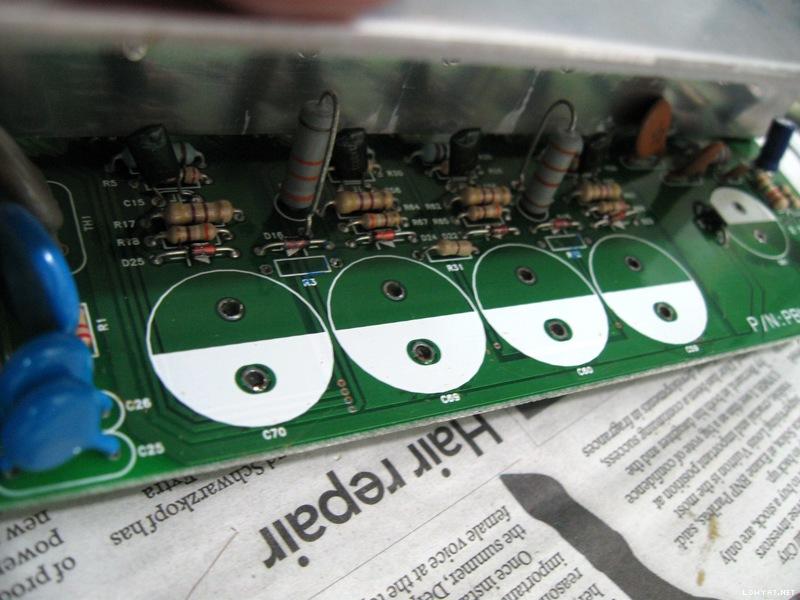
Cleaned and ready for new components.

This is the blown diode area under the board. There were leftover solder paste on the PWM power I.C that indicates a previous repair. Also previously there was a blob of degraded glue at the standoff on the right, which I've cleaned up (ie. the previous repairer did not remove the degraded glue around that area). Notice its next to the high voltage traces and solder pads! Definite recipe for current and future disaster.
user posted image
Ready for new diode and capacitor upgrade.

These are components (mostly capacitors and a blown diode) that were pulled out. The blown diode (broken into two pieces) is in the bottom foreground. Most of the capacitors are CapXon brand, while one of them was Su'scon brand. There was the odd S.J.E brand capacitor (small one with black sleeve) which most probably was from a previous repair.
user posted image
Destined for the junk yard. Two of the big capacitors were bulged quite significantly that they could not stand up straight on their tops.


Replacements
The capacitor replacements were all high quality Japanese capacitors (which took some time to arrive after placing the order). Both the original (blown) diode and the new replacement diode have 1A current rating. However the original (blown) diode had 400V DC blocking voltage rating, while the new diode had much higher specifications with 1000V DC blocking voltage rating.
user posted image
Brand new Panasonic TS-ED series capacitors and new diode. Also a brand new Nichicon CS series capacitor on the far right

Bought a new PWM power I.C (its a TOP243YN) for standby, just in case it was that I.C that caused the diode to blow in the first place. Already checked most of the components after the (blown) diode and they seem fine. However the state of the PWM power I.C was unknown (very difficult to check I.Cs). Also had to be wary of ceramic capacitor C6, although measures fine (on the capacitance meter), could have possible breakdown/leakage at higher voltages and cause the diode to blow (again).

Capacitor upgrade
As per recommendation, all CapXon and other el-cheapo brand capacitors were removed and then replaced with high quality Japanese capacitors...
user posted image
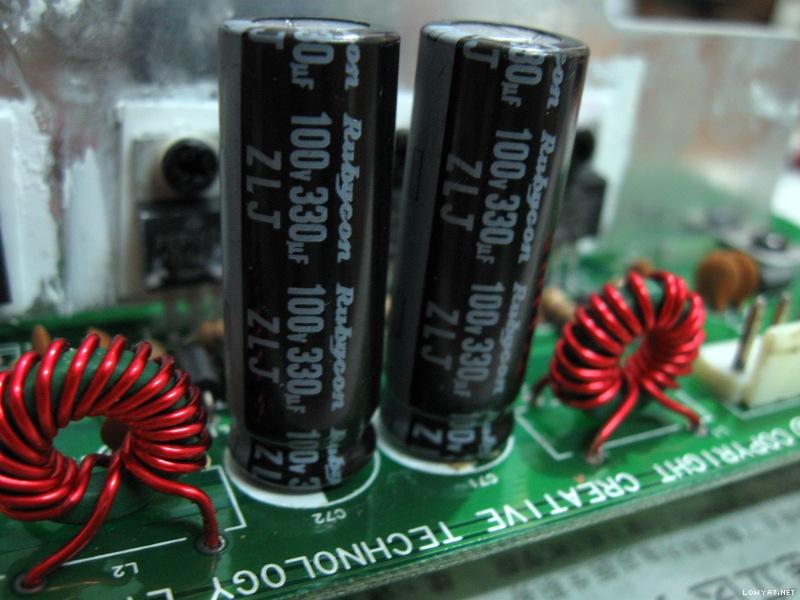
Rubycon ZLJ series for the power amplifier side right after the rectifiers.

user posted image
Nichicon HE series for the standby power side right after the rectifiers. A new ceramic capacitor to replace the cracked one as well.

user posted image
Nichicon PS series and HE series for the standby power side right after the linear voltage regulators.

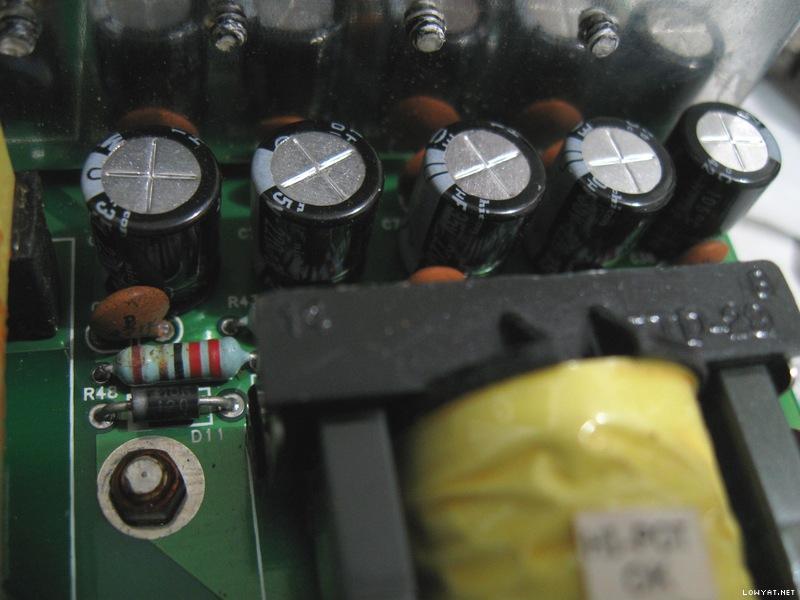
There was another CapXon GS series 85C general purpose capacitor right next (very close) to the toasty heatsink. Thus that was replaced with a very high temperature 150C ceramic capacitor. Notice the bits of residual degraded glue sticking to some of those components on the right. This area previously also had lots of degraded glue as well (already removed and cleaned).
user posted image
In the centre, the small yellow ceramic capacitor is an AVX AR series 150C high temperature capacitor.


This post has been edited by lex: Aug 28 2013, 11:31 PM
TSlex
post Jul 5 2013, 01:09 PM

Old Am I?
Group Icon
VIP
18,182 posts

Joined: Jan 2005
From: Dagobah
Putting it back together
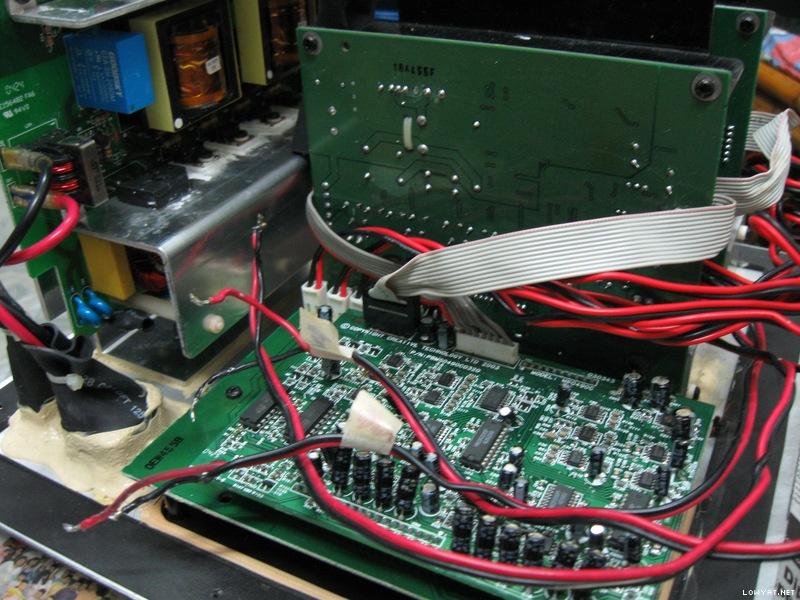
The power supply board is placed back together with the power amplifiers and interface on the subwoofer unit, ready for testing...
user posted image
Back in place and connected.

Another look inside the Creative GigaWorks S750 subwoofer unit. This speaker system uses a triple voice coil woofer!
user posted image
There are three pairs of wires connecting the woofer!


Testing and its fixed!
The moment of truth! Connect the power and switch on the power switch at the back, then finally the standby LED light comes up. Pressing the POWER button and the unit is fully switched on (can also hear the relay clicked inside). Feed it with some music and ran it for hours (ie. burn-in test). This speaker system can get pretty toasty as I could feel the heat on the speaker enclosure wood surface. Eventually this speaker system has been returned to the client.

Miscellaneous
Noticed that the power amplifier boards has lots of el-cheapo crap capacitors as well. This time its Jun Fu brand. Just lots of them, big and small. More cost cutting by Creative IMHO. Replacing them would take even more time and increase the burden (due to more component upgrade cost) on the client. The glue remains white in color thus had not degraded yet (possibly a different glue than the one used on the power supply board). My conclusion at the moment is to leave it like that...
user posted image
Jun Fu everywhere on the power amplifier boards, even the small black ones!


Ending notes
Another repair done, though I would consider this a little easy (although the glue removal part was a tedious task). I hope that you'll find this article interesting and informative. icon_rolleyes.gif

This post has been edited by lex: Jul 6 2013, 01:55 PM
TSlex
post Aug 20 2013, 08:03 PM

Old Am I?
Group Icon
VIP
18,182 posts

Joined: Jan 2005
From: Dagobah
Second Creative GigaWorks S750 speaker comes in for repair
Another client (a lowyat.net forummer) brought in another Creative GigaWorks S750 speaker. The main problem with his unit was "soft" and broken/distorted bass. He had tried repairing the speaker power supply himself using this guide since he found bulged capacitors also.

Incorrect components and bad repair
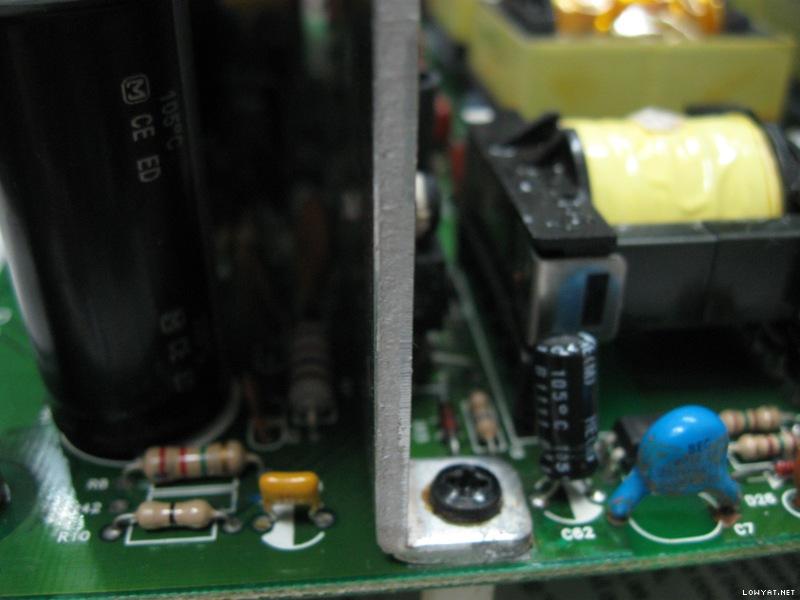
Unfortunately he did not follow everything in this guide, including the replacement components used/selected. First off, the four capacitors used for the amplifier power section were 85C rated (while the original capacitors were 105C rated) and was oversized (too tall). Also note there were still degraded glue remaining as well. See image below...

user posted image
Possibly fake Marcon capacitors. Can't find any information for "CEFTW-Q" series.

The top of the capacitors not only touched the heatsink, but was also pushing/bending the heatsink backwards and stressing the MOSFETs on the heatsinks. Also do beware that this type of condition must be avoided at all costs. Primarily the electrolyte inside the capacitors will start boiling due to direct heating from contact with the heatsink. This can cause electrolyte degradation and evaporation, as well as possibly capacitor explosion since the vents on the top of the capacitors were blocked by the heatsink.

This is the view from the side below. Note the heatsink is bending backwards due to the oversized capacitors. Can also see the small capacitor which I've mentioned earlier (the first unit repaired) that was very close to the heatsink, plus still lots of degraded glue in critical areas close to the transformer there.

user posted image
Not a pretty sight, especially the degraded glue areas.

Having 105C temperature rating on a capacitor does not always qualify as suitable for SMPS (switched mode power supply) capacitors. These MaxCap MKR series are actually 105C general purpose capacitors. Again, these capacitors were also oversized (too wide).

user posted image
These are actually general purpose capacitors, also note the glue underneath.

Degraded glue
There were still a lot of degraded glue in areas where there are exposed solder pads and traces, plus close to those standoffs which are connected to GND. The most critical ones are in the primary high voltage section. In short, he did not follow closely my guide on repairing.

user posted image
Degraded glue across the mains input terminals!

user posted image
This area contains the SMPS feedback actually.

user posted image
There were also degraded glue at the secondary low voltage side.


Remaining original capacitors
There were still those original CapXon GS capacitors that were 85C general purpose type. Besides CapXon there were three small Su'scon SL series capacitors (85C general purpose also). Usually I would recommend replacing them with low impedance/ESR capacitors as this speaker system uses SMPS (switched mode power supply).

user posted image
Note that "blob" of degraded glue on the left, actually contains a ceramic capacitor inside!

user posted image
More CapXon 85C general purpose capacitors. The small one is a Su'scon.


This post has been edited by lex: Aug 20 2013, 10:05 PM
TSlex
post Aug 20 2013, 09:40 PM

Old Am I?
Group Icon
VIP
18,182 posts

Joined: Jan 2005
From: Dagobah
Component removal and degraded glue cleanup
All images are self explanatory. When removing the capacitors, I've found the solder pads were damaged (peeled and came off very easily) due to the owner's self-repair, possibly placing the soldering iron on the pads too long and did not use any solder flux for faster de-soldering. When soldering and/or desoldering always try not to heat up the board too much as it can melt the glue that held the solder pads and traces. Any jaded and dirty solder joint can take time to melt, thus always use solder flux to allow the solder to melt easily and faster.

user posted image
The pads on the top row are goners. No connection at all.

user posted image
Incorrect capacitors removed. Note the damaged pads on the top layer as well.

user posted image
No more degraded glue. Critical areas cleaned.

user posted image
Mains input area cleaned as well.


Capacitor replacements
Just as before, all electrolytic capacitors were replaced with proper high quality ones.

user posted image
The same Panasonic TS-ED series as in the first repair.

user posted image
Instead of Nichicon CS series, this time I used Panasonic ED series for the standby power section. Other replacements remains the same. Degraded glue cleaned up here as well.

user posted image
Another change, this time using Panasonic FM series. Luckily that ceramic capacitor did not crack during glue removal (unlike the first one)...

user posted image
And this time Nichicon PW series here...

user posted image
And lastly, Rubycon ZLH series instead of Rubycon ZLJ series....


This post has been edited by lex: Aug 21 2013, 03:29 AM
TSlex
post Aug 20 2013, 11:07 PM

Old Am I?
Group Icon
VIP
18,182 posts

Joined: Jan 2005
From: Dagobah
Subwoofer problem
The main reason the subwoofer sounded broken and distorted was that all 3 voice coils inside the 8" woofer were damaged. At first diagnostics, 2 out of 3 voice coils were dead (no connection at all). During test of the sound channels, the 3rd voice coil finally gave up. Decided remove the woofer to check. When pressing down slightly on the woofer cone can hear scratchy and scraping sounds, indicating the voice coil wires have become loose and/or broken.

user posted image
The spoiled woofer...

user posted image
Triple terminals for triple voice coils...

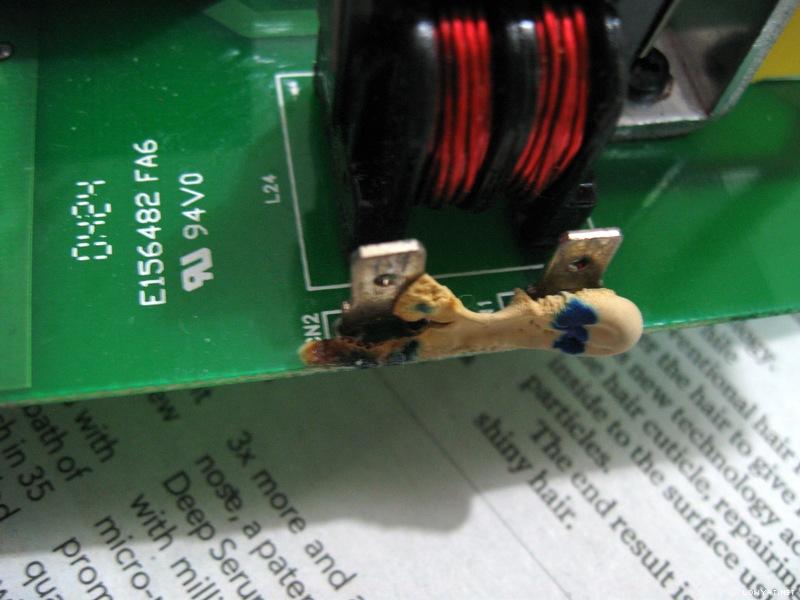
Since this is a voice coil problem, and furthermore triple voice coil then its going to be very tedious and time consuming to repair (especially the coil rewinding part with multiple layers for each voice coil). I've decided to send this woofer to speaker repair specialist instead. Have other repairs to attend to also.

More problems - sound channel randomly goes off
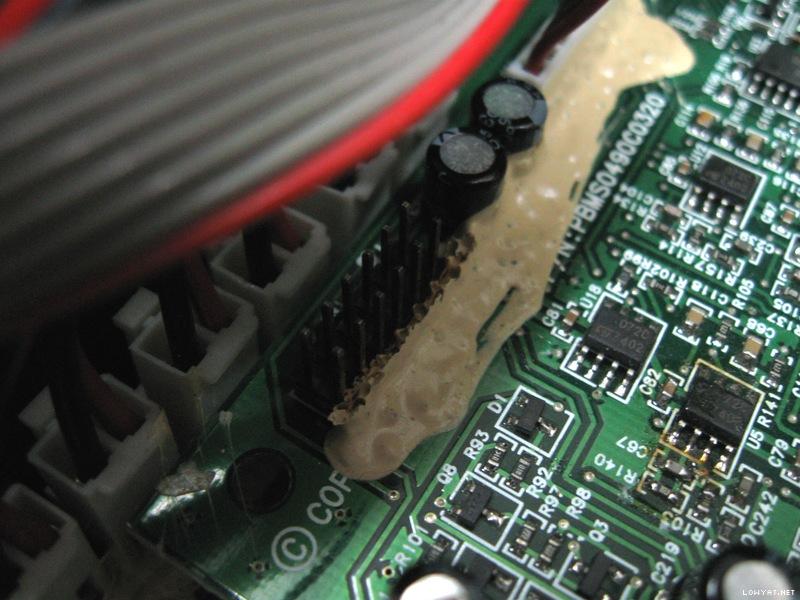
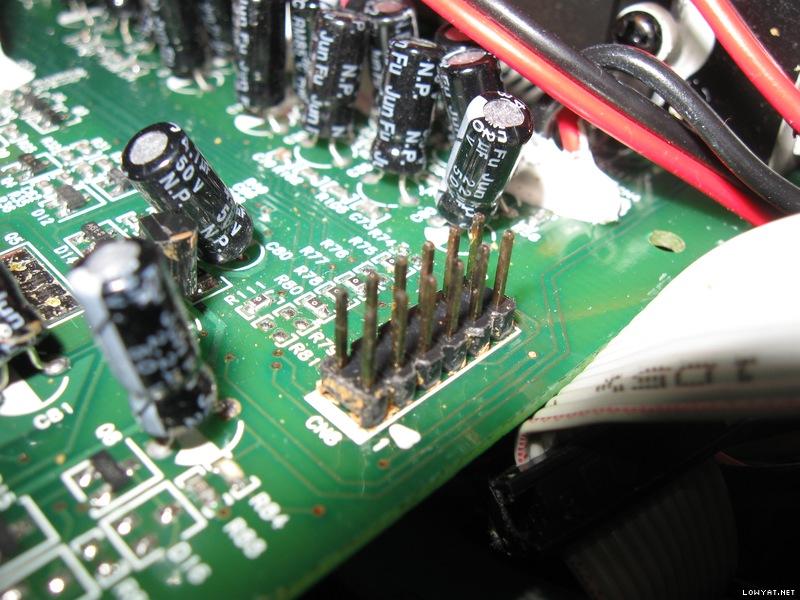
Also noticed the sound in some of the channels randomly goes missing/gone. Looking around the audio processor board, I noticed there were signs of degraded glue on the connectors. See the images below. Even though the glue does not seem degraded, it can be very deceptive as I found out there were actually degraded glue underneath. Wiggling the cables around, I found the fault easily. Chemicals from that degraded glue vaporised by heat (generated by the power amplifiers and power supply section) during usage corroded the connectors. The pins all looks dark and not shiny at all. Its not easy to clean these oxidized connectors.

user posted image
Don't be fooled. Scrape it off to find brownish degraded glue underneath!

user posted image
The connectors are no longer shiny, can see multiple colors due to oxidation...

user posted image
More oxidized connectors, on the power amplifier board, revealed during degraded glue cleanup


Putting it back together
The woofer was finally repaired and brought back. Time to assemble everything together.

user posted image
Partially assembled. Those wires hanging are for the woofer,.

user posted image
The repaired woofer back in place. The dust cap doesn't look as pretty as before though due to repairs.


Testing and its done.
Switch the speaker on and run feed some test audio signals to it, and the bass comes rumbling shaking everything in the room. Finally, its done.

user posted image


This post has been edited by lex: Aug 21 2013, 12:35 AM
TSlex
post Aug 21 2013, 12:51 PM

Old Am I?
Group Icon
VIP
18,182 posts

Joined: Jan 2005
From: Dagobah
QUOTE(Quazacolt @ Aug 21 2013, 03:28 AM)
lex, have you asked if creative wanna hire you? you're definitely doing a way better job (and by that i mean they've done pretty much nothing at all lol) compared to the folks at creative
*
I think they already expect these not to last long, as with other manufacturers. Probably they expect the user to buy new one after the speaker is spoiled. wink.gif

QUOTE(ADJ @ Aug 21 2013, 10:34 AM)
very interesting. My old Megaworks 550THX had a similar issue, apparently the blown cap spilled its guts all over the PCB...so now it's consigned to my storeroom, dunno what to do with it, with 5 excellent condition satellites, heh...
*
Which PCB? Is it the power section or the amplifier section? hmm.gif

QUOTE(andrekua2 @ Aug 21 2013, 12:35 PM)
How do you remove those glue? I seen them spread on a large surface with many components and pcb traces. Scraping them or using chemical solution?

Thanks you.
*
Just very slowly, carefully and meticulously scrape it off. Have to be aware of components under the glue. Sometimes have to temporarily desolder the components in order to clean. Quite often very time consuming. See example below... icon_rolleyes.gif

user posted image
Before. Note the brown spots on the on top of the glue, those are signs of degraded glue underneath...

user posted image
After...


This post has been edited by lex: Aug 21 2013, 01:14 PM
TSlex
post Aug 21 2013, 04:43 PM

Old Am I?
Group Icon
VIP
18,182 posts

Joined: Jan 2005
From: Dagobah
QUOTE(Quazacolt @ Aug 21 2013, 02:01 PM)
and THATS where i don't get them, there's NO NEW ONE LOL.

the only new multi channeled 5.1/7.1 creative are releasing are their non gigaworks series which typically have shit SQ. sure, people don't generally expect SQ from multi channels/gaming speakers, and they are way cheaper than the gigaworks series, but some people (like me) who does, are just out of luck.
Nowadays manufacturers try to cut cost as much as possible (just compare Altec Lansing of yesteryears with Altec Lansing today for example). Also these GigaWork and MegaWork speaker systems use multi-voice coil woofers which are rare and expensive. wink.gif

QUOTE(Quazacolt @ Aug 21 2013, 02:01 PM)
the only alternatives i can see are edifier (which i absolutely hate their mids, having a huge gap between highs/low freq and their sub response is quite poor although the SPL is pretty good, potentially better than creative's ) or logitech (overpriced, and the new z906 is having way too many negative feedback to my liking)
*
The midrange depends on the design of the ampliifer system (especially the high pass filter section) and primarily the drivers themselves. For good midrange, the drivers have to be of certain minimum size (diameter) and depth. Nowadays with most 2.1, 5.1 and 7.1 systems, the drivers in the satellite speakers are pretty small. Thus many would note the missing or hollow midrange. Replacing those tiny satellites speakers with a bigger one may give you back that midrange. As for modifications, besides the satellite speakers also very much depends on the amplifier system as well. If the preamp section for the satellites has a high pass filter then you try changing its cutoff frequency. Sometimes its the satellites that determine the sound. For example, on the Edifier M3300 there are lack of high pass filters for the satellites in the preamp section, thus its the satellites that determines the midrange and tweeter frequencies. icon_rolleyes.gif
TSlex
post Aug 21 2013, 05:43 PM

Old Am I?
Group Icon
VIP
18,182 posts

Joined: Jan 2005
From: Dagobah
QUOTE(Quazacolt @ Aug 21 2013, 05:20 PM)
as for the mods, sounds like a lot of work and the cost may even exceed the speakers set themselves :/
*
Replacing the satellite speakers are easy (a piece of cake, as one would say). But changing the cut-off frequency on the amplifier system very much depends on the design of the amplifier itself. If its a simple passive or active RC filter network then very easy (usually either resistor and/or capacitor change only). But if its controlled by a DSP in some digital systems, then its either very difficult, or just not applicable. hmm.gif

TSlex
post Aug 27 2013, 06:32 PM

Old Am I?
Group Icon
VIP
18,182 posts

Joined: Jan 2005
From: Dagobah
QUOTE(rlewin @ Aug 27 2013, 07:57 AM)
Lex, I stumbled on your post while trying to find anything that can help me with my own sets of these.  I have a few questions.
Are there any schematics for the Amp boards?
Nopes, I don't have the schematics for the power amplifier boards. Since those are BASH amplifier I.Cs, the circuit layout and components used are very straight forward (follows closely the datasheet for the BASH amplifier I.C). wink.gif

QUOTE(rlewin @ Aug 27 2013, 07:57 AM)
Do you have a comprehensive component list I can use to locate replacement Capacitors (I have no electronics training but I know what looks bad)
Apart from ordering capacitors with the same uf, voltage, heat rating and dimensions I have no idea what I need.
All the capacitors that needs to be replaced already mentioned here (with the exception of the big ceramic capacitors at the standby power section, and the film capacitors at the main power section). Make sure get correct/proper replacement capacitors. Just replace what is required, and highly recommend replacing all those CapXon and Su'scon brand capacitors even if they still look good. Roughly... icon_idea.gif

- 4x 470uF 200V 105C, high ripple handling type (for inverter and/or ballast operation)
- 2x 330uF 100V 105C, low impedance and/or low ESR type (for SMPS operation)
- 5x 220uF 35V 105C, low impedance and/or low ESR type (for SMPS operation)
- 5x 100uF 35V 105C, low impedance and/or low ESR type (for SMPS operation)
- 1x 68uF 450V 105C, high ripple handling type (for inverter and/or ballast operation)
- 2x 47uF 25V 105C, low impedance and/or low ESR type (for SMPS operation)
- 1x 0.1uF 50V 105C, high temperature type prefered (such as ceramic) as its very close to the heatsink

Still, depending on the fault and symptoms then you have to check other parts/components as well (e.g. MOSFET failure which is not mentioned here). hmm.gif

QUOTE(rlewin @ Aug 27 2013, 07:57 AM)
I have my original set and over the last year have purchased 3 other sets of these because they are great (when they work)
Any guidance you can give me will be most appreciated.
Cheers
Rod
*
Seems to be common to see this model with lots of problems. Some even tried the hair dryer treatment which I do not recommend at all, as it may eventually kill/destroy the components inside. Since you have 3 other sets to tinker with, there's a lot of room to try out and learn... icon_rolleyes.gif

This post has been edited by lex: Aug 27 2013, 08:22 PM
TSlex
post Sep 3 2013, 02:08 PM

Old Am I?
Group Icon
VIP
18,182 posts

Joined: Jan 2005
From: Dagobah
QUOTE(rlewin @ Sep 3 2013, 05:54 AM)
Lex, in your second repair you noticed the pads were gone, how did you deal with that?  I have a similar situation.
Cheers
Rod
*
Did you use any solder flux and/or solder paste during desoldering? What was the desoldering tool used? For the top layer, scrape a bit of solder resist off to near the hole expose some fresh copper (has to be shiny). Clean with isopropyl alcohol. With help of solder flux, put some solder on the exposed copper. Make sure the solder sticks to the exposed copper (if not then clean and try again). Make an "L" shape wire from any scrap leads (must be of good thickness). Solder one side of the "L" wire on the fresh exposed copper already tinned with solder. The other end should be through the hole. Make sure the snap-in legs can fit thru the hole with that "L" wire together. May not look pretty but gets the job done. Check the image below... tongue.gif

user posted image
Seeing double? That's an extra wire in the through hole...


This post has been edited by lex: Sep 3 2013, 07:09 PM
TSlex
post Sep 3 2013, 07:46 PM

Old Am I?
Group Icon
VIP
18,182 posts

Joined: Jan 2005
From: Dagobah
QUOTE(rlewin @ Sep 3 2013, 07:03 PM)
I used my soldering iron and a solder sucker, but I think you're right and it got too hot.  I'll follow your instructions to repad the hole. 
Thanks Lex.
Remember the solder flux... tongue.gif

QUOTE(rlewin @ Sep 3 2013, 07:03 PM)
Oh, I just had another set of these speakers turn up. With the help of your post and a lot of luck I hope to have all four sets running again.
I'll let you know how I go.
Cheers
Rod
*
If you are going to use ceramic type for that 0.1uF capacitor, then make sure the ceramic dielectric is either NP0/C0G (most prefered but quite costly for 0.1uF radial leaded part), X7R, X8R (high temperature type which was the one used here) or U2J (new kid on the block, almost as good as C0G/NP0). Avoid those with Y5V, Z5U and X5R dielectric as their capacitance can drift wildly (very large variations) with temperature. icon_rolleyes.gif

This post has been edited by lex: Sep 3 2013, 08:03 PM
TSlex
post Sep 8 2013, 02:55 PM

Old Am I?
Group Icon
VIP
18,182 posts

Joined: Jan 2005
From: Dagobah
QUOTE(Galeak @ Sep 8 2013, 02:08 AM)
I have a problem with Creative Gigaworks S750.
I turn button on from 230V, led turns in green - ok. At power on from remote, sistem turns on then automatic turns off. If I turns once again from remote, sistem turns on and is works normally.At these resets, audio levels is setting to default.
First and foremost, did you remove the degraded glue from critical areas especially the feedback section? Also check for degraded glue on the audio processing board, in particular those that touch/adhere to the I.Cs on the PCB... wink.gif

QUOTE(Galeak @ Sep 8 2013, 02:08 AM)
All capacitors from power board was checked with a ESR Meter and is it ok. No blown(balloon) capacitors.
Change only (at ESR meter it was ok):
- 4x 470uF 200V 105C
- 5x 220uF 35V 105C
- 5x 100uF 35V 105C
- 2x 47uF 25V 105C
Same problem. What could be?
*
Besides the ESR reading, check the capacitance of those capacitors below 100uF. Do check that 0.1uF capacitor that is very close to the heatsink (also part of the feedback section), and recommend replacing it as well (with a better capacitor). Also what was the replacement capacitor brand and series used? hmm.gif
TSlex
post Sep 8 2013, 07:04 PM

Old Am I?
Group Icon
VIP
18,182 posts

Joined: Jan 2005
From: Dagobah
QUOTE(Galeak @ Sep 8 2013, 05:57 PM)
I don't think it is from glue, because impedance measurement in hi - Mohm show me no value.
The problem was from the beginning, 4 years ago, but not agresive like now.
At that time  - 2009, sistem is reset perhaps once at two months.
Yes or no? Did you clear/clean the degraded glue first? Here's a re-quote from my first post... hmm.gif
QUOTE(lex @ Jul 5 2013, 02:32 AM)
Beware of degraded glue
Thus, why repeatedly the concern on degraded glue? Because degraded glue can become conductive and creates all sorts of weird problems (including short circuits)! You can read more about it here: Conductive Glue Carnage. Thus removal of degraded glue was essential.
*
And here's another user from long time ago, refer to his/her post here... wink.gif
QUOTE(bad2dbone @ Mar 24 2008, 08:59 PM)
Well guys the official news is out. My amp+sub is fixed. My brother in law btw is the electrician mention that the glue on the power source melted due to heat and shorted something inside. Cleared up the glue and it good as new.
*
Beacuse the degraded glue can create "phantom components" and/or "phantom circuits". Add to that, many test meters do not operate in the high voltage range and not at all/entire frequency ranges. tongue.gif

QUOTE(Galeak @ Sep 8 2013, 05:57 PM)
Capacitor 0.1 uF show me an ESR 100nF - is ok.
Because that capacitor is an electrolytic type plus very close to the heatsink. Not the ESR reading but the capacitance reading because its rectifying/smoothing the feedback signals from the opto-isolator. All electrolytic capacitors can vary their capacitance and ESR greatly with temperature, And usually for electrolytics, its capacitance increases and ESR decreases with higher temperatures. That's why I've asked about the smaller capacitors there, especially that 0.1uF because its part of the SMPS feedback section. Also you have not told us the brand and series of the replacement capacitors. unsure.gif

QUOTE(Galeak @ Sep 8 2013, 05:57 PM)
Audio system is protected by an UPS -APC from 2009.
Uploaded the problem on the youtube. Look at the link
www.youtube.com/watch?v=GNjoj4JKqFY
*
Doesn't matter whether there's an UPS, AVR (voltage regulator) and/or external power filter because the internal power supply already has power filter as well as inrush current protection. Looking at that video, are those volume level lights flickering? blink.gif

This post has been edited by lex: Sep 9 2013, 02:22 AM
TSlex
post Sep 8 2013, 11:13 PM

Old Am I?
Group Icon
VIP
18,182 posts

Joined: Jan 2005
From: Dagobah
QUOTE(Galeak @ Sep 8 2013, 10:38 PM)
This is the capacitor values:
4x470uF/200V 105 C, KSC
5x220uF/35V  Low Esr 105C, SAMWHA
5x100uF/35V  Low Esr 105C, SAMHWA
1x47uF/25V  Low Esr 105C, SAMHWA
KSC (King-Sun) and Samwha? Those are not good capacitors. Not recommended at all.... shakehead.gif

QUOTE(Galeak @ Sep 8 2013, 10:38 PM)
About video on youtube ... leds flickering from the frame rate processing. smile.gif
I will try to remove glue with hot air.
Those degraded glue are not hot glue. You have to slowly scrape them off actually. doh.gif

QUOTE(Galeak @ Sep 8 2013, 10:38 PM)
Next week I will change: 2x330uf/100V, 68uF/450V, 100nF/50V - X7R 10% -- instead of 0.1uF/50V.
I asked a question. Can I change 2x330v/200V SAMWHA instead of 2x330uF/100V ?
*
You can use capacitors with higher voltage rating but do not use Samwha. doh.gif Use original capacitors from Nichicon, Panasonic, Nippon Chemicon and/or Rubycon. Also make sure they are of the correct series also (as shown in my guide here). wink.gif

This post has been edited by lex: Sep 8 2013, 11:15 PM
TSlex
post Sep 9 2013, 03:07 PM

Old Am I?
Group Icon
VIP
18,182 posts

Joined: Jan 2005
From: Dagobah
QUOTE(Galeak @ Sep 9 2013, 03:38 AM)
I forget to tell you.... 3 months ago I hear like an explode at power on 230V but dont find no one capacitor problem. Now after clean from glue, find a capacitor 471K( ESR say 476 pF)/250V/400V  without a pin. In that space it is a problem, dont know where is the second link to the capacitor. See the images. Do you have any pictures ?
*
Remember the blown diode in my post? I've already suspected that it was due to that degraded glue. That is a safety "Y capacitor". The markings "471" denotes 0.47nF or 470pF. The "second link" is connected to the primary GND (sometimes referred to as "hot" GND), which is that through hole you've pointed out in the attached picture. For replacement, use a certified safety Y capacitor of the same capacitance (0.47nF or 470pF), and not just any plain capacitor. wink.gif

QUOTE(Galeak @ Sep 9 2013, 04:25 AM)
This varistor is compatible: JVR14N471K Varistor 300V AC; 385V DC instead of 471k/250V/400V ?
This is more better: VAR10-300 Varistor:metal-oxide; THT; 300V AC; 385V DC; 470V; ±10%; 2.5kA
*
Nopes! They are not the same! Inadvertantly may cause a disaster if you use it instead of a proper/correct replacement (possibly electrical shock and/or causing the mains circuit breaker to trip). doh.gif Varistors are for the mains input section and there's already an existing one on that power supply board. Anyway, what's your level of electrical/electronics knowledge? hmm.gif

This post has been edited by lex: Sep 9 2013, 03:09 PM
TSlex
post Sep 10 2013, 01:27 AM

Old Am I?
Group Icon
VIP
18,182 posts

Joined: Jan 2005
From: Dagobah
QUOTE(Galeak @ Sep 9 2013, 11:14 PM)
The "second link" connected to the primary GND is only from the right photo ? In the left photo no second link ?
See the image below, this is from a 3rd unit that came in for repair... hmm.gif

user posted image
Should be easy to see where the leads are located for that Y capacitor.


QUOTE(Galeak @ Sep 9 2013, 11:14 PM)
This is ok 470pF/400V capacitor, Y1, CY1Y-470P 400V instead of 471K ?
*
If its a certified Y capacitor then it should be fine. Example of a safety X/Y capacitor here: TDK CD series... icon_rolleyes.gif

TSlex
post Sep 15 2013, 01:25 AM

Old Am I?
Group Icon
VIP
18,182 posts

Joined: Jan 2005
From: Dagobah
QUOTE(Galeak @ Sep 14 2013, 03:42 PM)
Changed all capacitors from the power board,removed the glue, same problem. At power on from remote, relay start then stops fast.
Still using those (crappy) Samwha capacitors? How many times did the relay clicked? After the initial power on from standby, there should only be one click (to indicate the relay switching on). This relay is gets its power from the secondary side of the standby section, thus all problems should point back to the standby section. Did you remove any degraded glue on the the other boards, besides the power supply board? hmm.gif

QUOTE(Galeak @ Sep 14 2013, 03:42 PM)
Do you have a schematic (circuit) diagram for power board ?
Thanks.
*
Try this link here: Index of /S750 PSU/Power Supply Schematics... wink.gif

This post has been edited by lex: Sep 15 2013, 01:34 AM
TSlex
post Sep 15 2013, 02:34 AM

Old Am I?
Group Icon
VIP
18,182 posts

Joined: Jan 2005
From: Dagobah
QUOTE(Galeak @ Sep 15 2013, 02:02 AM)
I remove glue from the board where there are many capacitors >30 pieces.At power 230V don't hear relay. only from power remote = 2 clicks (power on - power off , very fast). I think it is a circuit remote problem. At next power on from remote, audio sistem works normally.
*
There are also glue on the I/O board (where the audio input and output connectors as well as the external control pod interface connector is located). Have you checked that one? Should be only a single click when pressing the power on from the control pod. There could be some problems either with the remote control line, standby section and/or simply a weak relay. You will need to check/monitor the control signal to that transistor controlling the relay. hmm.gif

This post has been edited by lex: Sep 15 2013, 02:36 AM
TSlex
post Sep 17 2013, 01:07 AM

Old Am I?
Group Icon
VIP
18,182 posts

Joined: Jan 2005
From: Dagobah
QUOTE(Galeak @ Sep 17 2013, 12:25 AM)
Hi Lex!
Transistors and components near the relay is ok.
I dont know what it is the problem.Could be a fault CI from the remote.
*
Just monitor the base of the transistor. If there is voltage at the base (at least 0.55V or higher) when the relay goes off (clicked for the second time), then could be the relay. Otherwise monitor the +9V rail which powers the relay (for any relatively large voltage dips when the relay is switched on) . If both turns out OK then the fault could be from the control section (mostly MCU controlled, which is much more difficult to diagnose). hmm.gif

QUOTE(rioven @ Sep 17 2013, 12:39 AM)
Hi lex..i do wonder where do u repair subs..dont have any idea where to repair
*
For your information, I do repair speakers and subwoofers. Just PM me for details if interested... wink.gif

4 Pages  1 2 3 > » Top
 

Change to:
| Lo-Fi Version
0.0274sec    0.38    7 queries    GZIP Disabled
Time is now: 4th December 2025 - 08:45 PM