Outline ·
[ Standard ] ·
Linear+
Haswell, Devil's Canyon, Pentium G3258 OC V1, 4790K/4760K/4770K/4670K/G3258 | LGA1150
|
TSowikh84
|
 Nov 5 2013, 10:18 AM Nov 5 2013, 10:18 AM
|
i7 Clan


|
QUOTE(Naraw @ Nov 5 2013, 04:26 AM) After clocking down and reducing voltage. Ring ratio is at 4ghz. Well done. Whats your mobo and cooler mate? This is what we call it a stable and successful overclock. Not that previous one which was throttled and underperformed like stock clock. The GFlops is a little off at the first loop could be due to background apps running at the back. Good job Naraw. This post has been edited by owikh84: Nov 5 2013, 10:21 AM |
|
|
|
|
|
TSowikh84
|
Nov 5 2013, 02:26 PM
|
i7 Clan
|
QUOTE(Naraw @ Nov 5 2013, 12:59 PM) Thanks Sifu! I'm using msi z87-gd65 and cm hyper 212 evo. My cooler is the problem now.. can't oc higher due to high temps. Need to get a better cooler. It is normal for low/mid end air cooler. Upgrade to higher end or watercooling for better OC. Btw, buyer list updated. Welcome to the club.  |
|
|
|
|
|
TSowikh84
|
Nov 10 2013, 12:15 AM
|
i7 Clan
|
QUOTE(joeboto @ Nov 9 2013, 07:44 PM) Quick question. Using asrock z87pro3. I set my ratio at 42. But cache ratio at 38. Vcore at 1.10v override. Is there any significant speed improve by setting the cache ratio to the same as core ratio? Putting cache ratio/ uncore equal to core multi will give you a slight improvement of performance but will give impact on stability. ASUS recommended uncore to stay at x1 to x3 lower than core multi. I myself usually will leave it auto.  |
|
|
|
|
|
TSowikh84
|
Nov 14 2013, 11:32 PM
|
i7 Clan
|
QUOTE(mod_po @ Nov 14 2013, 07:24 PM) can i overclock my i7-4770k on my msi z87-g41 up to 4.6ghz? currently running at 4.3ghz, wont get higher than that without crashing any 4770K could do 4.6. Try upping the vCore. Don't forget to check the temperature via RealTemp. < 100C. |
|
|
|
|
|
TSowikh84
|
Nov 15 2013, 06:34 AM
|
i7 Clan
|
QUOTE(mod_po @ Nov 15 2013, 12:55 AM) what the vcore voltage should be?where i can find it? my mobo only support max 1.3v for cpu voltage Depends on the chip. My 4770K requires 1.4625v min for 4.6. so i think your mobo/ bios is the limiting factor here.  |
|
|
|
|
|
TSowikh84
|
Nov 19 2013, 07:12 AM
|
i7 Clan
|
Ahh forgot to share some of the boards I have played recently.  ASUS Maximus VI Gene: ASUS Maximus VI Gene: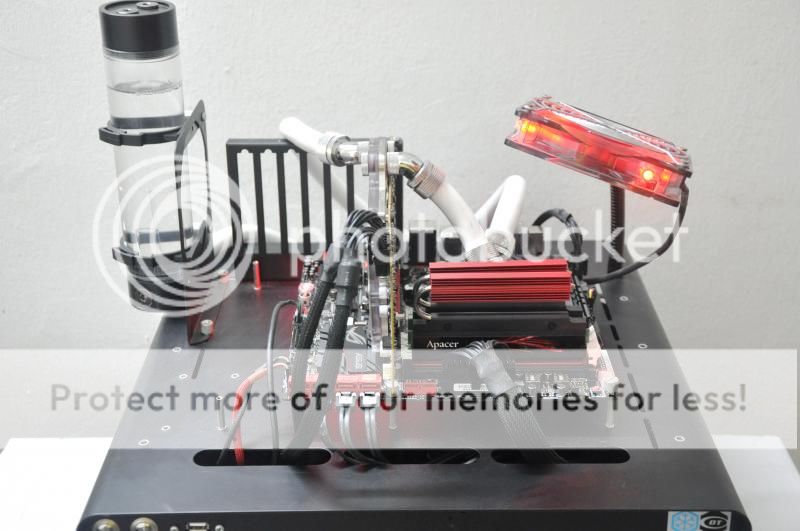 Apacer ARES 3000C12 2 X 4GB @ 3333MHz 12-16-15-25-1T  ======================================================== ASUS Maximus VI Formula: Apacer ARES 3000C12 2 X 4GB @ 3333MHz 12-16-15-25-1T  |
|
|
|
|
|
TSowikh84
|
Nov 21 2013, 11:04 AM
|
i7 Clan
|
QUOTE(Dura-Ace @ Nov 19 2013, 04:58 PM) Ma progresss x43 at 1.25 vcore  Nice! Until now I still don't understand what's the correct GFlops for Haswell with the latest LinX 0.6.5. Last night I got 214GFlops when disabling HT on my 4770K so that its running at 4 cores 4 threads. But I got 178GFlops when the HT is turned on. |
|
|
|
|
|
TSowikh84
|
Dec 3 2013, 09:23 AM
|
i7 Clan
|
Just to share my OC experience with ASRock Z87M OCF.  The board works flawlessly with 3000MHz mem kit:  Somehow, I couldn't get it stable at 3250MHz and 3333MHz like what I did on the ASUS' MATX Gene. I suspect it could be BIOS issues I managed to push this MFR SS kit to 3400MHz C12 on air: 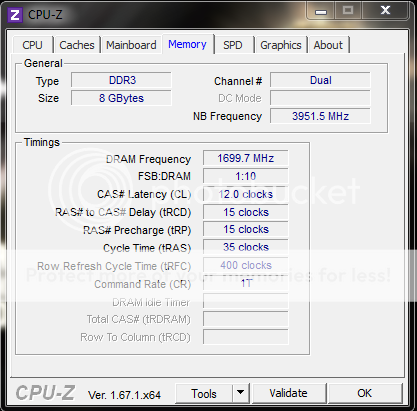 It is the only Z87 board that could do 2500MHz C8 with the BBSE kit.  Overall, it is an awesome board for overclocking and gaming. |
|
|
|
|
|
TSowikh84
|
Dec 4 2013, 11:59 PM
|
i7 Clan
|
QUOTE(stasio @ Dec 4 2013, 11:46 PM) Very nice. But I'm still hoping that nick would fix the CFR 1T issues that I have reported personally since last July.  |
|
|
|
|
|
TSowikh84
|
Dec 5 2013, 11:31 AM
|
i7 Clan
|
QUOTE(stasio @ Dec 5 2013, 10:41 AM) Yea...I saw on XS...  nvm, that's for CFR only that they ignore. Samsung, PSC and BBSE overclocks impressively on OCF. |
|
|
|
|
|
TSowikh84
|
Dec 5 2013, 10:37 PM
|
i7 Clan
|
QUOTE(joeboto @ Dec 5 2013, 09:30 PM) currently im at 43x with adaptive vcore set to auto. lol. also ram oced to 1833 cl10, t1. according to asrock a-tuning, vcore adaptive voltage is 1.2v rock solid stable. Nice! Do you have any screenshot of the OC to share with us? |
|
|
|
|
|
TSowikh84
|
Dec 6 2013, 06:46 AM
|
i7 Clan
|
QUOTE(joeboto @ Dec 5 2013, 10:43 PM) heres the screenshot. 1080p image beware. Not bad. Welcome to the club  |
|
|
|
|
|
TSowikh84
|
Dec 6 2013, 05:10 PM
|
i7 Clan
|
QUOTE(joeboto @ Dec 6 2013, 01:42 PM) Thanks. Btw trying 44x. Stilll stable. Which is the best pprime95 to use with adaptive volt? Im skeptical about the stability. Use custom blend to that you could stress as max amount of RAM as possible. You might wanna follow the instruction in the first post of this thread. |
|
|
|
|
|
TSowikh84
|
Dec 13 2013, 07:17 AM
|
i7 Clan
|
Recently, MSI Malaysia was kind to send me this XPower board for review. 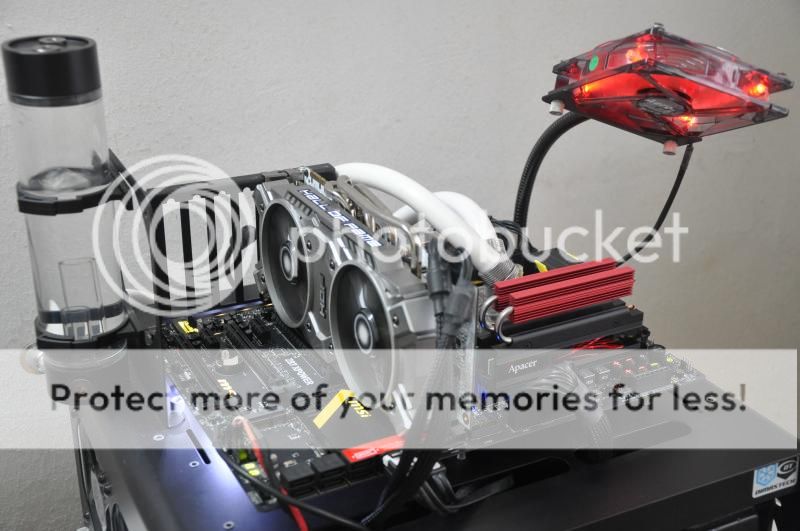 Unlike some other boards, I managed to push Hynix-CFR based RAM kit to 3000MHz C12 without a sweat. G.Skill TridentX 2800C11 2 X 4GB @ 3000MHz 12-14-14-25-2T  More OC results could be obtained from HERE |
|
|
|
|
|
TSowikh84
|
Dec 30 2013, 04:45 PM
|
i7 Clan
|
QUOTE(R3b0rn @ Dec 30 2013, 09:31 AM) Urm, 4 GHz with 1.16 vcore is it normal? I feel that my i5-4670k is a bad chip it doesn't like to overclock past 4Ghz and require lots of vcore for being stable. It's normal as the vCore required increased exponentially, instead of linearly. You will notice a bigger difference for 4.5 to 4.6. No idea what's the reason though. |
|
|
|
|
|
TSowikh84
|
Dec 30 2013, 09:11 PM
|
i7 Clan
|
QUOTE(R3b0rn @ Dec 30 2013, 08:31 PM) Yeah, and the temperatures are very high even noctua d-14 couldn't handle it Guess I may need to consider to de-lid my cpu and run in water... yeah delidding is the best way to solve the overheat issue. |
|
|
|
|
|
TSowikh84
|
Jan 1 2014, 09:43 AM
|
i7 Clan
|
QUOTE(gengstapo @ Jan 1 2014, 08:49 AM) Halloo ;p Just finished my cheap Haswell setup Havent OC yet but at booting already got few error msg Such "The following channel did not pass cpu memory test" Wht prob arr?? Either its good ram and you're not placing it in the channels needed to be filled first. Some mobo's have to have ram in 1 slot before any others are filled. Read the mobo manual. If its bad ram and RMA it and it should fix the issue. If you have 1 stick of usable ram, plug it into each of the memory slots and and test it to see if you get the same error. Forumers are advised to put system specs in the siggy. |
|
|
|
|
|
TSowikh84
|
Jan 1 2014, 11:26 AM
|
i7 Clan
|
QUOTE(gengstapo @ Jan 1 2014, 10:46 AM) I tried few setting still prob regarding men issue I tried each stick one by one, both can boot to windows Setup as single channel lane red + black, no problem Issue raise when it comes to dual channel I think my board got prob, demn.. Try borrowing RAM from others/ friends. Or take the mobo to PC shop for a check. Check mobo's CPU socket for bent pins. You might also try resitting the CPU and CPU cooler. Sometimes over-tightening would cause this issue. |
|
|
|
|
|
TSowikh84
|
Jan 1 2014, 04:48 PM
|
i7 Clan
|
QUOTE(gengstapo @ Jan 1 2014, 11:49 AM) Since today is holiday, will try call shop to exchange coz I just bought it yesterday Im sure I placed all component correctly Gonna give a call first if they we operating today Will bring along my damn heavy machine lol Good then. All the best for your new rig. |
|
|
|
|



 Quote
Quote


 0.0615sec
 0.43
0.43
 7 queries
 GZIP Disabled