

QUOTE(sklchan @ Apr 23 2013, 10:59 AM)
i wonder our note 2 can support >64Gb sdxc or not... 

I dun see why not. Is it available? But the price would be a killer now.Samsung Galaxy Note II LYN's Official Thread V21, 2nd Gen of the original "Phablet" XXDMC3
|
|
 Apr 23 2013, 11:03 AM Apr 23 2013, 11:03 AM
|
 
All Stars
10,873 posts Joined: Apr 2009 
|
QUOTE(sklchan @ Apr 23 2013, 10:59 AM) i wonder our note 2 can support >64Gb sdxc or not... I dun see why not. Is it available? But the price would be a killer now. |
|
|
|
|
|
Apr 23 2013, 11:08 AM
|

Junior Member
24 posts Joined: Jul 2008
|
Hi, I just swap my newly bought Samsung pro 64GB extSD as intSD memory using Uncle Benny's method.
However i found some problems. - I notice that the internal and external memory showing same amount of storage... (Please refer to the attachment.) 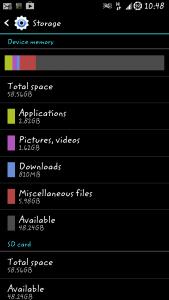
- should I erase all the internal memory files after I copied all into external memory? Anyone faced this problem before? Please help .....  |
|
|
Apr 23 2013, 11:11 AM
|

Senior Member
6,357 posts Joined: Feb 2008 From: Penang 
|
QUOTE(me1314 @ Apr 23 2013, 11:08 AM) Hi, I just swap my newly bought Samsung pro 64GB extSD as intSD memory using Uncle Benny's method. did u use any ext2int mem mods? or it's ROM related... However i found some problems. - I notice that the internal and external memory showing same amount of storage... (Please refer to the attachment.)
- should I erase all the internal memory files after I copied all into external memory? Anyone faced this problem before? Please help ..... This post has been edited by sklchan: Apr 23 2013, 11:12 AM |
|
|
Apr 23 2013, 11:12 AM
|

Junior Member
26 posts Joined: Nov 2004 From: Sibu, Sarawak, Malaysia
|
Thanks for the prompt replies guys, appreciated.
Guess the only thing I can do now is just try to get a replacement through warranty then. |
|
|
Apr 23 2013, 11:13 AM
|
|
Senior Member
6,357 posts Joined: Feb 2008 From: Penang
|
QUOTE(antt00 @ Apr 23 2013, 11:03 AM) I dun see why not. Is it available? But the price would be a killer now. i think currently it's only available in normal sdcard size and not microsd...  |
|
|
Apr 23 2013, 11:15 AM
|
|
All Stars
10,873 posts Joined: Apr 2009
|
QUOTE(sklchan @ Apr 23 2013, 11:13 AM) i think currently it's only available in normal sdcard size and not microsd... Then the answer is simple. No it cannot be used cos size is wrong. |
|
|
|
|
|
Apr 23 2013, 11:23 AM
|
|
Junior Member
24 posts Joined: Jul 2008
|
QUOTE(sklchan @ Apr 23 2013, 11:11 AM) did u use any ext2int mem mods? or it's ROM related... hmm, I'm using step by step from uncle benny's method, as below,1) Copy all the files from internal to external. (internal files never erase) 2) I'm on monxDIFIED rOM XXDMC3 v12-r01 3) Flash Perseus-alpha35-n7100.tar 4) Flash - 11extsd2internalsd_gs3_extfat.zip (https://www.box.com/shared/iqtkuvlxobfzbp9wc1o0) 5) shoud I erase all the files in internal after swapped? May i know is this the correct way to swap? thanks... |
|
|
Apr 23 2013, 11:26 AM
|
|
Senior Member
6,357 posts Joined: Feb 2008 From: Penang
|
QUOTE(me1314 @ Apr 23 2013, 11:23 AM) hmm, I'm using step by step from uncle benny's method, as below, then it's the swap mods that causing the reporting error, sorry i can't help further as from what i've observed when using memory swapping or even mounting will cause this kind of reporting error... 1) Copy all the files from internal to external. (internal files never erase) 2) I'm on monxDIFIED rOM XXDMC3 v12-r01 3) Flash Perseus-alpha35-n7100.tar 4) Flash - 11extsd2internalsd_gs3_extfat.zip (https://www.box.com/shared/iqtkuvlxobfzbp9wc1o0) 5) shoud I erase all the files in internal after swapped? May i know is this the correct way to swap? thanks...  |
|
|
Apr 23 2013, 11:32 AM
|
 
Elite
27,801 posts Joined: Jun 2007 From: Johor
|
QUOTE(me1314 @ Apr 23 2013, 11:23 AM) hmm, I'm using step by step from uncle benny's method, as below, You can safely delete all your files in internal memory. After you restart the phone, some basic folders/files will be rebuild back - don't touch these1) Copy all the files from internal to external. (internal files never erase) 2) I'm on monxDIFIED rOM XXDMC3 v12-r01 3) Flash Perseus-alpha35-n7100.tar 4) Flash - 11extsd2internalsd_gs3_extfat.zip (https://www.box.com/shared/iqtkuvlxobfzbp9wc1o0) 5) shoud I erase all the files in internal after swapped? May i know is this the correct way to swap? thanks... |
|
|
Apr 23 2013, 12:10 PM
|
|
Junior Member
24 posts Joined: Jul 2008
|
QUOTE(sklchan @ Apr 23 2013, 11:26 AM) then it's the swap mods that causing the reporting error, sorry i can't help further as from what i've observed when using memory swapping or even mounting will cause this kind of reporting error... haha, no problem bro... thanks for the helps...  |
|
|
Apr 23 2013, 12:10 PM
|

Junior Member
385 posts Joined: Dec 2004 From: Lighthalzen
|
sorry for disturbing you guys. i've asked a seller what the differences between AP set and SME set for note 2. the seller said, the only differences are warranty, firmware and of course the price.
about the firmware, the seller said, an AP unit will have firmware of a country or region where did the phone comes. an SME unit have firmware set for our country and region. so, if i buy an AP set, can i reset it with firmware that SME unit using? thanks. and, will it void warranty? |
|
|
Apr 23 2013, 12:11 PM
|
|
Junior Member
24 posts Joined: Jul 2008
|
QUOTE(benny888 @ Apr 23 2013, 11:32 AM) You can safely delete all your files in internal memory. After you restart the phone, some basic folders/files will be rebuild back - don't touch these Ok, will try to erase all the files in internal memory and then see how... thanks ya... |
|
|
Apr 23 2013, 12:12 PM
|

Senior Member
1,457 posts Joined: May 2009 From: In front of my laptop
|
QUOTE(me1314 @ Apr 23 2013, 11:08 AM) Hi, I just swap my newly bought Samsung pro 64GB extSD as intSD memory using Uncle Benny's method. now my micro sdcard corrupted ....all files gone because im using the mod also LOL!!! However i found some problems. - I notice that the internal and external memory showing same amount of storage... (Please refer to the attachment.)
- should I erase all the internal memory files after I copied all into external memory? Anyone faced this problem before? Please help ..... kindly remind...do backup ur files always |
|
|
|
|
|
Apr 23 2013, 12:13 PM
|

Senior Member
4,984 posts Joined: May 2010 From: South Pole
|
QUOTE(me1314 @ Apr 23 2013, 11:08 AM) Hi, I just swap my newly bought Samsung pro 64GB extSD as intSD memory using Uncle Benny's method. Faced this all the time but lazy 2 go dig out the reason since I hardly restart my phone . What u can do is this . Every time u reboot , u most go 2 recovery to clear your cache n dalvik cache . This will solve the problem until your next reboot .However i found some problems. - I notice that the internal and external memory showing same amount of storage... (Please refer to the attachment.)
- should I erase all the internal memory files after I copied all into external memory? Anyone faced this problem before? Please help ..... |
|
|
Apr 23 2013, 12:14 PM
|
|
Elite
27,801 posts Joined: Jun 2007 From: Johor
|
QUOTE(mazaziman @ Apr 23 2013, 12:10 PM) sorry for disturbing you guys. i've asked a seller what the differences between AP set and SME set for note 2. the seller said, the only differences are warranty, firmware and of course the price. Flashing firmware from a different region will void warrantyabout the firmware, the seller said, an AP unit will have firmware of a country or region where did the phone comes. an SME unit have firmware set for our country and region. so, if i buy an AP set, can i reset it with firmware that SME unit using? thanks. and, will it void warranty? You can flash any region firmware on your phone Check your present version first and download a copy of it first from sammobile.com/firmware. Than you can flash it back using Odin in PC if you wish to claim warranty This post has been edited by benny888: Apr 23 2013, 12:14 PM |
|
|
Apr 23 2013, 12:14 PM
|
|
Senior Member
1,457 posts Joined: May 2009 From: In front of my laptop
|
QUOTE(mazaziman @ Apr 23 2013, 12:10 PM) sorry for disturbing you guys. i've asked a seller what the differences between AP set and SME set for note 2. the seller said, the only differences are warranty, firmware and of course the price. Faster go watch the 1st post on this thread before u get scold my ppl about the firmware, the seller said, an AP unit will have firmware of a country or region where did the phone comes. an SME unit have firmware set for our country and region. so, if i buy an AP set, can i reset it with firmware that SME unit using? thanks. and, will it void warranty? |
|
|
Apr 23 2013, 12:16 PM
|
|
All Stars
10,873 posts Joined: Apr 2009
|
QUOTE(mazaziman @ Apr 23 2013, 12:10 PM) sorry for disturbing you guys. i've asked a seller what the differences between AP set and SME set for note 2. the seller said, the only differences are warranty, firmware and of course the price. Yes you can flash SME firmware provided its the same model. Dun go flashing N7100 rom on AP N7105. about the firmware, the seller said, an AP unit will have firmware of a country or region where did the phone comes. an SME unit have firmware set for our country and region. so, if i buy an AP set, can i reset it with firmware that SME unit using? thanks. and, will it void warranty? Warranty u better ask seller. He is the one giving you the AP warranty. |
|
|
Apr 23 2013, 12:20 PM
|

Senior Member
1,535 posts Joined: Oct 2005
|
QUOTE(crazyissac @ Apr 23 2013, 12:14 PM) Faster go watch the 1st post on this thread before u get scold my ppl yes i agree, already kena bambu yesterday for not reading. now i already have twrp recovery on my phone, how do i do the nandroid backup? i wasn't able to find any detailed step by step guide for the aforementioned process. either way i got a feeling i will kena bambu from people here again. |
|
|
Apr 23 2013, 12:26 PM
|
|
Elite
27,801 posts Joined: Jun 2007 From: Johor
|
QUOTE(hooh888 @ Apr 23 2013, 12:20 PM) yes i agree, already kena bambu yesterday for not reading. Just boot phone to recovery ( press simultaneously volup+home+power) and released all the 3 buttons once you see the second Samsung splash logo. You will see recovery menu now i already have twrp recovery on my phone, how do i do the nandroid backup? i wasn't able to find any detailed step by step guide for the aforementioned process. either way i got a feeling i will kena bambu from people here again. Select backup from there - you can choose to rename backup, and its location in internal or external card Obviously you don't even know the very basics of how to boot into recovery asking this It just amaze me so many of users such as you who jump in doing stuffs without understanding all these basics. Just be careful before your phone gets brick - than it will be a panic time |
|
|
Apr 23 2013, 12:29 PM
|
|
Senior Member
1,535 posts Joined: Oct 2005
|
QUOTE(benny888 @ Apr 23 2013, 12:26 PM) Just boot phone to recovery ( press simultaneously volup+home+power) and released all the 3 buttons once you see the second Samsung splash logo. You will see recovery menu i know how to go into recovery mode, just that i never go there before and don't know what's there. and besides, i only want to do backup now, which won't brick my phone. or maybe i am just too dumb to you that i would somehow miraculously brick my phone while doing backup. and either way, thanks for your instructions 'O Wise One.Select backup from there - you can choose to rename backup, and its location in internal or external card Obviously you don't even know the very basics of how to boot into recovery asking this It just amaze me so many of users such as you who jump in doing stuffs without understanding all these basics. Just be careful before your phone gets brick - than it will be a panic time This post has been edited by hooh888: Apr 23 2013, 12:30 PM |
|
Topic ClosedOptions
|
| Change to: |  0.0284sec 0.0284sec
 0.29 0.29
 6 queries 6 queries
 GZIP Disabled GZIP Disabled
Time is now: 6th December 2025 - 10:30 AM |
 Quote
Quote