

QUOTE(blacktubi @ Oct 14 2023, 11:24 AM)
China grey import model or official Malaysia model?

Lemme check further at the boxThis post has been edited by shinjite: Oct 14 2023, 12:01 PM
Home Networking ASUS Malaysia Networking User & Technical Support, Managed by ASUS Malaysia Representative
|
|
 Oct 14 2023, 11:45 AM Oct 14 2023, 11:45 AM
Return to original view | Post
#21
|
 
All Stars
19,320 posts Joined: Jan 2003 From: Klang  
|
QUOTE(blacktubi @ Oct 14 2023, 11:24 AM) China grey import model or official Malaysia model? Lemme check further at the boxThis post has been edited by shinjite: Oct 14 2023, 12:01 PM |
|
|
|
|
|
Oct 14 2023, 11:46 AM
Return to original view | Post
#22
|
|
All Stars
19,320 posts Joined: Jan 2003 From: Klang
|
QUOTE(White2000 @ Oct 14 2023, 11:29 AM) Can you check if your device is actually connecting with the router at 160 MHz or 80 MHz. Confirm wifi 6 80mhz at 1200mbpsOften device is the limiting factor. 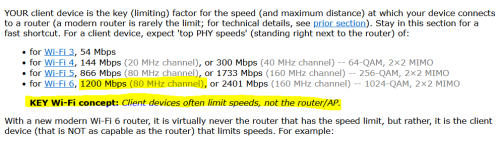 |
|
|
Oct 14 2023, 12:08 PM
Return to original view | IPv6 | Post
#23
|
|
All Stars
19,320 posts Joined: Jan 2003 From: Klang
|
QUOTE(AVFAN @ Oct 14 2023, 11:59 AM) Check yr box. I totally forgot to check that lol. Going to re-connect my old RT-AX55 tonight and compare.My box indicates it's from Australia. |
|
|
Oct 14 2023, 12:22 PM
Return to original view | IPv6 | Post
#24
|
|
All Stars
19,320 posts Joined: Jan 2003 From: Klang
|
QUOTE(White2000 @ Oct 14 2023, 12:12 PM) I think it doesn't matter, device is certified Tonight I will try again and post screen shots of my settings and speed test resultsor you mean there's a specific Malaysian model for TUF-AX4200 that have higher performance than non-Malaysian model (ie Aus)? Mine also from Aus 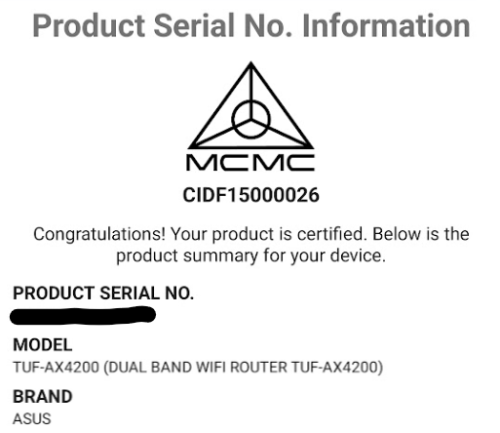 White2000 liked this post
|
|
|
Oct 14 2023, 06:50 PM
Return to original view | IPv6 | Post
#25
|
|
All Stars
19,320 posts Joined: Jan 2003 From: Klang
|
QUOTE(blacktubi @ Oct 14 2023, 03:13 PM) Try a factory reset and test the speed again Alrighty, I will do a factory reset tonight. I bought it at shopee from CGI store.You shouldn’t need to play with settings to get fast speed The factory out of box settings can get 800Mbps easily Worst to worst, send it back to your place of purchase to check Where you buy it from? |
|
|
Oct 14 2023, 10:05 PM
Return to original view | IPv6 | Post
#26
|
|
All Stars
19,320 posts Joined: Jan 2003 From: Klang
|
QUOTE(White2000 @ Oct 14 2023, 07:25 PM) Same place lol I'm wondering if should return it or not since same speed as you You also can't get the desired speed on WiFi? 😆belum press confirm at Lazada app yet |
|
|
|
|
|
Oct 14 2023, 10:07 PM
Return to original view | IPv6 | Post
#27
|
|
All Stars
19,320 posts Joined: Jan 2003 From: Klang
|
QUOTE(Max2006 @ Oct 14 2023, 07:58 PM) I also bought from the same place. Since both of you are having the same situation, then I don't think the product got problem. What's the odd of having 2 new routers having problem DOA? Most likely it's the setting, or Unifi itself got issue due to recent free upgrade/SWU/etc. I will setup back my RT-AX55 later tonight to reconfirm. If my old one can get max speed up close, then it's the new router 😂I have not yet setup mine because i am lazy to switch over.  Tried ookla, it goes like 2 patterns most of the time (up close to the router), 1) it bursts to 4xx mbps then it suddenly hits a big drop till 2xx then slowly goes back to 3xxmbps. 2) it bursts till 3xx and just stays there Other than that, wifi is pretty much stable. Unlike those refurbished US sets 🤣 This post has been edited by shinjite: Oct 14 2023, 10:11 PM |
|
|
Oct 14 2023, 10:29 PM
Return to original view | IPv6 | Post
#28
|
|
All Stars
19,320 posts Joined: Jan 2003 From: Klang
|
QUOTE(XeactorZ @ Oct 14 2023, 10:15 PM) I using TUF-AX3000 since year 2020, since sign up SWU 3.0 offer me 1st year 500mbps, mostly also getting 400+ mbps via Wi-Fi (test in front my router, using my s23 ultra or iphone 12 pro max also same) Yup, I tested LAN no issues. Just the WiFi is freaking weird, up close very hardly hit 400, mostly 350 to 38xmbpsvia LAN no issue, on desktop which using intel ax211 also getting about the same |
|
|
Oct 15 2023, 12:57 AM
Return to original view | Post
#29
|
|
All Stars
19,320 posts Joined: Jan 2003 From: Klang
|
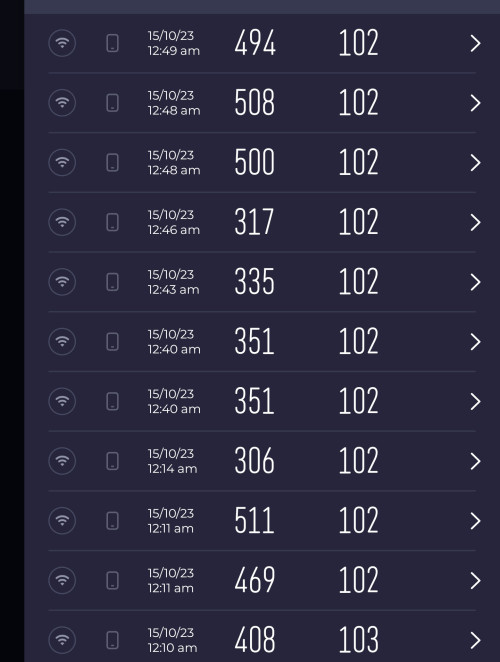 Guys, unfortunately I got to say the culprit is the new TUF AX-4200 router. I have fully hard reset it, just configure the unifi account and leave the rest of the settings intact. Tried with 160mhz and turn it off, still the same thing. 5ghz channel was 52 on auto. On the other hand, I hard reset the RT-AX55, set up my unifi account and with stock settings, 5ghz channel was 44 on auto. Guess what, easily hitting 500mbps. Tested with my phone right in front of both routers side by side. The 5xx, 494,469 and 408 are the RT-AX55. The 351 was the AX4200 with 160mhz checked. 315 and 337 is with 160mhz unchecked. 🤦🏻🤦🏻 This post has been edited by shinjite: Oct 15 2023, 12:58 AM |
|
|
Oct 16 2023, 11:00 AM
Return to original view | Post
#30
|
|
All Stars
19,320 posts Joined: Jan 2003 From: Klang
|
QUOTE(ASUSmy @ Oct 16 2023, 10:04 AM) Hi shinjite, Alright, I will go back and try again. Currently on channel 161.Can you try fixing the WiFi channel to 44 or others on the TUF-AX4200 to see which will provide better result? Thank you |
|
|
Oct 16 2023, 11:00 AM
Return to original view | Post
#31
|
|
All Stars
19,320 posts Joined: Jan 2003 From: Klang
|
QUOTE(AVFAN @ Oct 16 2023, 10:18 AM) just to share... What are the WiFi speeds you getting now? i had earlier changed from channel 52 to 40. it was ok. i then tried channel 36. appears to be a little better, i stay with this. this morning, changed cable modem->router, saw much improved results. v happy now.  |
|
|
Oct 17 2023, 12:05 AM
Return to original view | Post
#32
|
|
All Stars
19,320 posts Joined: Jan 2003 From: Klang
|
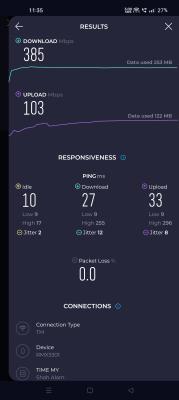
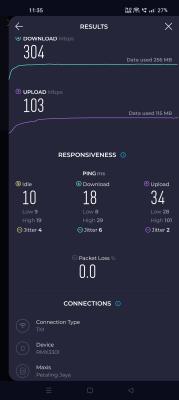
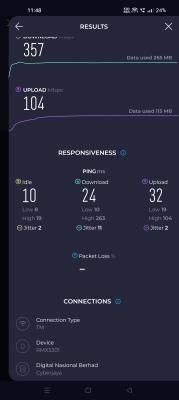
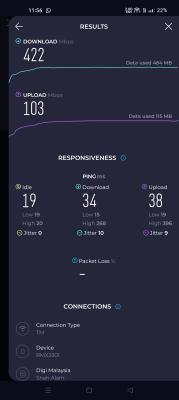
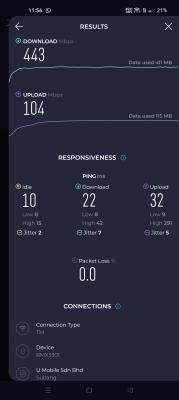
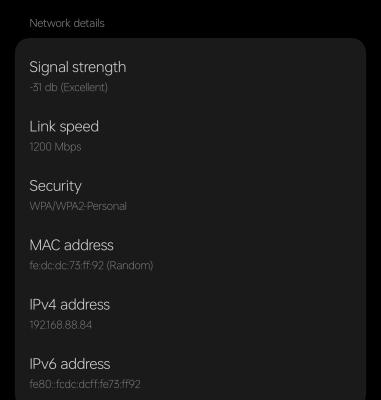
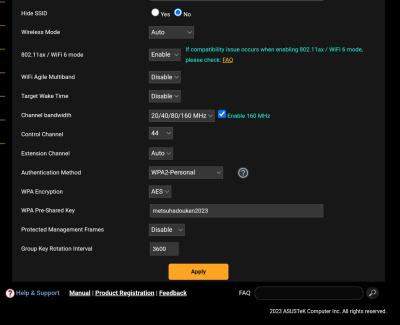
QUOTE(ASUSmy @ Oct 16 2023, 10:04 AM) Hi shinjite, Hi bro,Can you try fixing the WiFi channel to 44 or others on the TUF-AX4200 to see which will provide better result? Thank you I have tested with channel 44, 48 and 157 with 160Mhz checked. All exhibit similar patterns. So far, only Yes 5g can hit max. Umobile and Digi managed to hit in the 4xx range. Telekom, Maxis and the rest pretty much 3xx. Tests are done with my handphone right beside the router. LAN speeds pretty much no issues. Router firmware already updated to the latest. 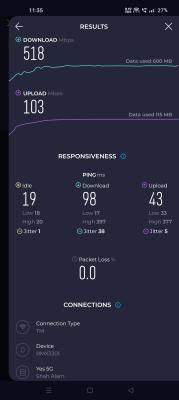



This post has been edited by shinjite: Oct 17 2023, 12:09 AM |
|
|
Oct 20 2023, 09:33 PM
Return to original view | Post
#33
|
|
All Stars
19,320 posts Joined: Jan 2003 From: Klang
|
QUOTE(hasifhanif @ Oct 20 2023, 06:48 PM) Hi. Sounds like you got the same issue as me just that I ain't using the AX56U. I have accepted my fate hahahahaIs anyone using ASUS AX56u or D-Link Dir 1860Z and managed to hit 500mbps on WiFi? Just got upgraded from 300 to 500. Managed to get 500mbps wired, but only 200-300mbps on WiFi. Already reset, use Merlin, try all channels, 80mhz, only wifi 5, only wifi 6, change ssid, change password, still the same. Using 14 pro max and late 2016 MacBook Pro. Am I wrong for expecting ax56us to get 500mbps on wifi without problem? |
|
|
|
|
|
Mar 3 2024, 11:21 PM
Return to original view | IPv6 | Post
#34
|
|
All Stars
19,320 posts Joined: Jan 2003 From: Klang
|
QUOTE(ASUSmy @ Feb 28 2024, 11:51 AM) Hi laihuhng, ASUSmy, is the 33144 update for TUF AX-4200 the same as the beta firmware 33149 (fix GN) that you recommended to test back then?Can you try to update the firmware to the latest and monitor whether the problem still persist or not. The latest version of the firmware version is 3.0.0.4.388_33144. https://www.asus.com/networking-iot-servers...F-Gaming-AX6000 Thank you |
|
|
Apr 6 2025, 08:46 PM
Return to original view | IPv6 | Post
#35
|
|
All Stars
19,320 posts Joined: Jan 2003 From: Klang
|
QUOTE(sgpdsmss @ Mar 24 2025, 08:37 AM) safe to upgrade latest firmware for tuf ax4200? I encountered very obvious issues with the Internet connectivity stability and I reverted. Now it's back to normal again. I plan to retest it again later in the future.ASUS TUF-AX4200 Firmware version 3.0.0.4.388_33903 any issue after upgraded? thanks .. |
|
|
Apr 8 2025, 02:33 PM
Return to original view | Post
#36
|
|
All Stars
19,320 posts Joined: Jan 2003 From: Klang
|
QUOTE(sgpdsmss @ Apr 7 2025, 12:50 PM) ops....i just did upgrade yesterday morning to 3.0.0.4.388_33903.... Hi bro, mine was basically the WiFi performance was not good. Pages tend to unable to load correctly, streaming of videos keeps on buffering etchow to noticed internet connectivity issue ? router auto disconnected then reconnect ? how to read from router log ? thanks .... However, no issues with LAN connection performance. |
|
|
Apr 8 2025, 10:09 PM
Return to original view | IPv6 | Post
#37
|
|
All Stars
19,320 posts Joined: Jan 2003 From: Klang
|
QUOTE(sgpdsmss @ Apr 8 2025, 08:04 PM) are u on latest firmware? Yeah, that was on the latest firmware at that time. Now I have just reupdated the router again with the latest firmware. Will do my monitoring.mine no such issue on wifi , kids online class without buffering or disconnect ... i surf fb, net also no problem via phone |
|
|
Apr 17 2025, 08:34 PM
Return to original view | IPv6 | Post
#38
|
|
All Stars
19,320 posts Joined: Jan 2003 From: Klang
|
QUOTE(toi @ Apr 17 2025, 09:51 AM) Hi, Yeah, after I reupdate it the second time, same issues persist and downgraded.I facing the same problem too, updated to the latest firmware ASUS TUF-AX6000 Firmware version 3.0.0.4.388_33903 recently, after using it for sometime, now the poor wifi Performance is back. Wifi 2.4G tends to unable to load page on web and phone apps. and very frequent when my phone connected to it, the phone show a notice of no internet connection. The previous version of firmware was good and without this problem Version 3.0.0.4.388_33427. |
|
|
Jun 28 2025, 11:17 AM
Return to original view | IPv6 | Post
#39
|
|
All Stars
19,320 posts Joined: Jan 2003 From: Klang
|
QUOTE(White2000 @ Jun 28 2025, 09:22 AM) Latest firmware for TUF-AX4200 fixes the issues mentioned above. That's great! I have just updated my router's firmware after reading your comment. Will monitor and see, cheers!Firmware "3.0.0.4.388_33920" changelog: "2. Improved network stability and data transmission performance." I've tested for a week and no problems anymore. Safe to update to this. |
|
|
Jun 29 2025, 08:43 PM
Return to original view | IPv6 | Post
#40
|
|
All Stars
19,320 posts Joined: Jan 2003 From: Klang
|
QUOTE(beberenne @ Jun 29 2025, 08:27 PM) Since you are also a TUF-AX4200 user, do you happen to know why the WAN Lease time is stuck at Renewing? Or do you see this at your end? This week my devices started to keep disconnecting/lag every 2-3 mins or so, and updating the firmware to 3.0.0.4.388_33920 did not help. Hey there, nope I don't see it in my router dashboard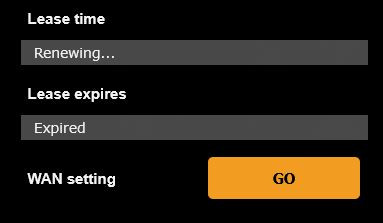 |
| Change to: |  0.0365sec 0.0365sec
 0.29 0.29
 7 queries 7 queries
 GZIP Disabled GZIP Disabled
Time is now: 6th December 2025 - 07:01 PM |
 Quote
Quote