Outline ·
[ Standard ] ·
Linear+
Home Networking ASUS Malaysia Networking User & Technical Support, Managed by ASUS Malaysia Representative
|
jpong1
|
 Jan 13 2017, 02:11 PM Jan 13 2017, 02:11 PM
|
Getting Started


|
QUOTE(Hutchy @ Jan 13 2017, 01:22 PM) Hi Asusmy, You mean downgrading my current firmware which is 3.0.0.4.378_5209-gd843b5f to the one you have provided here? I would like to mention that the current firmware is working fine with my chromecast so i was wondering how downgrading the current firmware to a much older one will help sort the issue. Please advice. Regards the link provided is ver 380.241 , it is one step below latest fw ver 380.4180 ;but one step higher than your current 378.5209 |
|
|
|
|
|
jpong1
|
Jan 17 2017, 10:25 AM
|
Getting Started
|
QUOTE(prs516 @ Jan 17 2017, 08:41 AM) Hi ASUSmy My RT-AC55UHP 5GHz wifi led suddenly no light but i can connect to it with no problem. My 2.4GHz have wifi led light and also no problem to connect. I tried to restart my router but the problem still there. Please advice. FYI, i am facing the same as you too for many months . Mine worse, the internet connected LED light off most of the time, and on very dim light for a while when it wants to....@@  well, all internet connection no problem. But for 5GHz connection , sometimes hard to be connected and if this happened, my phone will auto connect to 2.4GHz. |
|
|
|
|
|
jpong1
|
Feb 1 2017, 11:34 AM
|
Getting Started
|
QUOTE(kokomon @ Jan 31 2017, 10:25 PM) Hi, I am using RT-AC55UHP and on latest firmware - 3.0.0.4.380_4180. The CPU usage will hit 100% every time i connect any external HDD (1TB) to the router. Disconnecting the HDD will immediately reduce CPU usage to below 10%. Could this be a bug? This issue happened on the previous firmware as well. Yes, same here, guess it is reading the contents inside external HDD and CPU up down from 45% - 100% ! |
|
|
|
|
|
jpong1
|
Dec 18 2018, 03:25 PM
|
Getting Started
|
QUOTE(ASUSmy @ Oct 11 2018, 10:27 AM) Hi All, For those who are using RT-AC58U or RT-AC55UHP router and have trouble getting the high speed using LAN, you can try updating the beta firmware below. Do let me know is you have any problem with the firmware. https://www.asuswebstorage.com/navigate/s/B...8A1EEFE35D1B98YAs for the RT-AC86U HyppTV problem, we are looking at the problem now. We will get back to you ASAP. Thank you all for your patient. Hi, anyone can re-upload this RT-AC55UHP Beta f/w ? thanks a lot. all, I got it, thanks all. This post has been edited by jpong1: Dec 18 2018, 04:42 PM |
|
|
|
|
|
jpong1
|
Dec 23 2018, 10:41 PM
|
Getting Started
|
QUOTE(joeboto @ Dec 23 2018, 10:27 PM)  TQVM blacktubi! what is this fw version for RT-AC55UHP with 9.0.0.4.382.xxx compared to Beta 3.0.0.4.382.xxxx ? thanks |
|
|
|
|
|
jpong1
|
Dec 24 2018, 02:14 PM
|
Getting Started
|
QUOTE(jpong1 @ Dec 23 2018, 10:41 PM) what is this fw version for RT-AC55UHP with 9.0.0.4.382.xxx compared to Beta 3.0.0.4.382.xxxx ? thanks no-one can help ?? |
|
|
|
|
|
jpong1
|
Dec 24 2018, 02:28 PM
|
Getting Started
|
QUOTE(AVFAN @ Dec 24 2018, 02:22 PM) blacktubi asked u where do u find Beta 3.0.0.4.382.xxxx. there should be only 9.0.0.4.382.xxx. https://www.asuswebstorage.com/navigate/s/0...CE9F70FD61A392YI dl from asus webstorage on Aug 19,2018 provided by @ASUSMY , ver : RT-AC55UHP_3.0.0.4_382_50702-g6c0e289.trx thx |
|
|
|
|
|
jpong1
|
Dec 24 2018, 03:03 PM
|
Getting Started
|
QUOTE(blacktubi @ Dec 24 2018, 02:36 PM) Use the one I posted. It includes the fix. thanks, will do.  |
|
|
|
|
|
jpong1
|
Jan 8 2019, 10:51 PM
|
Getting Started
|
QUOTE(ASUSmy @ Jan 8 2019, 02:03 PM) Hi giko, Do make sure the ISP account user name and password are correct And make all the Lyra are factory reset after the new firmware update. If you still unable to connect to the Internet, do share me the system log and the setting file. And the LAN cable from modem must connect to the middle LAN port. Thank you is it a MUST to do factory reset after firmware update ? |
|
|
|
|
|
jpong1
|
Jan 11 2019, 02:00 PM
|
Getting Started
|
TM came 20 min ago, and bring along new router DIR-842 and their notebook, test with their DIR-842 and can reach 300Mbps (few tests done : 298 to 322Mbps in range). Thus, they suspect is my RT-AC55UHP problem.
with AC55UHP , max is 200Mbps (range 120 to 200Mbps), latest firmware.
cc : @ASUSMY
|
|
|
|
|
|
jpong1
|
Jan 11 2019, 04:14 PM
|
Getting Started
|
QUOTE(ASUSmy @ Jan 11 2019, 03:05 PM) Hi jpong1, Have you try to do a factory and redo the setup manually and do the testing again? Thank you I done factory reset and restore setting back via "restore"; well , I can try again doing factory reset and manually do setting , I will update here tonight. Thanks |
|
|
|
|
|
jpong1
|
Jan 13 2019, 12:30 AM
|
Getting Started
|
QUOTE(ASUSmy @ Jan 11 2019, 03:05 PM) Hi jpong1, Have you try to do a factory and redo the setup manually and do the testing again? Thank you Thanks ASUSMY, I have follow your instruction to do factory reser and configure manually, and IT WORKS ! Now my speed can reach 300+ Mbps ! Secondly, I try to check one by one what was wrong previously (I did have screen shots of all pages before I reset), and I found out that "Enable QoS" cause the problem. |
|
|
|
|
|
jpong1
|
Jan 17 2019, 02:05 PM
|
Getting Started
|
QUOTE(wind01 @ Jan 17 2019, 02:02 PM) Asus AC86u [Malaysia set] Was good until this morning. Then this...only LAN 4 LED up. It's not the bright light up as per normal LAN activities. It's a dim light on & it stay on (like below picture) I didn't do any settings update/ flash firmware or anything. Done the following & nothing happen. 1. Disconnect all cable except the power cable & do a few time power cycle. [same result] 2. Power up & press hold the reset button (10 seconds). [same result] 3. Attempt recovery by press hold the WDS & then power up. [same result] Anyone got any clue whats happen? Appreciate feedback. Thanks. connection working ? |
|
|
|
|
|
jpong1
|
Jan 27 2019, 06:43 PM
|
Getting Started
|
QUOTE(FauxHawk @ Jan 27 2019, 04:59 PM) Using the cable they gave when they came to change the modem 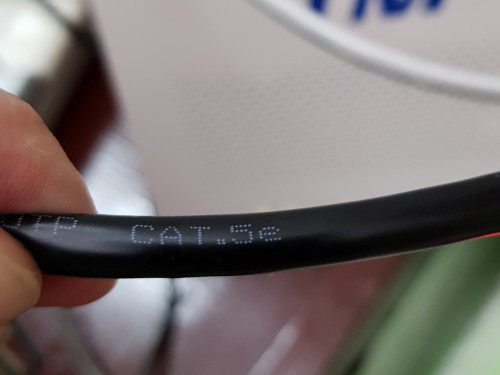 And cat6 between router and desktop switch CAT 6 to BTU and Router ; CAT5e to router and PC. |
|
|
|
|
|
jpong1
|
May 2 2019, 10:49 AM
|
Getting Started
|
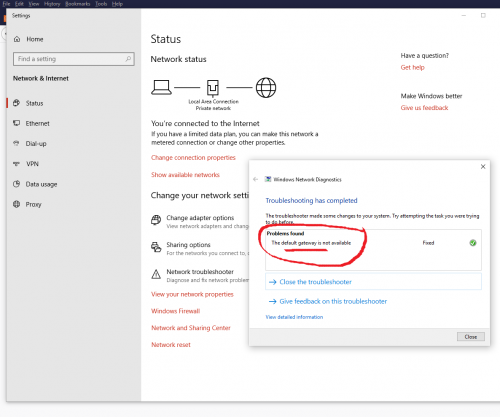 Dear all, on and off, I faced above "default gateway not available" problem ; it can solved with "Troubleshooting" , but very annoying. anyone has idea how to solve it forever ? this happened after Turbo-ed and using RT-AC55UHP, TM router no problem. thanks |
|
|
|
|
|
jpong1
|
May 2 2019, 12:33 PM
|
Getting Started
|
QUOTE(blacktubi @ May 2 2019, 11:43 AM) thanks, done that months ago... and now the LAN connetion light very dim but connected....Internet LED light off, but connected. This post has been edited by jpong1: May 2 2019, 01:02 PM |
|
|
|
|
|
jpong1
|
May 2 2019, 07:58 PM
|
Getting Started
|
QUOTE(blacktubi @ May 2 2019, 05:33 PM) Interesting, sounds like the router is not giving IP. Do you changed anything under DHCP? The high power blue LED will be dim after long usage since it will degraded. I do nothing to DHCP, it is ENABLED at the moment ; one more thing even more intersting , ie : the 5Ghz LED used to be dim but now very bright. |
|
|
|
|
|
jpong1
|
Jun 13 2019, 02:18 PM
|
Getting Started
|
QUOTE(rjflyguy @ May 28 2019, 05:02 PM) Guys, I need some idea from experts here on my 'downloading' issue. My family noticed that when they are connected to the house Wi-Fi, updating the applications (downloading the update files) was very slow. When they switched to using mobile data, the download was very fast. I didn't noticed the problem until my son highlighted this to me and I started to test. I noticed that updating apps from the playstore was very slow. Torrent was okay, 5Mb to 7Mb per second. Tried to download audio files and were horribly slow but when switched to mobile data, the downloads were quite fast. Browsing the internet, watching YouTube, emails and other stuff were okay, only downloading updates from PlayStore or several other files have problem. I am using Unifi and Asus RT-AC55UHP with the beta firmware suggested by Blacktubi. Any idea why? Thanks.... Hi, is your beta f/w ver : RT-AC55UHP_9.0.0.4_382_51085-gcf7cbc8.trx ? |
|
|
|
|
|
jpong1
|
Oct 29 2019, 08:11 PM
|
Getting Started
|
QUOTE(hghg.hg @ Oct 28 2019, 06:17 PM) Anyone upgrade to 3.0.0.4.382_51812? I was now on 9.0.0.4.382_51085-gcf7cbc8 which solved the highspeed issue. Is the new firmware remain with the highspeed fixes as well? @asusmy @blacktubi? I am using 9.0.0.4.382_51085-gcf7cbc8 which is beta version to solve problem that unable to go beyond 500Mbps ; yes, I do know after we click Check for Update, it will prompt that new version with 3.0.0.4.382_51812 is available, I did not download and update it cause so fat so good. I do guess system auto detected 3.0.0.4.382_51812 as new was due to this is official new f/w ; whereas 9.0.0.4 is Beta. Lets heard from others...for me simple, dont fixed when no problem/issues using it. |
|
|
|
|
|
jpong1
|
Oct 29 2019, 10:43 PM
|
Getting Started
|
QUOTE(AV_2018 @ Oct 29 2019, 09:06 PM) Looking at the list of security fixes, it is better to upgrade if the new version does not cause any issues. indeed. |
|
|
|
|



 Quote
Quote
 0.0457sec
 0.79
0.79
 7 queries
 GZIP Disabled