Outline ·
[ Standard ] ·
Linear+
Home Networking ASUS Malaysia Networking User & Technical Support, Managed by ASUS Malaysia Representative
|
yongtjunkit
|
 Oct 12 2019, 04:07 PM Oct 12 2019, 04:07 PM
|

|
QUOTE(nasilemaksedap @ Oct 12 2019, 01:16 PM) U can try claim warranty But bro and all the asus router user here make sure u use ups u know lah malaysia punya power always surge not stable so I highly recomend ups for the longevity of the router. What about surge protector like cal lab ? Same thing as well? |
|
|
|
|
|
yongtjunkit
|
Oct 12 2019, 06:46 PM
|
|
|
QUOTE(nasilemaksedap @ Oct 12 2019, 04:34 PM) Can. But why not just get ups nore protection from power cut like pc most router run linux software and like pc if shutdown just like that no good especially if power cut and then suddently back on in less than 5 sec. 🤔, but the power switch on the router( at least on the RT AC 68U ) is an on and off switch which basically cuts power to router when you put the switch to the off position This post has been edited by yongtjunkit: Oct 12 2019, 06:47 PM |
|
|
|
|
|
yongtjunkit
|
Nov 20 2019, 04:35 PM
|
|
|
QUOTE(BTS1501 @ Nov 20 2019, 04:30 PM) Sometimes you can not trust what the forum people wrote, need to ask very specific things, got to treat them like baby and spoon feed right ? Reason is because ac86u 2.4Ghz can go up to 750Mbps, so 270Mbps is achievable for 2.4Ghz. If like that can not ask, then no point telling him to reset to factory settings isn't it ?! He definitely got factory reset the router  Have you factored in that 2.4ghz is congested in the real world? |
|
|
|
|
|
yongtjunkit
|
Nov 22 2019, 05:24 PM
|
|
|
Deleted
This post has been edited by yongtjunkit: Nov 22 2019, 05:25 PM
|
|
|
|
|
|
yongtjunkit
|
Nov 22 2019, 05:55 PM
|
|
|
QUOTE(BTS1501 @ Nov 22 2019, 09:19 AM) Thanks, but 160Mbps is achievable on 2.4Ghz, and it also depends on what time of day you do the speedtest, and like what the original person said, depends on servers too. so that's why 270Mbps on 2.4Ghz to me is also achievable, on AC routers. Wah really ah, can share with us how to achieve that speed ah |
|
|
|
|
|
yongtjunkit
|
Nov 23 2019, 10:21 AM
|
|
|
QUOTE(archimedes @ Nov 23 2019, 09:16 AM) Btw can RP AC55 support aimesh? I've got a free unit with the purchase recently but it seems it works only as an extender. Followed the instructions but somehow there is no mesh set-up option. Any updates I need to do? Thanks Yes, update it to the latest firmware(Version 3.0.0.4.384.80710) then factory reset it This post has been edited by yongtjunkit: Nov 23 2019, 12:05 PM |
|
|
|
|
|
yongtjunkit
|
Feb 27 2020, 11:27 AM
|
|
|
Deleted
This post has been edited by yongtjunkit: Feb 27 2020, 11:27 AM
|
|
|
|
|
|
yongtjunkit
|
Feb 27 2020, 07:07 PM
|
|
|
ASUSmy, is there any plan for WPA 3 support on the RT-AC68U( I've already have devices supporting WPA 3)? And also any plan to patch WPA 2 for Kr00K? https://www.eset.com/int/kr00k/This post has been edited by yongtjunkit: Feb 27 2020, 07:19 PM
|
|
|
|
|
|
yongtjunkit
|
Mar 1 2020, 03:26 PM
|
|
|
Hi, how do I set up remote connection for my Asus RT-AC 68U?
tried by flipping the switch on the asus router app but still can't remote access, already have public IP, using Asus ddns
This post has been edited by yongtjunkit: Mar 1 2020, 03:27 PM
|
|
|
|
|
|
yongtjunkit
|
Mar 2 2020, 09:41 AM
|
|
|
QUOTE(ASUSmy @ Mar 2 2020, 09:24 AM) Hi yongtjunkit, Have you enable web access from WAN after you have created the DDNS? https://www.youtube.com/watch?v=7ECnW86tHCUThank you Yup, still doesn't work, I'm cascading router but I've assigned Public IP to it and I think DMZ as well, AIcloud also not working as well 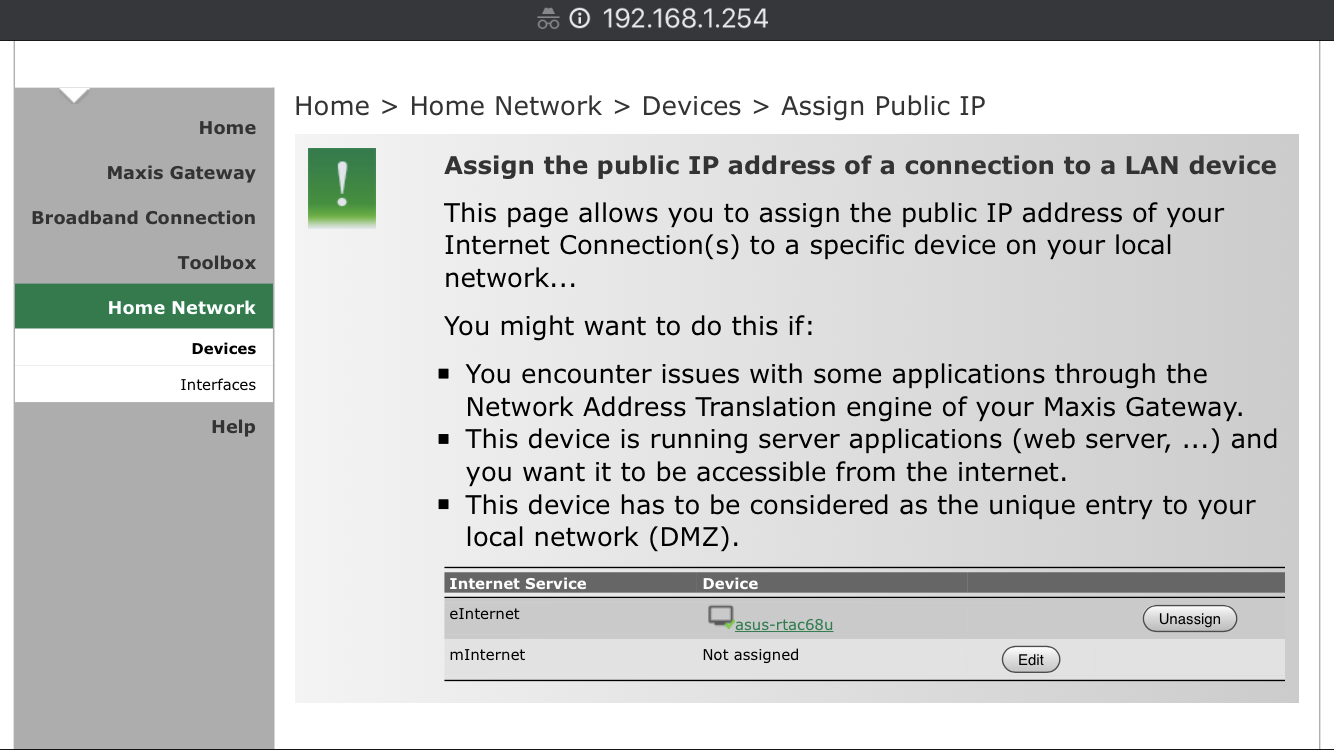 This post has been edited by yongtjunkit: Mar 2 2020, 09:47 AM This post has been edited by yongtjunkit: Mar 2 2020, 09:47 AM |
|
|
|
|
|
yongtjunkit
|
Mar 2 2020, 10:06 AM
|
|
|
QUOTE(ASUSmy @ Mar 2 2020, 09:56 AM) Hi yongtjunkit, From the look of it, the ASUS router is not the main router? If yes, the DDNS won't be able to work. Thank you Nope, basically the maxis router is the one that dials the PPPOE and the Vlans |
|
|
|
|
|
yongtjunkit
|
Mar 2 2020, 10:39 AM
|
|
|
QUOTE(ASUSmy @ Mar 2 2020, 10:15 AM) The ASUS DDNS only work only if the ASUS router is the main router. You can use other DDNS service on the Maxis router and port forward to the ASUS router if you want to access it remotely. Or change the ASUS router as the main router. Thank you The port forwarding should be done on the asus router or the maxis router? |
|
|
|
|
|
yongtjunkit
|
Mar 2 2020, 10:41 AM
|
|
|
QUOTE(junclj @ Mar 2 2020, 10:31 AM) Why don't you just move your pppoe user and password from the Maxis stock router to your Asus router? Meaning that, you need to make the Asus router to become as your main router in order to use the Asus DDNS and AiCloud. If that's the case will the Astro decoder see the Asus router to get internet( I'm using Astro IPTV)? currently, both of them are set as router, 2 different DHCP sever, asus one is 192.168.2.xx, maxis one is 192.168.1.xx This post has been edited by yongtjunkit: Mar 2 2020, 10:45 AM |
|
|
|
|
|
yongtjunkit
|
Mar 3 2020, 11:29 AM
|
|
|
QUOTE(junclj @ Mar 3 2020, 10:01 AM) The astro decoder doesn't care about which router that you are using. If you are worried about this, you can change your asus router to 192.168.1.1 and maxis router change to 192.168.1.2. It's doesn't matter. I'm guessing you mean switching from Lan to Wan cascading router setup to Lan to Lan setup, Asus router dial PPPOE, Disable DHCP on maxis router? Am I correct? |
|
|
|
|
|
yongtjunkit
|
Mar 3 2020, 01:19 PM
|
|
|
QUOTE(AV_2018 @ Mar 3 2020, 11:39 AM) He's using astro IPTV... Not just astro with Internet for VOD. So it's a complex set-up with both IPTV VLAN and Internet. Source: https://forum.lowyat.net/index.php?showtopi...post&p=95663659Yup, using Astro IPTV, cascading with lan to wan setup, Vlan tagging already taken care off by the maxis router(it currently does the Vlan tagging, bridging(probably the issue) and dialing PPPOE), I think he’s asking me to convert to lan to lan setup, disable DHCP on maxis router and transfer the PPPOE to the ASUS router |
|
|
|
|
|
yongtjunkit
|
Mar 20 2020, 10:24 AM
|
|
|
Does this count as an overload? Usually only see below 10% cpu usage for both CPU cores, today suddenly see high cpu usage... and the web UI is slow Is there any way to see what is hogging the CPU resources? Router: RT-AC68U  This post has been edited by yongtjunkit: Mar 20 2020, 10:26 AM This post has been edited by yongtjunkit: Mar 20 2020, 10:26 AM |
|
|
|
|
|
yongtjunkit
|
Mar 20 2020, 10:34 AM
|
|
|
QUOTE(jusbella @ Mar 20 2020, 10:28 AM) Torrenting..... Try reboot and observe again. I didn't install Asus download master on the router I've already scheduled a reboot overnight since got other family members in the house doing work |
|
|
|
|
|
yongtjunkit
|
Mar 20 2020, 03:33 PM
|
|
|
QUOTE(Jjuggler @ Mar 20 2020, 02:48 PM) If you good at ssh procedure, you can enter " top" comment on the terminal to find out which background program uses/utilises most cpu resources. Usually, as mentioned by bro/sis jusbella, torrenting is one of the cause, or a minor bug in the recent released firmware (only if you're using asuswrt). Try to reboot the router and see how it performs. Try to flash into merlin firmware to see if your cpu spikes or remains below 10% in its idle state. In some best cases, factory reset the router to see if the problem persists.  I wonder what process is this?  |
|
|
|
|
|
yongtjunkit
|
Mar 20 2020, 03:36 PM
|
|
|
QUOTE(blacktubi @ Mar 20 2020, 03:05 PM) LAN > Switch Control > NAT Acceleration Make sure set to auto and it shows CTF enabled I've just noticed that turning NAT acceleration on/ off would reboot the router... Anyway, after disabling it, it still shows that the NAT is processed by the CPU(same as Auto), Will reenable it when possible |
|
|
|
|
|
yongtjunkit
|
Mar 20 2020, 04:22 PM
|
|
|
QUOTE(Jjuggler @ Mar 20 2020, 03:45 PM) A few users of AC68U faced this problem already as discussed here. It is weird when I don't face such problem before.  Even loaded with a few scripts on my ac68u, the cpu still stays idle below than 10%. Have you tried to reset your router mate? My first time encountering this issue, factory reset this router on Tuesday already |
|
|
|
|



 Quote
Quote
 0.1726sec
 0.59
0.59
 7 queries
 GZIP Disabled