Outline ·
[ Standard ] ·
Linear+
Home Networking ASUS Malaysia Networking User & Technical Support, Managed by ASUS Malaysia Representative
|
yongtjunkit
|
 Jun 11 2017, 02:24 PM Jun 11 2017, 02:24 PM
|

|
QUOTE(voncrane @ Jun 11 2017, 01:04 PM) URL Filter under Firewall settings. Ive just tried it but it can block certain websites https website doesn't seems to be able to be blocked with This method, even the app version of the website isn't block even though the website (web browser) is blocked |
|
|
|
|
|
yongtjunkit
|
Jun 11 2017, 05:13 PM
|
|
|
QUOTE(voncrane @ Jun 11 2017, 04:22 PM) No. This is a technical limitation, since HTTPS encrypts the communication between the browser and the server, the router has no way of accessing that information. That's the whole idea of HTTPS. You can try blocking on a DNS level.. DNS-based Filtering. Do you know which dns have that feature? This post has been edited by yongtjunkit: Jun 11 2017, 05:13 PM |
|
|
|
|
|
yongtjunkit
|
Jun 11 2017, 08:40 PM
|
|
|
QUOTE(blacktubi @ Jun 11 2017, 05:55 PM) You can try OpenDNS family shield. You can't specify your own website unfortunately. You have to go for an enterprise firewall solution if you need HTTPS blocking. How about opendns home? I've tried it before setting the dns on the asus router but doesn't seem to work with my settings ( the firewall built in to the router works just only mobile apps for some reason still able to access the website) This post has been edited by yongtjunkit: Jun 11 2017, 08:41 PM |
|
|
|
|
|
yongtjunkit
|
Jun 11 2017, 10:45 PM
|
|
|
QUOTE(blacktubi @ Jun 11 2017, 09:47 PM) Where you set it? You should configure it at the Internet configuration page. The built-in content filtering feature does not support encrypted connection, you need enterprise gear for that. I set it at the firewall page |
|
|
|
|
|
yongtjunkit
|
Jun 11 2017, 10:48 PM
|
|
|
QUOTE(voncrane @ Jun 11 2017, 08:43 PM) OpenDNS does work.. Has my support.. It's as their website claims, set it once and forget about it..  Currently trying out open dns and also I've signed up for the account and blocked the websites that I want to block, changed the router dns to open dns but the website doesn't seems to be blocked by open dns, is there anything that I do wrong? |
|
|
|
|
|
yongtjunkit
|
Oct 17 2017, 09:43 AM
|
|
|
QUOTE(jusbella @ Oct 16 2017, 10:33 PM) WPA2 is standard security protocol in WiFi, thus all manufacturer that using WPA2 security will be affected, even most expansive cisco that using WPA2 will be affected. The only way is change to enterprise WPA that require cert to be installed will not be affected. How do we configure it? Or is it impossible on the consumer side This post has been edited by yongtjunkit: Oct 17 2017, 09:47 AM |
|
|
|
|
|
yongtjunkit
|
Nov 11 2017, 08:40 AM
|
|
|
Hi, I've been noticing lately that my Asus rt ac68u doesn't seem to restart properly during schedule restart, noticed that device won't be able to connect to the router and can't even access the internet. Turning off and on brings the router back to its normal state
|
|
|
|
|
|
yongtjunkit
|
Apr 24 2018, 06:59 AM
|
|
|
Hi , I'm having issue with the asus router app where it won't be able to connect to my asus rt-ac68u router. It keeps saying connection failed but the router shows up on the asus router app.
Update: web ui can't be accessed too until I unplug the power cable and plug it back in which fixed the problem
This post has been edited by yongtjunkit: Apr 24 2018, 07:18 AM
|
|
|
|
|
|
yongtjunkit
|
Jan 10 2019, 08:57 AM
|
|
|
QUOTE(jusbella @ Jan 10 2019, 08:05 AM) Did u run any torrent client? No, no usb device was connected to the router , all devices are connected via WiFi / Ethernet and no torrent client were runing on any device This post has been edited by yongtjunkit: Jan 10 2019, 08:58 AM |
|
|
|
|
|
yongtjunkit
|
Jan 10 2019, 10:10 AM
|
|
|
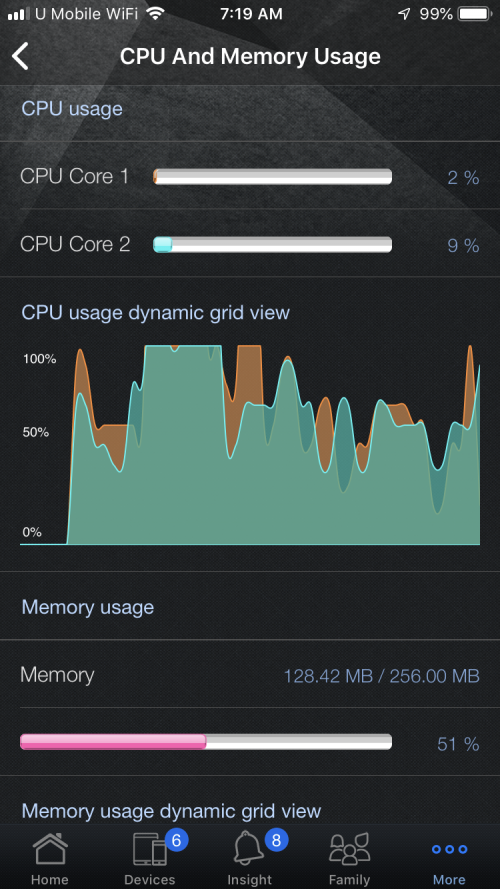
QUOTE(ASUSmy @ Jan 10 2019, 09:42 AM) Hi yongtjunkit, May I know what is the ASUS Router App version are you using now? The RAM usage on the grip show 100% but the bar still show 51%. As for the CPU usage are depending on your devices activity too, I can see that there are 6 devices connected. I you want to see the idle usage of the router, you can try disconnecting all the devices. Thank you Hi ASUSMY, Does disconnecting devices includes Ethernet devices This post has been edited by yongtjunkit: Jan 10 2019, 10:21 AM |
|
|
|
|
|
yongtjunkit
|
Jan 10 2019, 10:20 AM
|
|
|
QUOTE(ASUSmy @ Jan 10 2019, 10:16 AM) Hi yongtjunkit, Yes, so that there is no activity on the router when you do the monitoring. Thank you Hi ASUSMY, Here are the screenshot of the app version , and cpu/ram usage when idle 1 iPhone , 1 ASUS RTAC68U(router itself) 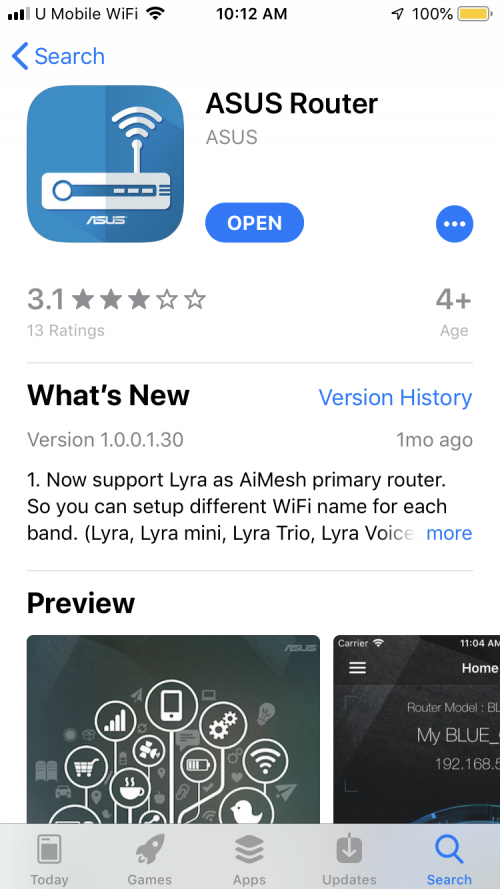 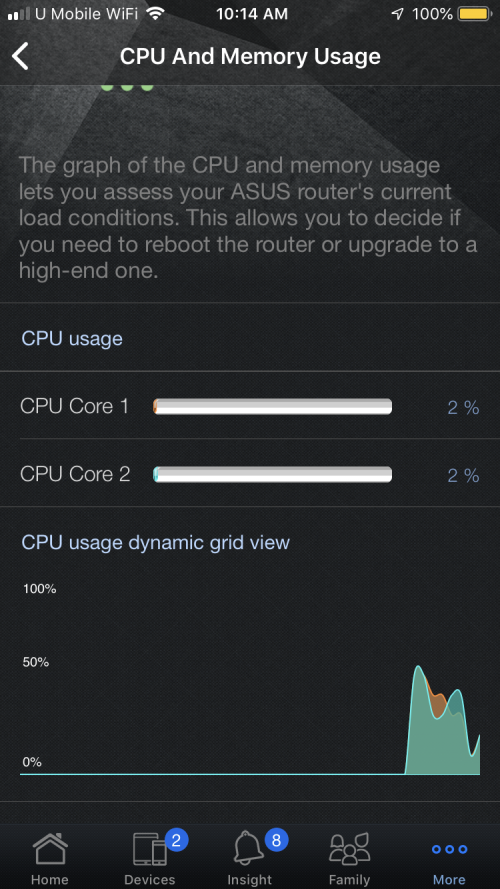 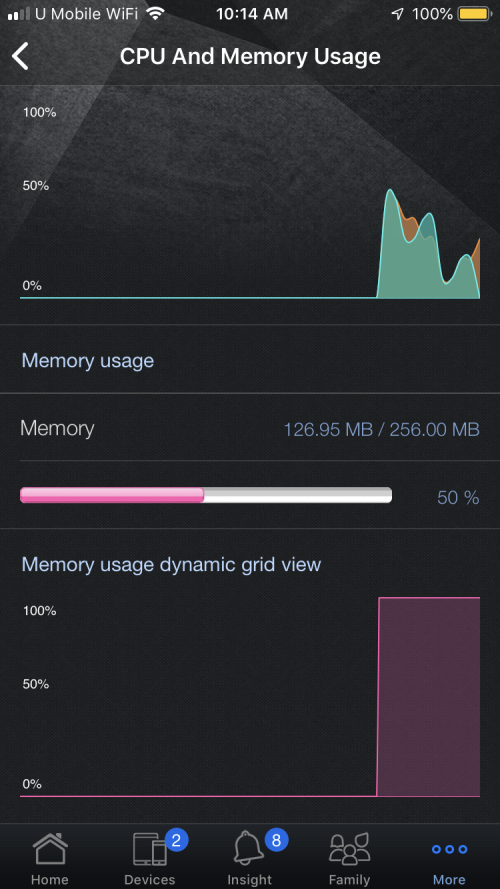 This post has been edited by yongtjunkit: Jan 10 2019, 10:22 AM This post has been edited by yongtjunkit: Jan 10 2019, 10:22 AM |
|
|
|
|
|
yongtjunkit
|
May 18 2019, 01:29 PM
|
|
|
Hi, I was wondering if it's possible to combine 2 Vlan on Lan port 4, I want to combine Vlan 11 and 17 specifically for Lan port 4 for IPTV service( Astro IPTV, currently only live channel works, VOD not working ) 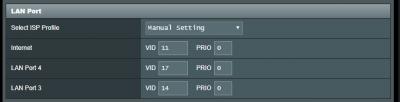 This post has been edited by yongtjunkit: May 18 2019, 02:07 PM
 |
|
|
|
|
|
yongtjunkit
|
Jun 10 2019, 10:59 AM
|
|
|
Hi, I’m noticing this issue with my ASUS RTAC68u where it would disconnect from the internet 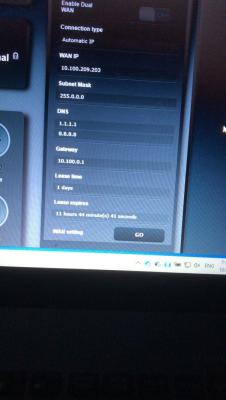
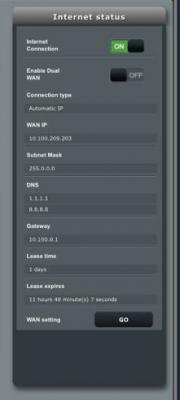
It appears that the ASUS router not releasing IP address as the dchp lease timer appears as if it stopped working This post has been edited by yongtjunkit: Jun 10 2019, 11:04 AM |
|
|
|
|
|
yongtjunkit
|
Jun 10 2019, 11:57 AM
|
|
|
QUOTE(ASUSmy @ Jun 10 2019, 11:06 AM) Hi yongtjunkit, Can you provide the system log of the router? And try updating the firmware to the latest and do a factory reset and test again. I can see that you got fixed the WAN DNS on the router, will the disconnection happen if you remove it or just put Google DNS? Thank you. 1.  asus_routersyslog.txt
 ( 283.16k )
Number of downloads: 52. I’m on the latest firmware( 3.0.0.4.384_45717)- just performed a factory reset via web ui( with the Initialize all the settings, and clear all the data log for AiProtection, Traffic Analyzer, and Web History. checkbox ticked) 3.didn't try that, will try it with google dns This post has been edited by yongtjunkit: Jun 11 2019, 09:28 AM |
|
|
|
|
|
yongtjunkit
|
Jun 12 2019, 08:22 AM
|
|
|
QUOTE(ASUSmy @ Jun 10 2019, 11:06 AM) Hi yongtjunkit, Can you provide the system log of the router? And try updating the firmware to the latest and do a factory reset and test again. I can see that you got fixed the WAN DNS on the router, will the disconnection happen if you remove it or just put Google DNS? Thank you. My house WiFi is down due to the same issue this morning Already tried all the steps given 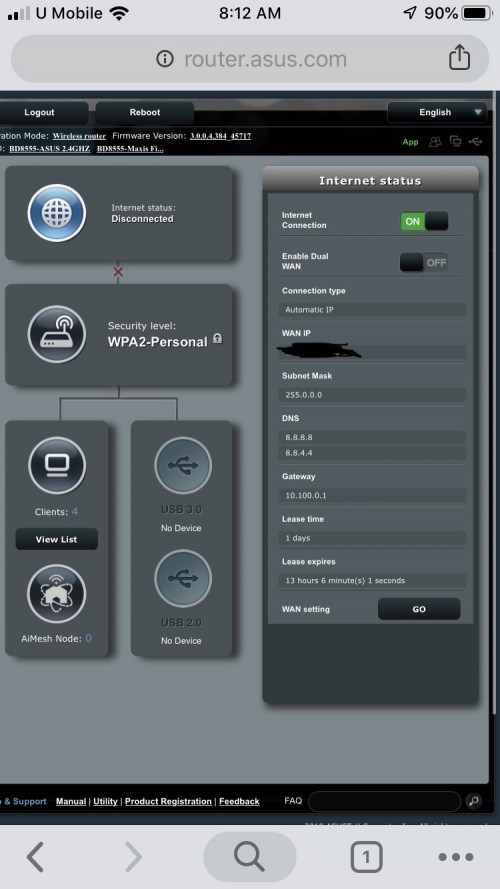 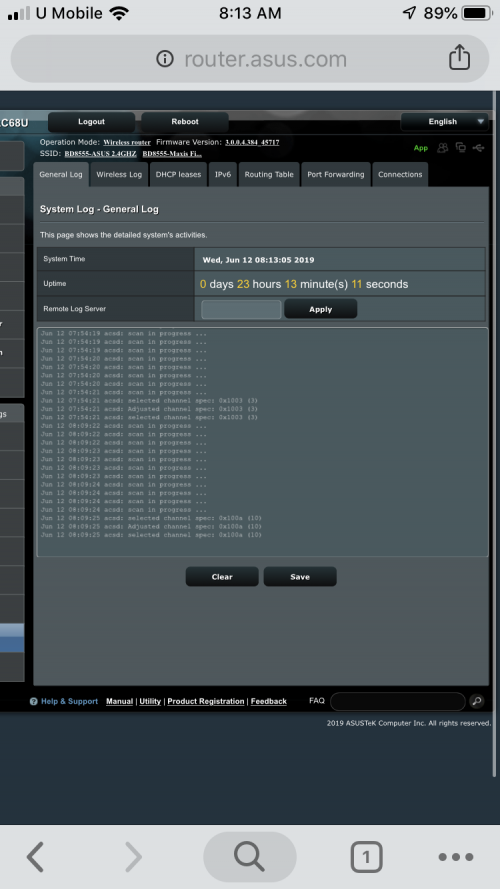 Also here’s the log(general section)
syslog.txt ( 101.22k )
Number of downloads: 6 |
|
|
|
|
|
yongtjunkit
|
Jun 12 2019, 10:23 AM
|
|
|
QUOTE(ASUSmy @ Jun 12 2019, 10:08 AM) Hi yongtjunkit, When this problem happen, is your modem DSL/Link signal is acting normally? Thank you yup, the link signal is acting normally This post has been edited by yongtjunkit: Jun 12 2019, 01:11 PM |
|
|
|
|
|
yongtjunkit
|
Jul 22 2019, 07:38 AM
|
|
|
QUOTE(lwk523 @ Jul 21 2019, 08:59 PM) Yeah, I found this www.dnsfilter.com service and i think only can filter by using DNS service. Does anyone can recommended DNS provider ? THanks OpenDNS( create account and setup) Make sure to register your IP address with opendns And you’ll need to constantly update your IP address in openDNS ( but there’s a software from opendns to make it easy) |
|
|
|
|
|
yongtjunkit
|
Sep 10 2019, 10:39 PM
|
|
|
Deleted
This post has been edited by yongtjunkit: Sep 10 2019, 10:39 PM
|
|
|
|
|
|
yongtjunkit
|
Sep 28 2019, 05:20 PM
|
|
|
I didn’t heard about ai mesh 2.0 before, new version of ai mesh coming ? 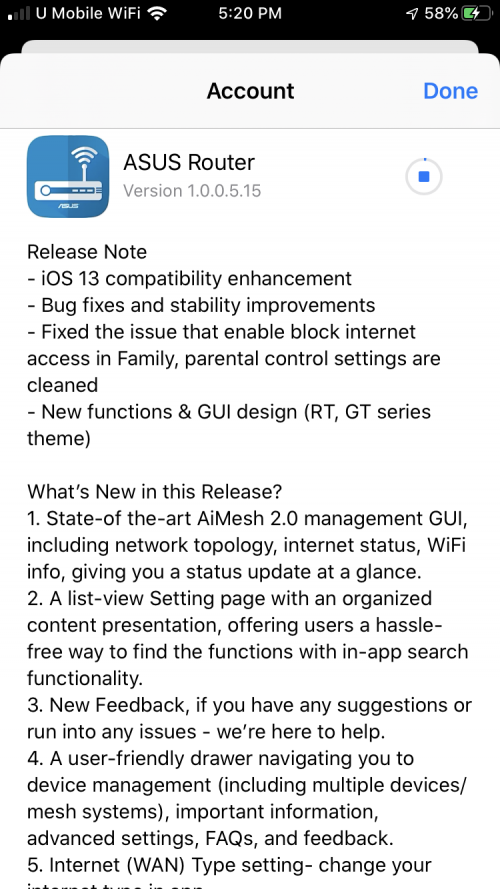 This post has been edited by yongtjunkit: Sep 28 2019, 05:22 PM This post has been edited by yongtjunkit: Sep 28 2019, 05:22 PM |
|
|
|
|



 Quote
Quote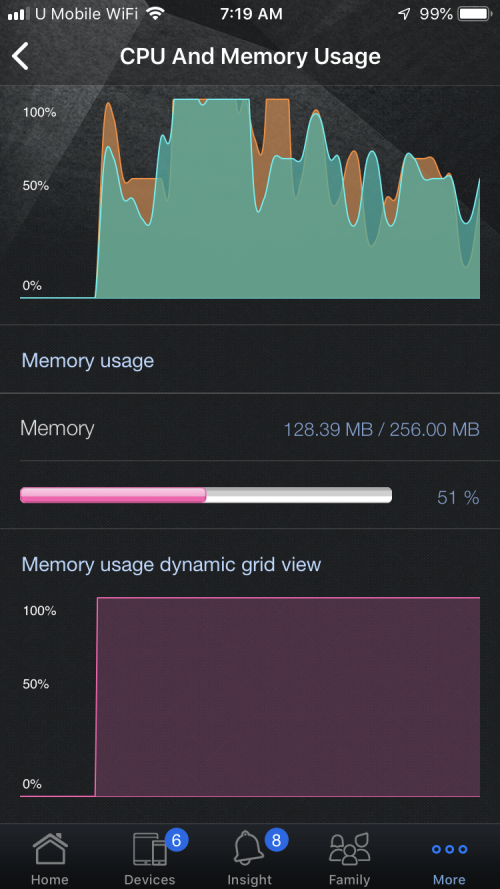

 0.0404sec
 0.60
0.60
 7 queries
 GZIP Disabled