Welcome Guest ( Log In | Register )

4 Pages < 1 2 3 4 >Bottom

Outline · [ Standard ] · Linear+

Home Networking ASUS Malaysia Networking User & Technical Support, Managed by ASUS Malaysia Representative

views
     
neekun
post Jun 13 2023, 08:58 PM

I'm a Mac
*******
Senior Member
2,570 posts

Joined: Jun 2006


QUOTE(eclectice @ Jun 11 2023, 02:34 PM)
Is Malaysia going to recognize UNII-4 5.9 GHz? Must change my current region to the US to access UNII-4 (DFS 5.9 GHz channel 181)?

I'd like to use UNII-4 5.9 GHz channel 181, which is another bandwidth that most homes do not use, thus there will be less interference. Its DFS support is designed to automatically avoid military/airport/weather radar signals causing a brief disconnectivity if it happens, which is not a concern in my area.

user posted image

Current ZenWifi AX XT8 Firmware Version:3.0.0.4.388_23285

Currently, my 5GHz-2 band used for wireless backhaul is performing great at -54dBm.

My Wireless log for 5GHz-2 Band (before auto DFS channels):
Sidenote:

UNII-4 is a set of channels in the 5 GHz frequency band that includes channels 52-64 and 100-144. In the United States, the 5.9 GHz frequency band is used for Dedicated Short-Range Communications (DSRC) and Intelligent Transportation Systems (ITS), and includes channel 181 (5.905 GHz). However, the availability and use of channel 181 may be subject to regulatory restrictions and limitations in other regions. It is important to follow local regulations and guidelines when configuring wireless networks.

DFS is a mechanism that allows wireless devices to detect and avoid interference with radar systems that operate in the same frequency band.
*
How can you get the channel 104? Mine was set to USA region and i can only see the following channels:

Attached Image
neekun
post Jun 15 2023, 08:42 PM

I'm a Mac
*******
Senior Member
2,570 posts

Joined: Jun 2006


QUOTE(blacktubi @ Jun 13 2023, 09:37 PM)
Use 5GHz-2 for tri-band models
*
Oh I seee, my 5ghz-2 is used as wireless backhaul for my mesh network. It’s on channel 100.
neekun
post Apr 20 2024, 05:13 AM

I'm a Mac
*******
Senior Member
2,570 posts

Joined: Jun 2006


QUOTE(ASUSmy @ Apr 15 2024, 05:50 PM)
Hi fruitie,

I believe the router already locked, no people are able to log in anymore.

If you want to try, you can use the DDNS you have created or by ASUS Router APP. In the ASUS router APP, you can go to Router Information->About My Router->Look for DDNS.

Thank you
*
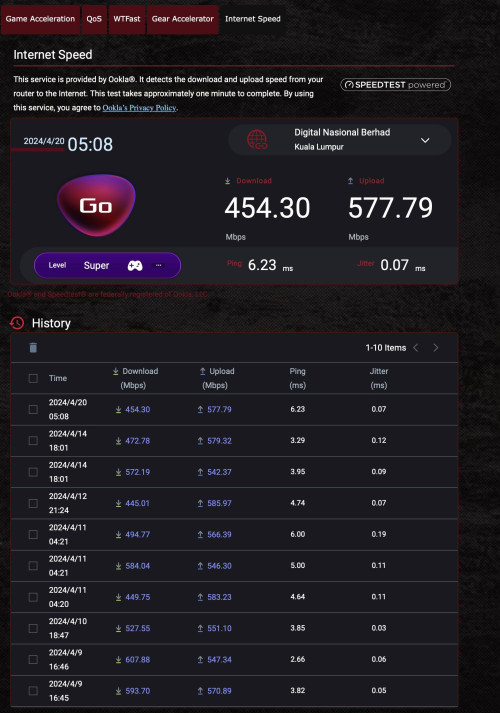
For my case opposite, on the Asus router Internet Speed Test I never get full speed of 940mbps (1gbps package), but when run on wired device like my Apple TV I can get 940mbps. any idea?

user posted image
neekun
post May 1 2024, 04:45 AM

I'm a Mac
*******
Senior Member
2,570 posts

Joined: Jun 2006


QUOTE(ASUSmy @ Apr 29 2024, 10:00 AM)
Hi neekun & jiaen0509,

Can you help to provide the below information for checking?

Router model:
Firmware version:
ISP Package:
Same result with different server?:

Thank you
*
Router model: GT-AX11000
Firmware version: 3.0.0.4.388_24328-g1e6e634
ISP Package: Unifi 1gbps
Same result with different server?: All server same result.
neekun
post May 4 2024, 04:40 AM

I'm a Mac
*******
Senior Member
2,570 posts

Joined: Jun 2006


QUOTE(ASUSmy @ May 2 2024, 11:37 AM)
Hi neekun,

Do you notice this problem before upgrading the firmware to the latest?

If previous firmware is no problem, do you still remember which firmware version is that?

Thank you
*
Hmmm i think the last time i saw full speed was very long ago and i also lost track when and which firmware... hmm.gif
neekun
post May 8 2024, 04:48 PM

I'm a Mac
*******
Senior Member
2,570 posts

Joined: Jun 2006


QUOTE(ASUSmy @ May 8 2024, 09:13 AM)
Hi neekun,

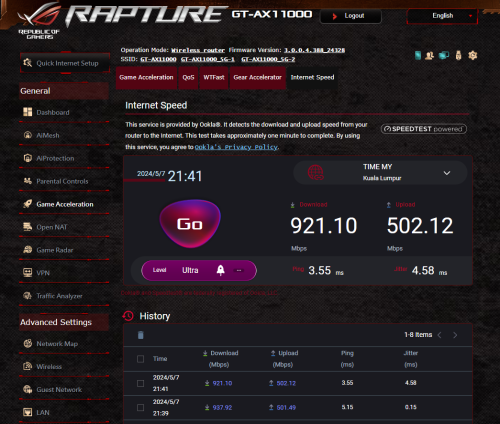
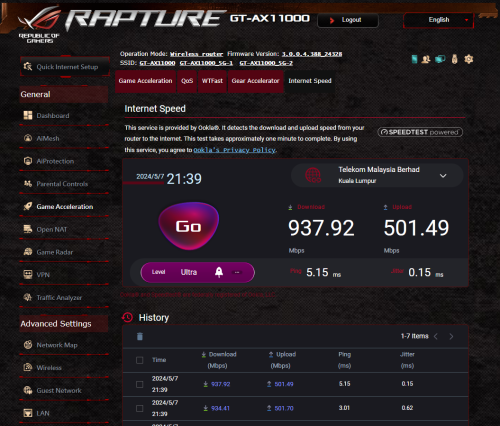
I have tested the GT-AX11000 with the firmware version 3.0.0.4.388_24328, the speedtest in the router GUI seen to be no problem.

Can you try to do a factory reset on the router and test again?

Thank you

user posted image

user posted image
*
Too hassle to factory reset and reconfigure la haha. It’s ok la nevermind.
neekun
post May 15 2025, 05:02 PM

I'm a Mac
*******
Senior Member
2,570 posts

Joined: Jun 2006


Asus Support, need your help with my issue of upload speed test on wired connection is only getting around 150mbps instead of 500mbps for my 1gbps package by Unifi. Ruled out it’s wifi interference as I tested on wired connection.

Elite Team came for on site troubleshooting with the following results:

A. Asus gt-ax11000 as router and dlink as modem, only technician windows laptop can get full 500mbps download speed. All my devices like Apple TV wired to Asus router, iPhone 16 pm, and even technician hand held device wired to my Asus router, all can get max around 150mbps upload speed.

B. Reset dlink and install 3.0.6 latest firmware, setup as bridge mode, same result with the above.

C. Reset dlink and setup as combo, Asus gt-ax11000 setup as ap mode, all devices can get full upload speed.

D. Reset dlink and setup as modem, use another Asus router of mine which is xt8 setup as router, same result with A above.

E. Use skyworth setup as modem, and use either 1 of the Asus router, same result with A.

No QOS was enabled for the Asus router. No gameing mode is enabled too. This was working finned since I upgraded to 1gbps in December 2024, but I only discovered on 8th May 2025 that my upload speed is terrible. Router is already with latest firmware 3.0.0.4.388_24403-gd4e3d0c

This post has been edited by neekun: May 15 2025, 05:03 PM
neekun
post May 15 2025, 07:13 PM

I'm a Mac
*******
Senior Member
2,570 posts

Joined: Jun 2006


QUOTE(blacktubi @ May 15 2025, 05:58 PM)
Enable AdaptiveQoS and set maximum upload speed to 500Mbps and download speed to 1000Mbps

Test and report back
*
Upload is around 120mbps with qos enabled as per following :

Attached Image
neekun
post May 15 2025, 07:18 PM

I'm a Mac
*******
Senior Member
2,570 posts

Joined: Jun 2006


QUOTE(neekun @ May 15 2025, 07:13 PM)
Upload is around 120mbps with qos enabled as per following :

Attached Image
*
By the way I revert back firmware to the one date November 13 2024 at https://rog.asus.com/my/networking/rog-rapt.../helpdesk_bios/ still same issue. I got my plan upgraded to 1gbps in December 2024 and had been great all the while only in last week I noticed the slow upload and that time already on firmware released on 5 march 2025.
neekun
post May 15 2025, 07:19 PM

I'm a Mac
*******
Senior Member
2,570 posts

Joined: Jun 2006


QUOTE(neekun @ May 15 2025, 07:13 PM)
Upload is around 120mbps with qos enabled as per following :

Attached Image
*
Tested a few more times upload is around 167mbps.
neekun
post May 15 2025, 07:47 PM

I'm a Mac
*******
Senior Member
2,570 posts

Joined: Jun 2006


QUOTE(blacktubi @ May 15 2025, 05:58 PM)
Enable AdaptiveQoS and set maximum upload speed to 500Mbps and download speed to 1000Mbps

Test and report back
*
Btw, I tested on my asus xt8 which was a mesh node but I set it as main router and connect to dlink modem. It’s the same issue also. Only thing is I don’t have a non Asus router to test with Telekom dlink modem.
neekun
post May 15 2025, 08:19 PM

I'm a Mac
*******
Senior Member
2,570 posts

Joined: Jun 2006


QUOTE(blacktubi @ May 15 2025, 08:02 PM)
What is your old fiber modem model?

Is it happening when you use your old fiber modem
*
Old fiber modem is Huawei gpon terminal hg8240h. This was used during 800mbps time. When upgraded to 1gbps then using the black dlink modem. Now I am on my old Huawei still same issue. Just now did a Speedtest on my Apple TV wired to Asus router, one time got the following:

Attached Image

Then the rest consistently 150 to 200 mbps.

Btw, is there a way to disable flow control at Asus gt-ax11000, I couldn’t find the feature. I am referring to https://www.smallnetbuilder.com/lanwan/lanw...t-a-good-thing/


And this thread seems like same issue with mine https://linustechtips.com/topic/1300515-slo...-asus-rt-ax86u/

https://www.reddit.com/r/Fios/s/9gedOZRHSN

This post has been edited by neekun: May 16 2025, 07:59 AM
neekun
post May 16 2025, 09:46 AM

I'm a Mac
*******
Senior Member
2,570 posts

Joined: Jun 2006


QUOTE(ASUSmy @ May 16 2025, 09:21 AM)
Hi neekun,

Can you show me the speedtest result using the router located at Game Acceleration->Internet Speed.

And is other speedtest server also same?

Thank you
*
During my testing yesterday the Speedtest result inside router with Telekom as server gets 930 mbps down and around 80 to 110mbps upload. Tested other server also same result. When trouble shooting with Telekom they will use https://speedtest.tm.com.my/ and the results also same with router internal speed test result. Just that sometimes with Tm Speedtest page the upload can go up to 120 to 150 mbps up. Overall consistently low upload speed as long as Asus gt-ax11000 or Asus xt8 used as router and Telekom device set as modem.

Test result using router Speedtest:


Attached Image


Tried disconnect all devices from wifi router one by one, left only my iPhone 16 pm. Speed test still showing upload speed of 150mbps plus.


--------------------

This post has been edited by neekun: May 17 2025, 09:30 AM
neekun
post May 19 2025, 01:09 PM

I'm a Mac
*******
Senior Member
2,570 posts

Joined: Jun 2006


QUOTE(ASUSmy @ May 16 2025, 09:21 AM)
Hi neekun,

Can you show me the speedtest result using the router located at Game Acceleration->Internet Speed.

And is other speedtest server also same?

Thank you
*
@asusmy Is there anything else I can do to troubleshoot?
neekun
post May 20 2025, 10:15 AM

I'm a Mac
*******
Senior Member
2,570 posts

Joined: Jun 2006


QUOTE(ASUSmy @ May 20 2025, 09:46 AM)
Hi neekun,

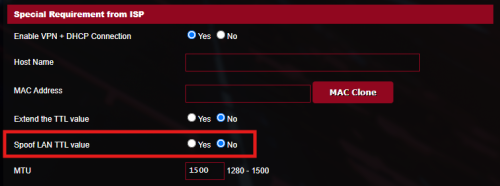
Can you try to enable "Spoof LAN TTL value" at WAN->Special Requirement from ISP?

user posted image

It is strange that only technician laptop able to get the full upload speed. Is there any setting on the laptop to get the full speed?

A. Asus gt-ax11000 as router and dlink as modem, only technician windows laptop can get full 500mbps download speed. All my devices like Apple TV wired to Asus router, iPhone 16 pm, and even technician hand held device wired to my Asus router, all can get max around 150mbps upload speed.

Is the modem just next to the router?

Thank you
*
Hmmm never noticed the spoof lan ttl before this, will try to check it out tonight and will get update here. The Asus router are located next to the Telekom dlink modem. Yup his windows laptop managed to get full download speed, didn’t check for any specific details though for his laptop.

I’ve submitted feedback to Asus support too under case id A2505032449-0002.


neekun
post May 20 2025, 07:30 PM

I'm a Mac
*******
Senior Member
2,570 posts

Joined: Jun 2006


QUOTE(ASUSmy @ May 20 2025, 09:46 AM)
Hi neekun,

Can you try to enable "Spoof LAN TTL value" at WAN->Special Requirement from ISP?

user posted image

It is strange that only technician laptop able to get the full upload speed. Is there any setting on the laptop to get the full speed?

A. Asus gt-ax11000 as router and dlink as modem, only technician windows laptop can get full 500mbps download speed. All my devices like Apple TV wired to Asus router, iPhone 16 pm, and even technician hand held device wired to my Asus router, all can get max around 150mbps upload speed.

Is the modem just next to the router?

Thank you
*
Tried enable spoof lan ttl and the Speedtest result upload is even worse haha:

Attached Image
neekun
post May 21 2025, 08:48 AM

I'm a Mac
*******
Senior Member
2,570 posts

Joined: Jun 2006


QUOTE(blacktubi @ May 20 2025, 07:36 PM)
Not ASUS but can you try 1480 MTU and MRU?
*
Tried with 1480 and still the same result

Attached Image
neekun
post May 21 2025, 02:44 PM

I'm a Mac
*******
Senior Member
2,570 posts

Joined: Jun 2006


QUOTE(ASUSmy @ May 21 2025, 02:37 PM)
Hi neekun,

Do you have any neighbor or friends from different location that is using the same Internet package and able to help test the ASUS router?

Thank you
*
My neighbour is not on 1gbps package and they are using combo mode. Asus support just asked me to hard reset, with the wps button and power button. I did that and the speed is still showing 150mbps. Only setting the router in ap mode then only I will get full upload speed 500mbps. Or alternately use dlink given by Telekom as combo, totally remove Asus from the connection then only I can get full upload speed 500mbps.

This post has been edited by neekun: May 21 2025, 06:56 PM
neekun
post May 27 2025, 12:59 PM

I'm a Mac
*******
Senior Member
2,570 posts

Joined: Jun 2006


QUOTE(neekun @ May 21 2025, 02:44 PM)
My neighbour is not on 1gbps package and they are using combo mode. Asus support just asked me to hard reset, with the wps button and power button. I did that and the speed is still showing 150mbps.  Only setting the router in ap mode then only I will get full upload speed 500mbps. Or alternately use dlink given by Telekom as combo, totally remove Asus from the connection then only I can get full upload speed 500mbps.
*
I managed to get full 500mbps upload speed fro all my devices both wireless and wired after enable Mac clone based on https://www.asus.com/support/faq/1045126/


Currently I opened a case with tm and demand them to give me an explanation what the heck they did to throttle my speed.
neekun
post May 27 2025, 05:04 PM

I'm a Mac
*******
Senior Member
2,570 posts

Joined: Jun 2006


QUOTE(blacktubi @ May 27 2025, 01:00 PM)
Curious: Which MAC address do you clone, is it the TM router or your PC
*
I just simply use my office laptop Mac and clone it at Asus wan.

I have a question, without Mac clone, all my previous speed test from various devices such as iPad Pro, Apple TV, Mac Studio will reveal its respective MAC address to Telekom or just the Asus wan port MAC address to Telekom? During previous troubleshooting with elite team, only the technician laptop managed to get full upload speed but all my devices including his hand held speed test device cannot get full upload speed.

4 Pages < 1 2 3 4 >Top
 

Change to:
| Lo-Fi Version
0.0444sec    0.52    7 queries    GZIP Disabled
Time is now: 12th December 2025 - 01:27 AM