

Using an n66u for many months on time Fibre. Not a single issue. Best router I've used so far.
What is your issue, specifically?
Home Networking ASUS Malaysia Networking User & Technical Support, Managed by ASUS Malaysia Representative
Home Networking ASUS Malaysia Networking User & Technical Support, Managed by ASUS Malaysia Representative
|
|
 Nov 7 2015, 11:28 PM Nov 7 2015, 11:28 PM
Return to original view | Post
#21
|
 
Senior Member
4,778 posts Joined: Jan 2003 
|
Using an n66u for many months on time Fibre. Not a single issue. Best router I've used so far.
What is your issue, specifically? |
|
|
|
|
|
Nov 7 2015, 11:48 PM
Return to original view | Post
#22
|
|
Senior Member
4,778 posts Joined: Jan 2003
|
QUOTE(achanth @ Nov 7 2015, 11:33 PM) Ah if you can point me to a setup for this under times fiber, as this router ...I have used this for unifi no problem..good range..but under times fibter, cannot get it working...I typed 192.168.1.1. cannot get into this setup too...used the disc to detect...cannot.. I don't know your exact network setup, but mine is very simple. Never used any disc.Perhaps advise me what should I do? Thanks.  1. Factory reset the router first. 2. Connect router WAN port to ONU (aka Time modem) port 1 3. Connect a laptop or PC via cable to one of router's LAN ports 4. Open 192.168.1.1 via web browser to do the quick setup wizard. 5. Time PPPoE login is in format of user@timebb 6. Configure PPPoE login details, followed by WIFI settings (SSID and passkey) and so on. A bit like this https://www.youtube.com/watch?v=Y7VUBSFy_es This post has been edited by kmrdeva: Nov 7 2015, 11:52 PM |
|
|
Mar 11 2016, 06:12 PM
Return to original view | Post
#23
|
|
Senior Member
4,778 posts Joined: Jan 2003
|
QUOTE(soonwai @ Mar 11 2016, 06:04 PM) Thanks, I'll try out AsusWRT-Merlin. There're so many firmwares for the RT-N16, I don't know where to start. I didn't know that the AsusWRT-Merlin f/w was available for the RT-N16..http://asuswrt.lostrealm.ca/download {edit} Oh, previously supported.. my bad. This post has been edited by kmrdeva: Mar 11 2016, 06:27 PM |
|
|
Mar 13 2016, 11:17 AM
Return to original view | Post
#24
|
|
Senior Member
4,778 posts Joined: Jan 2003
|
Hi all,
I have upgraded from an N66U to an AC68U as the main router for my home 50Mb Time Fibre connection. I've posted the N66U for sale but am now having 2nd thoughts, maybe keep it at home to use it together with the AC68U - both are bloody good routers, IMHO. Perhaps the network gurus here can share their thoughts. This is what I am thinking to do: 1. Leave the AC68U as the primary router. Disable 2.4GHz wifi, enable 5GHz with 1 main SSID, 1 guest SSID (e.g. home5, guest5). Basically 5GHz AC-Wifi up to 1300Mbps. 2. Install the N66U in AP mode (LAN cable to AC68U). Disable 5GHz and enable 2.4GHz wifi, 1 main SSID, 1 guest SSID (e.g. home2, guest2). Basically 2.4GHz N-Wifi up to 450Mbps. I have about 10 wireless devices and 2 wired devices at home. Overkill? This post has been edited by kmrdeva: Mar 13 2016, 11:20 AM |
|
|
Mar 13 2016, 12:18 PM
Return to original view | Post
#25
|
|
Senior Member
4,778 posts Joined: Jan 2003
|
QUOTE(blacktubi @ Mar 13 2016, 12:15 PM) No point doing that. Asus RT-AC68U alone is good enough. Hmm, thanks buddy. Yeah the AC68U is tremendously powerful. |
|
|
Mar 14 2016, 04:27 PM
Return to original view | Post
#26
|
|
Senior Member
4,778 posts Joined: Jan 2003
|
QUOTE(dreamthief @ Mar 14 2016, 03:25 PM) Definitely overkill. Unless AC68U resource usage is high (CPU, memory) and bandwidth is always maxed out. Not paranoid about network segregation. Everything's all in the same subnet anyway AC68U and N66U is designed to cope with both 2.4/5 and multiple clients, disabling one over another doesn't provide any benefit. There's another to be paranoid and physically also segregating your network.     Was just wondering if having each router dedicated to serving a single wifi frequency band would reap any tangible advantages. Thanks for your advice, bud  |
|
|
|
|
|
Mar 15 2016, 10:42 PM
Return to original view | Post
#27
|
|
Senior Member
4,778 posts Joined: Jan 2003
|
QUOTE(roxx @ Mar 15 2016, 10:34 PM) My question : How come my router can auto disable my wireless connection? Someone hack my router or hack my wifi signal? Isn't there a WIFI on/off button on the router? If yes, maybe someone pressed it? |
|
|
Jun 9 2016, 12:21 AM
Return to original view | Post
#28
|
|
Senior Member
4,778 posts Joined: Jan 2003
|
QUOTE(jusbella @ Jun 8 2016, 11:53 PM) It's up to u... It's optional.... Nice vid on VPN by Android Authority = https://www.youtube.com/watch?v=xGjGQ24cXAYYou can Google more what is VPN den make your choice. |
|
|
Jul 5 2016, 09:06 AM
Return to original view | Post
#29
|
|
Senior Member
4,778 posts Joined: Jan 2003
|
QUOTE(AdamNg @ Jul 5 2016, 08:55 AM) Official vs Merlin firmware? Some say...official fw gave more trouble? I always run Merlin firmware on my AC68U. No problems at all, with 6 wifi AC clients at home and 4 wifi N devices too.Easily achieving 250-350mps Internet speed test results in the same room, 150-250mps in other rooms with my 500mbps Time Fiber connection. 450-480mbps on wired LAN. Merlin firmware is very stable and as user friendly as the stock Asus firmware. |
|
|
Sep 1 2016, 10:08 AM
Return to original view | Post
#30
|
|
Senior Member
4,778 posts Joined: Jan 2003
|
QUOTE(Bliz @ Sep 1 2016, 09:48 AM) Thinking of getting AC68U to replace my DLink DIR850L ( Default router from Unifi ) to improve the signal strenght. I can't connect to 5ghz channel on my groundfloor ( double storey semi-D ), on the first floor ( where the router is located ) then i can connect to my 5ghz channel. Any user of AC68U can comment the signal strenght? want to make sure the AC68U signal strenght is way better than the DIR850L before spending my money AC68U user here, router placed in the living room of my 1.2K+ square feet condo. Every room gets good 5Ghz coverage but 2 doors outside at the lift area (15-20m outside my home), I can only get 2.4GHz.Based on my experience, the AC68U has superb network range. However, 5GHz band usually has much shorter range than 2.4GHz. Don't think the DIR850L can do better. Maybe you should consider a 5GHz AP or extender for your home's ground floor. Those living in double storey homes may be able to advise a better solution. |
|
|
Sep 1 2016, 04:41 PM
Return to original view | Post
#31
|
|
Senior Member
4,778 posts Joined: Jan 2003
|
QUOTE(Bliz @ Sep 1 2016, 04:01 PM) I am more concerned about the 5Ghz band as i will be using the wireless ac to stream bluray movies from my NAS upstairs ( where the router will be located ) to my android tv. IMHO, the AC68U has pretty strong wifi coverage, don't think the DIR850L can compete with it.I've even tested the Netgear R8000 (AC3200 6 antenna beast of a router) - its coverage loses to my AC68U. |
|
|
Sep 1 2016, 05:41 PM
Return to original view | Post
#32
|
|
Senior Member
4,778 posts Joined: Jan 2003
|
QUOTE(Bliz @ Sep 1 2016, 04:54 PM) The DIR850L has pretty crappy coverage Maybe you'd like to consider an AV1200 PowerLine connection from upstairs to downstairs then to a 2nd AC68U acting as an Access Point? , temporary using cable from 1st floor to my GF android tv just to stream movie from my NAS , temporary using cable from 1st floor to my GF android tv just to stream movie from my NAS  |
|
|
Sep 1 2016, 07:20 PM
Return to original view | Post
#33
|
|
Senior Member
4,778 posts Joined: Jan 2003
|
QUOTE(Bliz @ Sep 1 2016, 07:18 PM) My house is running 3 phase wiring, so powerline network is not really the best choice Then I am out of ideas, buddy. Maybe someone else here can share his/her thoughts. |
|
|
|
|
|
Sep 7 2016, 12:40 PM
Return to original view | Post
#34
|
|
Senior Member
4,778 posts Joined: Jan 2003
|
QUOTE(sHawTY @ Sep 7 2016, 12:18 PM) I'm using the notebook cooler in the link below on my AC68U & temperature goes down from 89°C to 67°C I found this pic on the net, some China store I think. Looks cool, wonder it works cooler or not Make sure to attach the fan as exhaust instead of intake Exhaust means you pull the hot air out of the router instead of blowing into the router http://www.lelong.com.my/fordable-travel-c...7-01-Sale-I.htm 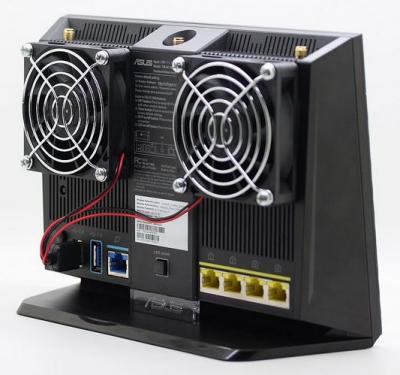
|
|
|
Sep 7 2016, 01:54 PM
Return to original view | Post
#35
|
|
Senior Member
4,778 posts Joined: Jan 2003
|
QUOTE(ThE-1cY @ Sep 7 2016, 01:20 PM) Btw what is the dimensions of the fan at the picture? Looks good on the router. Dunno, buddy. I found these 2 store links.http://www.hxlstore.com/533759567170.shtml http://www.yoycart.com/Product/534357487160/ |
|
|
Sep 7 2016, 03:27 PM
Return to original view | Post
#36
|
|
Senior Member
4,778 posts Joined: Jan 2003
|
QUOTE(sHawTY @ Sep 7 2016, 02:28 PM) US$8.68 = RM35. And that doesn't include shipping fees The china kit looks sexier, but your cooler solution is cheap and nice too The notebook cooler is less than RM10 |
|
|
Sep 7 2016, 03:28 PM
Return to original view | Post
#37
|
|
Senior Member
4,778 posts Joined: Jan 2003
|
QUOTE(djhenry91 @ Sep 7 2016, 03:07 PM) my house using router cooler..bought from IT store in Malaysia Something like this one ka?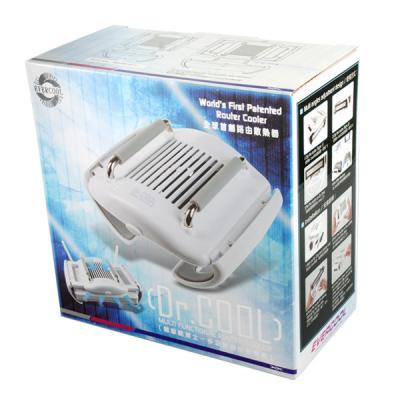
|
|
|
Sep 7 2016, 04:08 PM
Return to original view | Post
#38
|
|
Senior Member
4,778 posts Joined: Jan 2003
|
QUOTE(djhenry91 @ Sep 7 2016, 03:35 PM) ya this wan.. Wah nice. Can fit the backside of the AC68U ah bro? |
|
|
Sep 7 2016, 11:14 PM
Return to original view | Post
#39
|
|
Senior Member
4,778 posts Joined: Jan 2003
|
QUOTE(sHawTY @ Sep 7 2016, 12:18 PM) I'm using the notebook cooler in the link below on my AC68U & temperature goes down from 89°C to 67°C Interesting, I just tested with a portable fan and it wasn't even installed to the back of my router. Temp dropped from 87-89 C down to 67-69 degrees. Can't imagine how much better an attached fan or two would perform.  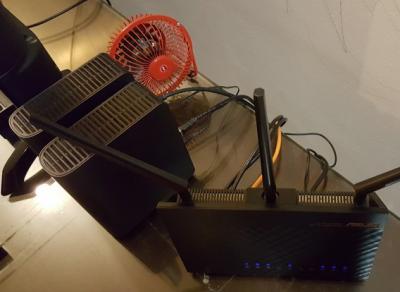
|
|
|
Sep 8 2016, 10:27 AM
Return to original view | Post
#40
|
|
Senior Member
4,778 posts Joined: Jan 2003
|
QUOTE(jpong1 @ Sep 8 2016, 10:23 AM) How do we measure the temp of router ? thx I believe these values are shown if you run the Merlin firmware (not stock Asus firmware).Screenshot below, taken off SNB forum.  This post has been edited by kmrdeva: Sep 8 2016, 10:28 AM |
| Change to: |  0.0404sec 0.0404sec
 0.37 0.37
 7 queries 7 queries
 GZIP Disabled GZIP Disabled
Time is now: 9th December 2025 - 07:33 AM |
 Quote
Quote