Outline ·
[ Standard ] ·
Linear+
Home Networking ASUS Malaysia Networking User & Technical Support, Managed by ASUS Malaysia Representative
|
kmrdeva
|
 Jul 21 2017, 03:19 PM Jul 21 2017, 03:19 PM
|

|
QUOTE(duckaton @ Jul 21 2017, 03:06 PM) Where to get the fan? from these conversations, I reckon it is necessary to install fan to help it cool down. asus should include the fan with the router or inbuilt inside the router if it has serious heat issues.  I bought mine from lelong website. Just a cheap laptop cooler. I don't know if it's necessary or if my AC68U is overheating beyond its operating temp range - I just feel better having it cooler since it's running 24x7 without aircon. |
|
|
|
|
|
kmrdeva
|
Jul 22 2017, 08:53 PM
|
|
|
QUOTE(InSplre @ Jul 22 2017, 02:47 PM) Need help, I notice lately my Asus RT-AC68U 5G signal keep disappearing. I have tried factory reset. I can see it like 1 2 seconds, then it disappear. Try change the channel from Auto, same result it keep disappearing. Tested with a 3.0.0.4.380_7743 and Merlin 380.67_0. Still the same. What other troubleshooting I can try? Client I used to scan 5G e.g. Samsung Note 5, Sony Xperia Tablet and Chromecast. 5GHz network disappears even when tested very near the router? Hardware problem, maybe? |
|
|
|
|
|
kmrdeva
|
Jul 23 2017, 12:33 AM
|
|
|
QUOTE(InSplre @ Jul 23 2017, 12:25 AM) I found the culprit, Pakite 5.8g cause massive interference. Only channel 165 is usable. After turn on, all back to normal. Thanks for sharing your findings. This is my first time hearing of interference on the 5GHz band.. |
|
|
|
|
|
kmrdeva
|
Jul 24 2017, 11:16 AM
|
|
|
QUOTE(Jjuggler @ Jul 23 2017, 06:03 PM) You are not alone. My Archer C7 tends to get hot. So installed cheap laptop cooler and another cooler for btu. Nice! I should get something similar to this trendy laptop cooler you have, for my Time Fibre GPON and Edgerouter-X.  This post has been edited by kmrdeva: Jul 24 2017, 11:16 AM This post has been edited by kmrdeva: Jul 24 2017, 11:16 AM |
|
|
|
|
|
kmrdeva
|
Jul 28 2017, 09:14 PM
|
|
|
QUOTE(InSplre @ Jul 28 2017, 08:57 PM) What is the temperature before and after you put the fan? 89C before, 63C after. |
|
|
|
|
|
kmrdeva
|
Sep 23 2017, 12:35 PM
|
|
|
QUOTE(crazydjrock @ Sep 23 2017, 12:26 PM) That also I have tried changing to local NTP server but it still did not register. It shows it is connected but due to NTP time not in sync, it is stated as not connected I wasn't aware that connection to ntp server is needed for internet to work with an Asus router. I set mine to manual time configuration if I recall correctly. No problems with internet access. |
|
|
|
|
|
kmrdeva
|
Oct 22 2017, 04:04 PM
|
|
|
QUOTE(skywardsword @ Oct 22 2017, 03:38 PM) Followed jayceooi recommendation. Gearbest. But it is buying from China. So I try to follow his instructions on how to buy at gearbest. U should too. http://www.jayceooi.com/buy-gearbest-products-malaysia/Edit: Ur budget rm600. Get the rt-1300uhp locally rm550. I read JO's writeup and the comments too. Not sure I feel reassured or not. 
|
|
|
|
|
|
kmrdeva
|
Oct 23 2017, 12:11 PM
|
|
|
QUOTE(JayceOoi @ Oct 23 2017, 11:51 AM) Both of them are original actually. Just tested again. And updated my comment there.  » Click to show Spoiler - click again to hide... « Thanks for the update bro. Gonna do some shopping on gearbest now  |
|
|
|
|
|
kmrdeva
|
Jan 5 2018, 05:33 PM
|
|
|
QUOTE(chuyeu @ Jan 5 2018, 05:25 PM) Hi there, I wish to know what model of dual band router support Android phone as USB modem to share the 3/4G. I remember reading this posting before, not sure if my AC68U supports it too. SNBForum Post |
|
|
|
|
|
kmrdeva
|
Jan 5 2018, 05:46 PM
|
|
|
QUOTE(chuyeu @ Jan 5 2018, 05:43 PM) Haha, I also read this article before, but AC68U seem too expensive for me. Did you have android phone? test it? I didn't mean to say that only the AC68U supports this. Nope, no android phone with me now to test this. AsusMY's reply above should help dispel any doubt. |
|
|
|
|
|
kmrdeva
|
Jan 10 2018, 10:06 AM
|
|
|
QUOTE(kenlui @ Jan 10 2018, 09:45 AM) Anybody has their asus routers set on scheduled reboot? I used to set my AC68U to reboot 3 times a week, and after rebooting both my 2.4/5 GHZ wifi will go haywire and all my devices wont be able to reconnect. Have to manually restart most of the time. Hence I reduced mine to twice a week, and still the same issue. Any idea on what's wrong? I have home automation which relies on the internet connection so it's really troublesome to wake up finding that they are not working due to the router. I recall that the scheduled reboot feature also made my AC68U's radios go nuts, forcing me to manually reboot the unit. Had assumed that this was a bug in the Merlin firmware. I now only manually reboot if there is an issue or after I update the firmware. My router runs 24x7 otherwise. |
|
|
|
|
|
kmrdeva
|
Jan 10 2018, 11:34 AM
|
|
|
QUOTE(kenlui @ Jan 10 2018, 11:07 AM) Nah not automation equipment causing me to reboot my router but rather a habit of mine. I used to reboot my non-asus routers previously too. Bad habit thanks to my old dlink and tplink routers. My AC68U so far runs for multiple weeks without issues. Daily reboot not required ha ha. This post has been edited by kmrdeva: Jan 10 2018, 11:35 AM |
|
|
|
|
|
kmrdeva
|
Jan 12 2018, 05:56 PM
|
|
|
QUOTE(AVFAN @ Jan 12 2018, 05:37 PM) checked for u... my ac1300uhp... torr speed average 12.5MBps which is about 100mbps. cpu usage... core 3... 28-33%, sometimes spike to 40%. other cores... 10-25%. at the same time, hypptv... all good, no lag as usual. when torr done, cpu usage falls to almost nothing as expected. observation was for a few minutes only. Pretty good, I think. Anyway, I'm glad I moved to a 2 device solution - edgerouter X as wired router, ac68u as wifi AP. Downloading at about 164 Mbps (i.e. 19.6 MiB/s) and the edgerouter's dual core CPU is still 96% idle. That's half of my Time Fibre 300mbps speed. 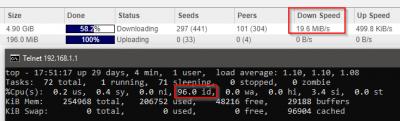 This post has been edited by kmrdeva: Jan 12 2018, 05:59 PM
 |
|
|
|
|
|
kmrdeva
|
Mar 2 2018, 07:51 PM
|
|
|
If you live in a condo, there could be neighbouring 2.4ghz networks causing interference.
I now run only 5ghz in my home. Multiple access points.
|
|
|
|
|
|
kmrdeva
|
Mar 3 2018, 10:12 AM
|
|
|
QUOTE(Alex9182 @ Mar 3 2018, 10:04 AM) setting done and apply and rebooted then test. Hyppe working normally tested using lan connected notebook, speed is normal. (see attached) tested with android mobile phone, Ping, UL, DL - all not normal (see attached) disappointing result. the router WiFi not working normally. Try this - set no password for your wifi SSID and test again. Many years ago had encountered an issue between wifi security settings and my old android phone. Something about the key settings or other. If still same then maybe router is a lemon and needs to be sent to the shop. This post has been edited by kmrdeva: Mar 3 2018, 10:18 AM |
|
|
|
|
|
kmrdeva
|
Mar 25 2018, 10:41 PM
|
|
|
QUOTE(HuorEarfalas @ Mar 25 2018, 10:35 PM) If I do that, will my wireless device scan out multiple WAP of the same SSID or just 1 WAP? I have 3 APs in total. My wireless devices only see 1 SSID. |
|
|
|
|
|
kmrdeva
|
May 14 2018, 10:41 AM
|
|
|
QUOTE(SilentVampire @ May 14 2018, 09:09 AM) That router I suggested, the Asus RT-AC86U, definitely can, and you should give it a try rather than getting the Lyra, which is overkill for your double-storey house. The official Asus warranty AC86U is about RM1.5K? And the 3 pack Lyra is RM2K, if I recall. I'd go with the Lyra if I had a 2 storey home, to be honest. I've disabled the 2.4Ghz band on my AC68U and it's not even able to support my 1.2K sqf condo unit fully on 5Ghz. The AC86U has similar wifi coverage as my AC68U, yes? Am using 2 other 5Ghz access points to cover my home. This post has been edited by kmrdeva: May 14 2018, 10:42 AM |
|
|
|
|
|
kmrdeva
|
May 14 2018, 10:51 AM
|
|
|
QUOTE(shiru @ May 14 2018, 10:45 AM) New Ac86u selling for RM1099. Lyra selling for RM1299. I’m willing to spend the extra 200-300 if it is sure to solve my WiFi issues. If the Ac86u doesn’t cover downstairs I’ll end up spending extra on another router for aimesh. Wow, cheaper now. Those are the Asus 3 years warranty or Shop 3 years warranty units? |
|
|
|
|
|
kmrdeva
|
May 14 2018, 11:04 AM
|
|
|
QUOTE(shiru @ May 14 2018, 10:57 AM) Probably shop warranty. I haven’t asked the shop. You can also wait for the Asus Lazada promo. They were going for RM999 on the official shop. Thanks. Not actively looking for a mesh solution now, but never say never  |
|
|
|
|
|
kmrdeva
|
May 30 2018, 12:04 PM
|
|
|
QUOTE(firdausbhari @ May 30 2018, 11:38 AM) Thats my point. Most people who has no value worried being hacked lol Value or not, I'd rather not have someone else hack into my router. The RM10 in my bank account may be small to the hacker but it's still my RM10 to spend ha ha. |
|
|
|
|



 Quote
Quote


 0.0397sec
 0.80
0.80
 7 queries
 GZIP Disabled