

do u really need that corshair 800mhz ram? well i think 3800 or 3600 can enuf to do the job here...just my 2cent
PC Audio HTPC, anyone doing this?
PC Audio HTPC, anyone doing this?
|
|
 Jul 17 2007, 12:39 PM Jul 17 2007, 12:39 PM
|
 
Senior Member
1,561 posts Joined: Feb 2006 From: Penang island 
|
do u really need that corshair 800mhz ram? well i think 3800 or 3600 can enuf to do the job here...just my 2cent
|
|
|
|
|
|
Jul 17 2007, 01:47 PM
|

Junior Member
12 posts Joined: Jul 2007
|
QUOTE(intothefantasy @ Jul 17 2007, 12:39 PM) do u really need that corshair 800mhz ram? well i think 3800 or 3600 can enuf to do the job here...just my 2cent Hi intothefantasy, Thanks for your reply, Since the pricing different of the CPU and ram is not too big, i was trying to get a better performance cpu and ram to prepare for future expension/requirment....hehe  The GPU also build in, so it might need some CPU and Ram power for graphic intensive task... |
|
|
Jul 17 2007, 04:52 PM
|

Senior Member
2,851 posts Joined: Jun 2006
|
QUOTE(hongty @ Jul 17 2007, 01:47 PM) Hi intothefantasy, Honesty save a little on the RAM and CPU, get a bigger HDD. I tell you 320GB is not enough one...Thanks for your reply, Since the pricing different of the CPU and ram is not too big, i was trying to get a better performance cpu and ram to prepare for future expension/requirment....hehe The GPU also build in, so it might need some CPU and Ram power for graphic intensive task... No need on future expansion, future all change completely. Well, enjoy your HTPC... |
|
|
Jul 17 2007, 07:06 PM
|
|
Senior Member
1,561 posts Joined: Feb 2006 From: Penang island
|
yea thats wat i have in mind....if u duwan to save cpu then is better to save for ram....from 667 to 800 din have much different...also if u wan better ram i prefer u get crucial which is more better then corshair xms for ddr2 800mhz....well overrall with a 667mhz value ram i think is good for ur htpc...as for mobo i duno abt gigabyte but i currently keep my eyes on asus M2A-VM HDMI i think is more cheaper abit then gigabyte but hey as for mobo u can go for ur choise...this just my 2cent...correct me if i am wrong pls
This post has been edited by intothefantasy: Jul 17 2007, 07:11 PM |
|
|
Jul 17 2007, 08:00 PM
|
|
Senior Member
808 posts Joined: Jan 2003
|
QUOTE(ryansia @ Jul 17 2007, 09:13 AM) sure, but you won't benefit certain features specifically only work within nVidia ships. Alright, my specs:what 690G mobo did u buy? with HDMI? pls report in with the review with onboard HDMI mobo..... AM2 X2 2300+ 45W Asus M2A VM HDMI 1x 1 GB Kingston Value RAM 667Mhz 400 GB Western Digital Hauppauge PVR 150 MCE Kit Toshiba Regza 42A3000E Windows Vista Ultimate Harman Kardon AVR5000 5.1 DTS receiver - At first I bought the Biostar TF7050 but I realized it doesnt have a S/PDIF pci bracket, and I have no idea where to buy it separately, so unfortunately I have to change to the slightly older and more expensive asus 690g board.  Does anyone know of any m-ATX mobo that has HDMI and optical out? Does anyone know of any m-ATX mobo that has HDMI and optical out?I'm still in the process of setting up all the software. So far, I've installed: Purevideo TVxB and Bladerunner 3.0 To be installed: Powerstrip beta for support with 690G chipset (http://forums.entechtaiwan.net/viewtopic.php?t=5726) ffdshow I can post up pics if anyone is interested. My setup is like this: Astro input to Hauppauge via S-Video and RCA. PC output to TV via HDMI (At first had a problem outputting Astro's sound thru HDMI, it would only go to my SPDIF output, but after restart it was ok, weird. However, Vista I think can only output to one audio channel at a time, but realtek has a custom driver file that can allow simultaneous output to all audio outs. Copy this file http://neosmart.net/downloads/guides/Vista...nd/rtkhdaud.zip to C:\Windows\System32\drivers and restart). DVD and downloaded HD video output thru HDMI for video only. Sound will be output to my DTS receiver via S/PDIF. Currently, I'm having a problem getting my Vista Media center to download the EPG, a huge turn off... I've followed TVxB's Vista guide here (http://www.tvxb.com/doc/Vista-BladerunnerPro%20Instructions.htm) but when Media Center tries to download off my IIS, it still says it cant connect. I've verified my IIS settings and everything checks out fine. I'd welcome any assistance! Also, having difficulties getting my onboard ATI to display 1366x768 @60 hz. I'm hoping this beta powerstrip will allow me to. Man, its been really hard setting all this up.. but very fun! Will be posting reviews once everything is set up properly. ATM, Media center detected my Astro signal and also the remote controller very well. A complaint is that there will be a significant lag (1second) when using the MCE remote to control Astro. I'd like to thank terrencey for his guide! This post has been edited by parsona: Jul 17 2007, 10:01 PM |
|
|
Jul 18 2007, 09:17 AM
|
|
Junior Member
12 posts Joined: Jul 2007
|
Hi parsona,
Thanks for your sharing. I'm going to use the 690G mobo as well. So definately I will need your help in the setting up of this mobo. Actually the Asus M2A VM HDMI is my first choice before the Gigabyte MA69G-S3H. But i heard that the raiser card for the HDMI will be utilised the PCI 16x port, so it won't be able to instore a discrete graphic card, right? By the way, how is the HD playback on your current CPU and Ram setup? Looking forward for your review on your system which will be a valuable guide for me. Regards, Hong |
|
|
|
|
|
Jul 18 2007, 01:48 PM
|
|
Junior Member
178 posts Joined: Jul 2007 
|
QUOTE(parsona @ Jul 17 2007, 08:00 PM) Currently, I'm having a problem getting my Vista Media center to download the EPG, a huge turn off... I've followed TVxB's Vista guide here (http://www.tvxb.com/doc/Vista-BladerunnerPro%20Instructions.htm) but when Media Center tries to download off my IIS, it still says it cant connect. I've verified my IIS settings and everything checks out fine. I'd welcome any assistance! I just finished setting up my PC so that I can record Astro programs for my wife. She doesn't agree to Astro Max so the Hauppauge PVR-150 MCE Kit is my next option. I am using Vista Ultimate too and I managed to configure the EPG as per the instructions on http://www.tvxb.com site and managed to download the EPG onto Media Center. Yes, you have to use Bladerunner v3.0 to make this work. I tried Bladerunner v3.5 just to be sure and I can't make it work.Also, having difficulties getting my onboard ATI to display 1366x768 @60 hz. I'm hoping this beta powerstrip will allow me to. Man, its been really hard setting all this up.. but very fun! Will be posting reviews once everything is set up properly. ATM, Media center detected my Astro signal and also the remote controller very well. A complaint is that there will be a significant lag (1second) when using the MCE remote to control Astro. I'd like to thank terrencey for his guide! I assume your Tvxb grabber managed to downloaded the xmltv files from Astro and Bladerunner created the guide.bin successfully. The key is to make sure that you change the registry key when you setup the Guide Listing (before you enter the area code). Once you change that key, do a "net start keepkey" to restrict that key being change. Go back to enter the area code to continue and then the EPG will be downloaded. Also when you make the change to the GetTVServicesMetaInfo.html file, include the serverName and hostName parameter. The default settings in Bladerunner doesn't include those two parameters. Hope this help. Regards, This post has been edited by LongBeforeHorn: Jul 18 2007, 01:49 PM |
|
|
Jul 18 2007, 03:49 PM
|
|
Junior Member
316 posts Joined: Apr 2005
|
as for HD playback, my p4 northwood 3.0 with the cheapo nVidia 6200 are able to run fine..... kekeekek
i'm still on XP MCE, lazy to explore to vista ultimate. if more vista users report in and it is running without major issues then i might consider to move on..... someone is asking spdif optical out..... why dun use the coaxial instead? my mobo comes with only the spdif header w/o bracket. i diy to have the coaxial out and it's working perfectly. what you need to do is to get the pinout of the spdif, then connect the data pin to the center of the female RCA, and the ground to the outer of the female RCA....voila u got the coaxial out!! anyone wanna swap HD titles???? i've few titles in wmv, ts, mkv....... thos files are too huge and takes hell lot of time to download.... exchanging seems to be a better idea...... hope the mods don't read this...kekekeke |
|
|
Jul 18 2007, 10:04 PM
|
|
Senior Member
808 posts Joined: Jan 2003
|
Hongty,
Yes, the Asus needs the pcie 16x slot used for the HDMI and SPDIF out. I guess they were thinking that if someone were to want to install a separate graphics card, they'd get one with HDMI as well, but theres still the missing SPDIF out then. Anyway from my initial viewing of one 720p HD clip, it runs very smoothly. I've read tho that recording HD requires some serious juice, but then we wont have HD tv for a very long time in Malaysia, I'm pretty sure about that. Longbeforehorn, Why doesn't your wife agree to Astro Max? Anyways, I've done exactly like the guide, but I'm really stumped now why its still not working. My registry key is modified and stuck there with keepkey. My guide.bin file has also been created successfully. I can browse with IE to the http://localhost/Native/GetTVServicesMetaInfo.html site... but Media Center just keeps telling me it cant download. Getting worried now... If this dont work, I might try installing XP MCE instead. Anyone knows whats the diff between Vista's MC and XP's MC? ryansia, If I had know how easy it was to create the coaxial out, I'd have stuck with my Biostar tf7050! Too bad, too late... Oh, when i do get some HD titles, I'll look you up for trade  This post has been edited by parsona: Jul 18 2007, 10:22 PM |
|
|
Jul 19 2007, 12:33 AM
|
|
Junior Member
178 posts Joined: Jul 2007
|
QUOTE(parsona @ Jul 18 2007, 10:04 PM) Longbeforehorn, Why doesn't your wife agree to Astro Max? Anyways, I've done exactly like the guide, but I'm really stumped now why its still not working. My registry key is modified and stuck there with keepkey. My guide.bin file has also been created successfully. I can browse with IE to the http://localhost/Native/GetTVServicesMetaInfo.html site... but Media Center just keeps telling me it cant download. Getting worried now... If this dont work, I might try installing XP MCE instead. Anyone knows whats the diff between Vista's MC and XP's MC? I hit the same problem like yours and when I did it the 2nd time I managed to make it work. Let try this again. 1. net stop keepkey 2. Start MC and then go through the Guide Setting 3. Stop when it ask you for the area code 4. Check if registry key is "file://<computername>/admin$/ehome/BladeRunnerPro/Native/GetTVServicesMetaInfo.html", change it to "http://<computername>/Native/GetTVServicesMetaInfo.html". Try to use your computer name instead of <localhost>. It work for me 5. net start keepkey 6. Continue with MC Guide setup Just to be sure (but I can't confirm if it has any effect as I didn't bother to verify), make sure you have Internet connection when you do these steps. |
|
|
Jul 19 2007, 07:13 PM
|
|
Senior Member
808 posts Joined: Jan 2003
|
I uninstalled TVxB and Bladerunner and reinstalled them, this time it worked
Now I've to figure out how to use ffdshow to postprocess my astro |
|
|
Jul 30 2007, 12:50 AM
|

Senior Member
601 posts Joined: Jan 2003 From: I can hear Planes taking off... 
|
hey guys.
planning to build a half-HTPC in the near future. i want it to : 1. Play video files. 2. maybe music. 3...err..not sure loh i was looking around for those Hard disk media players, but they dont really support ALL of the codecs out there, and media streamers are either too expensive, or does not exist in malaysia. So, i was wondering about a few things: 1. where to get a somewhat slim and nice looking casing around here? 2. what brands to look for? 3. Any suggestions for a rig-list? ( have yet to look through the thread so ada sedikit malas ni  ) )i got this suggestion from someone - is it worth it? http://www.biostar.com.tw/app/en-us/t-seri...ion.php?S_ID=17 and are component out considered HD? thx |
|
|
Aug 4 2007, 11:17 PM
|
|
Junior Member
129 posts Joined: Dec 2005 From: KL Lumpur
|
how much for the Hauppauge PVR 150 MCE Kit?? im plan to built the htpc too..rite now only need the matx mobo, casing n tv card |
|
|
|
|
|
Aug 4 2007, 11:22 PM
|
|
Senior Member
1,083 posts Joined: Jan 2003 From: "New" Klang Road, Kuala Lumpur
|
i saw a price drop in sri comp... try there...
|
|
|
Aug 8 2007, 01:21 PM
|
|
Junior Member
129 posts Joined: Dec 2005 From: KL Lumpur
|
how about the htpc casing price? where i can buy the cheapest htpc case in kl area?? around rm200 -300 can get??
 This post has been edited by mentalkronik: Aug 8 2007, 01:21 PM |
|
|
Aug 8 2007, 08:53 PM
|

Senior Member
1,447 posts Joined: Mar 2006
|
Hi dunno whether my PC can be describe as HTPC or not. Pls give some advice
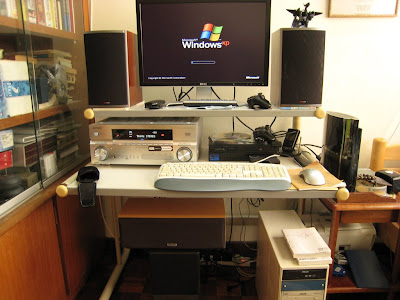 For more info can visit my blog using the link at my signature. |
|
|
Aug 8 2007, 09:25 PM
|

Senior Member
4,840 posts Joined: Jan 2003 From: Universal 
|
QUOTE(300078 @ Aug 8 2007, 08:53 PM) Hi dunno whether my PC can be describe as HTPC or not. Pls give some advice U really need a bigger table and space.. For more info can visit my blog using the link at my signature.  |
|
|
Aug 8 2007, 10:53 PM
|
|
Senior Member
1,447 posts Joined: Mar 2006
|
yah i know! I did get a Subwoofer becoz of space constrant!
|
|
|
Aug 12 2007, 03:23 AM
|
|
Senior Member
601 posts Joined: Jan 2003 From: I can hear Planes taking off...
|
After some consideration and finance juggling around, i have narrowed down my specs of my 1/2 HTPC:
Intel Pentium 4 2.6GHz Northwood ASRock P4VM890 http://www.asrock.com/mb/overview.asp?Model=P4VM890 1GB DDR400 RAM Western Digital 80GB Creative Live! value 24bit Asus X1650Pro Silent Edition <--- the best thing about my system  ....and that is it so far. Maybe in the future i'll add a tv tuner, but for now all i need is to play my Video files and music. after going through the thread, i think i will install a copy of Win XP Pro + Media portal software to emulate the look and feel of Win MCE. all i need now is to try and get a nice looking casing for the system. Any ideas/suggestions? btw, this is a truly budget system. i can say i'm getting all of the stuff above for less than 1K .....of course, casing tak masuk lagi... |
|
|
Aug 17 2007, 09:00 AM
|
|
Senior Member
4,840 posts Joined: Jan 2003 From: Universal
|
Just transformed my workstation into my room's HTPC..
 Whole View 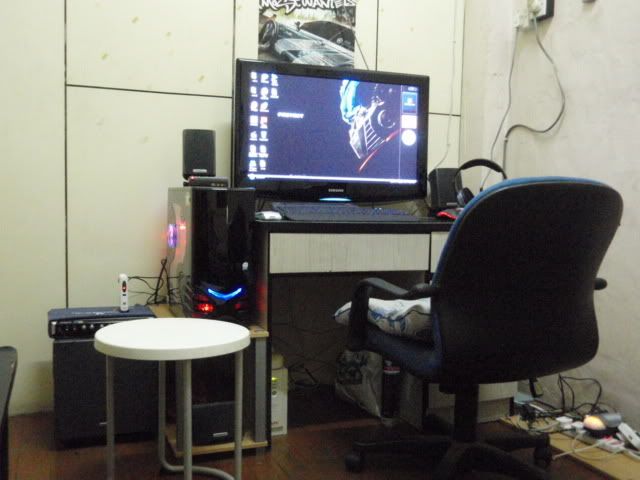 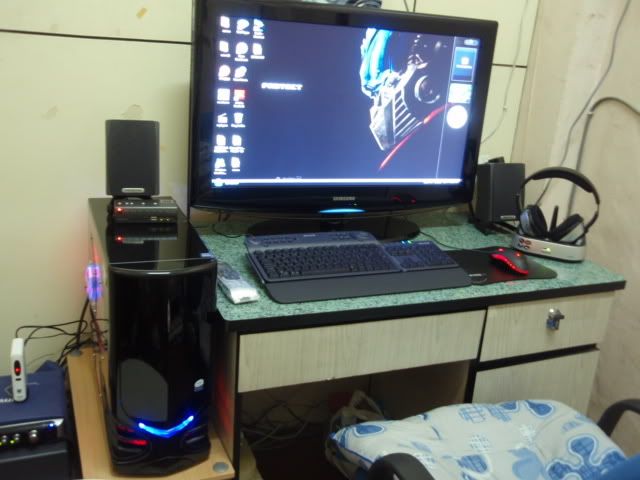 AV transmitter for ASTRO; X-fi external console; C2D System Unit... 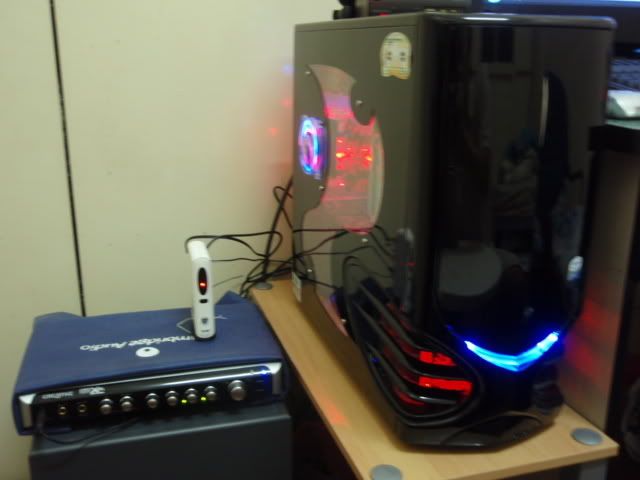 Logitech Harmony 525 Universal remote and Belkin Media Pilot for HTPC purpose.. 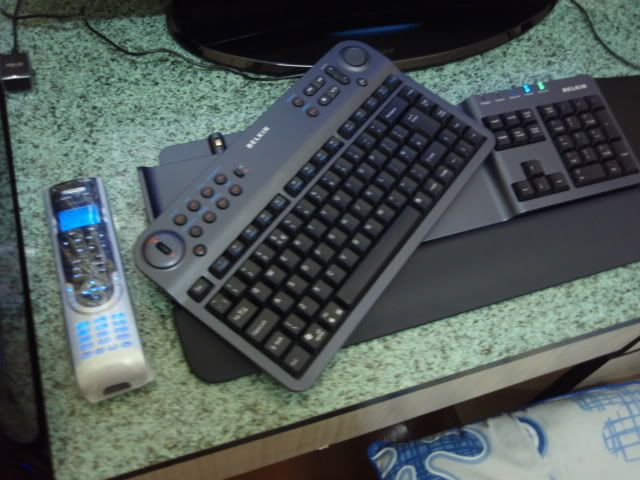 This post has been edited by accs_centre: Aug 17 2007, 09:02 AM |
|
Topic ClosedOptions
|
| Change to: |  0.0290sec 0.0290sec
 0.53 0.53
 6 queries 6 queries
 GZIP Disabled GZIP Disabled
Time is now: 1st December 2025 - 11:22 AM |
 Quote
Quote