

QUOTE(llsphinxll @ Aug 28 2009, 11:03 PM)
my merdeka month setup while waiting for my mstand and a keyboard. 
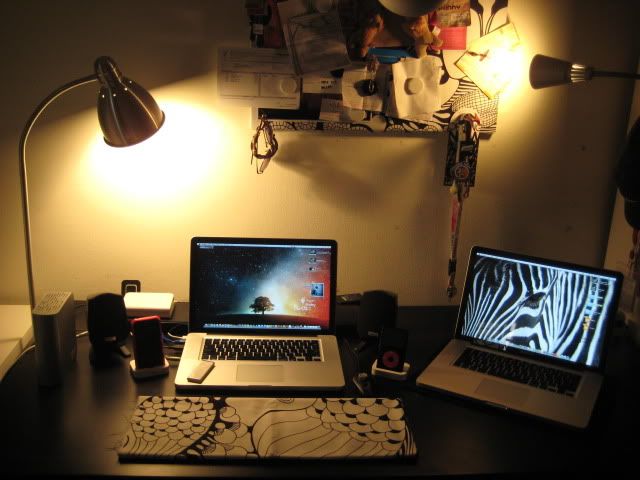
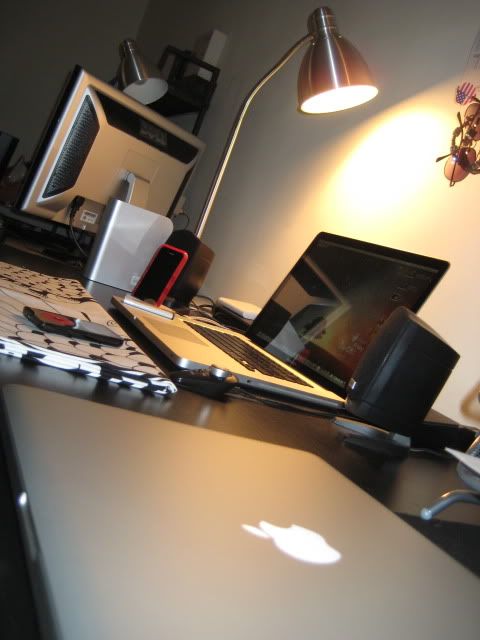


 two 13" macbookpro ? how nice ><!
Hardware Your Mac Desktop / Apple Hardware
|
|
 Sep 11 2009, 12:35 AM Sep 11 2009, 12:35 AM
|
 
Senior Member
1,264 posts Joined: Feb 2006 From: KL, Malaysia   
|
QUOTE(llsphinxll @ Aug 28 2009, 11:03 PM) my merdeka month setup while waiting for my mstand and a keyboard. two 13" macbookpro ? how nice ><! |
|
|
|
|
|
Sep 11 2009, 01:55 AM
|

Senior Member
659 posts Joined: Apr 2007 From: Russia with Love
|
isn't that 2 15'' MacBook Pro ?
|
|
|
Sep 14 2009, 06:54 AM
|

Junior Member
208 posts Joined: Nov 2004
|
That dual MBP15" is overkill.
 Anyway, here's my latest workspace. I'm back to dual screen setup after buying Mini DisplayPort to VGA adapter. Workspace is missing an iPhone 3G[S] booked 20 days ago from Maxis! And that's my living room by the way.   This post has been edited by Snecx: Sep 14 2009, 08:30 AM |
|
|
Sep 14 2009, 10:12 AM
|

Junior Member
28 posts Joined: Sep 2009
|
QUOTE(Snecx @ Sep 14 2009, 06:54 AM) That dual MBP15" is overkill. Whoa! Simple but nice, I like it! Anyway, here's my latest workspace. I'm back to dual screen setup after buying Mini DisplayPort to VGA adapter. Workspace is missing an iPhone 3G[S] booked 20 days ago from Maxis! And that's my living room by the way.  Btw, what screen is that? Never seen it before... |
|
|
Sep 14 2009, 10:28 AM
|
|
Junior Member
208 posts Joined: Nov 2004
|
Thanks! The monitor is HP w2408h, more details here: http://www.anandtech.com/displays/showdoc....i=3188&p=3&cp=3
|
|
|
Sep 14 2009, 12:23 PM
|
|
Junior Member
28 posts Joined: Sep 2009
|
Oh... it ROTATES! No wonder, I thought they're selling vertical LCD screens now...
 |
|
|
|
|
|
Sep 14 2009, 12:35 PM
|

All Stars
10,688 posts Joined: Jan 2005
|
QUOTE(Snecx @ Sep 14 2009, 06:54 AM) That dual MBP15" is overkill. Cool setup, really but the car outside were Awesome!! Can test drive? LoLAnyway, here's my latest workspace. I'm back to dual screen setup after buying Mini DisplayPort to VGA adapter. Workspace is missing an iPhone 3G[S] booked 20 days ago from Maxis! And that's my living room by the way. [img]Image by user[/img |
|
|
Sep 14 2009, 03:40 PM
|

Senior Member
2,197 posts Joined: Nov 2008 
|
QUOTE(Snecx @ Sep 14 2009, 06:54 AM) That dual MBP15" is overkill. really nice setting. i gotta say, perfect wiring. you cud send this shot back to bluelounge to advertise their cable box. you really put it into great use. not even a single wire is visible on the first time looking. Anyway, here's my latest workspace. I'm back to dual screen setup after buying Mini DisplayPort to VGA adapter. Workspace is missing an iPhone 3G[S] booked 20 days ago from Maxis! And that's my living room by the way. very nicely done. mm i aim to have your kind of setup. aiming for the mstand now den im pretty much set  |
|
|
Sep 14 2009, 03:56 PM
|
|
Senior Member
672 posts Joined: Jul 2008
|
QUOTE(Snecx @ Sep 14 2009, 06:54 AM) That dual MBP15" is overkill. wow, never seen this type of monitor before and it cost Amazon $599.99, so expensive....Anyway, here's my latest workspace. I'm back to dual screen setup after buying Mini DisplayPort to VGA adapter. Workspace is missing an iPhone 3G[S] booked 20 days ago from Maxis! And that's my living room by the way. hope can get 1 after few year and is that got sport car? This post has been edited by devabby: Sep 14 2009, 03:56 PM |
|
|
Sep 14 2009, 07:44 PM
|
|
Junior Member
208 posts Joined: Nov 2004
|
@gengstapo: Can handle a 6 speed manual or not?
 @llsphinxll: I'm not using bluelounge's cable box ler. Almost all my furniture also from IKEA one. There's a wire organizer below the desk, near the back. Just not very visible only. I got 6 cables plugged into my MBP all the time. Keyboard and mouse both also wired coz really tired of replacing batteries.  Kinda messy actually but thankfully the mStand got a hole for wire organization, which helps quite a bit. Kinda messy actually but thankfully the mStand got a hole for wire organization, which helps quite a bit.@devabby: I bought it at RM1.8k last year in April. Price should be cheaper now. A lot of LCD monitors nowadays can also rotate to portrait mode. And yea that's my Fairlady in the background. |
|
|
Sep 15 2009, 12:17 AM
|

Senior Member
574 posts Joined: Feb 2008
|
Bro Snecx, can pm for bigger pic? Really like that setting.
If dun have bigger photo like ur previous post then its fine. Cheers for the clean set up. Do u clean ur table every day?  |
|
|
Sep 15 2009, 12:36 PM
|
|
Junior Member
208 posts Joined: Nov 2004
|
Got bigger one here: http://farm4.static.flickr.com/3423/391758...a2f5bdf34_o.jpg
I clean up once a while, weekly at best. |
|
|
Sep 15 2009, 02:24 PM
|

Junior Member
438 posts Joined: Nov 2008 From: [-UnderWorld-] 
|
Snecx bro really nice setup u got there..yes 6 speed manual should be alright for me....so when am i eligible for a test drive..
|
|
|
|
|
|
Sep 15 2009, 11:26 PM
|

Senior Member
1,557 posts Joined: Jul 2007 From: -KL-
|
QUOTE(Snecx @ Sep 14 2009, 07:54 AM) That dual MBP15" is overkill. The car is the nice background....sure can angkut chicks 1...hehe..Anyway, here's my latest workspace. I'm back to dual screen setup after buying Mini DisplayPort to VGA adapter. Workspace is missing an iPhone 3G[S] booked 20 days ago from Maxis! And that's my living room by the way. |
|
|
Sep 17 2009, 10:22 AM
|
|
Junior Member
208 posts Joined: Nov 2004
|
First time trying this... but here goes!
 FOUR full HD monitors, ONE keyboard, ONE mouse. Left to right: 24" 1920x1200 23" 1920x1080 24" 1200x1920 17" 1920x1200 Surreal! |
|
|
Sep 17 2009, 03:07 PM
|
|
Senior Member
2,197 posts Joined: Nov 2008
|
QUOTE(Snecx @ Sep 17 2009, 10:22 AM) First time trying this... but here goes! hahah firstly great setup. must b a dream come true. FOUR full HD monitors, ONE keyboard, ONE mouse. Left to right: 24" 1920x1200 23" 1920x1080 24" 1200x1920 17" 1920x1200 Surreal! but just curious, why wud you need 4 monitors for? and it runs on the mbp and the imac right? mm the other mouse on the left wud b for another computer? haha i wudnt know where to look if i were to b sitting there bro.  |
|
|
Sep 17 2009, 04:01 PM
|
|
Junior Member
28 posts Joined: Sep 2009
|
QUOTE(Snecx @ Sep 17 2009, 10:22 AM) First time trying this... but here goes! Whoa! This guy's got Iron Man's HQ going on! FOUR full HD monitors, ONE keyboard, ONE mouse. Left to right: 24" 1920x1200 23" 1920x1080 24" 1200x1920 17" 1920x1200 Surreal! It's set then, I'm gonna follow this setup style... Haha! |
|
|
Sep 17 2009, 08:48 PM
|
|
Junior Member
208 posts Joined: Nov 2004
|
llsphinxll, long story how I got until this setup.
If you see my previous photos, I already use iMac via Screen Sharing. I have multiple OS installed in iMac via Parallels Desktop for web development. That's how I load up IE6, IE8, Firefox, Chrome, Opera and Safari at the same time as well as simulating my web server configuration. When I added one external display to my MBP, I used the internal MBP display to connect to the iMac via Screen Sharing. However the nature of Screen Sharing is that it is not real time and the lag kinda gets on my nerve after prolonged hours of testing. I am unable to put the iMac on the same table as my MBP+external display due to size limitation so I tried putting the iMac table close to my main table. It was a little far but it worked because I got 2 sets of keyboard and mouse. I was controlling the iMac wirelessly via the Logitech VX Revolution mouse and wireless keyboard and switch between the set during testing. The mouse you see in the previous photo is the VX Revolution. Then I tried putting the extra display I have on my main table, driven by the iMac. It filled the gap nicely, monitors are side by side. Later I even got rid of the keyboard and mouse of iMac by using Teleport ( http://lifehacker.com/294909/control-multi...e-with-teleport ) and now it functions like a single entity multi-displays. My mouse pointer can just move over to the iMac displays seamlessly! One keyboard and mouse for 4 different displays! This is the surreal part for me. Suppose I can turn off iMac's internal display coz I rarely use it and 3 is more than enough. But there isn't an option to use just the external display and not the internal one.  So now here's my allocation of work: So now here's my allocation of work:Left to right: iMac 24" - Research pages, code references, random stuff needed for work Acer H233H 23" - Multiple browsers for development tests HP w2408h 24" - Portrait mode, main display for coding, showing up to 160 lines of codes at once MBP 17" - IM, emails, iTunes, personal browsing (Facebook, Twitter, Lowyat, etc.) I must say having extra monitor makes things much more productive. There isn't a need to switch windows around. |
|
|
Sep 18 2009, 12:09 AM
|
|
Senior Member
574 posts Joined: Feb 2008
|
Efficiency requires more money~
 U have any security in ur house? Got nice car, hell a lot of nice computer...... Oh god~~ U have any security in ur house? Got nice car, hell a lot of nice computer...... Oh god~~  |
|
|
Sep 18 2009, 01:47 AM
|
|
Senior Member
2,197 posts Joined: Nov 2008
|
QUOTE(Snecx @ Sep 17 2009, 08:48 PM) llsphinxll, long story how I got until this setup. whoa dude. thats quite a mouth-full. well i understand whyd you did it, but the practicallity of it all, how is it working out for you?mayb in a way bcos im claustrophobic so that 4 huge screen kinda scares me. but nonetheless, the vertical monitor idea is very cool. If you see my previous photos, I already use iMac via Screen Sharing. I have multiple OS installed in iMac via Parallels Desktop for web development. That's how I load up IE6, IE8, Firefox, Chrome, Opera and Safari at the same time as well as simulating my web server configuration. When I added one external display to my MBP, I used the internal MBP display to connect to the iMac via Screen Sharing. However the nature of Screen Sharing is that it is not real time and the lag kinda gets on my nerve after prolonged hours of testing. I am unable to put the iMac on the same table as my MBP+external display due to size limitation so I tried putting the iMac table close to my main table. It was a little far but it worked because I got 2 sets of keyboard and mouse. I was controlling the iMac wirelessly via the Logitech VX Revolution mouse and wireless keyboard and switch between the set during testing. The mouse you see in the previous photo is the VX Revolution. Then I tried putting the extra display I have on my main table, driven by the iMac. It filled the gap nicely, monitors are side by side. Later I even got rid of the keyboard and mouse of iMac by using Teleport ( http://lifehacker.com/294909/control-multi...e-with-teleport ) and now it functions like a single entity multi-displays. My mouse pointer can just move over to the iMac displays seamlessly! One keyboard and mouse for 4 different displays! This is the surreal part for me. Suppose I can turn off iMac's internal display coz I rarely use it and 3 is more than enough. But there isn't an option to use just the external display and not the internal one. So now here's my allocation of work:Left to right: iMac 24" - Research pages, code references, random stuff needed for work Acer H233H 23" - Multiple browsers for development tests HP w2408h 24" - Portrait mode, main display for coding, showing up to 160 lines of codes at once MBP 17" - IM, emails, iTunes, personal browsing (Facebook, Twitter, Lowyat, etc.) I must say having extra monitor makes things much more productive. There isn't a need to switch windows around.  hahha you make me wanna try and configure my monitor to stand that way. but i dont think the stand allows it. haha! hahha you make me wanna try and configure my monitor to stand that way. but i dont think the stand allows it. haha! |
|
Topic ClosedOptions
|
| Change to: |  0.0319sec 0.0319sec
 0.53 0.53
 6 queries 6 queries
 GZIP Disabled GZIP Disabled
Time is now: 10th December 2025 - 09:41 PM |
 Quote
Quote