

hello guys,can anyone suggest for me an intake fans?im using fractal design define mini C case right now.there are too many fans out there.are those static pressure are good for this type of case?
The Case Fans Thread V2, Fans Fans Fans
The Case Fans Thread V2, Fans Fans Fans
|
|
 Jan 2 2017, 02:01 PM Jan 2 2017, 02:01 PM
|
 
Junior Member
164 posts Joined: Jul 2011  
|
hello guys,can anyone suggest for me an intake fans?im using fractal design define mini C case right now.there are too many fans out there.are those static pressure are good for this type of case?
|
|
|
|
|
|
Jan 5 2017, 06:23 AM
|

Junior Member
516 posts Joined: Sep 2007 From: Ninth Mile
|
QUOTE(mrdesire @ Jan 2 2017, 02:01 PM) hello guys,can anyone suggest for me an intake fans?im using fractal design define mini C case right now.there are too many fans out there.are those static pressure are good for this type of case? I think the current coolermaster masterfans line ups are good. The air pressure version most likely suits your requirements. Corsair SP series of fans are also good but can be a bit noisy and can only be bought by pairs iinm. I also recommend san aces fans. Niclasteoh have these. Have a look around in garage sales. |
|
|
Jan 6 2017, 02:47 PM
|
 
Elite
4,420 posts Joined: Jan 2003
|
QUOTE(mrdesire @ Jan 2 2017, 02:01 PM) hello guys,can anyone suggest for me an intake fans?im using fractal design define mini C case right now.there are too many fans out there.are those static pressure are good for this type of case? intake should focus on airflowstatic pressure for those use with radiators/heatsinks IMO |
|
|
Jan 16 2017, 08:07 PM
|

Junior Member
495 posts Joined: Nov 2007 From: Sarawak (Now in PJ)
|
Hi guys. I am using case corsair spec alpha
Planning to change my two front 120mm LED stock fan to three LED fan. I want to mount my 120 Corsair CPU all in one water cooler in front intake. What suggested fan is best for front at the same time good for AIO CPU cooler? |
|
|
Jan 17 2017, 07:35 AM
|
|
Junior Member
516 posts Joined: Sep 2007 From: Ninth Mile
|
QUOTE(Zelmel @ Jan 16 2017, 08:07 PM) Hi guys. I am using case corsair spec alpha I think your best bet is to get the corsair SP120 LED version.Planning to change my two front 120mm LED stock fan to three LED fan. I want to mount my 120 Corsair CPU all in one water cooler in front intake. What suggested fan is best for front at the same time good for AIO CPU cooler? corsair fans or coolermaster jetflo or sickleflow can also. Still can perform while keeping your case bling.  |
|
|
Jan 17 2017, 09:11 AM
|
|
Junior Member
495 posts Joined: Nov 2007 From: Sarawak (Now in PJ)
|
QUOTE(Oyaji @ Jan 17 2017, 07:35 AM) I think your best bet is to get the corsair SP120 LED version. Haha I like the word bling. 😁😁corsair fans or coolermaster jetflo or sickleflow can also. Still can perform while keeping your case bling. I just want good bling fan for the water cooler. Dun want cheaplang fan that can't cold my CPU😊😊 This post has been edited by Zelmel: Jan 17 2017, 09:15 AM |
|
|
|
|
|
Jan 22 2017, 01:29 AM
|

Junior Member
184 posts Joined: Jan 2008
|
A question guys...
My front intake is running 1600RPM (120mm) Rear exhaust is running 1800RPM (120mm) But my side intake is only running a mere 500-600RPM (120mm) Is the side a bit too slow? All fans are Lian Li case fans. |
|
|
Jan 22 2017, 07:46 PM
|

Junior Member
175 posts Joined: Aug 2012
|
QUOTE(ZeroSP @ Jan 22 2017, 01:29 AM) A question guys... normally 120mm fan will be 1200rpm above and 140mm fan about 1000rpm.My front intake is running 1600RPM (120mm) Rear exhaust is running 1800RPM (120mm) But my side intake is only running a mere 500-600RPM (120mm) Is the side a bit too slow? All fans are Lian Li case fans. So your side fan may too slow unless u go silent mode. |
|
|
Jan 22 2017, 09:07 PM
|
|
Junior Member
184 posts Joined: Jan 2008
|
QUOTE(heerosakura @ Jan 22 2017, 07:46 PM) normally 120mm fan will be 1200rpm above and 140mm fan about 1000rpm. So I should buy a new fan and replace the side right?So your side fan may too slow unless u go silent mode. |
|
|
Jan 23 2017, 06:51 PM
|
|
Junior Member
175 posts Joined: Aug 2012
|
QUOTE(ZeroSP @ Jan 22 2017, 09:07 PM) So I should buy a new fan and replace the side right? try check is fan or cable problem.if fan problem then change new fan will be better. |
|
|
Jan 23 2017, 08:11 PM
|
|
Junior Member
184 posts Joined: Jan 2008
|
QUOTE(heerosakura @ Jan 23 2017, 06:51 PM) try check is fan or cable problem. Did some troubleshooting.if fan problem then change new fan will be better. Plugged the side fan into the front intake fan port, max still 1100RPM. I have to mention also, front intake is using the PWR_FAN 3 pin port. Side fans is using the SYS_FAN2 4pin. But all of my fans are only 3 pins. |
|
|
Jan 24 2017, 06:22 PM
|
|
Junior Member
175 posts Joined: Aug 2012
|
QUOTE(ZeroSP @ Jan 23 2017, 08:11 PM) Did some troubleshooting. u side fan is connect to motherboard?Plugged the side fan into the front intake fan port, max still 1100RPM. I have to mention also, front intake is using the PWR_FAN 3 pin port. Side fans is using the SYS_FAN2 4pin. But all of my fans are only 3 pins. then you may need check your bios setting and change the fan mode. and may be can change new fan seem it only can go 1100rpm as same with 140mm fan. |
|
|
Apr 5 2017, 03:21 PM
|

Senior Member
2,776 posts Joined: Jul 2006 
|
Which brand of fans to get for rear fans? 120mm. Only one is needed. Budget around RM50 or less, but I am curious on Noctua fans as well.
|
|
|
|
|
|
May 23 2017, 02:44 PM
|

Junior Member
14 posts Joined: Oct 2009
|
anyone know where i can get a 200mm fan to replace my CM storm enforcer front case fan?
|
|
|
May 24 2017, 08:46 AM
|

Senior Member
1,165 posts Joined: Jul 2007 From: Johor 
|
QUOTE(Frenixo @ May 23 2017, 02:44 PM) anyone know where i can get a 200mm fan to replace my CM storm enforcer front case fan? garage sales got a few seller |
|
|
May 30 2017, 12:43 PM
Show posts by this member only | IPv6 | Post
#676
|

All Stars
10,472 posts Joined: Jan 2003 From: Sarawak
|
|
|
|
Jun 10 2017, 11:23 AM
|

Store Representative
9,140 posts Joined: Jan 2003 From: Edifier, Stax, Noctua and AirPulse
|
Noctua - Even Better Than Before | Computex 2017
|
|
|
Jun 13 2017, 05:40 PM
|
|
Store Representative
9,140 posts Joined: Jan 2003 From: Edifier, Stax, Noctua and AirPulse
|
Noctua A-Series Fan Review - NF-A20, NF-A12 & NF-A4
http://glob3trotters.com/portfolio/noctua-...0-nf-a12-nf-a4/ Attached thumbnail(s) 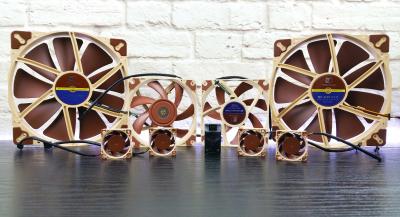
|
|
|
Jun 15 2017, 05:48 PM
|
|
Store Representative
9,140 posts Joined: Jan 2003 From: Edifier, Stax, Noctua and AirPulse
|
These fans took a long time to get right. Noctua should be praised for holding them back until they were this good. These are strongly built fans. Just holding them is a pleasure. In the photographs you can see the struts, but in person the broad blades seem to take up the whole disk. The fans come with a lot of accessories, including enough that you can choose how to fasten your fan. And the many screw-holes will let this fan to go into a large number of settings.
http://www.overclockers.com/noctua-nf-a20-fan-review/ Attached image(s) 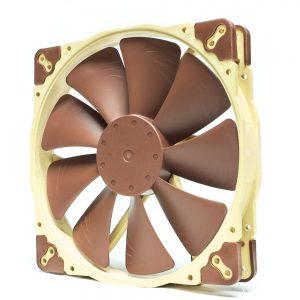 |
|
|
Jun 17 2017, 11:38 AM
|
|
Store Representative
9,140 posts Joined: Jan 2003 From: Edifier, Stax, Noctua and AirPulse
|
These fans took a long time to get right. Noctua should be praised for holding them back until they were this good. These are strongly built fans. Just holding them is a pleasure. In the photographs you can see the struts, but in person the broad blades seem to take up the whole disk. The fans come with a lot of accessories, including enough that you can choose how to fasten your fan. And the many screw-holes will let this fan to go into a large number of settings.
http://www.overclockers.com/noctua-nf-a20-fan-review/ Attached image(s) 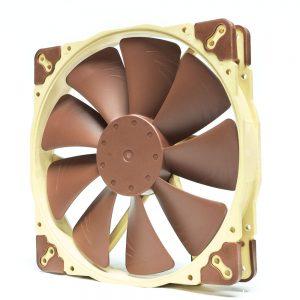 |
| Change to: |  0.0246sec 0.0246sec
 0.33 0.33
 6 queries 6 queries
 GZIP Disabled GZIP Disabled
Time is now: 2nd December 2025 - 05:22 AM |
 Quote
Quote