

Hello v37
and hello there 1wildcat1
Samsung Galaxy S II Official Thread V37, Jellybean me, maybe?
Samsung Galaxy S II Official Thread V37, Jellybean me, maybe?
|
|
 Oct 28 2012, 12:07 AM Oct 28 2012, 12:07 AM
Return to original view | Post
#1
|
 
Senior Member
3,432 posts Joined: Apr 2010   
|
Hello v37
and hello there 1wildcat1 |
|
|
|
|
|
Oct 28 2012, 08:42 PM
Return to original view | Post
#2
|
|
Senior Member
3,432 posts Joined: Apr 2010
|
QUOTE(1wildcat1 @ Oct 28 2012, 08:29 PM) What's up guys traitor!  I only pop up when needed haha Just bought myself a new iPod touch 5g, loving it so far!   lol jk about the battery, you guys can get those other brand ones, i don't see any s2 battery already, even note battery i cannot find |
|
|
Oct 29 2012, 06:50 PM
Return to original view | Post
#3
|
|
Senior Member
3,432 posts Joined: Apr 2010
|
QUOTE(antt00 @ Oct 29 2012, 04:31 PM) Normal sim SGS2 uses. lol you give wrong code leh, its *#0#* , later the fella cod keep try try lol Also press *#0*# in the keypad and test out everything to make sure its in working condition.  |
|
|
Oct 30 2012, 08:58 AM
Return to original view | Post
#4
|
|
Senior Member
3,432 posts Joined: Apr 2010
|
android 4.2 out!
|
|
|
Oct 30 2012, 10:50 PM
Return to original view | Post
#5
|
|
Senior Member
3,432 posts Joined: Apr 2010
|
QUOTE(azone1 @ Oct 30 2012, 10:49 PM) I have 1 question. Now I'm using stock ics rom. If I want to flash PA 2.52, should I do factory reset? yes and i suggest you flash 2.50 instead and also use dorimanx latest kernel 7.4.2 |
|
|
Oct 31 2012, 01:33 AM
Return to original view | Post
#6
|
|
Senior Member
3,432 posts Joined: Apr 2010
|
QUOTE(zebra1995 @ Oct 30 2012, 11:24 PM) when i'm about to update my s2 via kies it says your device does not support software upgrading via kies your s2 using what android versionany solution? |
|
|
|
|
|
Oct 31 2012, 10:59 PM
Return to original view | Post
#7
|
|
Senior Member
3,432 posts Joined: Apr 2010
|
yes long long ago, you are highly encouraged to upgrade if g version
|
|
|
Nov 1 2012, 09:49 PM
Return to original view | Post
#8
|
|
Senior Member
3,432 posts Joined: Apr 2010
|
QUOTE(kazama82 @ Nov 1 2012, 09:04 PM) what you mean by JB base rom?..no sammy base JB out yet..all is aokp/aosp/cm10... eh kazama you send to which service center? they take how long? and did they charge you? mind sharing your experience? downloading wanamlite..should be able to use dorimanx kernel right?..  This post has been edited by destEX: Nov 1 2012, 09:49 PM |
|
|
Nov 1 2012, 11:22 PM
Return to original view | Post
#9
|
|
Senior Member
3,432 posts Joined: Apr 2010
|
QUOTE(Someonesim @ Nov 1 2012, 11:14 PM) Greeting S2 users, am not S2 user, but my friend seek help from me, said that his S2 ( non G ) with RR 3.1.0 with Siyah v5.0.b1, just wanna ask opinion that above rom + kernel stable enough or not . . . . been go through whole 12 pages of V37 but wasnt help too much. i'm not using RR you have to wait someone else who's using it but in my opinion la ok, if your friend is the type that prefers very stable no problems at all and not really into flashing/updating, then i suggest you stick with the current ICS roms, because there havent been a single samsung s2 leak from samsung and the jb roms are all 'homebrewed' so i would not suggest to use them yet.Any input from fellow S2 owner ? Should I just suggest him flash back ICS rom ? |
|
|
Nov 1 2012, 11:55 PM
Return to original view | Post
#10
|
|
Senior Member
3,432 posts Joined: Apr 2010
|
QUOTE(Someonesim @ Nov 1 2012, 11:33 PM) Thanks for input. BTW how's PA in S2 ? Am using PA in my GNex and swear will not go back to other ROM, awesome HD looks with lower dpi and per-App nav button color, oops off topic . . . . nope not off topicbut yep awesome rom, love the freedom it allows to change size and layout, tablet mode and the nav colours, definitely not going to any other roms anymore |
|
|
Nov 2 2012, 01:51 PM
Return to original view | Post
#11
|
|
Senior Member
3,432 posts Joined: Apr 2010
|
QUOTE(gin&tonic @ Nov 2 2012, 12:40 PM) Thx mtxx for the 4.2 camera patch link. Now i have photo sphere working. my photosphere like slow slow only when snap, when wanna snap the bottom pic the alignment move very slow |
|
|
Nov 2 2012, 02:08 PM
Return to original view | Post
#12
|
|
Senior Member
3,432 posts Joined: Apr 2010
|
QUOTE(gin&tonic @ Nov 2 2012, 02:04 PM) Ya mine works but keep getting FC. Anybody having this issue? find the patched version from android police, the one mtxx gave is unpatched version, that you need to modify the default.prop only can work |
|
|
Nov 2 2012, 08:15 PM
Return to original view | Post
#13
|
|
Senior Member
3,432 posts Joined: Apr 2010
|
QUOTE(kazama82 @ Nov 2 2012, 07:00 PM) Sd card is the easiest way if you jump to a new phone. Fix memory, you still need to backup out unless everything is cloud backup.. Hehe yep, sd card the best, i keep all my media files in sd card, songs(6gb of flac) , mangas, light novels, pictures, tb backups, nandroid backup and all the hd game's sd data are all kept in sdcard, if anything happens at least i don't have to download the sd datas again and my pictures are safe. |
|
|
|
|
|
Nov 3 2012, 02:58 AM
Return to original view | Post
#14
|
|
Senior Member
3,432 posts Joined: Apr 2010
|
QUOTE(mtxx @ Nov 2 2012, 11:32 PM) the android 4.2 camera kindda sucks, at least on my S2. http://forum.xda-developers.com/showthread.php?t=1966288the stitching is terrible. and after using the camera, my phone cant enter deep sleep. always stuck with wake lock. so today i tried the new camera 4.2 form xda. but its still the same bad stitching quality. and worst it dont fully generate the whole sphere. and wake lock problem still there. no one complain in xda. i think its my issue. stock cm10 nigthly. i'm using the one from here, not bad i feel, give it a try |
|
|
Nov 3 2012, 10:05 AM
Return to original view | Post
#15
|
|
Senior Member
3,432 posts Joined: Apr 2010
|
QUOTE(mtxx @ Nov 3 2012, 09:26 AM) Yup I use this one too. yea i agree with all above lol, i notice all 3 problems last night when i tried it after i posted There are several issues with it. 1. Camera viewfinder is zoomed in a bit, so cnt predict the final pic size accurately. 2. When rotate camera from landscape to portrait, it does a silly rotating animation that is excess n not required. 3. Photo sphere is just awful no matter how slow n how many times I tried. I it doesn't appear as a nice seamless panaroma. It's like a horribly stitched broken pic. Check the Engadget review of nexus 4&10, they complain the photo sphere was terrible as well. Due to above problems, i change back to stock camera. |
|
|
Nov 3 2012, 07:19 PM
Return to original view | Post
#16
|
|
Senior Member
3,432 posts Joined: Apr 2010
|
QUOTE(gin&tonic @ Nov 3 2012, 06:58 PM) Ya i also migrate fr RR & settle down using CM10. Really stable & smooth. JB rocks. c'mon guys, have a try at Paranoid Android, you guys have no idea how famous this rom is, the dev only supports s2 s3 and nexus but there's a port of it in nearly every android device! http://forum.xda-developers.com/showthread.php?t=1580070 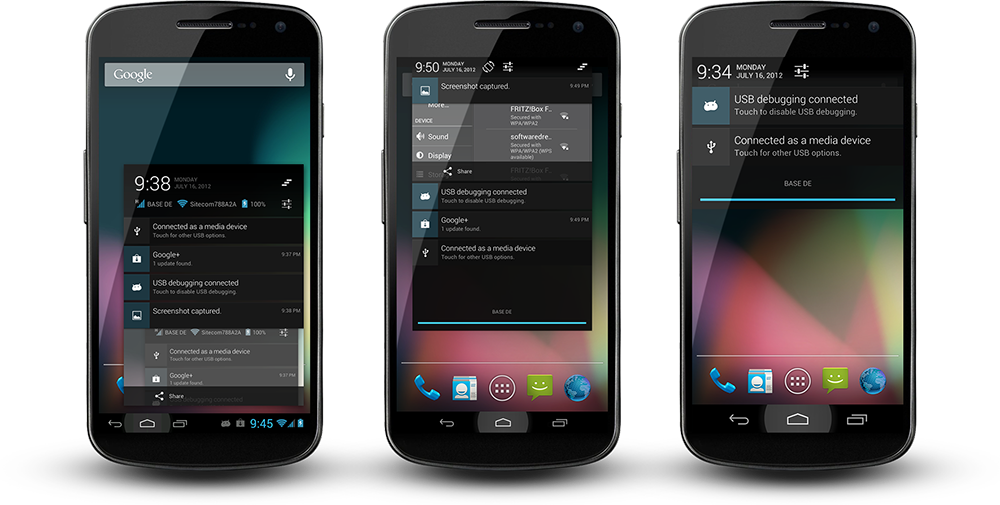 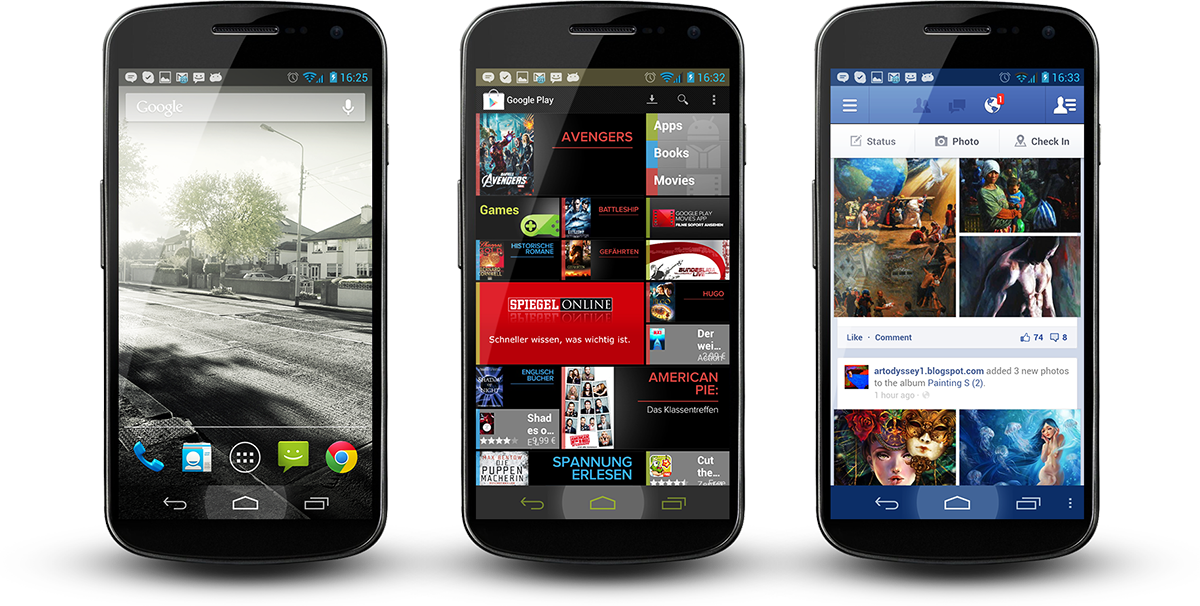 |
|
|
Nov 3 2012, 08:14 PM
Return to original view | Post
#17
|
|
Senior Member
3,432 posts Joined: Apr 2010
|
QUOTE(pikachu01 @ Nov 3 2012, 07:31 PM) How do they compare to Cyanogenmod? The interface is basically the same as AOSP from the pictures :/ same? hahas, well first they have the 3 layouts mode, which is the phone, phablet and tablet (as in first pic) , also each modes have their own set of toggles you can choose from like in jkay mod, those toggles have their own layouts too, for example they have on/off switch or toggle button or holo button or multi-row toggles and many many other settings you can choose from for the notification bar area. the holo buttons also allows you to change their colours, all these are not in the pic sadly but you can find the pics in their 1965+ page thread next we enter the main allure of paranoid android which is the ability to change dpi of each and every app, and the apps don't get fc too, all very stable. They have first a general interface section which you can select the notification type(as in first pic) and your layout for system apps and user apps, then you can set the default dpi for system and user apps, the size for the notification bar and also the size of your lockscreen. then we have the famour per-app settings, in this we can choose which dpi we want for any app instead of the default sizes. inside you can choose the app's dpi, and you can see which layout that app supports, some app supports 6 types of different layouts some supports only 1 layout, for example the google play store has different layouts when you switch to tablet size. Next is the force ability, which allows you to truly resize any widgets related to that app. its not like those resize we have in the launchers, this is true resizing and will not clip/cut off. a recent development/feature would be the per-app nav bar colours, this one works like a charm, you can see any colour for any specific apps, even transparent, it uses a 8 character hex colour code to support this (as in 2nd pic) , and as you can see the nav bar colour changes when you open a different app (2nd pic right most) by default it will turn black, also the buttons can also be coloured, up to the glow that you see when you press. There's tons of extra settings in paranoid android, and they all give you more freedom and more eye candy compared to the default CM, the rom is based on CM so you can expect it to have all the CM goodies with it This post has been edited by destEX: Nov 3 2012, 08:27 PM |
|
|
Nov 3 2012, 08:49 PM
Return to original view | Post
#18
|
|
Senior Member
3,432 posts Joined: Apr 2010
|
|
|
|
Nov 3 2012, 09:15 PM
Return to original view | Post
#19
|
|
Senior Member
3,432 posts Joined: Apr 2010
|
QUOTE(reijikageyama @ Nov 3 2012, 09:02 PM) if i read this earlier i wouldn't have flashed to RR or even CM10 at all  now they have backup and restore for the settings too, so everything become very simple when flashing updates, also comes with a demo. now they have backup and restore for the settings too, so everything become very simple when flashing updates, also comes with a demo.QUOTE(verdangilte @ Nov 3 2012, 09:09 PM) just like a new phone ..just default ...cuz inside many apps folder..i duno which one to delete also everything in your /sdcard can just deleteAdded on November 3, 2012, 9:15 pm QUOTE(verdangilte @ Nov 3 2012, 09:13 PM) all sms, photo, music will gone ?? only sms, media files won't disappear unless you delete/format the sdcard areaThis post has been edited by destEX: Nov 3 2012, 09:15 PM |
|
|
Nov 3 2012, 09:32 PM
Return to original view | Post
#20
|
|
Senior Member
3,432 posts Joined: Apr 2010
|
QUOTE(verdangilte @ Nov 3 2012, 09:18 PM) just wan delete all contact numb....sms..and some folder ..beside..if i factory reset ...will it delete my backup rom ? last time i backup using rom manager.. no it wont delete your rom backup, your contact no. and sms will be gone. you just factory reset, then see what folder still around and delete what you want |
|
Topic ClosedOptions
|
| Change to: |  0.0475sec 0.0475sec
 0.38 0.38
 7 queries 7 queries
 GZIP Disabled GZIP Disabled
Time is now: 22nd December 2025 - 05:32 AM |
 Quote
Quote