Outline ·
[ Standard ] ·
Linear+
Maxis Maxis 3G/HS 3G Thread V6 (Not WBB), Don't Envy at Our Super Fast Speed! :D
|
chuahcs79
|
 Sep 23 2012, 03:39 AM Sep 23 2012, 03:39 AM
|
Look at all my stars!!


|
QUOTE(LcBoy135z @ Sep 23 2012, 03:34 AM) yeah..true  thank you for sharing the latest firmware to me... for E372 user,please update now  and dont forget to review arr   link download please refer to last post  for the real DC-HSPA+ speed only goood at this hour, day time speed no different than HSPA or HSPA+... so i rather want the speed that stable day/night and not only high speed few hour in midnight
Added on September 23, 2012, 3:40 am For HUawei E372 user on mobile partner only
can update this firmware
here -> E372Update_11.203.13.00.00.B757.exeThis post has been edited by chuahcs79: Sep 23 2012, 03:41 AM |
|
|
|
|
|
LcBoy135z
|
Sep 23 2012, 03:42 AM
|
Getting Started

|
QUOTE(chuahcs79 @ Sep 23 2012, 03:39 AM) for the real DC-HSPA+ speed only goood at this hour, day time speed no different than HSPA or HSPA+... so i rather want the speed that stable day/night and not only high speed few hour in midnight i can feel the different...before this while downloading, surfing will not smooth and also buffering will happen when watch utube...after update..try downloading + streaming 720 at utube no buffering at all..good improvement for this latest firmware for E372, will try out and monitoring later and report it back to you chuah   |
|
|
|
|
|
chuahcs79
|
Sep 23 2012, 04:03 AM
|
Look at all my stars!!
|
QUOTE(LcBoy135z @ Sep 23 2012, 03:42 AM) i can feel the different...before this while downloading, surfing will not smooth and also buffering will happen when watch utube...after update..try downloading + streaming 720 at utube no buffering at all..good improvement for this latest firmware for E372, will try out and monitoring later and report it back to you chuah just remember to share it with other E372 user who need it if u know any ,.. Sharing is Caring |
|
|
|
|
|
digilife
|
Sep 23 2012, 06:02 AM
|
|
|
Mf680 stock FW raw, yeah purple all nite long with a Pinger must be Umts900 as the Upload is good 
 I purposely leave the connection on all nite long without any download but the purple light stay solid through out. I used a Pinger to let data flow through, but those are PIng data and its minimal activity on UL/DL, why the purple keeps solid on and no blue blinking or blue solid?  cant brain it   This post has been edited by digilife: Sep 23 2012, 06:10 AM
 |
|
|
|
|
|
ddr3
|
Sep 23 2012, 08:17 AM
|
|
|
QUOTE(zellleonhart @ Sep 22 2012, 10:59 PM) Guys is it proven that B04/05 firmware for ZTE MF680 cannot get purple light? I upgraded mine to B04 yesterday, I can't get purple light already but I still can get around 8mbps speed... But just doesn't feel right y u go update wor 
Added on September 23, 2012, 8:19 amQUOTE(digilife @ Sep 23 2012, 12:23 AM) This is wat everyone is lor lor luien about [attachmentid=3063650] arghhhhhhhh  i want purple   for now the speed is ok, once afternoon it will ding ding compared to the PURPLE 
Added on September 23, 2012, 8:58 amQUOTE(blacktubi @ Sep 22 2012, 11:49 PM) Doing some testing on this software psas.revskills.de It was able to extract and flash it. Trying to figure out how it works ada good news from the extraction software?  This post has been edited by ddr3: Sep 23 2012, 08:58 AM This post has been edited by ddr3: Sep 23 2012, 08:58 AM |
|
|
|
|
|
Narako
|
Sep 23 2012, 08:59 AM
|
|
|
which is more stable mf680 or e372?
like just wanna watch youtube with 720p with no lag no buffering
|
|
|
|
|
|
ic-klass
|
Sep 23 2012, 09:20 AM
|
|
|
QUOTE(chuahcs79 @ Sep 23 2012, 03:39 AM) for the real DC-HSPA+ speed only goood at this hour, day time speed no different than HSPA or HSPA+... so i rather want the speed that stable day/night and not only high speed few hour in midnight
Added on September 23, 2012, 3:40 am For HUawei E372 user on mobile partner only
can update this firmware
here -> E372Update_11.203.13.00.00.B757.exeWhat does it means "on mobile partner only"? |
|
|
|
|
|
LcBoy135z
|
Sep 23 2012, 09:28 AM
|
Getting Started
|
QUOTE(Narako @ Sep 23 2012, 08:59 AM) which is more stable mf680 or e372? like just wanna watch youtube with 720p with no lag no buffering mf680 is good e372 also same depend on you want try which one...right now im using e372,so far after update the firmware...performance more consistent la...if want 720p on utube..no problem at all...1080p pon boleh maa |
|
|
|
|
|
LcBoy135z
|
Sep 23 2012, 09:37 AM
|
Getting Started
|
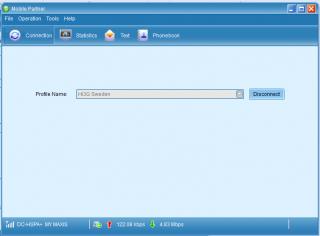
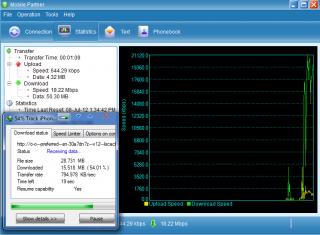
QUOTE(ic-klass @ Sep 23 2012, 09:20 AM) What does it means "on mobile partner only"? to maxis user i think please check your current version of firmware first...and dont update it now..becoz maybe it wil break your modem. for unlocked e372,feel free to update...all come with mobile partner dashboard... and what the funny the latest dashboard is, it troll u lor..hahaha  it wil show the current speed 20Mbps, but when u download using IDM,it will detect the true speed only 5Mbps or depend ur speed that time.... one more thing..see picture » Click to show Spoiler - click again to hide... « like this This post has been edited by LcBoy135z: Sep 23 2012, 09:38 AM |
|
|
|
|
|
digilife
|
Sep 23 2012, 09:55 AM
|
|
|
QUOTE(LcBoy135z @ Sep 23 2012, 09:37 AM) to maxis user i think please check your current version of firmware first...and dont update it now..becoz maybe it wil break your modem. for unlocked e372,feel free to update...all come with mobile partner dashboard... and what the funny the latest dashboard is, it troll u lor..hahaha it wil show the current speed 20Mbps, but when u download using IDM,it will detect the true speed only 5Mbps or depend ur speed that time.... one more thing..see picture » Click to show Spoiler - click again to hide... « like this meaning DL with IDM is slower than normal speedtest/browsing? |
|
|
|
|
|
noobandroid
|
Sep 23 2012, 09:58 AM
|
|
|
QUOTE(digilife @ Sep 23 2012, 09:55 AM) meaning DL with IDM is slower than normal speedtest/browsing? i think he is saying dashboard mis-reporting speed |
|
|
|
|
|
LcBoy135z
|
Sep 23 2012, 09:59 AM
|
Getting Started
|
QUOTE(digilife @ Sep 23 2012, 09:55 AM) meaning DL with IDM is slower than normal speedtest/browsing? nope.. the speed reading error on the new dashboard are there... actual mine speed only 5Mbps,but on the new dashboard it shown up 20Mbps |
|
|
|
|
|
digilife
|
Sep 23 2012, 10:08 AM
|
|
|
QUOTE(LcBoy135z @ Sep 23 2012, 09:59 AM) nope.. the speed reading error on the new dashboard are there... actual mine speed only 5Mbps,but on the new dashboard it shown up 20Mbps so meaning, its the "feel good" feeling on the dashboard where in actual is only 5Mbps tats why IDM is the real speedtest guage, not even speedtest.net |
|
|
|
|
|
blacktubi
|
Sep 23 2012, 10:17 AM
|
-
|
QUOTE(LcBoy135z @ Sep 23 2012, 09:59 AM) nope.. the speed reading error on the new dashboard are there... actual mine speed only 5Mbps,but on the new dashboard it shown up 20Mbps who knows Maybe there are some background applications hogging the connection |
|
|
|
|
|
LcBoy135z
|
Sep 23 2012, 10:47 AM
|
Getting Started
|
QUOTE(digilife @ Sep 23 2012, 10:08 AM) so meaning, its the "feel good" feeling on the dashboard where in actual is only 5Mbps tats why IDM is the real speedtest guage, not even speedtest.net before update it real / a bit different..not much la after update, it wil troll u
Added on September 23, 2012, 10:48 amQUOTE(blacktubi @ Sep 23 2012, 10:17 AM) who knows Maybe there are some background applications hogging the connection of coz no laa....dont troll me like my new dashboard had done to me lor..hahahaa not logic with 1 bar dc-hspa+ can get 20Mbps lol This post has been edited by LcBoy135z: Sep 23 2012, 10:49 AM |
|
|
|
|
|
ahbi1982
|
Sep 23 2012, 11:56 AM
|
New Member
|
Hi,
i am using zte mf680 and win XP,
i am noob in computer stuff and face up a problem when creating dial up connection,
i choose
"connect to the internet" >
"set up my connection manually" >
1. "connect using a dial-up modem"
2. "connect using a broadband connection that requires username and password"
3. "connect using a broadband connection that is always on"
(which one should i choose)
i choose 1. dial up modem but it comes up saying no dial tone.
Besides, should i need to unplug my mf680 from usb (i close the dashboard already) before all these setup?
Thanks in advance.
|
|
|
|
|
|
blacktubi
|
Sep 23 2012, 11:57 AM
|
-
|
QUOTE(ahbi1982 @ Sep 23 2012, 11:56 AM) Hi, » Click to show Spoiler - click again to hide... « i am using zte mf680 and win XP,
i am noob in computer stuff and face up a problem when creating dial up connection,
i choose
"connect to the internet" >
"set up my connection manually" >
1. "connect using a dial-up modem"
2. "connect using a broadband connection that requires username and password"
3. "connect using a broadband connection that is always on"
(which one should i choose)
i choose 1. dial up modem but it comes up saying no dial tone.
Besides, should i need to unplug my mf680 from usb (i close the dashboard already) before all these setup?
Thanks in advance. Select this "connect using a broadband connection that requires username and password" Make sure you installed the modem driver May I know what are you trying to do? Are you trying to connect through mdma? This post has been edited by blacktubi: Sep 23 2012, 01:32 PM |
|
|
|
|
|
ahbi1982
|
Sep 23 2012, 01:05 PM
|
New Member
|
QUOTE(blacktubi @ Sep 23 2012, 11:57 AM) Select this "connect using a broadband connection that requires username and password" Make sure you installed the modem driver May I know what are you trying to do? Are you trying to connect through mdma? Thanks.. I installed the modem driver d, but found out that it keep switching between 3G and turbo 3g, not stable, But my signal strength got 4-5bar (show in the dashboard).. I read out he thread, saying that using umts2100 will be more stable, so I wanna test it out. Is that if I wanna using umts2100, every time when I connect have to use the MDMA? Thanks. |
|
|
|
|
|
blacktubi
|
Sep 23 2012, 01:07 PM
|
-
|
QUOTE(ahbi1982 @ Sep 23 2012, 01:05 PM) Thanks.. I installed the modem driver d, but found out that it keep switching between 3G and turbo 3g, not stable, But my signal strength got 4-5bar (show in the dashboard).. I read out he thread, saying that using umts2100 will be more stable, so I wanna test it out. Is that if I wanna using umts2100, every time when I connect have to use the MDMA? Thanks. The configuration will be saved until you change it again. |
|
|
|
|
|
linkeong
|
Sep 23 2012, 01:38 PM
|
|
|
Seems like B04 firmware from 3 is better than Umobile, at least now my speed is back to 11-12mbps compared with whole day testing umobile stuck at 7-8mbps
|
|
|
|
|



 Quote
Quote







 0.0223sec
 1.19
1.19
 6 queries
 GZIP Disabled