Welcome Guest ( Log In | Register )

Bump Topic Topic Closed RSS Feed
56 Pages « < 29 30 31 32 33 > » Bottom

Outline · [ Standard ] · Linear+

 No more experimental shots "Closed door liao", Mr.Mod please delete this thread

views
     
TSWildPiew
post Sep 18 2006, 03:53 PM

Regular
******
Senior Member
1,369 posts

Joined: Nov 2005


QUOTE(clemong_888 @ Sep 18 2006, 03:16 PM)
piew,nice to c u around. 25,28,29 very nice
*
10q for viewing notworthy.gif

QUOTE(aaron @ Sep 18 2006, 03:34 PM)
ah piew...hv a great holiday ar....
nice pic ler...i like 13,22,25,26,27,28

how u make the sunlight look like a bubble 1?
recently i oso got shot a similar pic on the sunlight under a big tree and snail oso...haha....tomolo post will post it...

how u combine 2 pic into 1?
*
ok mula mula,
step1 (take the ground exposure, then the sky sure over abit geh)
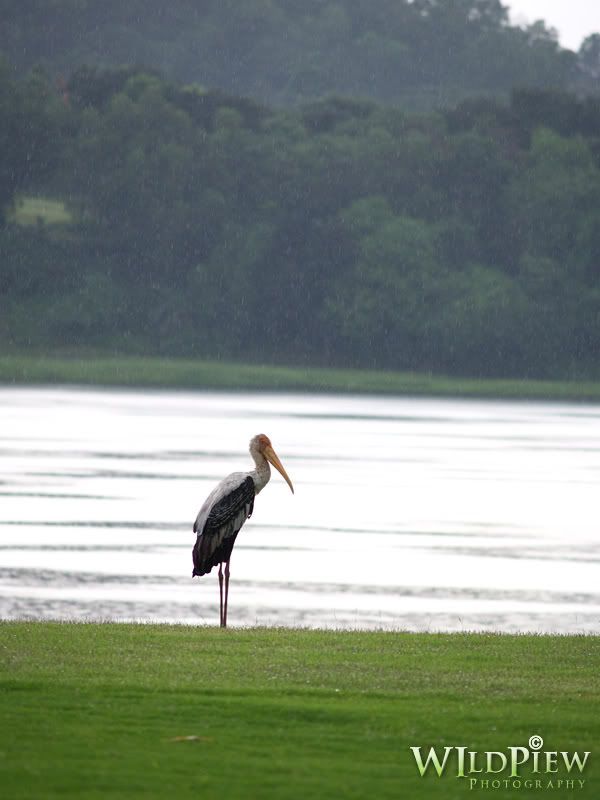
user posted image

step 2 (take the sky exposure, the ground sure under geh)
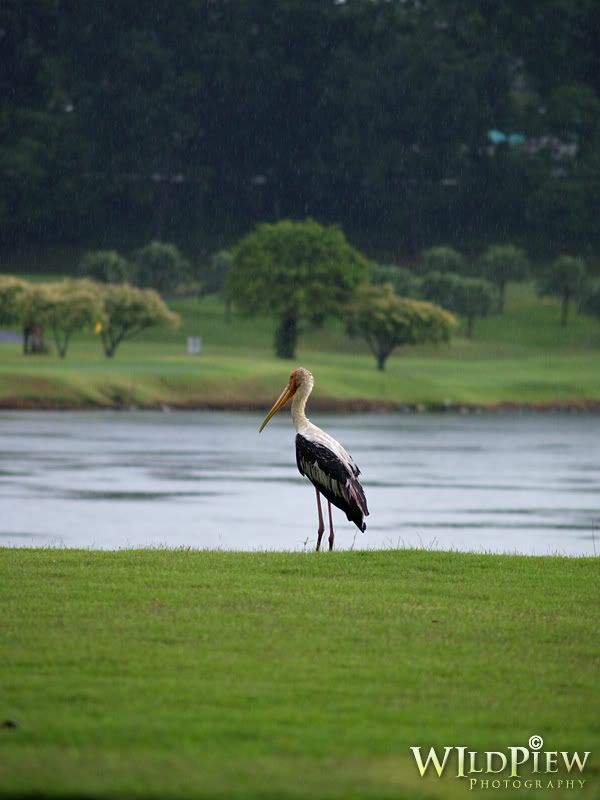
user posted image

step3
Photoshop use layer mask, either masking the sky or the ground.

step4 kaw-tim
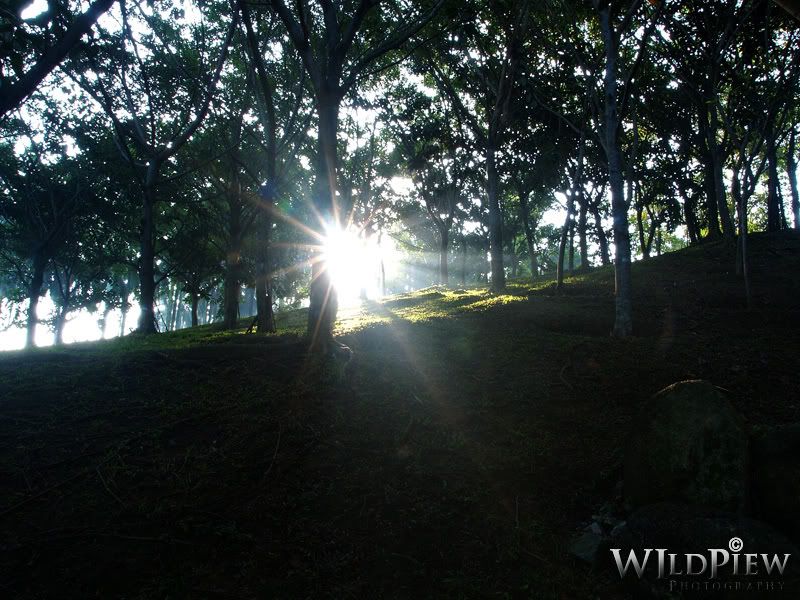
user posted image

oh ya u need a tripod as well.

This post has been edited by WildPiew: Sep 18 2006, 03:56 PM
aaron
post Sep 18 2006, 03:58 PM

LUMIX Freak
*******
Senior Member
2,451 posts

Joined: Jan 2003
From: Seri Kembangan


oic...haha..i'm photoshop noob.... tongue.gif
HenryLow
post Sep 18 2006, 04:21 PM

liddat oso can, you win liao lor.
Group Icon
VIP
4,336 posts

Joined: Jan 2003
From: BOLEHLand
ah piew is photoshop sifu ler...
he is too creative la...
beh ta han... tongue.gif
NonBlooD
post Sep 18 2006, 04:24 PM

Enthusiast
*****
Senior Member
800 posts

Joined: Jan 2003


haha...i saw this trick b4 but din try b4...what i can say, ur stiches cant b c...very nice... biggrin.gif
TSWildPiew
post Sep 18 2006, 04:26 PM

Regular
******
Senior Member
1,369 posts

Joined: Nov 2005


QUOTE(aaron @ Sep 18 2006, 03:58 PM)
oic...haha..i'm photoshop noob.... tongue.gif
*
nvm we all still learning.

QUOTE(HenryLow @ Sep 18 2006, 04:21 PM)
ah piew is photoshop sifu ler...
he is too creative la...
beh ta han... tongue.gif
*
wei, my ps so so jet, this technique learnt it from astro WLT got 1 prog at sat 8pm (dun still got or not), that prog teach photog leh.
TSWildPiew
post Sep 18 2006, 04:30 PM

Regular
******
Senior Member
1,369 posts

Joined: Nov 2005


QUOTE(NonBlooD @ Sep 18 2006, 04:24 PM)
haha...i saw this trick b4 but din try b4...what i can say, ur stiches cant b c...very nice... biggrin.gif
*
haha, 10q first, this tech suitable for landscape pic , coz ur flash cannot fill up that far ma tongue.gif i also first time using, i think can do better leh.
aaron
post Sep 18 2006, 04:51 PM

LUMIX Freak
*******
Senior Member
2,451 posts

Joined: Jan 2003
From: Seri Kembangan


i oso do hv a trick on this kind of photo....but i can say is like a cheat la..

normally i shoot the ground in correct exposure so the sky will over exposure and used the gradually tint effect on the sky...than adjust the level of the tint effect...than the details of the sky will come out...i hv a pic doing this trick will post tonite..coz now no pic...
TSWildPiew
post Sep 18 2006, 04:54 PM

Regular
******
Senior Member
1,369 posts

Joined: Nov 2005


QUOTE(aaron @ Sep 18 2006, 04:51 PM)
i oso do hv a trick on this kind of photo....but i can say is like a cheat la..

normally i shoot the ground in correct exposure so the sky will over exposure and used the gradually tint effect on the sky...than adjust the level of the tint effect...than the details of the sky will come out...i hv a pic doing this trick will post tonite..coz now no pic...
*
tongue.gif come post here, post the original n the touch-up1 tongue.gif, i also wan to learn something from Captain @-@ron. laugh.gif
aaron
post Sep 18 2006, 04:59 PM

LUMIX Freak
*******
Senior Member
2,451 posts

Joined: Jan 2003
From: Seri Kembangan


aiyo..ah piew..my touch up skill sux...
haha...i borrow ur pic and retouch on ur 1st pic. hope u dun mind..
no additional retouch,just add the graduated tint effect only.


Attached thumbnail(s)
Attached Image
HenryLow
post Sep 18 2006, 05:09 PM

liddat oso can, you win liao lor.
Group Icon
VIP
4,336 posts

Joined: Jan 2003
From: BOLEHLand
Captain aaron...
ur retourch skill chun la...
nice...

i have to learn some skill liao...
aaron
post Sep 18 2006, 05:31 PM

LUMIX Freak
*******
Senior Member
2,451 posts

Joined: Jan 2003
From: Seri Kembangan


@henry sir,
not chun la...my skill sux...
i just used the picassa to do it only...it a software for dummy like me..
i dunno how to used the PS..very complecated 1..
clemong_888
post Sep 18 2006, 05:36 PM

どんど晴れ
*******
Senior Member
2,502 posts

Joined: Apr 2005
From: Kuching,Kuala Lumpur, Gifu,Japan


piew, thanks for the tip! i've been having this problem recently.. now i know what to do biggrin.gif thanks!
TSWildPiew
post Sep 18 2006, 05:42 PM

Regular
******
Senior Member
1,369 posts

Joined: Nov 2005


QUOTE(HenryLow @ Sep 18 2006, 05:09 PM)
Captain aaron...
ur retourch skill chun la...
nice...

i have to learn some skill liao...
*
me2

QUOTE(aaron @ Sep 18 2006, 05:31 PM)
@henry sir,
not chun la...my skill sux...
i just used the picassa to do it only...it a software for dummy like me..
i dunno how to used the PS..very complecated 1..
*
for me , i dunno how to use picassa leh. same thing we learn from each other jet tongue.gif

QUOTE(clemong_888 @ Sep 18 2006, 05:36 PM)
piew, thanks for the tip! i've been having this problem recently.. now i know what to do biggrin.gif thanks!
*
haha no prob, js sharing. looking forward to see ur nice pic again tongue.gif.
??!!
post Sep 18 2006, 05:46 PM

Look at all my stars!!
*******
Senior Member
2,548 posts

Joined: May 2005
I read somewhere that it's better to under than over-expose: so that the details are not lost. I've taken the liberty to do the reverse of what Aaron did. Can see more of the village at the valley, but at the expense of some wash-out effects of the clouds.


user posted image

Edit:

Still think the stitch 2 exposures into 1 will give better results. Or photoshop can do fill-in on certain part of picture only?..got such feature or not?

This post has been edited by ??!!: Sep 18 2006, 05:49 PM
TSWildPiew
post Sep 18 2006, 05:59 PM

Regular
******
Senior Member
1,369 posts

Joined: Nov 2005


wah even ??!! also coming cool. appreciate it notworthy.gif
??!! u can play around wif my pic la, dun worry i dun mind leh.

1 more thing i forgot to mention which is, this pic i was taken at around 7++am, coz i tot i can get a sunrise shot, but too bad it's another cloudy+small small rain T_T, so actually the environment is not so bright leh tongue.gif
aaron
post Sep 18 2006, 06:03 PM

LUMIX Freak
*******
Senior Member
2,451 posts

Joined: Jan 2003
From: Seri Kembangan


QUOTE(WildPiew @ Sep 18 2006, 05:42 PM)
me2
for me , i dunno how to use picassa leh. same thing we learn from each other jet tongue.gif
haha no prob, js sharing. looking forward to see ur nice pic again tongue.gif.
*
ya..just learn from each other.. rclxms.gif

@?!!
great touch up.
i agree with u..take in under exposure better than over exposure,coz wont lose the details. in pc..we can always add the light source to the pic.
but the only problem for me is..how much light we need to add in..i tried b4 where view on different pc will hv different result..last time i touch my pic on my home pc, i look great but when view on other monitor...it sux...

so i now start shoot pic at the right exposure...so no need pening... wink.gif
??!!
post Sep 18 2006, 06:07 PM

Look at all my stars!!
*******
Senior Member
2,548 posts

Joined: May 2005
QUOTE(WildPiew @ Sep 18 2006, 05:59 PM)
wah even ??!! also coming  cool. appreciate it notworthy.gif
??!! u can play around wif my pic la, dun worry i dun mind leh.

*
Thanks!

hahah...i always lurking around..look see and learn techniques mah...
??!!
post Sep 18 2006, 06:13 PM

Look at all my stars!!
*******
Senior Member
2,548 posts

Joined: May 2005
QUOTE(aaron @ Sep 18 2006, 06:03 PM)
@?!!

but the only problem for me is..how much light we need to add in..i tried b4 where view on different pc will hv different result..last time i touch my pic on my home pc, i look great but when view on other monitor...it sux...

so i now start shoot pic at the right exposure...so no need pening...  wink.gif
*
view on monitor , tak accurate sangat.

also prefer to get it right when taking pic. Problem is , when I am travelling, no time to wait for right lighting. Lagi, skills so lacking... kadang just have to hantam take pic. Like they say, lousy pic, better than no picture! However, hope to minimize lousy shots as I go along.
HenryLow
post Sep 18 2006, 06:16 PM

liddat oso can, you win liao lor.
Group Icon
VIP
4,336 posts

Joined: Jan 2003
From: BOLEHLand
QUOTE(??!! @ Sep 18 2006, 06:13 PM)
view on monitor , tak accurate sangat.

also prefer to get it right when taking pic. Problem is , when I am travelling, no time to wait for right lighting. Lagi, skills so lacking... kadang just have to hantam take pic. Like they say, lousy pic, better than no picture! However, hope to minimize lousy shots as I go along.
*
lousy pics also can take back to home to PS to nice pics...
but for me... lousy pics = no pics coz i donno photo-editing...
doh.gif
??!!
post Sep 18 2006, 06:19 PM

Look at all my stars!!
*******
Senior Member
2,548 posts

Joined: May 2005
QUOTE(HenryLow @ Sep 18 2006, 06:16 PM)
lousy pics also can take back to home to PS to nice pics...
but for me... lousy pics = no pics coz i donno photo-editing...
doh.gif
*
Aiyoh...ah mah like me can also do 1 step auto fix photo-editing...tak kan techies like you all kenot do meh ???????

56 Pages « < 29 30 31 32 33 > » Top
Topic ClosedOptions
 

Change to:
| Lo-Fi Version
0.0246sec    0.46    6 queries    GZIP Disabled
Time is now: 24th December 2025 - 09:11 PM