Outline ·
[ Standard ] ·
Linear+
Unifi UNIFI with TP-Link N750 TL-WDR4300, Any advise on how to setup this router
|
bahathir
|
 Jul 2 2013, 11:21 AM Jul 2 2013, 11:21 AM
|

|
QUOTE(pokemon01234 @ Jul 2 2013, 01:53 AM) Hi, can you help me a bit with TL-WDR4300 ?  I just got my N750 TL-WDR4300 today and I spent a few hours configuring it up But I still can't find the Guest Newtork options  Cause in official Malaysia Tp-Link site wrote: 5. The firmware supports Guest Network and IPv6 function.I am not using "Guest Network' feature, but, I also cannot find the 'Guest Network' feature/page in the setup's page. Why not try the WPS feature, which is quite easy to use. Thank you. |
|
|
|
|
|
urbansaint
|
Jul 4 2013, 09:07 PM
|
Getting Started

|
QUOTE(pokemon01234 @ Jul 2 2013, 01:53 AM) Hi, can you help me a bit with TL-WDR4300 ? I just got my N750 TL-WDR4300 today and I spent a few hours configuring it up But I still can't find the Guest Newtork options Cause in official Malaysia Tp-Link site wrote: 5. The firmware supports Guest Network and IPv6 function.HI, I just bought the N750 TP-Link today and also faced the same thing. I even called UNIFI support thought the problem might come from them. But I've download the latest firmware and upgrade it...Now everything works fine...but the 5GHz signal is quite weak. http://www.tp-link.com/en/support/download...ersion=V1#tbl_jTry it out.. |
|
|
|
|
|
arslow
|
Jul 7 2013, 01:23 PM
|
|
|
Amy reason why you guys don't seem to prefer wdr4900?
|
|
|
|
|
|
firdausbhari
|
Jul 12 2013, 01:06 PM
|
|
|
QUOTE(arslow @ Jul 7 2013, 01:23 PM) Amy reason why you guys don't seem to prefer wdr4900? wdr4900 support unifi meh? |
|
|
|
|
|
arslow
|
Jul 12 2013, 02:37 PM
|
|
|
QUOTE(firdausbhari @ Jul 12 2013, 01:06 PM) wdr4900 support unifi meh? if 4300 support, shouldn't 4900 support it too?  |
|
|
|
|
|
firdausbhari
|
Jul 14 2013, 03:43 PM
|
|
|
QUOTE(arslow @ Jul 12 2013, 02:37 PM) if 4300 support, shouldn't 4900 support it too? really meh? have u tried? This post has been edited by firdausbhari: Jul 14 2013, 03:50 PM |
|
|
|
|
|
arslow
|
Jul 14 2013, 04:11 PM
|
|
|
QUOTE(firdausbhari @ Jul 14 2013, 03:43 PM) really meh? have u tried? 
this seller seems to be sure about it yeah, maybe its not so clear from his answer, but he could have just said no... |
|
|
|
|
|
firdausbhari
|
Jul 14 2013, 08:26 PM
|
|
|
QUOTE(arslow @ Jul 14 2013, 04:11 PM)
this seller seems to be sure about it yeah, maybe its not so clear from his answer, but he could have just said no... im not sure bout that but i dont think wdr4900 firmware supports unifi. or does it? |
|
|
|
|
|
bahathir
|
Jul 14 2013, 08:37 PM
|
|
|
TL-WDR4900: To be safe look at the simulator/emulator http://www.tp-link.com/resources/simulator...R4900/Index.htmClick at Network. If it does NOT have VLAN Setup, then, it is CANNOT be used to replace uniifi's DIR615. Example from my WDR4300. 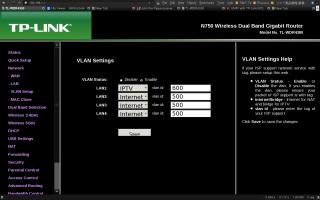
If you browse TP-LInk Malaysia (www.tp-link.com.my), the is no Unifi mode mentioned. Thank you. This post has been edited by bahathir: Jul 14 2013, 08:49 PM |
|
|
|
|
|
firdausbhari
|
Jul 15 2013, 04:56 PM
|
|
|
QUOTE(bahathir @ Jul 14 2013, 08:37 PM) TL-WDR4900: To be safe look at the simulator/emulator http://www.tp-link.com/resources/simulator...R4900/Index.htmClick at Network. If it does NOT have VLAN Setup, then, it is CANNOT be used to replace uniifi's DIR615. Example from my WDR4300.
If you browse TP-LInk Malaysia (www.tp-link.com.my), the is no Unifi mode mentioned. Thank you. yes broooo. thank you. this is what im trying to say haha. its firmware does not support unifi. |
|
|
|
|
|
sHawTY
|
Jul 19 2013, 11:21 PM
|
|
|
QUOTE(bahathir @ Jun 30 2013, 09:12 AM) I upgraded firmware version to 3.13.32 Build 130612 Rel.83937n I'm using the same version of firmware as yours. Everything is working perfectly. I've been wondering, how on earth did you stick those antennas to the back of the LCD TV? Are you using double sided tape?  |
|
|
|
|
|
kaisam
|
Jul 20 2013, 11:55 AM
|
Getting Started
|
can call to Hotline Support to ask. For Malaysian Users Only(English Service) Toll Free: +60 1300 88 875465 (1300 88 TP-LINK) E-mail: support.my@tp-link.com Service Time: 24 hours a day, 7 days a week. Thank you.  |
|
|
|
|
|
bahathir
|
Jul 20 2013, 02:20 PM
|
|
|
QUOTE(sHawTY @ Jul 19 2013, 11:21 PM) I'm using the same version of firmware as yours. Everything is working perfectly. I've been wondering, how on earth did you stick those antennas to the back of the LCD TV? Are you using double sided tape? Doutble tape ? No.  The TP-Link TL-ANT2408C 8dB antenna comes with magnetic base which I able to stick the antenna to the back of the HDTV, which is made from metal. Ref http://www.tp-link.com/en/products/details...del=TL-ANT2408C |
|
|
|
|
|
sHawTY
|
Jul 20 2013, 06:04 PM
|
|
|
QUOTE(bahathir @ Jul 20 2013, 02:20 PM) Doutble tape ? No. The TP-Link TL-ANT2408C 8dB antenna comes with magnetic base which I able to stick the antenna to the back of the HDTV, which is made from metal. Damn, too bad my LCD TV doesn't have metal back.  |
|
|
|
|
|
bahathir
|
Jul 23 2013, 10:54 AM
|
|
|
QUOTE(sHawTY @ Jul 20 2013, 06:04 PM) Damn, too bad my LCD TV doesn't have metal back. Let's look at behind of the HDTV. 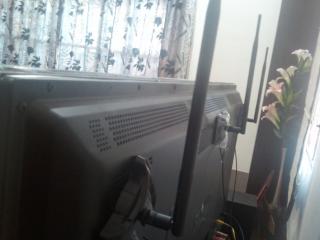
But. the 'metal' also can be a problem because it MAY absorb or deflect radio wave. Anyway, I don't have coverageproblem, because,...... I am using the Unifi's D-Link DIR615; which running DD-WRT firmware and run as 'Repeater Bridge' mode; and changed it's TX Power to 200mW, which provides coverage for upper stair. Thank you. This post has been edited by bahathir: Jul 23 2013, 10:57 AM |
|
|
|
|
|
gopinath24
|
Jul 25 2013, 04:10 PM
|
New Member
|
QUOTE(sHawTY @ Jul 19 2013, 11:21 PM) I'm using the same version of firmware as yours. Everything is working perfectly. I've been wondering, how on earth did you stick those antennas to the back of the LCD TV? Are you using double sided tape? Bro i using the TL-WDR4300 router, after i upgrade the new firmware 3.13.32 its doesn't connect to unifi, how did you did it ?? Perviously in wan menu i have radio button to select wither normal or unifi mode, if i use select unifi mode it work normally. But for new firmware i cant select unifi, normal , or maxis as they stated in the website. |
|
|
|
|
|
sHawTY
|
Jul 25 2013, 04:45 PM
|
|
|
QUOTE(gopinath24 @ Jul 25 2013, 04:10 PM) Bro i using the TL-WDR4300 router, after i upgrade the new firmware 3.13.32 its doesn't connect to unifi, how did you did it ?? Perviously in wan menu i have radio button to select wither normal or unifi mode, if i use select unifi mode it work normally. But for new firmware i cant select unifi, normal , or maxis as they stated in the website. 3.13.32 which build? I'm using "3.13.32 Build 130612 Rel.83937n", it works perfectly with UNiFi. Or you may try the: TL-WDR4300_V1_130613(VLAN)_My from this website: http://www.tp-link.com.my/support/download...ersion=V1#tbl_j |
|
|
|
|
|
gopinath24
|
Jul 25 2013, 04:57 PM
|
New Member
|
Thanks shawty, i figure out the issue ready, after i upgrade the firware when i try to restore the setting from my pervious firmware it doesnt work.. i have to reconfigure everything to make it work again. thanks
|
|
|
|
|
|
sHawTY
|
Jul 28 2013, 01:37 PM
|
|
|
Has anyone tried the TL-WDR4300_V1_130617 firmware? Does it work with UNiFi? |
|
|
|
|
|
sHawTY
|
Jul 29 2013, 05:08 PM
|
|
|
Edited.
This post has been edited by sHawTY: Oct 20 2013, 02:33 AM
|
|
|
|
|




 Quote
Quote


 0.0256sec
 0.30
0.30
 6 queries
 GZIP Disabled