Welcome Guest ( Log In | Register )

Bump Topic Topic Closed RSS Feed
7 Pages « < 4 5 6 7 >Bottom

Outline · [ Standard ] · Linear+

Hardware 2012 NEW MacBook Pro | MacBook Air Users Thread, Version 9.0 - 95%/92% score on Gdgt.com!

views
     
TSstringfellow
post Jul 2 2012, 09:44 PM

Ultrawide | 4K | VR
********
Senior Member
11,305 posts

Joined: Jan 2003
QUOTE(FishnChipx @ Jul 2 2012, 08:48 PM)
lol, instead of getting mac mini which i cant bring around, that y i just upgrade the ram to 16gb then problem solve ?  rclxms.gif
*
Yes. Instead of turning the laptop form factor and use it with external keyboards, USB headsets, USB mouse and USB hubs dangling around?

I have never(or rarely) seen anyone (except those coming from Windows camp), that are fond with external peripherals. Did you read that "kernel_task" article I posted? You're adding unnecessary RAM allocation to peripherals you keep connected all the time.

As for the advice on maxing out RAM, it's a matter of looking at your usage + how long your hanging on to that Mac before reselling it. I never had a portable device longer than 12 months in my possession, AND fom my posted Activity Monitor screenshot, I KNOW my RAM allocation needs never exceeds 8GB RAM. Virtualization is a poor way of using dual OS, and is more of a stop-gap than a permanent solution. Boot camp utilizes all the resources available mended for multi-OSes without any detrimental effect on either OS.
TSstringfellow
post Jul 2 2012, 10:37 PM

Ultrawide | 4K | VR
********
Senior Member
11,305 posts

Joined: Jan 2003
Because you're bringing the Windows mentality if doing things when the Mac OSX workflow and common sense costs you less money and more efficiency?

There is a better way of doing things. And costs lest performance hits on your machine compared to the sloppy way of you doing it currently. Sure, I can get a message sent via snail mail/post but who does that anymore when it's more efficient to either just text, email or bloody voice-chat via teleconferencing?

You can get away with 8GB RAM without running VMWare Fusion and going via Bootcamp instead. The end result would be the same, you'd get the job done, but it's like you going to the supermarket on a noisy,gas-guzzling, smoke belching lorry, when you can do the same thing riding a Nissan Leaf or Prius without spending much and with improved fuel/cost efficiency.

By all means, do what you want. In the end, no specs will be enough for you coz you do things the inefficient way (More Ghz, more RAM,etc) instead if packing those work flow within efficient work cycle.

I learnt to do things "the hard way" too coz I'm taught the ways of Windows but when Apple provides better execution and efficient ways of doing things, I'm willing to learn those work flow and abandon the slow, clunky, inefficiency Window ways. I still use Windows for games though, coz in the flip-side of this, Windows does it better in gaming than Macs. Just don't bring the old Windows adage (more gigahertz, bigger the number the better) when using a Mac. We've moved beyond pure Ghz numbers in processors and gone into improving cite processor efficiency cycles at lower processor frequency.

I'm providing my own side of how I compute on my Mac. If you still want to carry on with that Windows adage, be my guest. *shrugs*
TSstringfellow
post Jul 2 2012, 10:40 PM

Ultrawide | 4K | VR
********
Senior Member
11,305 posts

Joined: Jan 2003
QUOTE(liwei92 @ Jul 2 2012, 10:22 PM)
Agree with you , i dont understand how the way people wanted 16gb ram could be so troubling to him

to: Stringfellow
he ordered the 16gb ram and get over it
*
Yup. It's like saying I ordered an 8GB Retina just to surf and play music. That's the analogy. Sure that's his own money, but championing "more RAM = always better" does not always apply in all cases.

In the end, yes it's his own money. In not calling him out on how he spend his money (God knows how much more cavalier I am with my own expenditure), I'm questioning his work methods and how he utilizes that MBP RD he just bought.

This post has been edited by stringfellow: Jul 2 2012, 10:45 PM
TSstringfellow
post Jul 2 2012, 10:44 PM

Ultrawide | 4K | VR
********
Senior Member
11,305 posts

Joined: Jan 2003
The Chrome/Chrome Canary causing Mac crashes news was a few days back. It was out on Engadget, Gizmodo and picked up by other tech-related websites. I suggest subscribing to their RSS feeds and keep up with the news. Google even admitted on the memory leak causing Mac OSX shutdowns.
TSstringfellow
post Jul 2 2012, 10:54 PM

Ultrawide | 4K | VR
********
Senior Member
11,305 posts

Joined: Jan 2003
Point number 3 isn't efficient if you have to carry two laptops with you. Efficient is the keyword here, remember?

I don't use my Ferrari just to drive it to the wet market to buy fish. I use my reliable Nissan Leaf. Sure, I can use the Ferrari to do the same thing but it defeats the purpose of doing it efficiently without costing me much of my resources. Analogous enough?
TSstringfellow
post Jul 3 2012, 02:22 PM

Ultrawide | 4K | VR
********
Senior Member
11,305 posts

Joined: Jan 2003
QUOTE(desreg2913 @ Jul 3 2012, 01:46 PM)
am really new in mac, therefore 8GB ram is not necessary actually?
how its really work? thank you for replying =)
*
I'll post the reply through PM. Don't wanna post here, too many trolls. UGPM.

This post has been edited by stringfellow: Jul 3 2012, 02:23 PM
TSstringfellow
post Jul 3 2012, 06:33 PM

Ultrawide | 4K | VR
********
Senior Member
11,305 posts

Joined: Jan 2003
Let's populate this thread with more useful posts than idle-Kopitiam-uncle talk.

http://www.theverge.com/2012/7/2/3132249/o...display-support


Bookmark that page, The Verge will be updating them with apps updated for Retina Display once they are made available. Of course, games are already Retina-ready.

So far, Reeder, Sparrow, Aperture, Chrome (Canary developer channel), iMovie, VLC and most of Apple's apps, including Mail, Safari, Aperture, and Final Cut Pro, have been updated to Retina resolution. There is a glitch you can take advantage of to trick the MBP RD into displaying Retina resolution for MS Office suite of apps, plus the "Get Info" trick to re-enable high-resolution version of apps to run (on certain apps only). Only when the apps has dormant hi-res assets but did not being turned on by the app developer.

This post has been edited by stringfellow: Jul 3 2012, 06:34 PM
TSstringfellow
post Jul 3 2012, 10:19 PM

Ultrawide | 4K | VR
********
Senior Member
11,305 posts

Joined: Jan 2003
QUOTE(zXJaMeSXz @ Jul 3 2012, 07:38 PM)
Got a question... Not sure if this is the right place to ask, but here goes...

Let's say I have 2 MacBooks, both different specs...
I want to put Macbook1's HDD together with its data to Macbook2...
What's the best way to do it?

Copy an image of that HDD with an external drive, insert that HDD to Macbook2 and format it then backup the data?

Thanks in advance...
*
Carbon Copy Cloner.

Make sure your source HDD(MacBook 1) had been updated to the latest software update before cloning to target(MacBook 2).

You can also follow Edoras's advice using Migration Assistant. The fastest method is connecting both source and target MacBooks via Thunderbolt. The next fastest is via FireWire, then Gigabit Ethernet. Migration Assistant does not work via USB.

I migrated all my perfectly set up Retina MBP files to the just purchased 2013 MacBook Air 13" via Thunderbolt, takes just 45mins to transfer 200GB+ of data over.


TSstringfellow
post Jul 4 2012, 10:54 PM

Ultrawide | 4K | VR
********
Senior Member
11,305 posts

Joined: Jan 2003
Good evening from Istanbul. It's 5:50pm here.

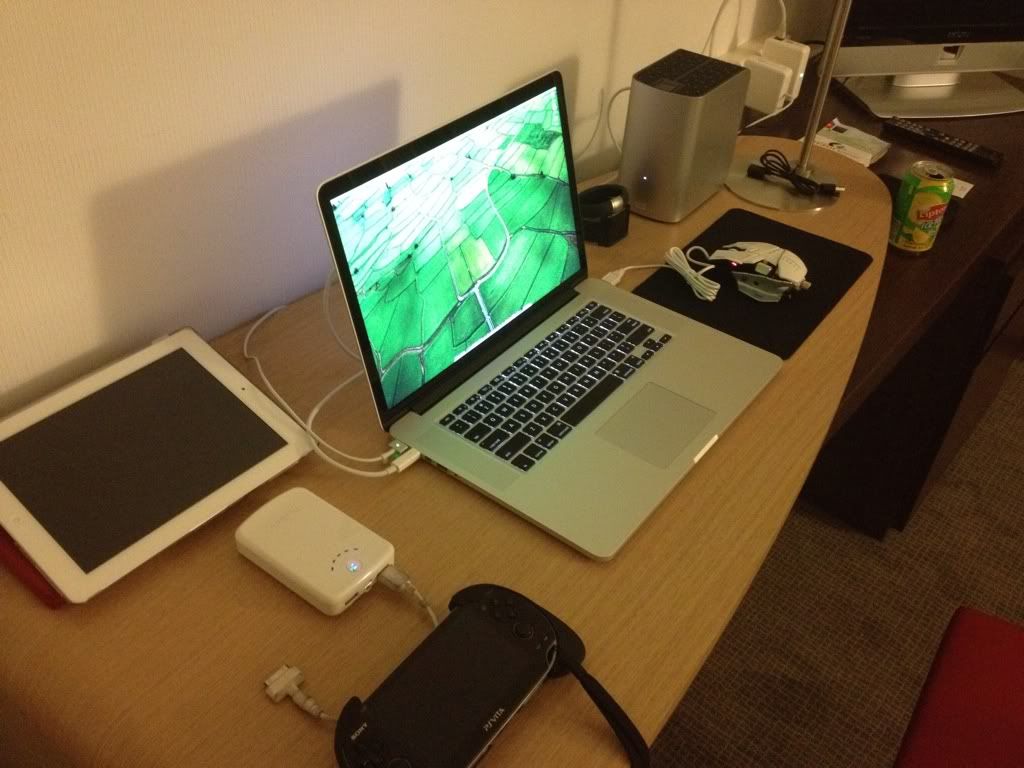
Stuck here for 3 nights, it's summer here and freaking 33-35 degrees HOT with dry heat. Not gonna do any sightseeing in this stupid weather, so I've prepped this in the hotel room for the entire duration of the stay.

user posted image

Retina MacBook Pro, running Diablo 3, StarCraft 2 and Steam games. The silver behemoth is the 6TB Thunderbolt Duo drive feeding 6TB worth of 720p/1080p movies and TV shows via Plex, Retina iPad, Retina iPhone 4S (used to take this pic, which makes me Retinized across all my portable devices), and PSVita.

No moments of boredom here. The only boring time is the time to venture out of the room to get something to eat. Turkish food isn't exactly "delightful".

This post has been edited by stringfellow: Jul 4 2012, 10:54 PM
TSstringfellow
post Jul 4 2012, 11:42 PM

Ultrawide | 4K | VR
********
Senior Member
11,305 posts

Joined: Jan 2003
QUOTE(Victor3010 @ Jul 4 2012, 11:12 PM)
For 226 dpi of pixel density in the rmbp, i recalled Steve jobs launching the iPhone 4 saying that the threshold our eyes can't differentiate pixel is when the pixel density becomes more than 300 dpi... Did they over advertised the rmbp?
*
The reason why it still qualifies as Retina is the fact that the screen pixels aren't discernible from the normal distance of viewing. When it comes to iPhone, you view the screen closer, therefore it needs a greater PPI count. You view the Retina iPad much further than iPhone 4S, and still unable to discern the pixel structure of the screen at normal viewing distance. The same principles applies to the Retina MBP.

In all cases, the Retina definition doesn't apply when you view them closer than their optimum viewing distance. If I put my eyeballs millimeters from the iPhone 4S screen, the Retina doesn't apply anymore. The same with Retina iPad and Retina MBP. Nobody views their Retina devices out of context when it comes to the viewing distance other than the craziest pixel-peepers and optically-challenged people.


Added on July 4, 2012, 11:46 pm
QUOTE(Xirality @ Jul 4 2012, 11:32 PM)
very nice setup stringfellow!  drool.gif
wonder how many kilos are this total up haha
abit off topic here. where you download those 720p/1080p video that store inside your WD thunderbolt duo?
or you buy from itunes store?
*
Some ripped from BD collection I have, the rest, you have to be resourceful. Not gonna elaborate on that.

A sample of movies in that 6TB Thunderbolt Duo. A tip of the iceberg compared to the content in the Pegasus Thunderbolt at home.

» Click to show Spoiler - click again to hide... «


This post has been edited by stringfellow: Jul 4 2012, 11:46 PM
TSstringfellow
post Jul 5 2012, 12:29 AM

Ultrawide | 4K | VR
********
Senior Member
11,305 posts

Joined: Jan 2003
QUOTE(olivur @ Jul 5 2012, 12:24 AM)
i see a rat9 in there!

also,

http://youtu.be/vankaSlfSr0  laugh.gif
*
That's a RAT7 Contagion. As for your Youtube link, very 60/70s Bond-ish. tongue.gif
TSstringfellow
post Jul 5 2012, 01:16 AM

Ultrawide | 4K | VR
********
Senior Member
11,305 posts

Joined: Jan 2003
Personally (and I can't emphasize more on that word: PERSONALLY), I find these skin wraps degrades from the look of the Macs. Sure, it protects, but Apple uses the aluminum body chassis as a giant heat sink to conduct the heat away. Wrapping it in plastic negates that heat dispersion.

The most I would do on my Retina MBP would be a palm guard. Just because I wear the Nike Fuelband and Lunatik Lynk on my two arms and I don't like the idea of scratching the palm rest area while I'm typing.

But hey, everybody got their own idea on what they wanna do with their Macs, I'm gonna follow Olivur's wisdom and opt-out.
TSstringfellow
post Jul 5 2012, 11:56 PM

Ultrawide | 4K | VR
********
Senior Member
11,305 posts

Joined: Jan 2003
One aspect that I don't see being mentioned at all is how good the MBP RD speakers are. Sure, I listen most of the time on my K550, but I was surprised how good they sound for a notebook speaker. Separation is great especially when listening to "Hanuman" by Rodrigo Y Gabriela guitar duel.

» Click to show Spoiler - click again to hide... «


Been using this all this while with demuxed stereo with TV shows and movies, but it was a pleasant surprise when I fired up my lossless iTunes library and had a listen on notebook speakers alone. Great job, Apple! thumbup.gif

*or maybe I've had my expectations tempered by the tinny MBA speakers all this while. Either way, I can get away without using my Jambox now!*

This post has been edited by stringfellow: Jul 6 2012, 12:18 AM
TSstringfellow
post Jul 6 2012, 01:25 AM

Ultrawide | 4K | VR
********
Senior Member
11,305 posts

Joined: Jan 2003
Yes, for real.

I don't have the big Jambox, only have the regular one.

Plus, dont wanna be a douche and blast music loud till the neighbors/next-door hotel room tenants complain. 60% on iTunes and it's plenty loud.

Jambox uses Bluetooth A2DP 1.2 Profile, which means lossy compression and decompression, unlike Kleer. Sure, if you like your bass, Jambox gives thumpy bass, but I'm not a basshead (not anymore).
TSstringfellow
post Jul 6 2012, 02:02 AM

Ultrawide | 4K | VR
********
Senior Member
11,305 posts

Joined: Jan 2003
If you're just thinking of using laptop speakers, I use this to do further audio signal processing, this improves clarity and volume.

http://www.bongioviacoustics.com/

» Click to show Spoiler - click again to hide... «


I forgot I have this DSP turned off(because of most the time, I use external DAC(CENtrance DACPort LX) and amplifier(ALO RX MKIII-B) connected via USB and monitored via headphones), which is why I had to crank it to 60% to get satisfactory volume. With the Bongiovi DSP on, it's 20% volume on iTunes (system volume 100%), and it's already plenty loud with great detail acquisition and clarity.

I've purchased this under recommendation from a good friend who uses this on his Mac, and this helped immensely with the tiny speakers of the old 2011 MBA I had last time. With the already superior MBP RD speakers, it's even better!

You can download audio profile based on how a built-in/headphones/speakers setup sounds like pre-processed by this DSP iTunes plugin. Nothing beats the real hardware (real speakers and headphones), but with this DSP, you can get a general idea on how other hardware characteristics sounds like. I recommend this wholeheartedly if you plan to run your music through any notebook speakers that sounds tiny. With the already awesome speakers on the MBP RD, your music flies! rclxms.gif

If you wanna go into external DACs and audio preprocessing devices, that's a different story for another day. Try Bongiovi DPS (they have free trial, IIANM), and see if it improves your built-in notebook speakers. For MBP RD and MBA users, I guarantee you it will make a significant change on how you hear music out of your notebook speakers.

This post has been edited by stringfellow: Jul 6 2012, 02:29 AM
TSstringfellow
post Jul 6 2012, 02:39 AM

Ultrawide | 4K | VR
********
Senior Member
11,305 posts

Joined: Jan 2003
How it sounds on my Retina Display MacBook Pro.

» Click to show Spoiler - click again to hide... «


With and without the Bongiovi DSP iTunes plugin.

Probably not the best example, but you get the idea. Recorded using iPhone 4S.
TSstringfellow
post Jul 6 2012, 03:33 AM

Ultrawide | 4K | VR
********
Senior Member
11,305 posts

Joined: Jan 2003
Yup purchased it at the link previously provided. An investment I didn't regret one bit. It was especially apparent on the MBA coz the speaker is really tiny.


TSstringfellow
post Jul 6 2012, 12:08 PM

Ultrawide | 4K | VR
********
Senior Member
11,305 posts

Joined: Jan 2003
QUOTE(rotijon25 @ Jul 6 2012, 05:30 AM)
Stringfellow
Hey, thanks for the recommendation. Helped immensely with the sound of my stock iPad speakers =D
*
thumbup.gif You're welcomed!

It seems that Apple fails every time they try to make their devices as slim and portable as they can, coz their endusers always end up wrapping it with permanently attached casings that bulks the thickness up back to what it was shaved off previously.
TSstringfellow
post Jul 6 2012, 12:42 PM

Ultrawide | 4K | VR
********
Senior Member
11,305 posts

Joined: Jan 2003
Sleeves is best. You cover it temporarily, then remove it out to use, maintaining that advantage of slimmer form factor, then place it back in the sleeve for protection when moving it around again.

I like the iconic design identity of the MBA/MBP. Encapsulating it in matte plastic in multitude of rainbow color denies that design identity and makes it look "like any other laptop in the market".

Speaking of iconic, I still use the envelope sleeve on my 13"MBA, everyone remembers the day Steve withdrew that thin sexiness from an office envelope during its very first unveiling. Only difference is, my envelope sleeve is made of leather. Same tan yellow office color though, to mimic that very same envelope.

This post has been edited by stringfellow: Jul 6 2012, 12:46 PM
TSstringfellow
post Jul 6 2012, 02:11 PM

Ultrawide | 4K | VR
********
Senior Member
11,305 posts

Joined: Jan 2003
QUOTE(pmsoo @ Jul 6 2012, 01:05 PM)
Yes i remember that keynote. That was really eye-catching.
That was the second keynote that really caught me. The first was the iPod Nano.

May i know what envelope sleeves do you use for your MBA?
I'm using a 11" Switcheasy Sleeves (Thins). The velcro keep failing me.
I'm looking for alternative.

Are you using sleeves for your iPad as well? May i know what brand is it?
I gave up and bought a samsonite one but it does not really cut it.
It still feel a bit loose.
I'm also looking for alternative. laugh.gif
*
For the 13" MBA, the leather envelope sleeve is a brand from Australia, I can't remember the name. I'll look it up once I get back from Istanbul.

For the iPad, I have three different sleeves/cases from Waterfield. http://sfbags.com/products/ipad-cases/ipad-cases.php .I have the Slip Case, the Smart Case and the Ultimate SleeveCase. You can guess, I'm very enamored by these San Francisco guys, and their products are built with the utmost precision and care. I'll be buying their MBP RD SleeveCase once they are back in production in mid-July.


QUOTE(dinodog_Jr @ Jul 6 2012, 01:21 PM)
Waoh..Thanks for sharing this awesome DPS plugins for Mac OS X!

It's been always bothering me how to punching more loudness from my speaker.. This plugins did the job impressively without needing a golden ear to notice the improvement.

Last time, i bought the BitPerfect. The improvement is not so significant. And it have to disable to allow others sounds to work for youtube or video player.

This is such a convenient and realistic sound improvement application.
*
You're welcome!

For owners of MBP/MBA with SD card slots, this Kickstarter project is pretty interesting.

http://www.kickstarter.com/projects/134231...nifty-minidrive

It'll add a semi-permanent storage option via SD card slot on your MBA/MBP with the card FLUSH against the side. Go pledge your support at the link to get the project off the ground.

This post has been edited by stringfellow: Jul 6 2012, 02:27 PM

7 Pages « < 4 5 6 7 >Top
Topic ClosedOptions
 

Change to:
| Lo-Fi Version
0.0326sec    0.35    7 queries    GZIP Disabled
Time is now: 21st December 2025 - 05:41 AM