


ASUS-N56VZ (i5/i7), 15.6" HD/FHD, GT650m. Discussion of N56
|
|
 Oct 28 2012, 04:29 PM Oct 28 2012, 04:29 PM
|
 
Senior Member
1,459 posts Joined: Oct 2009 From: BOLEHLAND  
|
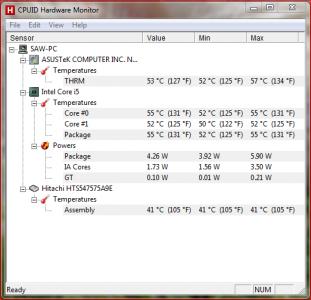
This is my temperature, now its 4.30pm with the blazing sun, no air cond, only ceiling fan
|
|
|
|
|
|
Oct 28 2012, 06:12 PM
|

Newbie
0 posts Joined: Aug 2009
|
QUOTE(danielkhoo83 @ Oct 27 2012, 11:26 PM) really?? y my n56 cant boot into window when i put both 4gb n 8gb ram along? so far is ok with 12GB ram, but i notice the temperature increasing and quite fast to get hot. have u try to swap the 4gb and 8gb slot? put the 8gb on the current 4gb slot. |
|
|
Oct 28 2012, 06:46 PM
|

Newbie
1 posts Joined: Oct 2012
|
QUOTE(singeryoon @ Oct 28 2012, 03:22 PM) lol 50-55 is consider very low already as normal temperature is already 47 for my case =.= so do the resting area of your keypad feel hot ? is it because of the aluminum surface that cos de resting area to be that hot and uncomfortable...(i have cooler pad below my pc)without air cond my cpu temp can be 58 and..i dunno this is kinda weird...last week when i on the pc, there is a loud sound of fan coming out of the air vent (i assume that the fan?) but i oni heard once since i brought this pc 2 weeks ago... after i start the pc next day,the sound is gone,and the air come out of de air vent is low compare to the previous day. Attached thumbnail(s) 
|
|
|
Oct 28 2012, 07:44 PM
|

Junior Member
185 posts Joined: Jan 2007 From: Puchong Perdana, Selangor
|
QUOTE(joshua_93 @ Oct 28 2012, 06:46 PM) so do the resting area of your keypad feel hot ? is it because of the aluminum surface that cos de resting area to be that hot and uncomfortable...(i have cooler pad below my pc) mine when idling is around 50-55, once you run some applications, such as browser, immediately increase to 60+..and..i dunno this is kinda weird...last week when i on the pc, there is a loud sound of fan coming out of the air vent (i assume that the fan?) but i oni heard once since i brought this pc 2 weeks ago... after i start the pc next day,the sound is gone,and the air come out of de air vent is low compare to the previous day. when gaming, Dirt 3, BF 3, it goes up to 80+.. no aircond, no cooler pad, just a table fan beside me... air ventilation is loud, hot, and large volume of air flow.. once quit from the game, all back to normal within 5-10mins.. |
|
|
Oct 28 2012, 08:00 PM
|

Junior Member
254 posts Joined: Mar 2010
|
QUOTE(joshua_93 @ Oct 28 2012, 06:46 PM) so do the resting area of your keypad feel hot ? is it because of the aluminum surface that cos de resting area to be that hot and uncomfortable...(i have cooler pad below my pc) I have the ventilation problem once, just within few days of purchase only and..i dunno this is kinda weird...last week when i on the pc, there is a loud sound of fan coming out of the air vent (i assume that the fan?) but i oni heard once since i brought this pc 2 weeks ago... after i start the pc next day,the sound is gone,and the air come out of de air vent is low compare to the previous day.  That's a very weird problem so I rather restart then the problem solved already  Then another problem arises last month but I don't know why, suddenly the palm rest become so hot like having fever and I checked that my temp hits approx 60, that's worrying me but again, restart my system seems like solved my problem though.. But when my pc is normal, without cooling pad, with air cond my cpu will be less than 50, without air cond it was 58 like that haha ,normal usage only  |
|
|
Oct 29 2012, 01:18 AM
|
|
Junior Member
94 posts Joined: Jul 2012
|
lol guys have u met this problem before? i was using the laptop with subwoofer plugged in for quite some time, after certain time i try to play a music, no sound come out at all from the speaker and subwoofer... when i try to open the speaker icon at the taskbar, there indicate a sound.. after i plugged out the subwoofer, got sound again lol happened twice -.-
and one more thing, is my waves maxxaudio interface looks abit odd? i dont remember seeing the big grey space underneath the 'asus' This post has been edited by celee: Oct 29 2012, 04:05 AM Attached thumbnail(s) 
|
|
|
|
|
|
 Oct 30 2012, 12:57 AM Oct 30 2012, 12:57 AM
|
|
Newbie
1 posts Joined: Oct 2012
|
QUOTE(celee @ Oct 29 2012, 01:18 AM) lol guys have u met this problem before? i was using the laptop with subwoofer plugged in for quite some time, after certain time i try to play a music, no sound come out at all from the speaker and subwoofer... when i try to open the speaker icon at the taskbar, there indicate a sound.. after i plugged out the subwoofer, got sound again lol happened twice -.- yup...It happen to me once...i do the same configuration too...than the sound is back !and one more thing, is my waves maxxaudio interface looks abit odd? i dont remember seeing the big grey space underneath the 'asus' ur maxaudio got prob i think .... Added on October 30, 2012, 1:00 am QUOTE(singeryoon @ Oct 28 2012, 08:00 PM) I have the ventilation problem once, just within few days of purchase only bcos of de aluminum surface , the palm rest feel very uncomfortable http://static.lowyat.net/style_images/1/fo...icons/icon9.gif mine is also around 58 w/out aircon...so i guess is normal ? http://static.lowyat.net/style_images/1/fo...icons/icon2.gif That's a very weird problem so I rather restart then the problem solved already Then another problem arises last month but I don't know why, suddenly the palm rest become so hot like having fever and I checked that my temp hits approx 60, that's worrying me but again, restart my system seems like solved my problem though.. But when my pc is normal, without cooling pad, with air cond my cpu will be less than 50, without air cond it was 58 like that haha ,normal usage only This post has been edited by joshua_93: Oct 30 2012, 01:00 AM Attached thumbnail(s) 
|
|
|
Oct 30 2012, 10:59 AM
|
|
Junior Member
94 posts Joined: Jul 2012
|
QUOTE(joshua_93 @ Oct 30 2012, 12:57 AM) yup...It happen to me once...i do the same configuration too...than the sound is back ! ur maxxaudio so nice :/ any idea how to fix it? my driver disc doesnt seem to have itur maxaudio got prob i think .... |
|
|
Oct 30 2012, 11:35 AM
|
|
Junior Member
86 posts Joined: Apr 2010
|
Is it me or everyone facing the same problem, it kinda slow for N56 to boot up using Win 7?
It took around 52 secs for it to fully loaded and sometime it will hang  |
|
|
Oct 30 2012, 12:31 PM
|
|
Junior Member
185 posts Joined: Jan 2007 From: Puchong Perdana, Selangor
|
QUOTE(celee @ Oct 30 2012, 10:59 AM) ur maxxaudio so nice :/ any idea how to fix it? my driver disc doesnt seem to have it celee, maybe you can try with re-download the driver at Asus N56, choose the your model and select audio.uninstall is recommended but you can just proceed to install without uninstall. Hope it helps. Added on October 30, 2012, 12:33 pm QUOTE(NickTan147 @ Oct 30 2012, 11:35 AM) Is it me or everyone facing the same problem, it kinda slow for N56 to boot up using Win 7? boot up is slow, but never hang. fully loaded time is around 50 secs - 1 min 30 secs.. LOL.. not consistent boot up time.It took around 52 secs for it to fully loaded and sometime it will hang 64-bit OS need more time to boot la.. This post has been edited by toonny: Oct 30 2012, 12:33 PM |
|
|
Oct 30 2012, 12:35 PM
|
|
Junior Member
254 posts Joined: Mar 2010
|
QUOTE(NickTan147 @ Oct 30 2012, 11:35 AM) Is it me or everyone facing the same problem, it kinda slow for N56 to boot up using Win 7? slow? My fully loaded time inside Event Viewer is at least 65 seconds It took around 52 secs for it to fully loaded and sometime it will hang  try windows 8 perhaps, if you want a even more faster startup... hanging? |
|
|
Oct 30 2012, 02:25 PM
|
|
Junior Member
86 posts Joined: Apr 2010
|
QUOTE(toonny @ Oct 30 2012, 12:31 PM) celee, maybe you can try with re-download the driver at Asus N56, choose the your model and select audio. uninstall is recommended but you can just proceed to install without uninstall. Hope it helps. Added on October 30, 2012, 12:33 pm boot up is slow, but never hang. fully loaded time is around 50 secs - 1 min 30 secs.. LOL.. not consistent boot up time. 64-bit OS need more time to boot la.. QUOTE(singeryoon @ Oct 30 2012, 12:35 PM) slow? My fully loaded time inside Event Viewer is at least 65 seconds Don't know, it will hang or either super slow, like window 95 pc with mb RAM, open a folder also take almost half a minute to open it. Now seems OK already, I removed some startups and remove the trend micro antivirus. Change it to Kaspersky antivirus it looks much better now...but some of the time it might lag abit not as worse as last time. Nah, not gonna upgrade Win 8, prefer staying with Win 7. Afraid compatibility issue. try windows 8 perhaps, if you want a even more faster startup... hanging? This post has been edited by NickTan147: Oct 30 2012, 02:28 PM |
|
|
Oct 30 2012, 03:15 PM
|
|
Junior Member
304 posts Joined: Jun 2012
|
QUOTE(joshua_93 @ Oct 30 2012, 12:57 AM) yup...It happen to me once...i do the same configuration too...than the sound is back ! Mine only Maxx audio 3 ur maxaudio got prob i think .... Added on October 30, 2012, 1:00 am bcos of de aluminum surface , the palm rest feel very uncomfortable http://static.lowyat.net/style_images/1/fo...icons/icon9.gif mine is also around 58 w/out aircon...so i guess is normal ? http://static.lowyat.net/style_images/1/fo...icons/icon2.gif |
|
|
|
|
|
Oct 30 2012, 04:17 PM
|

Senior Member
1,114 posts Joined: Feb 2006 From: PJ, Selangor 
|
8-10 seconds to boot to start screen from my Windows 8 and i'm on HDD. My friend whom is using the SSD - 1.5-2 sec!
Worth it to upgrade and i notice no compatibility issues. Everything working as usual in desktop mode.  |
|
|
Oct 30 2012, 05:44 PM
|
|
Newbie
1 posts Joined: Oct 2012
|
QUOTE(csrulez @ Oct 30 2012, 04:17 PM) 8-10 seconds to boot to start screen from my Windows 8 and i'm on HDD. My friend whom is using the SSD - 1.5-2 sec! 8-10 seconds??? omg...so fast Worth it to upgrade and i notice no compatibility issues. Everything working as usual in desktop mode. i take 2-3 minute ... This post has been edited by joshua_93: Oct 30 2012, 06:00 PM |
|
|
Oct 30 2012, 10:04 PM
|

Junior Member
182 posts Joined: May 2012
|
QUOTE(csrulez @ Oct 30 2012, 04:17 PM) 8-10 seconds to boot to start screen from my Windows 8 and i'm on HDD. My friend whom is using the SSD - 1.5-2 sec! seriously? Worth it to upgrade and i notice no compatibility issues. Everything working as usual in desktop mode. thatx faz? u unlock bios o something is it? or purely upgrade to win 8 onii? |
|
|
Oct 30 2012, 11:13 PM
|
|
Senior Member
1,114 posts Joined: Feb 2006 From: PJ, Selangor
|
purely window 8 pro upgrade.
and yeah you guys should try it out. now instead of putting my lappy to sleep, i shut it down cause boot up time is fast. loll. |
|
|
Oct 31 2012, 02:37 AM
|
|
Junior Member
94 posts Joined: Jul 2012
|
Added on October 31, 2012, 2:39 am QUOTE(Darrylx3 @ Oct 30 2012, 03:15 PM) Mine only Maxx audio 3 means is written maxxaudio 3 instead of maxxaudio master?Added on October 31, 2012, 3:00 am QUOTE(toonny @ Oct 30 2012, 12:31 PM) celee, maybe you can try with re-download the driver at Asus N56, choose the your model and select audio. thank you bro uninstall is recommended but you can just proceed to install without uninstall. Hope it helps. u really did helped ! now it looks perfectly fine hehe thank you so muchThis post has been edited by celee: Oct 31 2012, 03:00 AM |
|
|
Oct 31 2012, 05:36 PM
|
|
Senior Member
1,459 posts Joined: Oct 2009 From: BOLEHLAND
|
any1 tried windows 8 ald? all software for N56VZ compatible and can do clean installation? anything that i should remember?
|
|
|
Oct 31 2012, 06:04 PM
|
|
Newbie
1 posts Joined: Oct 2012
|
anyone had problem with the backlit keypad? after i hibernate or sleep the pc...i have prob with the backlit keypad...i need to sleep or hibernate again to solve it....
|
|
Topic ClosedOptions
|
| Change to: |  0.0359sec 0.0359sec
 0.91 0.91
 6 queries 6 queries
 GZIP Disabled GZIP Disabled
Time is now: 5th December 2025 - 10:47 AM |
 Quote
Quote