Outline ·
[ Standard ] ·
Linear+
LENOVO Y480/580 feel the need for SPEED, lowest price at higher specs cpu
|
chopin
|
 Sep 6 2012, 04:15 PM Sep 6 2012, 04:15 PM
|
Getting Started


|
QUOTE(sss2sssss @ Sep 6 2012, 11:44 AM) Just took my HDD Caddy Bay, now installing Windows to my SSD did u do a clean installation? can we just transfer the c: drive from old hdd to ssd? not that i'm lazy to install windows, just that there's a lot of other programs, and settings, etc etc... i'd hate to have to redo all these all over again... |
|
|
|
|
|
TarePanda
|
Sep 6 2012, 04:22 PM
|
|
|
QUOTE(chopin @ Sep 6 2012, 04:15 PM) did u do a clean installation? can we just transfer the c: drive from old hdd to ssd? not that i'm lazy to install windows, just that there's a lot of other programs, and settings, etc etc... i'd hate to have to redo all these all over again... Yes. You can move hdd to ssd by using few software available. |
|
|
|
|
|
chopin
|
Sep 6 2012, 04:24 PM
|
Getting Started
|
QUOTE(TarePanda @ Sep 6 2012, 04:22 PM) Yes. You can move hdd to ssd by using few software available. great. pls list down the steps/tools if possible... or url for tutorial? |
|
|
|
|
|
sss2sssss
|
Sep 6 2012, 04:32 PM
|
|
|
QUOTE(chopin @ Sep 6 2012, 04:15 PM) did u do a clean installation? can we just transfer the c: drive from old hdd to ssd? not that i'm lazy to install windows, just that there's a lot of other programs, and settings, etc etc... i'd hate to have to redo all these all over again... I always reinstall Windows....  Anyway, C300 benchmark 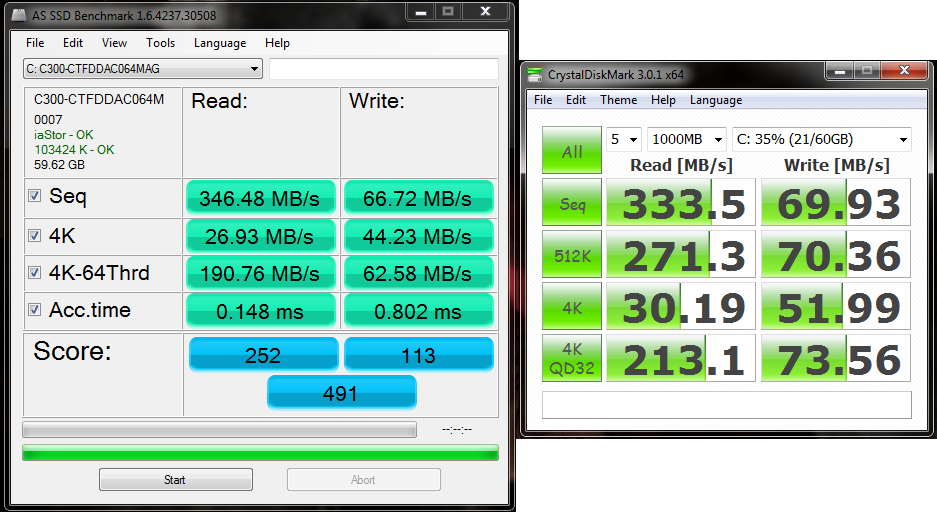 was surprise when I saw some score still higher than some new gen SSD |
|
|
|
|
|
TarePanda
|
Sep 6 2012, 04:36 PM
|
|
|
QUOTE(chopin @ Sep 6 2012, 04:24 PM) great. pls list down the steps/tools if possible... or url for tutorial? I will show you the link (in Youtube) when i back home later. Note: You SSD must have sufficient space like HDD |
|
|
|
|
|
kensaikenai
|
Sep 6 2012, 05:51 PM
|
New Member
|
guys, did ur machine ever auto switch to Intel HD graphics 4000 after a long afk and when u go to device manager, it says the adapter for GT650 is not working, and it requires restart to make it work?
|
|
|
|
|
|
sss2sssss
|
Sep 6 2012, 05:58 PM
|
|
|
QUOTE(kensaikenai @ Sep 6 2012, 05:51 PM) guys, did ur machine ever auto switch to Intel HD graphics 4000 after a long afk and when u go to device manager, it says the adapter for GT650 is not working, and it requires restart to make it work? Update ur NVIDIA driver... R u still using the stock one? |
|
|
|
|
|
kensaikenai
|
Sep 6 2012, 06:01 PM
|
New Member
|
LOl yea, dam stocked one
can give me the link again? need for window x64 one GT650
|
|
|
|
|
|
sss2sssss
|
Sep 6 2012, 06:03 PM
|
|
|
QUOTE(kensaikenai @ Sep 6 2012, 06:01 PM) LOl yea, dam stocked one can give me the link again? need for window x64 one GT650 |
|
|
|
|
|
XionCity
|
Sep 6 2012, 08:17 PM
|
Getting Started
|
QUOTE(chopin @ Sep 6 2012, 05:24 PM) great. pls list down the steps/tools if possible... or url for tutorial? the best of all....recovery discs... |
|
|
|
|
|
chopin
|
Sep 6 2012, 08:19 PM
|
Getting Started
|
QUOTE(XionCity @ Sep 6 2012, 08:17 PM) the best of all....recovery discs... where got recovery disc? |
|
|
|
|
|
XionCity
|
Sep 6 2012, 08:20 PM
|
Getting Started
|
through your onekey recovery program in ur windows...
|
|
|
|
|
|
chopin
|
Sep 6 2012, 08:30 PM
|
Getting Started
|
QUOTE(XionCity @ Sep 6 2012, 08:20 PM) through your onekey recovery program in ur windows... ooo, let me put it, correct me if i'm wrong: 1. use the onekey recovery program to create a backup of my c: 2. copy that recovery folder into the new ssd 3. recover that folder in ssd over to you XionCity... |
|
|
|
|
|
XionCity
|
Sep 6 2012, 08:53 PM
|
Getting Started
|
onekey recovery, create factory default recovery disc(4 DVDs)...
|
|
|
|
|
|
chopin
|
Sep 6 2012, 08:55 PM
|
Getting Started
|
QUOTE(XionCity @ Sep 6 2012, 08:53 PM) onekey recovery, create factory default recovery disc(4 DVDs)... huh, factory default? means all my programs and settings will not be included? also, i bought dos ver, installed my own win7 wor. so what factory default is there? |
|
|
|
|
|
kuroneko0509
|
Sep 6 2012, 09:19 PM
|
~~sleeping anywhere, anytime, anyplace~~

|
QUOTE(chopin @ Sep 6 2012, 08:55 PM) huh, factory default? means all my programs and settings will not be included? also, i bought dos ver, installed my own win7 wor. so what factory default is there? instead of factory default, choose recovery disc with current system... it is recommended not to format ur hdd until you manage to migrate your data to ssd  i'm not sure whether the option will only make image of the system or including all stuff in your current C drive |
|
|
|
|
|
XionCity
|
Sep 6 2012, 10:27 PM
|
Getting Started
|
factory default always the better choice
|
|
|
|
|
|
TarePanda
|
Sep 6 2012, 11:47 PM
|
|
|
Follow this link / youtube... No disc required....just a ssd / hdd / software http://www.youtube.com/watch?v=BWM79HCzdDA&feature=related |
|
|
|
|
|
chopin
|
Sep 7 2012, 07:50 AM
|
Getting Started
|
QUOTE(TarePanda @ Sep 6 2012, 11:47 PM) Follow this link / youtube... No disc required....just a ssd / hdd / software http://www.youtube.com/watch?v=BWM79HCzdDA&feature=relatedthis is great!! tqvm  |
|
|
|
|



 Quote
Quote


 0.0155sec
 0.65
0.65
 6 queries
 GZIP Disabled