

Register here, a Lenovo Ideapad Y580(FHD) owner from Kedah....
got my lappy yesterday
LENOVO Y480/580 feel the need for SPEED, lowest price at higher specs cpu
LENOVO Y480/580 feel the need for SPEED, lowest price at higher specs cpu
|
|
 Aug 17 2012, 11:19 PM Aug 17 2012, 11:19 PM
Return to original view | Post
#1
|
 
Junior Member
171 posts Joined: Mar 2010 From: Perth, Western Australia   
|
Register here, a Lenovo Ideapad Y580(FHD) owner from Kedah....
got my lappy yesterday |
|
|
|
|
|
Aug 18 2012, 11:52 AM
Return to original view | Post
#2
|
|
Junior Member
171 posts Joined: Mar 2010 From: Perth, Western Australia
|
Y580 reporting in to duty
|
|
|
Aug 20 2012, 10:45 PM
Return to original view | Post
#3
|
|
Junior Member
171 posts Joined: Mar 2010 From: Perth, Western Australia
|
anyone here can help me on cloning my hdd to my ssd with workable one key recovery??
|
|
|
Aug 21 2012, 08:08 AM
Return to original view | Post
#4
|
|
Junior Member
171 posts Joined: Mar 2010 From: Perth, Western Australia
|
just don't stress the graphic too hard, then it'll be OK...
|
|
|
Aug 21 2012, 09:12 AM
Return to original view | Post
#5
|
|
Junior Member
171 posts Joined: Mar 2010 From: Perth, Western Australia
|
nope, as I know Y580 is LIMITED edition
|
|
|
Aug 21 2012, 10:35 AM
Return to original view | Post
#6
|
|
Junior Member
171 posts Joined: Mar 2010 From: Perth, Western Australia
|
3117?! i got it at 3599 ==
|
|
|
|
|
|
Aug 21 2012, 01:01 PM
Return to original view | Post
#7
|
|
Junior Member
171 posts Joined: Mar 2010 From: Perth, Western Australia
|
mine is FHD version....
There are RM200 increase from 720p to 1080p.... RM3399 is the original price for Y580(720P) RM3599 is the original price for Y580(1080P) I think he kena F****** ald |
|
|
Aug 21 2012, 01:14 PM
Return to original view | Post
#8
|
|
Junior Member
171 posts Joined: Mar 2010 From: Perth, Western Australia
|
he wanted a Y580, he got it..but a HD screen, not FHD
|
|
|
Aug 21 2012, 02:39 PM
Return to original view | Post
#9
|
|
Junior Member
171 posts Joined: Mar 2010 From: Perth, Western Australia
|
lucky i got it b4 raya...hahaha....
really enjoy it...except One-Key Recovery in cloned SSD won't work....pfft!!!! |
|
|
Aug 22 2012, 10:17 AM
Return to original view | Post
#10
|
|
Junior Member
171 posts Joined: Mar 2010 From: Perth, Western Australia
|
hey guys, since now i in KL for holiday, wanna come out yamcha ???
|
|
|
Aug 22 2012, 01:48 PM
Return to original view | Post
#11
|
|
Junior Member
171 posts Joined: Mar 2010 From: Perth, Western Australia
|
QUOTE(alaskanbunny @ Aug 22 2012, 12:42 PM) mana u? I stay at SS2 PJ, installed..but took out due to this One Key Recovery button problem, I need do recovery DVDs back in Alor Setar...and also finding people to buy my 128GB Vertex 4 and 120GB Corsair Force 3...i wanna get a 256GB Vertex 4have u installed ur ssd?  i wanna get my y580 soon... wif ssd... so maybe need guidance..   |
|
|
Aug 22 2012, 06:33 PM
Return to original view | Post
#12
|
|
Junior Member
171 posts Joined: Mar 2010 From: Perth, Western Australia
|
if lucky, tomorrow i will stay 1 more day....but if unlucky, then after breakfast, bye bye KL.....
|
|
|
Aug 22 2012, 09:36 PM
Return to original view | Post
#13
|
|
Junior Member
171 posts Joined: Mar 2010 From: Perth, Western Australia
|
[DELETED]
This post has been edited by XionCity: Aug 22 2012, 09:42 PM |
|
|
|
|
|
Aug 24 2012, 10:55 PM
Return to original view | Post
#14
|
|
Junior Member
171 posts Joined: Mar 2010 From: Perth, Western Australia
|
Finally!!!! OKR button can use ald using my SSD...
|
|
|
Aug 24 2012, 11:12 PM
Return to original view | Post
#15
|
|
Junior Member
171 posts Joined: Mar 2010 From: Perth, Western Australia
|
very easy....but it still take me days to figured it out...
|
|
|
Aug 25 2012, 08:22 AM
Return to original view | Post
#16
|
|
Junior Member
171 posts Joined: Mar 2010 From: Perth, Western Australia
|
i have no choice but to use ori bitdefender 2013....cause is a free gift license software from the shop i bought this laptop
|
|
|
Aug 25 2012, 09:03 PM
Return to original view | Post
#17
|
|
Junior Member
171 posts Joined: Mar 2010 From: Perth, Western Australia
|
QUOTE(alaskanbunny @ Aug 25 2012, 11:17 AM) ohh.. they give bit defender and u get free mccafeee... 2 anti virus!! oh?? i thought the stock mcafee came with 30 days trial only? so i uninstalled it...bro, u havent giv us step by step for ssd installtion yet step by step ssd INSTALLATION?? easy 20 steps... 1st. Flip to the back of your laptop 2nd. Remove the battery 3rd. Unlock the 2 screws that access your main board 4th. Remove the cover 5th. Remove the 2 screws at your hard disk bay (1 very long, 1 very short) 6th. Unplug your HDD from the hard disk bay 7th. Unscrew the 4 chrome screws on your HDD tray 8th. Take out your HDD (remember the front and back position) 9th. Place your SSD at the tray 10th. Screw back the 4 chrome screws on your HDD tray 11th. Plug in your SSD to the HDD bay 12th. Screw back the 2 screws at the hard disk bay 13th. Put back the cover and properly inplace it 14th. Screw back the bottom 2 screws 15th. Install back your battery 16th. Flip back to the front 17th. Open the Lid 18th. Press power switch to switch it on 19th. Press F2 to enter BIOS to make sure it detects your SSD 20th. Save and Exit Walah!!! SSD Installation COMPLETE  |
|
|
Aug 25 2012, 09:16 PM
Return to original view | Post
#18
|
|
Junior Member
171 posts Joined: Mar 2010 From: Perth, Western Australia
|
QUOTE(alaskanbunny @ Aug 25 2012, 10:10 PM) mccafee was for 1 year i think.. oooo....coz u mention the INSTALLATION ma....hehehehayar, daikor... not the physical part la.. that 1 even my little bro can do it, easier than tamiya car.. i mean moving windows from the hdd stock partition to ssd without partition.. d steps leh.. rmb we talked about it.. recovery disk n all ok...easy as 1 2 3 1st. use ur HDD and create 4 recovery DVDs (choose factory default) 2nd. change HDD to SSD like the previous 20 Steps 3rd. change from BIOS boot from DVD 4th. restore back I can't guarantee 100% work.... but mine had partition cloned and customize the size before....so, mine worked.. |
|
|
Aug 25 2012, 09:42 PM
Return to original view | Post
#19
|
|
Junior Member
171 posts Joined: Mar 2010 From: Perth, Western Australia
|
QUOTE(chopin @ Aug 25 2012, 10:31 PM) I think what we want is how to transfer the windows OS that was already installed, without going thru the h*ll again of intalling all the OS, drivers, programs... Windows will work, Recovery partition won't neither do OKR buttoni have an idea, don't know if work or not: backup my C: drive and save it in D:. then fix the SSD, copy the backup from D: to SSD, then restore...  |
|
|
Aug 25 2012, 09:47 PM
Return to original view | Post
#20
|
|
Junior Member
171 posts Joined: Mar 2010 From: Perth, Western Australia
|
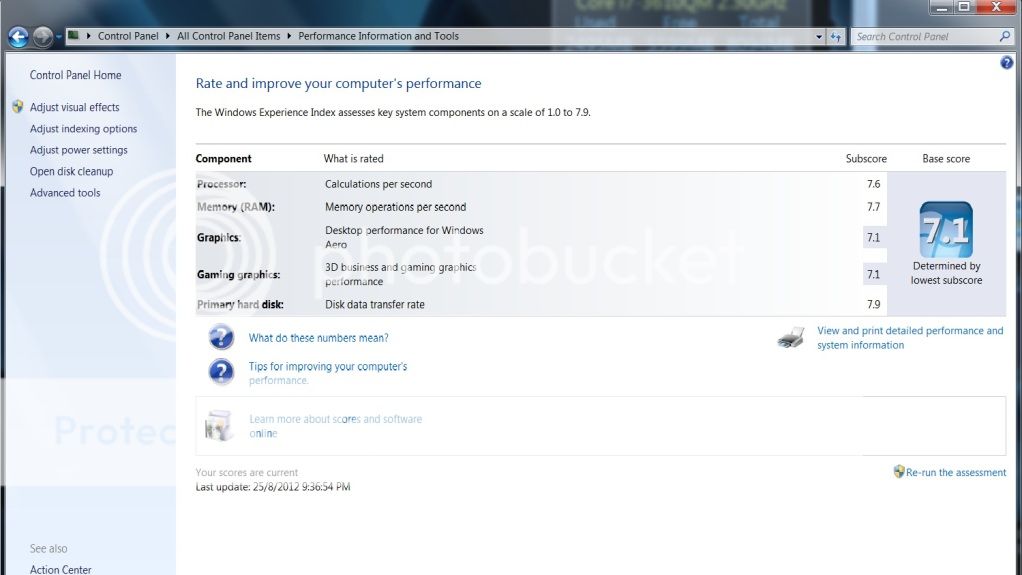
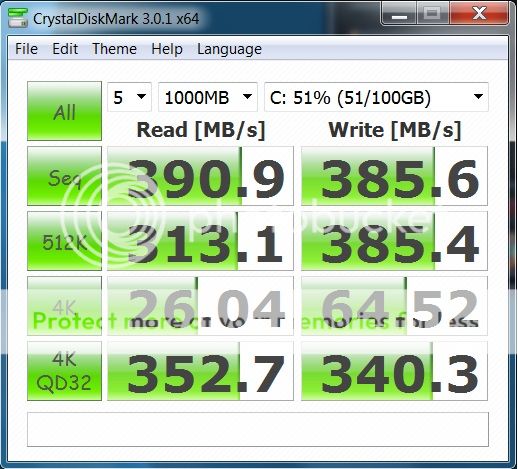
My computer rating and 128GB OCZ Vertex 4 SSD benchmark :
  |
| Change to: |  0.0444sec 0.0444sec
 0.66 0.66
 7 queries 7 queries
 GZIP Disabled GZIP Disabled
Time is now: 9th December 2025 - 04:34 PM |
 Quote
Quote