QUOTE(takino88 @ May 23 2012, 12:40 AM)
Quadrant and Antutu only and it was fast already to beat hox

thanks 
Samsung Galaxy S III I9300 Official Thread V3, S III event 28th May - 3rd June @ LYP
|
|
 May 23 2012, 12:43 AM May 23 2012, 12:43 AM
|
 
All Stars
11,086 posts Joined: Jan 2003 
|
QUOTE(takino88 @ May 23 2012, 12:40 AM) Quadrant and Antutu only and it was fast already to beat hox thanks |
|
|
|
|
|
May 23 2012, 12:45 AM
|

All Stars
31,607 posts Joined: Aug 2010
|
QUOTE(llk @ May 23 2012, 12:24 AM) Ny friend's ex colleague who are work in Maxis also got the test phone to try before launching. wow that means Maxis sure offer s3 with plan awesome |
|
|
May 23 2012, 12:47 AM
|

Senior Member
2,908 posts Joined: Nov 2008 From: Planet Earth  
|
QUOTE(bestofel @ May 23 2012, 12:40 AM) Harddisk, can you make demo for user manual page 27 and 30? It about: I guess you will know how those works by reading the manual right? For example, while pressing an app in the app drawer an hold, tilt the device left or right so that the app drawer scrolls, letting you to decide which page to put the app in - pan to move - pan to browse - lock or unlock screen All are by motions. Search in youtube still no demo found. Thankss.  QUOTE(XeactorZ @ May 23 2012, 12:45 AM) wow that means Maxis sure offer s3 with plan For sure all the big 3 telcos will offer plans for this beast. They won't let this pie off their mouth awesome  This post has been edited by ken2291: May 23 2012, 12:48 AM |
|
|
May 23 2012, 12:50 AM
|

Senior Member
4,541 posts Joined: Feb 2009
|
Any idea whether the SIII will be able to handle Hi10p 10 bit mkv files?
|
|
|
May 23 2012, 12:55 AM
|

Senior Member
528 posts Joined: Mar 2008 From: Klang Valley
|
QUOTE(ken2291 @ May 23 2012, 12:47 AM) I guess you will know how those works by reading the manual right? For example, while pressing an app in the app drawer an hold, tilt the device left or right so that the app drawer scrolls, letting you to decide which page to put the app in Not that one, that one already have in TouchWiz 4.0 for Galaxy Note:I think it work same when we browse photo gallery in full screen mode. Touch the photo, then pan to left, screen will go to the previous photo, pan to right, screen will go to the next photo. Then, how about playing music and video, can we move to previous or next video/music? |
|
|
May 23 2012, 01:03 AM
|

Senior Member
2,959 posts Joined: Jan 2003 
|
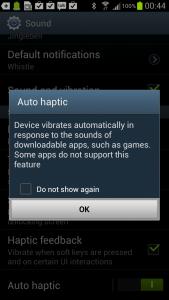
QUOTE(ZeneticX @ May 23 2012, 12:34 AM) so your conclusion. is it a good phone to upgrade from s2? For my own requirements and usage, from what I have read online and brief hands-on. I'd say that, this is a phone that I would not bother to flash custom ROM. These are the things that would stop me from doing so.take S out of the question because it definitely worth to upgrade from S 1) battery % display (this is the 1st thing I'd go for. Root to flash, but seeing that Kitchen doesn't support 720p resolution, one can only resort to custom ROM, as witnessed in GNex) 2) working FM radio, nuff said. 3) Android Beam on Steroid (hence S-Beam). No need further explanation on this, together with working Wifi Direct. 4) Smart Stay. You never know how useful this is until you actually have it. I'm avid Google Reader user, this helps damnnnn a lot. 5) Various vibration rhythms. Back when the day of Nokia! Not sure if AOSP can bring this on, or just not important enough. This is for gamers only. » Click to show Spoiler - click again to hide... « That's all for now. EDIT: Sorry guys, bad news... no Mass Storage, MTP/PTP only. I'm sure there will be hack to mount it as Mass Storage. This post has been edited by Harddisk: May 23 2012, 01:17 AM |
|
|
|
|
|
May 23 2012, 01:07 AM
|

All Stars
12,413 posts Joined: Jan 2008 From: KL - Cardiff - Subang - Sydney 
|
QUOTE(Harddisk @ May 23 2012, 01:03 AM) For my own requirements and usage, from what I have read online and brief hands-on. I'd say that, this is a phone that I would not bother to flash custom ROM. These are the things that would stop me from doing so. totally agree with you there1) battery % display (this is the 1st thing I'd go for. Root to flash, but seeing that Kitchen doesn't support 720p resolution, one can only resort to custom ROM, as witnessed in GNex) 2) working FM radio, nuff said. 3) Android Beam on Steroid (hence S-Beam). No need further explanation on this, together with working Wifi Direct. 4) Smart Stay. You never know how useful this is until you actually have it. I'm avid Google Reader user, this helps damnnnn a lot. 5) Various vibration rhythms. Back when the day of Nokia! Not sure if AOSP can bring this on, or just not important enough. This is for gamers only. » Click to show Spoiler - click again to hide... « That's all for now. i can see a lot features that samsung implement on this phone are only available through custom rom previously but maybe a custom rom based on the stock rom would still be worthwhile to flash but still i will chg the launcher  |
|
|
May 23 2012, 01:16 AM
|
|
Senior Member
2,959 posts Joined: Jan 2003
|
QUOTE(bestofel @ May 23 2012, 12:40 AM) Harddisk, can you make demo for user manual page 27 and 30? It about: Sorry la bro, I don't have 3rd hand to hold my camera. - pan to move - pan to browse - lock or unlock screen All are by motions. Search in youtube still no demo found. Thankss.  I have tested the camera activation one, but the wait was... about 2 seconds. As for those stated above, don't think I'll use them. |
|
|
May 23 2012, 01:16 AM
|
|
Senior Member
2,908 posts Joined: Nov 2008 From: Planet Earth
|
QUOTE(bestofel @ May 23 2012, 12:55 AM) Not that one, that one already have in TouchWiz 4.0 for Galaxy Note: That's what I meant. I'm saying it's the same as seen in tw4 of SII and Note, not a new feature » Click to show Spoiler - click again to hide... « I think it work same when we browse photo gallery in full screen mode. Touch the photo, then pan to left, screen will go to the previous photo, pan to right, screen will go to the next photo. Then, how about playing music and video, can we move to previous or next video/music? QUOTE(Harddisk @ May 23 2012, 01:03 AM) For my own requirements and usage, from what I have read online and brief hands-on. I'd say that, this is a phone that I would not bother to flash custom ROM. These are the things that would stop me from doing so. As I said, I would only bother to flash custom rom when Samsung's not updating SIII, where we can't get the latest Android 1) battery % display (this is the 1st thing I'd go for. Root to flash, but seeing that Kitchen doesn't support 720p resolution, one can only resort to custom ROM, as witnessed in GNex) 2) working FM radio, nuff said. 3) Android Beam on Steroid (hence S-Beam). No need further explanation on this, together with working Wifi Direct. 4) Smart Stay. You never know how useful this is until you actually have it. I'm avid Google Reader user, this helps damnnnn a lot. 5) Various vibration rhythms. Back when the day of Nokia! Not sure if AOSP can bring this on, or just not important enough. This is for gamers only. » Click to show Spoiler - click again to hide... « That's all for now. |
|
|
May 23 2012, 01:20 AM
|
|
Senior Member
2,959 posts Joined: Jan 2003
|
QUOTE(ZeneticX @ May 23 2012, 01:07 AM) but still i will chg the launcher Stick for a while first. The transition looks nice from home -> app drawer -> home. Maybe 5 minutes?There are some other stuff to change, the ugly SMS app. As for GPS, will give it a shot, but no guarantee I'll remember though. Luckily my other SIM card is micro-SIM ready. SIM slot has ejection spring like SD card's slot. EDIT: managed to lock GPS in less than 1min, connected to my wifi with 3g on. I was inside my room though. Not sure if that counts to anything or not. Compass direction still haywire. Is that Google Maps' problem? lol. This post has been edited by Harddisk: May 23 2012, 01:28 AM |
|
|
May 23 2012, 01:25 AM
|
|
All Stars
12,413 posts Joined: Jan 2008 From: KL - Cardiff - Subang - Sydney
|
QUOTE(Harddisk @ May 23 2012, 01:20 AM) Stick for a while first. The transition looks nice from home -> app drawer -> home. Maybe 5 minutes? but then i dun like how TW put the app drawer icon on the far left There are some other stuff to change, the ugly SMS app. As for GPS, will give it a shot, but no guarantee I'll remember though. Luckily my other SIM card is micro-SIM ready. SIM slot has ejection spring like SD card's slot.  always prefer it in the middle |
|
|
May 23 2012, 01:25 AM
|
|
Senior Member
4,541 posts Joined: Feb 2009
|
QUOTE(Harddisk @ May 23 2012, 01:03 AM) EDIT: Sorry guys, bad news... no Mass Storage, MTP/PTP only. I'm sure there will be hack to mount it as Mass Storage. Well that's a given I guess. If Mass Storage mode available, Samsung would have to partition the internal storage like most android based phones before ICS where there's a small amount of space for apps separate from the rest of the internal storage since the storage can not be mounted on two different devices (eg. the phone and a computer) at the same time and dismounting the internal space with the apps could make the phone go crazy. There are still new phones that use that type of storage like the HTC One series. Google wants android devices to start moving towards a single partition for everything in the internal storage.It's a good trade off in my opinion for the SIII. You get the whole internal storage for apps instead of measly 2gb or so like my SII which is currently bugging me that I'm running out of internal memory for apps when there's about 200mb left in the app partition. |
|
|
May 23 2012, 01:30 AM
|
|
All Stars
31,607 posts Joined: Aug 2010
|
QUOTE(Harddisk @ May 23 2012, 01:03 AM) For my own requirements and usage, from what I have read online and brief hands-on. I'd say that, this is a phone that I would not bother to flash custom ROM. These are the things that would stop me from doing so. LOL no USG OTG function, nvm sure got developer made it 1) battery % display (this is the 1st thing I'd go for. Root to flash, but seeing that Kitchen doesn't support 720p resolution, one can only resort to custom ROM, as witnessed in GNex) 2) working FM radio, nuff said. 3) Android Beam on Steroid (hence S-Beam). No need further explanation on this, together with working Wifi Direct. 4) Smart Stay. You never know how useful this is until you actually have it. I'm avid Google Reader user, this helps damnnnn a lot. 5) Various vibration rhythms. Back when the day of Nokia! Not sure if AOSP can bring this on, or just not important enough. This is for gamers only. » Click to show Spoiler - click again to hide... « That's all for now. EDIT: Sorry guys, bad news... no Mass Storage, MTP/PTP only. I'm sure there will be hack to mount it as Mass Storage. and thanks for the hand on  wow that means stock ROM more than enough, that was good, no need flash custom rom = no need keep backup and restore using titanium backup, lol |
|
|
|
|
|
May 23 2012, 01:34 AM
|

Senior Member
3,177 posts Joined: Sep 2006 From: subway FTW
|
QUOTE(XeactorZ @ May 23 2012, 01:30 AM) LOL no USG OTG function, nvm sure got developer made it it got USB OTG... it just doesnt have mass storageand thanks for the hand on wow that means stock ROM more than enough, that was good, no need flash custom rom = no need keep backup and restore using titanium backup, lol |
|
|
May 23 2012, 01:34 AM
|
|
All Stars
12,413 posts Joined: Jan 2008 From: KL - Cardiff - Subang - Sydney
|
GPS should be good because there's support for GLONASS as well iinm
This post has been edited by ZeneticX: May 23 2012, 01:34 AM |
|
|
May 23 2012, 01:34 AM
|

Senior Member
1,943 posts Joined: Nov 2008
|
QUOTE(Harddisk @ May 23 2012, 01:03 AM) » Click to show Spoiler - click again to hide... « EDIT: Sorry guys, bad news... no Mass Storage, MTP/PTP only. I'm sure there will be hack to mount it as Mass Storage. This post has been edited by game4life: May 23 2012, 01:36 AM |
|
|
May 23 2012, 01:35 AM
|
|
Senior Member
4,541 posts Joined: Feb 2009
|
QUOTE(XeactorZ @ May 23 2012, 01:30 AM) LOL no USG OTG function, nvm sure got developer made it The SIII has been confirmed to have USB OTG function. No Mass Storage mode does not equal to no USB OTG ^^ |
|
|
May 23 2012, 01:35 AM
|
|
Senior Member
2,959 posts Joined: Jan 2003
|
Here are the complete notifications files "stolen" from the phone. Hope I'm not violating Sammy's stuff and getting sued.
Just to share with you nice peeps here. I have yet to see complete upload made by anyone so far. » Click to show Spoiler - click again to hide... « |
|
|
May 23 2012, 01:38 AM
|
|
Senior Member
3,177 posts Joined: Sep 2006 From: subway FTW
|
QUOTE(game4life @ May 23 2012, 01:34 AM) are you sure? Try to find it under wireless and network, usb utilities this is sure for all latest phone, google threw out the mass storage mood, because to do that it have to unmount the sd card, meaning cutting all connection to the phone, and this will cause unstable,you can still drag and drop using the MTP, no problem with that, and people confirm it will work on any windows computer. the only problem i see so far, you cant drag something that is not consider as multimedia such as .apk. you have to rename it to .mp3 then drag it, and rename it back in the phone This post has been edited by silentser: May 23 2012, 01:39 AM |
|
|
May 23 2012, 01:39 AM
|
|
Senior Member
2,959 posts Joined: Jan 2003
|
QUOTE(game4life @ May 23 2012, 01:34 AM) are you sure? Try to find it under wireless and network, usb utilities Can't find that in the Settings menu. It's very very similar to original ICS settings menu already, except "Stay Awake" has been hidden and as of right now (DXLE4), the screen doesn't go sleeping when I have PC USB connected. Will try a few more rounds to confirm if it was PC USB that kept the screen awake. I swear the screen went off earlier when I was charging using adapter (without SIM).This post has been edited by Harddisk: May 23 2012, 01:41 AM |
|
Topic ClosedOptions
|
| Change to: |  0.0262sec 0.0262sec
 0.41 0.41
 6 queries 6 queries
 GZIP Disabled GZIP Disabled
Time is now: 5th December 2025 - 06:15 PM |
 Quote
Quote