

QUOTE(DarkTenno @ Jul 7 2014, 04:01 PM)
the mount printed with pla? no scare with the heat? 

Sacred, just keep the fan running to keep it cool. 
Repraps and DIY 3D Printing!, Open source hardware~
|
|
 Jul 7 2014, 04:33 PM Jul 7 2014, 04:33 PM
Return to original view | Post
#41
|
Junior Member
188 posts Joined: Sep 2009 From: Either PJ, JB or SG but not at your house!  
|
QUOTE(DarkTenno @ Jul 7 2014, 04:01 PM) the mount printed with pla? no scare with the heat? Sacred, just keep the fan running to keep it cool. |
|
|
|
|
|
Jul 10 2014, 07:54 PM
Return to original view | Post
#42
|
|
Junior Member
188 posts Joined: Sep 2009 From: Either PJ, JB or SG but not at your house!
|
QUOTE(tribrainz @ Jul 8 2014, 11:16 AM) hi guys. i still havent got any reply from blomker yet lol. i found this kit, also i3, but using wood instead of alu. can u guys take a look and see? You might want to ask them for more specs to actually do a proper comparison. Also, the type of wood used in the printer frame can make a big difference.http://3dprinter.my/abante/3d-printer/repr...usa-i3-full-kit it says that its SD print ready, which is nice. hope it has monitor too lol You should ask them for the type of nozzle provided and the controller board used in the printer. |
|
|
Oct 7 2014, 03:34 PM
Return to original view | Post
#43
|
|
Junior Member
188 posts Joined: Sep 2009 From: Either PJ, JB or SG but not at your house!
|
QUOTE(layzieboy @ Oct 7 2014, 01:48 PM) Thought you guys might be interested. Pretty decent deal considering the build volume and resolution. Thanks for the recommendation but buying a 3D printer through crowd funding sites are a big risk because these companies don't actually have printers or even parts in stock before their fund raising campaign ends. There has been a lot of kickstarter and indiegogo 3D printer campaigns that have dissapointed supporters over the years such as makibox (the worst, see their general discussion forum), pirate3D (delaying on delivery due to technical reasons) and others you might not have heard. Build volume:200 by 200 by 200 mm Layer resolution:50 microns Price:USD$499 (was $399 ) shipping not included. http://igg.me/at/rapide-lite/x/8698979 In case anyone plans to buy a 3D printer, my best advice is not to go for start up in crowd funding sites becasue delivery could take years and the printers would not turn the way they claim, rather search for reputable full fledged companies making 3D printers and have actually manufactured and sold printers such as makerbot, ultimaker, and even printrbot. Another alternative is to build your own reprap 3D printer where the designs have been community tested and improved to many iterations. You can search for reprap at reprap.org. Regarding the Rapid Lite, I think there is little credibility since they did not demo enough of their prototype and are making false claims just to attract supporters. I wish those supporters good luck and be ready for delivery delays. My 2 cents. |
|
|
Oct 29 2014, 11:58 PM
Return to original view | Post
#44
|
|
Junior Member
188 posts Joined: Sep 2009 From: Either PJ, JB or SG but not at your house!
|
QUOTE(marauderz @ Oct 29 2014, 11:32 PM) Hi guys, I already have a Up! Mini Printer, but I'm ready to go for a RepRap now in order to be customizable to deal with different types of filament. Hello, good to know there are still active 3D printer owner in Malaysia.Is the Pursa Mendel I3 a good design to go for now? Although I must say I'm slightly intrigued with the Micro Delta design.. http://reprap.org/wiki/Micro_Delta Any suggestion on where to buy the kits locally? Thanks! I have recently printed and sold the plastic bits for a Prusa i3 but I have not build one yet on my own. What I like about it is the small number of plastic parts needed to build a functional reprap. I think a Prusa is a good start for first time reprappers since its design to have one single frame supporting the x and z axis. Besides the part count is minimal. I do know there are some local stores selling 3D printer wares online but they are really pricy when compared to buying from international stores. So far I have not come across a micro delta kit but a Rostock kit is available at any online stores. About the delta, you should look for modified corners designed for extruded aluminum instead of linear rods, since it was discuss in some forums that the linear rod does wobble quite a fair bit during prints. BTW, you could just source for the vitamins (nuts and bolts) locally and check your nearest hardware store for threaded rods. You could use your up printer to make the plastuc bits in PLA or get someone to print the parts for you. Since its reprap, you are encouraged to modify, improvise, and jury rig the printer in whatever way for it to function. |
|
|
Nov 1 2014, 12:27 AM
Return to original view | Post
#45
|
|
Junior Member
188 posts Joined: Sep 2009 From: Either PJ, JB or SG but not at your house!
|
QUOTE(marauderz @ Oct 30 2014, 12:33 AM) I'm pretty sure there are quite a few enthusiasts in Malaysia. I am sure there are some enthusiast but I find a lot of them seem inactive or just gone dark for some reason. Maybe their presence isn't well know or they just simply got bored or frustrated over their printers.Basically I was just planning to get the kit from DX http://www.dx.com/c/electrical-tools-499/3...3d-printers-441 Buying locally is expensive, but buying internationally runs the risk of being taxed right? Hmm.. locally I saw this site being referred in this thread. any experience with them? http://3dprinter.my/abante/3d-printer Yeah.. hacking is one thing I'm planning to do, by the way, what difference does the nozzle size make? determines how fine a print can be? Yes, buying internationally has the risk of being taxed but it occurred to me many times I buy from experience sellers from China or Hong Kong they would declare the package value far lower than the taxable threshold, say USD 10, and so far I have not been taxed from buying from them. You could also request the seller to declare a value lower than the taxable threshold, which I am having a hard time pin pointing the exact value. I have not bought from 3dprinter.my before but I don't know whether their claim of selling out 10 units of Prusa-i3 (mentioned at the bottom of their product description) is true since there are no reviews or any customer feedback on their website. You could try purchasing from them and let us know your thought about them, especially their after sales service which normally fails for a lot of 3D printing sale companies because its been reported by 3D printer enthusiast that countless of times they cannot manage many printers located all over the country. Reference: » Click to show Spoiler - click again to hide... « |
|
|
Nov 1 2014, 05:46 PM
Return to original view | Post
#46
|
|
Junior Member
188 posts Joined: Sep 2009 From: Either PJ, JB or SG but not at your house!
|
QUOTE(marauderz @ Nov 1 2014, 02:46 AM) Seeing how this is a kit anyway what kind of after sales service are we expecting anyway? Replacement parts in case of failure? Yup, there's the 6 months warranty they stated in their website but I don't know if they provide troubleshooting which I am sure every enthusiast have to experience it someday. I know one makerbot operator who has his printer failed due to extruder jamming and the sales agent could not provide technical service since the technician is based in the states.Whether its a kit or not, another after sales service is to provide training or documentation in operating the printer which is useful for beginners going into reprap but obviously this step is usially left to the user to hunt for the relevant information online. From my experience, teaching new users on using the printer in a 1 hour session can save them a day's worth of searching and reading solutions online. I was lucky enough to attend a 3D printing workshop for a reprap printer which I find very useful and at that time I know nothing about 3D printing. |
|
|
|
|
|
Nov 3 2014, 06:36 PM
Return to original view | Post
#47
|
|
Junior Member
188 posts Joined: Sep 2009 From: Either PJ, JB or SG but not at your house!
|
QUOTE(marauderz @ Nov 1 2014, 06:14 PM) Hmm.. there's more training than support right? But you're right that some help and guidance is needed for new users. The way I look at it, a non technical user would still not be able to use 3D printing properly, especially if they think it's a matter of pressing print and everything magically works perfectly all the time It is magical  when a 3D printer does its job but true enough, the technical factor is still a necessity when it comes to getting successful prints and troubleshooting when the time arise since stuff can randomly go wrong at anytime. New users think that 3D printing has reached a level where pressing buttons is all there is to do to get a statue or a toy coming out of their printers. This is one reason why 3D printing became such a fad in the past few years when Makerbot first introduce desktop grade 3D printers into the market. Apparently their concept was to bring down the technical barrier in 3D printing so everyone at home can just use it as an everyday appliance, say a washing machine or microwave oven. when a 3D printer does its job but true enough, the technical factor is still a necessity when it comes to getting successful prints and troubleshooting when the time arise since stuff can randomly go wrong at anytime. New users think that 3D printing has reached a level where pressing buttons is all there is to do to get a statue or a toy coming out of their printers. This is one reason why 3D printing became such a fad in the past few years when Makerbot first introduce desktop grade 3D printers into the market. Apparently their concept was to bring down the technical barrier in 3D printing so everyone at home can just use it as an everyday appliance, say a washing machine or microwave oven. If you have tried out Makerware, the host software for the Makerbot printers, you will notice how easy and simple to just download models from Thingiverse and just press the start button to initiate the print. I am not against the idea of simplifying 3D printing which a lots of start-ups are doing right now but the fact is that they ignore the technical growth aspect of the 3D printer user, making them less knowledgeable about 3D printing rather turning them into button pushers. QUOTE(marauderz @ Nov 3 2014, 04:33 PM) Made contact with the 3Dprinter.my person. You should try asking them to send you a print sample for one of their printer so you can get a feel of the actual quality.- Controller board is ramps - 6 months warranty is basically any component failure in 6 months they're replace FOC, just need to pay shipping costs. - He says he's actually running everything locally. Even all the frame pieces are cut by himself because he has a laser cutter. If its ramps, then the controller board is likely an Arduino Mega 2560. |
|
|
Nov 3 2014, 11:15 PM
Return to original view | Post
#48
|
|
Junior Member
188 posts Joined: Sep 2009 From: Either PJ, JB or SG but not at your house!
|
QUOTE(marauderz @ Nov 3 2014, 09:52 PM) Don't know about makerware, but my Up Mini software is the same thing, start program, load STL and print. If the basics is what you aim in achieving, then I would recommend getting the kit since it comes with everything needed to build a reprap and you don't have to worry about sourcing which is somewhat time consuming and requires a good knowledge in hunting down parts. I mean you could start with sourcing for parts but you won't learn the basics until the printer is complete and it would be really frustrating to go from shop to shop and still not get the parts to build a working reprap.As for the sample, well, the main reason i'm buying a kit is to get the basics nailed down, if need be i'll most likely just buy the necessary parts to mod on my own. Frankly, I did not start off with a kit but I did get my hands on a reprap printer and from the maintenance, repairs, and testing out mods, I can say I did learn a lot before I got a desktop 3D printer and in which I have modded it till it looks completely unrecognizable. So, as long as you got the budget and time to setup one reprap printer, then I think getting a kit would do wonders. Also, before you can get your hands dirty and waiting for your kit to be delivered, you might want to read up the print troubleshooting guide at raprap.org which isn't an absolute guide to fixing print problems but its tells you what to expect and what is a possible solution. Another very common mistake made by new 3D printer enthusiasts is buying cheap or low quality filaments. Try to get filaments from reputable sellers and if unsure, pay a little bit more and try their sample filament before making a bigger order. |
|
|
Nov 4 2014, 04:09 PM
Return to original view | Post
#49
|
|
Junior Member
188 posts Joined: Sep 2009 From: Either PJ, JB or SG but not at your house!
|
QUOTE(marauderz @ Nov 3 2014, 11:28 PM) Yup, that's why I'm getting the kit. Thanks for the link, mind pointing me to the programs I need as well? I think if I understand it correctly after I get my model STL file, I actually need a slicer program that actually makes the layer instructions for the 3D printer? Yes you got the idea right and an example is your UP printer software which is both the slicer and host software for your UP printer. What I mean is there are two software you will need to download and install in order to 1) slice/translate your .STL files into machine instructions or commonly known as G-code (hence the file name is .gcode) and 2) to have a host establish a connection to your printer and send the G-code instruction to the printer using your G-code file. You can get both the host and slicer integrated together with a software called Repetier-Host, which is used mainly as a host software but it comes integrated with a few slicer such as Cura, Slic3r, or Skeinforge. Another host software that is easier to use is Pronterface which is based on a command line host called Printrun but spruced up with a graphical user interface. When I first started, I used Pronterface because the interface was minimal and direct to the point while Repetier-Host has quite a lot of tabs and graphical diarrhea making it hard to navigate for first timers. Now I am using another host called OctoPrint which has a clean interface and I have it installed and remotely operated through Wifi on a Raspberry Pi. Its available for the PC but why leave your main computer on the whole day just for your 3D printer when you can get a low cost and energy saving mini computer to do the job. Anyway, regarding slicer software, my default and all time favorite would be Cura 14 by Ultimaker because the number of parameters available for fine tuning is just enough to get by with a good print and doesn't take too long to setup and run a slice on the .STL file. If you want to dig deep into every available parameter for slicing, you should use Slic3r. I find it useful when you really want to perform complicated tasks such as printing multiple objects separately on one go and have different fill pattern which provides different internal structural strength to printed objects. The third is skeinforge but I can't say much since I never have gotten to use it yet. Apparently, these three slicer software are commonly reviewed by users on forums and blogs, and each of them even with same parameters setups will give different results. I guess you might want to tryout each one of them and see which works best for you and your printer. |
|
|
Nov 7 2014, 01:27 AM
Return to original view | Post
#50
|
|
Junior Member
188 posts Joined: Sep 2009 From: Either PJ, JB or SG but not at your house!
|
QUOTE(marauderz @ Nov 6 2014, 10:56 PM) I understand that these guys might be just doing this on the side, but to tell me that they're too busy to get back to me after a few days doesn't really give me much confidence I wouldn't be surprise if there isn't any after sales service. Besides its reprap and a lot of times these businesses tend to fade away when cheaper and less complicated desktop 3D printers enters the market. I know a guy who was also selling reprap printers on his own as a side job didn't last too long (one or two years if I recalled correctly) due to difficult customers and upkeep with after sales services. After that he completely abandoned the business and went on doing other more lucrative businesses.The attitude is quite common for part time business because probably the margin is high but sale volume is very low. I have an article here that tells the reason why 3D printer business fail in crowd funding but the concept applied to regular business. The summary of the article is that, to succeed and survive by selling 3D printer, you have to meet the minimum unit sale (in thousands) per year just to pay off all the cost in a year no matter how high is your profit margin. |
|
|
Nov 21 2014, 09:42 PM
Return to original view | Post
#51
|
|
Junior Member
188 posts Joined: Sep 2009 From: Either PJ, JB or SG but not at your house!
|
Wow, after I disappeared for 2 weeks, then this forum became very lively...
 Just to share with you reprappers some videos of my prints at YouTube. I am in the middle of editing a video of a 3D printed robot I have made for a recent competition and I will try to upload it this weekend. Also forgot to mention , I will be able to print in Ninjaflex and Flexi filament this early December. Now I am in the process of testing it out on my modded extruder and hotend. The results looks good for now...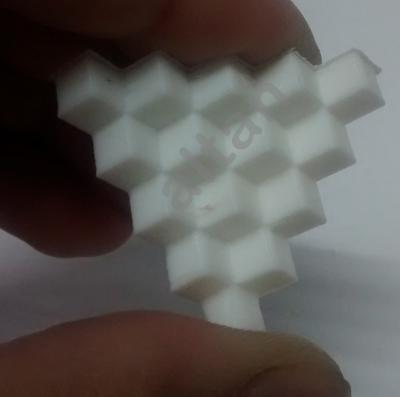


This post has been edited by altan: Nov 22 2014, 03:58 AM |
|
|
Nov 23 2014, 09:55 PM
Return to original view | Post
#52
|
|
Junior Member
188 posts Joined: Sep 2009 From: Either PJ, JB or SG but not at your house!
|
QUOTE(blomker @ Nov 23 2014, 09:38 PM) Hi Altan, Ninjaflex stuff sounds fun. Waiting for mine to arrive next week. Yup, the filament buckles at the drive gear very often when printing really fast, say 30mm/s, for that particular material.Show us your extruder design for Ninjaflex. I know the material is soft so the filament has to be guided down the tube all the way else it may end up like this :  Fortunately my 3D printer extruder has the filament guide raised slightly close to the gear and idler but still buckles even with a gap of 3mm. I am still experimenting with the speed and hotend parameter since its the two main factors for successful prints. I am planning to design a jig to narrow the gap further to improve feed reliability and hopefully doesn't buckle after hours of printing. I will put up a picture when I get back to my printer next week. |
|
|
Nov 29 2014, 08:27 PM
Return to original view | Post
#53
|
|
Junior Member
188 posts Joined: Sep 2009 From: Either PJ, JB or SG but not at your house!
|
QUOTE(marauderz @ Nov 29 2014, 08:13 PM) Ok, finally I had the time to recalibrate the platform, and my prints are performing very well, no more platform warping any more, already printing out new corner blocks for the Rep Rap and hope I can get back to it soon! Nice, if you could, do post some pictures of your prints.As for me, I have a picture of a bowden extruder for a 50 mm stepper motor that I am working on. I will release the design on thingiverse once fine tuned and adjusted fro a 40 mm stepper motor. 
|
|
|
|
|
|
Nov 30 2014, 08:23 PM
Return to original view | Post
#54
|
|
Junior Member
188 posts Joined: Sep 2009 From: Either PJ, JB or SG but not at your house!
|
QUOTE(marauderz @ Nov 30 2014, 01:16 AM) Here's another lesson for people interested with 3D printing, after you get your print, it might be filled with support structures where the holes are. Talking about adding supports, my advice to you is to try not to use too much support. From my experience, I have printed models with overhangs and bridges without support whenever possible.Also, if you have access to the design, try to design your parts with minimal overhangs or make the overhang parts bridge as much as possible. To me, its just gets really annoying when you have to cut and scrape out every support attached to some slopes that didn't need to be supported in the first place. Besides, its gets very wasteful after a long period of printing and I would love to reduce wastage as much as possible as the reason is in the picture below.[attachmentid=4238297] And you need to take care of them, by digging, cutting, picking, praying you don't damage the actual part, so after one hour these are the results. [attachmentid=4238302] Nice looking blocks, a bunch of excess, and one cut in my finger where one of the blocks slipped and a splint sticking out jabbed INTO MY FINGER!! [attachmentid=4238310] 
This is a picture I just took of a bag full of wasted PLA accumulated after 6 months of printing and it consist of brim, supports, and a few failed prints. Its about 650 grams of PLA in that bag, almost 2/3 of a reel gone.  QUOTE(izzudinhafiz @ Nov 30 2014, 06:30 PM) Glad to see you guys are active around here. Anyone knows a local shop that sells GT2 pulleys and belts? KL Selangor area. Welcome to the reprap forum izzudinhafiz. You should post a few pictures of your reprap.  |
|
|
Dec 2 2014, 12:36 AM
Return to original view | Post
#55
|
|
Junior Member
188 posts Joined: Sep 2009 From: Either PJ, JB or SG but not at your house!
|
QUOTE(marauderz @ Dec 1 2014, 05:10 PM) Pic of the motor Hi marauderz, to solve your problem, you can actually operate a 6 pole stepper with 4 wires only. In order to do that, you will need to find the schematic diagrams of the stepper motor internal wiring from the internet. From the 6 pole stepper diagram, you will notice 2 coils with 3 poles each. Two of the poles on a coil is on either ends and a cetral pole taps the middle of the coil. What this means is that you will need to find the two pins that connect the coils on each end and hook them to 2 of 4 wire connector. You will need to use a multimeter set to measure resistance to find out which two poles are connected to which coil and find the connected poles that has the highest resistance, which represents the full length of a coil. Once you found which of the 4 of 6 poles on the stepper motor are the two ends of a coil, then it's a matter of flipping the poles of the same coil until your stepper runs continuously and is not jerking randomly, provided you set the command from the host software to run the motor continuously.[attachmentid=4240504] I have tried this and it does work, just needs a bit of time to thinker with the wiring... I will also post a picture of the 6 pole stepper running on 4 wires later. This post has been edited by altan: Dec 2 2014, 01:05 AM |
|
|
Dec 2 2014, 12:42 AM
Return to original view | Post
#56
|
|
Junior Member
188 posts Joined: Sep 2009 From: Either PJ, JB or SG but not at your house!
|
QUOTE(KLKS @ Dec 1 2014, 09:28 PM) Yup, that solution works as long as you initially have a working printer in the first place to print the parts. I had a problem once where my printer came with a broken z axis coupler and sad to say it could have been resolved if there was a working 3d printer to print the replacement coupler. I have to scourage and strap an aquarium tubing to the z axis lead screw as coupling for the z axis motor to print the replacement part. Although that didn't work so in the end I used another printer that was utterly unreliable and hope it could print a coupler without any failure. This post has been edited by altan: Dec 2 2014, 01:07 AM |
|
|
Dec 2 2014, 01:12 AM
Return to original view | Post
#57
|
|
Junior Member
188 posts Joined: Sep 2009 From: Either PJ, JB or SG but not at your house!
|
QUOTE(marauderz @ Dec 2 2014, 01:00 AM) The guy says he'll send me the right cables, I wonder if the control board needs to be changed... You might want to check the connector end on the board but even with a 6 cable connector and a 4 pin connector on the board, you can still run the motor but you might have to flip and shift the cable connector around a few times to get the stepper to rotate in the correct direction.Also, it unlikely you can change the board because, the reprap control boards like the ramps 1.4 board are designed for driving bipolar or 4 pole stepper motors. I have not come across a unipolar or 6 pole stepper motor drivers before for repraps printers. This post has been edited by altan: Dec 2 2014, 01:16 AM |
|
|
Dec 2 2014, 01:24 AM
Return to original view | Post
#58
|
|
Junior Member
188 posts Joined: Sep 2009 From: Either PJ, JB or SG but not at your house!
|
QUOTE(marauderz @ Dec 2 2014, 01:21 AM) Fun.... Yup, have fun...  |
|
|
Dec 2 2014, 08:26 AM
Return to original view | Post
#59
|
|
Junior Member
188 posts Joined: Sep 2009 From: Either PJ, JB or SG but not at your house!
|
QUOTE(marauderz @ Dec 2 2014, 07:50 AM) No I haven't, thanks for the link, it'll be interesting if I have to take care of this myself. That's the spirit of reprap, you have to "take care of this" problem and that problem until you find the best solution to make your printer work the way you want it too.About steppers, the thing about it is that they don't work like ordinary DC motors where you apply power to both the pins and it freely rotates the shaft continuously. As for steppers, each coil that is powered moves the shaft by a tiny fraction of a few degrees and to achieve continuous rotation, a special electronic circuit is needed to create a sequence or steps to rotate the shaft in a known direction in a timely sequence. Hence you see 4, 5, 6, and 8 wire stepper, the 4 poles are bipolar only and the rest are unipolar but can be reconfigured to bipolar. Steppers are complicated and a lot of modern paper printers don't use stepper motor anymore, they use DC motor nowadays. We use steppers for their holding power and the controllability. If you need help figuring out what bipolar and unipolar steppers and how to wire it to work, you can post your question and I will try my best to explain in layman terms. |
|
|
Dec 3 2014, 07:44 PM
Return to original view | Post
#60
|
|
Junior Member
188 posts Joined: Sep 2009 From: Either PJ, JB or SG but not at your house!
|
QUOTE(DarkTenno @ Dec 3 2014, 02:05 PM) get it printed locally altan can help he not willing to I can do it also Thanks for the recommendation!  wow that a lot of support material , normally for those kind part I don't use support at all seem it printed fine on my printer, but I'm printing PLA not ABS I give you free one piece printable replacement part for your printer on your next order. |
| Change to: |  0.0555sec 0.0555sec
 0.34 0.34
 7 queries 7 queries
 GZIP Disabled GZIP Disabled
Time is now: 8th December 2025 - 10:38 PM |
 Quote
Quote
