

Problem here ! I've downloaded ClockWork Rom Manager and it seems that it can't detect my model. IT doesn't have Galaxy W :/
SΛMSUNG Galaxy W (I8150) Official Thread V4, Be intelligent; read thoroughly.
SΛMSUNG Galaxy W (I8150) Official Thread V4, Be intelligent; read thoroughly.
|
|
 Feb 10 2012, 10:50 PM Feb 10 2012, 10:50 PM
|
 
Junior Member
498 posts Joined: Apr 2009 
|
Problem here ! I've downloaded ClockWork Rom Manager and it seems that it can't detect my model. IT doesn't have Galaxy W :/
|
|
|
|
|
|
Feb 10 2012, 10:51 PM
|

Senior Member
1,943 posts Joined: Nov 2008
|
QUOTE(~@Sharks@~ @ Feb 10 2012, 10:48 PM) Downloading Nandroid to perform backup. Learning from this website http://www.androidpolice.com/2010/04/16/co...od-rom-manager/ don't use that, it might brick your phone. use this http://forum.xda-developers.com/showthread.php?t=1446593Please correct me if i'm doing any mistakes.  Thanks sifus. Thanks sifus. if you want to find anything about galaxy w http://forum.xda-developers.com/forumdisplay.php?f=1474 Added on February 10, 2012, 10:53 pm QUOTE(megeligeli @ Feb 10 2012, 10:50 PM) how to use the v6 supercharger script? http://forum.xda-developers.com/showthread.php?t=991276 This post has been edited by game4life: Feb 10 2012, 10:53 PM |
|
|
Feb 10 2012, 10:54 PM
|
|
Junior Member
498 posts Joined: Apr 2009
|
QUOTE(game4life @ Feb 10 2012, 10:51 PM) don't use that, it might brick your phone. use this http://forum.xda-developers.com/showthread.php?t=1446593 Alright Thanks ! Luckily you helped . Just only installed and was finding for the model already. if you want to find anything about galaxy w http://forum.xda-developers.com/forumdisplay.php?f=1474  Added on February 10, 2012, 10:59 pmHey game4life, I have downloaded the SDK and from what i read from the forum, I need to download the ancora for flashing? Thanks This post has been edited by ~@Sharks@~: Feb 10 2012, 10:59 PM |
|
|
Feb 10 2012, 11:24 PM
|
|
Senior Member
1,943 posts Joined: Nov 2008
|
QUOTE(~@Sharks@~ @ Feb 10 2012, 10:54 PM) Alright Thanks ! Luckily you helped . Just only installed and was finding for the model already. use odin, it's easierAdded on February 10, 2012, 10:59 pmHey game4life, I have downloaded the SDK and from what i read from the forum, I need to download the ancora for flashing? Thanks 1. download odin http://dl.dropbox.com/u/47601401/ODIN___An...S_for_I8150.rar 2. download recovery-clockwork-5.5.0.4-ancora.tar.md5 http://www.mediafire.com/?c9diay46cfllu3i 3. Select the ops file, and enable one package in options, then load the md5 file with the One Package button  4. boot into download mode and connect usb cable 5. click start to flash. don't disconnect the usb, wait until it reboot successfuly |
|
|
Feb 10 2012, 11:36 PM
|
|
Junior Member
498 posts Joined: Apr 2009
|
QUOTE(game4life @ Feb 10 2012, 11:24 PM) use odin, it's easier Download mode is Recovery mode right? So when go into recovery mode put in the usb cable and press start? 1. download odin http://dl.dropbox.com/u/47601401/ODIN___An...S_for_I8150.rar 2. download recovery-clockwork-5.5.0.4-ancora.tar.md5 http://www.mediafire.com/?c9diay46cfllu3i 3. Select the ops file, and enable one package in options, then load the md5 file with the One Package button 4. boot into download mode and connect usb cable 5. click start to flash. don't disconnect the usb, wait until it reboot successfuly  |
|
|
Feb 10 2012, 11:38 PM
|
|
Senior Member
1,943 posts Joined: Nov 2008
|
QUOTE(~@Sharks@~ @ Feb 10 2012, 11:36 PM) Download mode is Recovery mode right? So when go into recovery mode put in the usb cable and press start? no, download mode is vol down + home + power button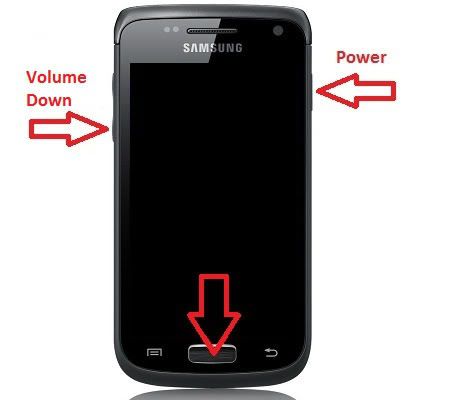 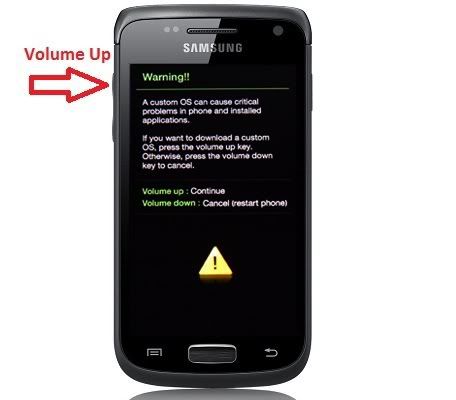 |
|
|
|
|
|
Feb 10 2012, 11:44 PM
|
|
Junior Member
498 posts Joined: Apr 2009
|
QUOTE(game4life @ Feb 10 2012, 11:38 PM) no, download mode is vol down + home + power button I've started it . IT rebooted and It still shows RESET on odin without anything hapenning . Is this normal ? |
|
|
Feb 10 2012, 11:45 PM
|
|
Senior Member
1,943 posts Joined: Nov 2008
|
QUOTE(~@Sharks@~ @ Feb 10 2012, 11:44 PM) I've started it . IT rebooted and It still shows RESET on odin without anything hapenning . Is this normal ? it's normal |
|
|
Feb 10 2012, 11:48 PM
|
|
Junior Member
498 posts Joined: Apr 2009
|
QUOTE(game4life @ Feb 10 2012, 11:45 PM) it's normal It shows pass already  . So how do i backup everything in my phone now before i go to custom roms? . So how do i backup everything in my phone now before i go to custom roms? |
|
|
Feb 10 2012, 11:48 PM
|
 
Trade Dispute
3,379 posts Joined: Apr 2006 From: KL  
|
QUOTE(Xabrius @ Feb 10 2012, 10:49 PM) Because, Samsung didn't even bother to put: So its more towards hardware. Hmmm...USB high speed host controller based on EHCI (a register interface) Full/low speed host controller based on OHCI (another register interface) USB device controller, supporting both high and full speeds Fourth controller to switch the OTG root port between host and device controllers. |
|
|
Feb 10 2012, 11:53 PM
|
|
Senior Member
1,943 posts Joined: Nov 2008
|
QUOTE(~@Sharks@~ @ Feb 10 2012, 11:48 PM) It shows pass already reboot into clockworkmod recovery . So how do i backup everything in my phone now before i go to custom roms?How to navigate in menus: Volume buttons = go up and down Home button = select Power button = go back choose backup and restore |
|
|
Feb 10 2012, 11:56 PM
|
|
Junior Member
498 posts Joined: Apr 2009
|
QUOTE(game4life @ Feb 10 2012, 11:53 PM) reboot into clockworkmod recovery So Clockworkmod recovery is by holding Power + Home and volume up , right? How to navigate in menus: Volume buttons = go up and down Home button = select Power button = go back choose backup and restore  Thanks for helping me all this while bro Appreciate it  |
|
|
Feb 11 2012, 12:01 AM
|
|
Senior Member
1,943 posts Joined: Nov 2008
|
QUOTE(~@Sharks@~ @ Feb 10 2012, 11:56 PM) So Clockworkmod recovery is by holding Power + Home and volume up , right? Thanks for helping me all this while bro Appreciate it  yes. you can also go to app drawer and launch cwm. there's an option to reboot into cwm recovery yes. you can also go to app drawer and launch cwm. there's an option to reboot into cwm recovery |
|
|
|
|
|
Feb 11 2012, 12:03 AM
|
|
Junior Member
498 posts Joined: Apr 2009
|
QUOTE(game4life @ Feb 11 2012, 12:01 AM) yes. you can also go to app drawer and launch cwm. there's an option to reboot into cwm recovery Press backup and restore then got alot choices. I chose backup. Is that the correct one? Sorry for asking so many questions Press backup and restore then got alot choices. I chose backup. Is that the correct one? Sorry for asking so many questions  |
|
|
Feb 11 2012, 12:04 AM
|
|
Senior Member
1,943 posts Joined: Nov 2008
|
QUOTE(~@Sharks@~ @ Feb 11 2012, 12:03 AM) I am in! yes, it's correct. happy flashing Press backup and restore then got alot choices. I chose backup. Is that the correct one? Sorry for asking so many questions |
|
|
Feb 11 2012, 12:19 AM
|
|
Junior Member
498 posts Joined: Apr 2009
|
QUOTE(game4life @ Feb 11 2012, 12:04 AM) yes, it's correct. happy flashing Thanks ! I think i've got the hang of it !  Am downloading Cow's Rom now . Am downloading Cow's Rom now .  |
|
|
Feb 11 2012, 01:03 AM
|

Junior Member
36 posts Joined: Jul 2011 
|
helo,im new with android and just bought galaxy w recently,when i try install samsung kies it keep saying some file corrupted bla2..i already install it many times..i use wins 7 64bit..please help me..
|
|
|
Feb 11 2012, 01:56 AM
|
|
Junior Member
498 posts Joined: Apr 2009
|
OMG. After i downloaded Cow's Rom . I joined it and installed the zip . After samsung and Galaxy W screen pop out, i get black screen! What happened?
I have restored and everything is back to normal. May i know how to use your rom , Cow. My battery was overheating and it showed black screen. Thanks This post has been edited by ~@Sharks@~: Feb 11 2012, 02:01 AM |
|
|
Feb 11 2012, 02:37 AM
|
|
Trade Dispute
3,379 posts Joined: Apr 2006 From: KL
|
QUOTE(agraphicpoint @ Feb 11 2012, 01:03 AM) helo,im new with android and just bought galaxy w recently,when i try install samsung kies it keep saying some file corrupted bla2..i already install it many times..i use wins 7 64bit..please help me.. Delete all installation files. Redownload kies with your antivirus/firewall turn off.Try using another browser then the current one you have to redownload. Make sure download from Samsung direct. |
|
|
Feb 11 2012, 11:12 AM
|

Junior Member
56 posts Joined: Dec 2011 From: lunas kedah loo
|
QUOTE(game4life @ Feb 10 2012, 11:24 PM) use odin, it's easier Need help here..1. download odin http://dl.dropbox.com/u/47601401/ODIN___An...S_for_I8150.rar 2. download recovery-clockwork-5.5.0.4-ancora.tar.md5 http://www.mediafire.com/?c9diay46cfllu3i 3. Select the ops file, and enable one package in options, then load the md5 file with the One Package button 4. boot into download mode and connect usb cable 5. click start to flash. don't disconnect the usb, wait until it reboot successfuly Im stuck at odin mode..everything as advise but after 30 min pressing start, i still stuck at recovery.img download.. no pass message or phone reboot..is it normal? how long does it take to flash cwm?  manage to flash cwm..  Download back odin,ancora ops and recovery.md5.. less than 2 mins finish..  This post has been edited by qamarzam: Feb 11 2012, 11:30 AM |
|
Topic ClosedOptions
|
| Change to: |  0.0190sec 0.0190sec
 0.57 0.57
 6 queries 6 queries
 GZIP Disabled GZIP Disabled
Time is now: 12th December 2025 - 06:07 AM |
 Quote
Quote