

can suggest to me 4g LTE USB stick which give more speed and good signal receiver....and suggest to me Mifi also...budget doesnt matter..
thanks
USB/USB-WiFi/MIFI Modem Owner Club V1, Huawei/ZTE/Option Icon and other...
USB/USB-WiFi/MIFI Modem Owner Club V1, Huawei/ZTE/Option Icon and other...
|
|
 Apr 13 2014, 01:36 PM Apr 13 2014, 01:36 PM
|
 
Junior Member
92 posts Joined: Aug 2009  
|
can suggest to me 4g LTE USB stick which give more speed and good signal receiver....and suggest to me Mifi also...budget doesnt matter..
thanks |
|
|
|
|
|
Apr 17 2014, 02:50 AM
|
|
Junior Member
17 posts Joined: Feb 2008
|
Hi sifus. So, i've already bought alcatel y800. But the performance seems to let me down (speed always dropped & connection lost). Can you guys recommend any configuration that i need to do or should i change to different LTE MiFi?
|
|
|
Apr 18 2014, 11:02 AM
|

Senior Member
1,524 posts Joined: Apr 2008
|
QUOTE(asanthadenz @ Apr 6 2014, 08:01 AM) could someone recommend a good portable mifi modem under rm100 if you have a usb modem, juz buy a battery powered 3g router, plug the usb modem to it, then already become a 'mifi'. it cost below rm100. e.g tp-link 3040, hame a1. |
|
|
Apr 20 2014, 06:33 AM
|
|
Junior Member
92 posts Joined: Aug 2009
|
hi all here..
i've just bought Huawei E3272 USB modem HiLink and TP-LINK MR3040.. already set up the connectivity..and everything done..the wifi is on and succesfully connect to the internet under celcom 4G... how can i make it auto connect without need to redirect to the HiLink web dashboard and need to click the Connect button to start connecting? |
|
|
Apr 20 2014, 03:20 PM
|
 
Elite
6,931 posts Joined: Apr 2011 From: Bolehland for sure ^_^
|
QUOTE(freakjb @ Apr 20 2014, 06:33 AM) hi all here.. auto connect should be setting at your mr3040,.. if u plug it together i've just bought Huawei E3272 USB modem HiLink and TP-LINK MR3040.. already set up the connectivity..and everything done..the wifi is on and succesfully connect to the internet under celcom 4G... how can i make it auto connect without need to redirect to the HiLink web dashboard and need to click the Connect button to start connecting?  |
|
|
Apr 20 2014, 06:04 PM
|
|
Junior Member
92 posts Joined: Aug 2009
|
QUOTE(chuahcs79 @ Apr 20 2014, 03:20 PM) auto connect should be setting at your mr3040,.. if u plug it together yup..i already set as auto connec at mr3040..but its still the same..need to click da connect button after plug in together.. |
|
|
|
|
|
Apr 20 2014, 06:11 PM
|

Elite
8,400 posts Joined: Jul 2008 
|
QUOTE(freakjb @ Apr 20 2014, 06:04 PM) yup..i already set as auto connec at mr3040..but its still the same..need to click da connect button after plug in together.. Go to the E3272 HiLink interfaceThere will be somewhere which is able to configure auto connect |
|
|
Apr 20 2014, 06:53 PM
|
|
Junior Member
92 posts Joined: Aug 2009
|
QUOTE(blacktubi @ Apr 20 2014, 06:11 PM) Go to the E3272 HiLink interface its seem da Hilink interface didnt provide auto-connect..There will be somewhere which is able to configure auto connect see the pic..no option to auto-connect.. Attached thumbnail(s) 
|
|
|
Apr 20 2014, 08:07 PM
|
|
Elite
6,931 posts Joined: Apr 2011 From: Bolehland for sure ^_^
|
QUOTE(freakjb @ Apr 20 2014, 06:53 PM) its seem da Hilink interface didnt provide auto-connect.. your max idle time should be > 0 ( or the lowest number it allow )see the pic..no option to auto-connect.. |
|
|
Apr 20 2014, 10:30 PM
|
|
Elite
8,400 posts Joined: Jul 2008
|
QUOTE(freakjb @ Apr 20 2014, 06:53 PM) its seem da Hilink interface didnt provide auto-connect.. Then nothing you can do except flash it to non a non HiLInk firmwaresee the pic..no option to auto-connect.. Good luck finding a non HiLink firmware |
|
|
Apr 21 2014, 12:01 AM
|
|
Junior Member
92 posts Joined: Aug 2009
|
QUOTE(chuahcs79 @ Apr 20 2014, 08:07 PM) your max idle time should be > 0 ( or the lowest number it allow ) minimum set is 30.. |
|
|
Apr 21 2014, 12:17 AM
|
|
Elite
6,931 posts Joined: Apr 2011 From: Bolehland for sure ^_^
|
QUOTE(freakjb @ Apr 21 2014, 12:01 AM) minimum set is 30.. yeah 30 i think it is second, so 30 second max idle time is acceptable,. |
|
|
Apr 21 2014, 12:34 AM
|
|
Junior Member
92 posts Joined: Aug 2009
|
QUOTE(chuahcs79 @ Apr 21 2014, 12:17 AM) yeah 30 i think it is second, so 30 second max idle time is acceptable,. mind tell me, so what is it for? i dont understand the idle time for.Update: Thanks..its worked! This post has been edited by freakjb: Apr 21 2014, 11:26 AM |
|
|
|
|
|
Apr 22 2014, 09:57 AM
|

All Stars
15,192 posts Joined: Oct 2004
|
QUOTE(chuahcs79 @ Apr 21 2014, 12:17 AM) yeah 30 i think it is second, so 30 second max idle time is acceptable,. QUOTE(freakjb @ Apr 21 2014, 12:34 AM) mind tell me, so what is it for? i dont understand the idle time for. Wrong la.. Should set it the highest possible, so before the idle seconds, your connection is still active and after that idle seconds, it is disconnected.Update: Thanks..its worked! |
|
|
Apr 22 2014, 11:02 AM
|

Junior Member
289 posts Joined: Oct 2007 From: KL
|
Hi everyone, just wanted to ask which mifi you guys would recommend coz i see YES is quite expensive. got anything under RM200? I'll bringing it everywhere i go. thanks ya
 |
|
|
Apr 22 2014, 03:40 PM
|
|
Elite
6,931 posts Joined: Apr 2011 From: Bolehland for sure ^_^
|
QUOTE(freakjb @ Apr 21 2014, 12:34 AM) mind tell me, so what is it for? i dont understand the idle time for. so i guess now everything is fine , right ?Update: Thanks..its worked! max idle time must be the lowest,.. |
|
|
Apr 22 2014, 08:05 PM
|

Senior Member
1,846 posts Joined: Apr 2008
|
QUOTE(chuahcs79 @ Apr 22 2014, 03:40 PM) so i guess now everything is fine , right ? mind explain to me why lowest?max idle time must be the lowest,.. i tot should be highest? lowest should be good for long battery life so, when u not using the internet, it will off the data. when u set to highest, mean u always want it to connect to internet max idle time= max time period when u didnt use the internet, so it will auto turn off the data. and auto reconnect when u want to use it again. correct me if im wrong |
|
|
Apr 22 2014, 08:14 PM
|

Junior Member
323 posts Joined: Sep 2009
|
QUOTE(coolstore @ Apr 18 2014, 11:02 AM) if you have a usb modem, juz buy a battery powered 3g router, plug the usb modem to it, then already become a 'mifi'. Great tip it cost below rm100. e.g tp-link 3040, hame a1.  I am looking to subscribe the Umobile MB68 package http://www.u.com.my/internet-postpaid-plans , should I top up RM100 with umobile to buy the MiFi modem or to buy tp-link 3040? I am looking to subscribe the Umobile MB68 package http://www.u.com.my/internet-postpaid-plans , should I top up RM100 with umobile to buy the MiFi modem or to buy tp-link 3040?This post has been edited by ericling: Apr 22 2014, 08:14 PM |
|
|
Apr 23 2014, 10:48 AM
|
|
Senior Member
1,524 posts Joined: Apr 2008
|
QUOTE(ericling @ Apr 22 2014, 08:14 PM) Great tip don't waste the offer by umobile if you going to be their post paid broadband users, if don't take during signing up, no sure in future u can ask for it or not. I am looking to subscribe the Umobile MB68 package http://www.u.com.my/internet-postpaid-plans , should I top up RM100 with umobile to buy the MiFi modem or to buy tp-link 3040?i believe the LTE mifi offerred by umobile is huawei e5372 difference wtih maxis/digi huawei e5776 is that: e5372 support 2 external antenna, e5776 support 1 external antenna e5372 got wifi 5GHz support e5372 got repeater mode e5372 battery capacity 1780mAh (removable), e5776 3000mAh * can get several back up huawei battery, easy compensate that weaker battery point. here got a link from huawei: http://support.huawei.com/ecommunity/bbs/10174283.html 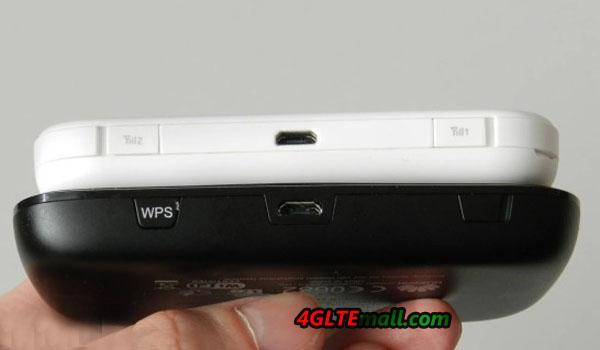 ** else let say u really don't want buy, u make an offer here : who wanna buy authentic umobile Huawei E5372 at RM200? I go sign up umobile plan now, sure got hot reply! then u can arrange time with buyer go together sign up and he/she pay u on the spot. This post has been edited by coolstore: Apr 29 2014, 04:48 PM |
|
|
Apr 24 2014, 06:14 AM
|
|
Junior Member
92 posts Joined: Aug 2009
|
QUOTE(chuahcs79 @ Apr 22 2014, 03:40 PM) so i guess now everything is fine , right ? Yup..after change the idle time.then i try unplug and plug it..directly it auto-connect..max idle time must be the lowest,.. no need to click connect button..and it also work when plug with the wifi reuter.. |
| Change to: |  0.0203sec 0.0203sec
 0.38 0.38
 6 queries 6 queries
 GZIP Disabled GZIP Disabled
Time is now: 2nd December 2025 - 07:18 AM |
 Quote
Quote