

is there any way to get stock widget, apps n live wallpaper after flashing CHECKROM HD??
SAMSUNG GALAXY S II Official thread V20, NEW Users be SMARTuser - PLS read Page 1
SAMSUNG GALAXY S II Official thread V20, NEW Users be SMARTuser - PLS read Page 1
|
|
 Nov 27 2011, 05:01 PM Nov 27 2011, 05:01 PM
|
 
Junior Member
356 posts Joined: Oct 2011 From: Shah Alam  
|
is there any way to get stock widget, apps n live wallpaper after flashing CHECKROM HD??
|
|
|
|
|
|
Nov 27 2011, 05:07 PM
|

Junior Member
168 posts Joined: Nov 2011
|
QUOTE(Shizuru @ Nov 27 2011, 04:59 PM) can't wifi or data? Yes,can't access to internet at all. |
|
|
Nov 27 2011, 05:08 PM
|

Senior Member
5,322 posts Joined: Oct 2009
|
QUOTE(syahmie_dbf1430 @ Nov 27 2011, 05:01 PM) is there any way to get stock widget, apps n live wallpaper after flashing CHECKROM HD?? Yup.. the default apps are in the kitchen. |
|
|
Nov 27 2011, 05:12 PM
|

Junior Member
68 posts Joined: Mar 2005 From: cyberjaya&serdang
|
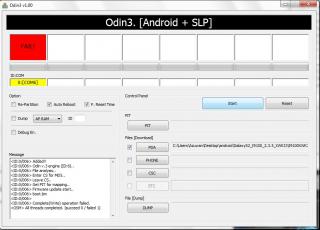
Hi all,
While updating my hp to Gingerbread 2.3.5 Firmware got error message saying failed.Then I disconnected the phone even on the hp saying its downloading mode. Now when I try to restart back the phone it won’t.Just black screen with phone and pc icon showing ‘!’ as per pic.Also I've disconnected the battery and redo the process again but still error. What should I do now? Please advise.. Attached thumbnail(s) 
|
|
|
Nov 27 2011, 05:22 PM
|
|
Junior Member
356 posts Joined: Oct 2011 From: Shah Alam
|
QUOTE(botakbin @ Nov 27 2011, 05:08 PM) Yup.. the default apps are in the kitchen. thanks..  so i can have them back right?? how about widget n live wallpaper?? |
|
|
Nov 27 2011, 05:35 PM
|
|
Senior Member
2,388 posts Joined: Sep 2004
|
QUOTE(r33_abflug @ Nov 27 2011, 05:12 PM) Hi all, did you choose the correct firmware for flashing?While updating my hp to Gingerbread 2.3.5 Firmware got error message saying failed.Then I disconnected the phone even on the hp saying its downloading mode. Now when I try to restart back the phone it won’t.Just black screen with phone and pc icon showing ‘!’ as per pic.Also I've disconnected the battery and redo the process again but still error. What should I do now? Please advise.. Added on November 27, 2011, 5:37 pm QUOTE(iori57 @ Nov 27 2011, 11:46 AM) anyone encounter lag in latest siyah 2.2 final? or even the latest betas... i thought my phone install too much app start to lag then try flashing to speedmod back.. wah the lagging gone.. by lag i mean when u go market there and try to scroll down u see the scrolling effect like not smooth and chik har chik har like that.. after i flash final no log version did heat up and laggy abitbut after i restart phone everything back to normal d so far no problem yet This post has been edited by snigapoe: Nov 27 2011, 05:37 PM |
|
|
|
|
|
Nov 27 2011, 05:39 PM
|

Senior Member
524 posts Joined: Jun 2007
|
QUOTE(r33_abflug @ Nov 27 2011, 05:12 PM) Hi all, soft bricked, still able to get to download mode?While updating my hp to Gingerbread 2.3.5 Firmware got error message saying failed.Then I disconnected the phone even on the hp saying its downloading mode. Now when I try to restart back the phone it won’t.Just black screen with phone and pc icon showing ‘!’ as per pic.Also I've disconnected the battery and redo the process again but still error. What should I do now? Please advise.. |
|
|
Nov 27 2011, 05:45 PM
|
 
Elite
27,801 posts Joined: Jun 2007 From: Johor
|
QUOTE(r33_abflug @ Nov 27 2011, 05:12 PM) Hi all, Switch off phoneWhile updating my hp to Gingerbread 2.3.5 Firmware got error message saying failed.Then I disconnected the phone even on the hp saying its downloading mode. Now when I try to restart back the phone it won’t.Just black screen with phone and pc icon showing ‘!’ as per pic.Also I've disconnected the battery and redo the process again but still error. What should I do now? Please advise.. Boot to download mode ( vol down+power+home) Connect to PC Launch Odin and flash back your stock rom or any rom you have on hand Added on November 27, 2011, 5:47 pm QUOTE(warren11 @ Nov 27 2011, 05:07 PM) Yes,can't access to internet at all. I supposed you are referring to #G accessDid you enabled packet data ? Settings/Wireless networks/mobile networks : tick packet data Or hardpress power button - select data network This post has been edited by benny888: Nov 27 2011, 05:47 PM |
|
|
Nov 27 2011, 05:52 PM
|
|
Junior Member
68 posts Joined: Mar 2005 From: cyberjaya&serdang
|
not able to go download mode anymore..
Added on November 27, 2011, 5:55 pm QUOTE(benny888 @ Nov 27 2011, 05:45 PM) Switch off phone the main prob now is im not able to go download mode anymore..sighhBoot to download mode ( vol down+power+home) Connect to PC Launch Odin and flash back your stock rom or any rom you have on hand This post has been edited by r33_abflug: Nov 27 2011, 05:55 PM |
|
|
Nov 27 2011, 05:56 PM
|

Senior Member
2,741 posts Joined: Jan 2007
|
QUOTE(r33_abflug @ Nov 27 2011, 05:12 PM) Hi all, I9100 G model?While updating my hp to Gingerbread 2.3.5 Firmware got error message saying failed.Then I disconnected the phone even on the hp saying its downloading mode. Now when I try to restart back the phone it won’t.Just black screen with phone and pc icon showing ‘!’ as per pic.Also I've disconnected the battery and redo the process again but still error. What should I do now? Please advise.. |
|
|
Nov 27 2011, 05:57 PM
|

Senior Member
3,221 posts Joined: Sep 2008 From: KL
|
QUOTE(r33_abflug @ Nov 27 2011, 05:52 PM) not able to go download mode anymore.. disconnect ur usb cable first. then off phone. take out battery. wait 30 sec. put back again. boot to download mode. if cannot, go get a usb jigAdded on November 27, 2011, 5:55 pm the main prob now is im not able to go download mode anymore..sighh |
|
|
Nov 27 2011, 06:03 PM
|
|
Junior Member
168 posts Joined: Nov 2011
|
Added on November 27, 2011, 5:47 pm I supposed you are referring to #G access Did you enabled packet data ? Settings/Wireless networks/mobile networks : tick packet data Or hardpress power button - select data network [/quote] Yes. Packet data already enabled. Data network activated. But still can't access. |
|
|
Nov 27 2011, 06:07 PM
|
|
Junior Member
68 posts Joined: Mar 2005 From: cyberjaya&serdang
|
QUOTE(JayceOoi @ Nov 27 2011, 05:56 PM) I9100 G model? yes..G model. Do u have blog as well?Because I think I'm checking your blog for answer now..Pls help.. |
|
|
|
|
|
Nov 27 2011, 06:17 PM
|
|
Senior Member
5,322 posts Joined: Oct 2009
|
QUOTE(syahmie_dbf1430 @ Nov 27 2011, 05:22 PM) thanks.. Widgets yes but livr wallpaper I duno. Now I see left 3 there. Galaxy, grass, and nexus.so i can have them back right?? how about widget n live wallpaper?? |
|
|
Nov 27 2011, 06:18 PM
|

Senior Member
1,371 posts Joined: Jun 2008
|
Guys, is it confirmed that the S2 is no longer being carried by maxis?
|
|
|
Nov 27 2011, 06:19 PM
|

Senior Member
1,401 posts Joined: Oct 2008 From: Bandar Sunway 
|
anyone know the suggested price for S II?
|
|
|
Nov 27 2011, 06:21 PM
|
|
Elite
27,801 posts Joined: Jun 2007 From: Johor
|
[quote=warren11,Nov 27 2011, 06:03 PM]
Added on November 27, 2011, 5:47 pm I supposed you are referring to #G access Did you enabled packet data ? Settings/Wireless networks/mobile networks : tick packet data Or hardpress power button - select data network [/quote] Yes. Packet data already enabled. Data network activated. But still can't access. [/quote] Check your APN settings : Setting/Wireless Network/Mobile Nework/Access Point Names - phone should auto detect these and installed . Or you try key in the values again ( refer page 1 post #8 ) |
|
|
Nov 27 2011, 06:23 PM
|
|
Junior Member
356 posts Joined: Oct 2011 From: Shah Alam
|
QUOTE(botakbin @ Nov 27 2011, 06:17 PM) Widgets yes but livr wallpaper I duno. Now I see left 3 there. Galaxy, grass, and nexus. yes.. there r 3 only.. i just want microbes.. |
|
|
Nov 27 2011, 06:28 PM
|

Junior Member
410 posts Joined: May 2007 From: Darkness..
|
QUOTE(r33_abflug @ Nov 27 2011, 05:12 PM) Hi all, seems liqe urphone is G version ? if yes then flash back to ori firmware..so ll back to normal.. not serious issue to worryWhile updating my hp to Gingerbread 2.3.5 Firmware got error message saying failed.Then I disconnected the phone even on the hp saying its downloading mode. Now when I try to restart back the phone it won’t.Just black screen with phone and pc icon showing ‘!’ as per pic.Also I've disconnected the battery and redo the process again but still error. What should I do now? Please advise.. |
|
|
Nov 27 2011, 06:48 PM
|
|
Newbie
3 posts Joined: Sep 2011
|
hi everyone, want to ask does anyone here facing the s2 auto on problem?
because my s2 is auto on the screen after I off it since yesterday... |
|
Topic ClosedOptions
|
| Change to: |  0.0288sec 0.0288sec
 0.86 0.86
 6 queries 6 queries
 GZIP Disabled GZIP Disabled
Time is now: 11th December 2025 - 01:32 PM |
 Quote
Quote