Welcome Guest ( Log In | Register )

6 Pages < 1 2 3 4 5 > » Bottom

Outline · [ Standard ] · Linear+

 Rooting your Samsung Galaxy SII (I9100G), also updating/repairing a bricked one

views
     
premk71
post Dec 8 2011, 03:20 AM

Getting Started
**
Junior Member
119 posts

Joined: Jul 2006


QUOTE(gsan @ Dec 7 2011, 10:37 PM)
just flashed to superatoms kernel v1.1, now charging...will moniter the battery life tomolo...
*
My side the superatmos v 1 kernel caused battery drain. Very bad. Last night Flashed back to stock DZKJ2 and rooted doomlord. Decent battery life again.
Now gonna try V 1.1. Lets see how it goes.

Oh on the superROM , I did have 3 freeze crash. Not sure kernel or ROM . We'll see how it goes this time with V 1.1
Flashing time. rclxm9.gif

=================================================
Okay time to flash Superatmos kernel 1.1 + SuperRom v 1.1 - its already out on xda.
Will check out battery life on this so called lightweight ROM.
drool.gif

This post has been edited by premk71: Dec 8 2011, 03:45 AM
premk71
post Dec 9 2011, 12:51 AM

Getting Started
**
Junior Member
119 posts

Joined: Jul 2006


QUOTE(EightPhantomz @ Dec 8 2011, 10:18 PM)


Similar exp .

Tried kernel 1.1 and rom 1.1. Not good. The Rom is too lightweight.many apps been removed .including search and software update components .

Kernel 1.0 drain battery but kernel 1.1 is ok .
So now running kernel 1.1 plus Rom 1.0 .good battery .put on ics theme. Really cool .only problem sometimes camera fails or hang .otherwise good .cleared dalvic .lets see if camera problem comes back
premk71
post Dec 9 2011, 01:15 AM

Getting Started
**
Junior Member
119 posts

Joined: Jul 2006


QUOTE(EightPhantomz @ Dec 9 2011, 01:13 AM)
Yup. I also suspected superatmos deleted Samsung components for SuperROM v1.1.
Currently running on v1.0 with kernel v1.1. Looks ok for now. smile.gif
*
try put on ICS back on it. I have ICS running. Its awesome . Better than the ics launchers.
So far even before JD, setcpu and freeze unwanted apps, battery life is good, goes down like 2-3% per hour on standby


Added on December 9, 2011, 1:18 am
QUOTE(hermanchb @ Dec 9 2011, 01:13 AM)
no camera problem b4 flashing?
*
No camera problem running juffo 2.1 or stock DZKJ2 +rooted.
The problem is like this. U take a photo , its done successfully , but the camera freezes at the image. no response even closed with task manager. it happens when u try to view the shot you just taken while camera is still on.... i think u know what i mean. rclxub.gif


This post has been edited by premk71: Dec 9 2011, 01:18 AM
premk71
post Dec 9 2011, 01:35 AM

Getting Started
**
Junior Member
119 posts

Joined: Jul 2006


QUOTE(EightPhantomz @ Dec 9 2011, 01:28 AM)


GAH! I need to spam more in xda forum.
*
go ahead , we'll start a banter there. Ha ha ha icon_rolleyes.gif whistling.gif drool.gif rolleyes.gif
premk71
post Dec 10 2011, 01:13 AM

Getting Started
**
Junior Member
119 posts

Joined: Jul 2006


QUOTE(eddie2020 @ Dec 9 2011, 06:08 PM)
Yes it works.but better way just reinstall stock firmware .
premk71
post Dec 10 2011, 05:01 AM

Getting Started
**
Junior Member
119 posts

Joined: Jul 2006


With SuperROM 1.0 ,anyone figure out how to make USB connections work? I can connect to PC in USB debugging. I can connect without USB debugging but KIES doesnt connect.
I can connect USB storage and also USB teethering , but KIES doesnt connect. Says phone not supported by KIES when I use the correct mode for connecting with KIES.

===============================================

Argh! nevermind....i think i know ( But i maybe wrong as the launcher in custom ROM is still TWlauncher)... KIES only works when u have Touchwiz on. Obviously with this custom ROM and no touchwiz it shouldnt...... unless someone else got work around rclxms.gif rclxm9.gif shakehead.gif

This post has been edited by premk71: Dec 10 2011, 05:28 AM
premk71
post Dec 10 2011, 07:21 AM

Getting Started
**
Junior Member
119 posts

Joined: Jul 2006


QUOTE(dolcegabana @ Dec 10 2011, 07:08 AM)
hey bro...iam using doomood to rooted my i9100g (with GDZKH4). now my s2 was (rooted) But how to i get (ClockwordModeRecovery)??? pls give me a advise...thousand Tkns Bro........
*
The fastest way is to flash a kernel which has CWM. You can try superatmos kernel v 1.1 or 1.2 or the myGkernel v 1.1.1 ( dont instal v 1.1, but 1.1.1)

These are the links

http://forum.xda-developers.com/showthread.php?t=1369977

and

http://forum.xda-developers.com/showthread.php?t=1327509

Doomlord gives u root but not CWM.
premk71
post Dec 10 2011, 07:28 AM

Getting Started
**
Junior Member
119 posts

Joined: Jul 2006


QUOTE(codefuturama @ Dec 10 2011, 07:23 AM)
gonna try root my phone now. god giv me strength.
*
Good Luck! Give it a Go.
premk71
post Dec 10 2011, 06:42 PM

Getting Started
**
Junior Member
119 posts

Joined: Jul 2006


QUOTE(EightPhantomz @ Dec 10 2011, 04:16 PM)
I'm running SuperROM v1.0 with superatmos kernel v1.1.

No problem. Very smooth. Battlife is awesome!

I'm gonna stick with this setup for awhile. smile.gif
*
I concur .same set up . I did not even freeze any app yet with titanium and battery life is outrageously good.lucky me not to try kernel 1.2 .


Added on December 10, 2011, 6:43 pm
QUOTE(creezalird @ Dec 10 2011, 03:59 PM)
weird, i am running stock with almost all samsung apps removed, except useful like mtp applications, and i have no problem with KIES. lucky me then smile.gif
*
Bro , did you remove TWlauncher on your custom ROM ?

This post has been edited by premk71: Dec 10 2011, 06:43 PM
premk71
post Dec 11 2011, 01:02 AM

Getting Started
**
Junior Member
119 posts

Joined: Jul 2006


QUOTE(fauzi_91 @ Dec 10 2011, 07:56 PM)
can i freeze the pcwdevice,bluetoothavrcp and brcmbluetoothservice? wht is it actually?hmm..every time i fast reboot my phone it keep starting..but i dunno if these drain my batt or not..
*
If you don't want to freeze but prefer not to have them running in background you can use autostarts app (the one with a car icon ) to turn off this unknown /unwanted apps from starting based on event .you can use this to stop apps from starting up and running in.background and only run when you use them.


premk71
post Dec 11 2011, 03:00 AM

Getting Started
**
Junior Member
119 posts

Joined: Jul 2006


QUOTE(steven92 @ Dec 11 2011, 02:42 AM)
I try many time and i sure i follow all the step.........
*
Not sure if its worth mentioning since you probably tried it.
Reboot your pc.don't connect phone yet.go task manager on pc .kill anything that is related to phone or usb device. On my windows 7 32 bit , there was a process running n***usb ...can't recall the name. Its about access media on usb device or something.read thru all process description .kill anything that relate to phone or usb even if it didn't come from Samsung

Then on ur phone open up all apps .gps and stuff.keep them all running .until ram used is about 500 mb .on stock phone without apps it literally means every app running. Then with usb debugging n unknown sources ticked on your phone , stick into usb n run the script as administrator.right click n run as admin (assuming u using later than xp os )

Keep the screen on your phone.just increase the screeout time .I seen it helps not to be doing anything else on ur pc at sane time. It guarantee work . If it doesn't ,unplug usb , don't turn off ur phone . Connect usb again and kill adb process .should have 2 running . And run the script again as admin . Guarantee work .

Try it .my first time took 42 tries. But now I succeed evrtytime with memory crash technique
premk71
post Dec 11 2011, 03:37 AM

Getting Started
**
Junior Member
119 posts

Joined: Jul 2006


QUOTE(fauzi_91 @ Dec 11 2011, 01:22 AM)
owh..i see..will dload it later..thx  thumbup.gif
*
Yes, if u explore the app, you'd find that you can sort all the startups by application rather than by event. Its easier to "audit" by application list and turn off stuff. Good luck. thumbup.gif whistling.gif


Added on December 11, 2011, 3:39 am
QUOTE(dolcegabana @ Dec 11 2011, 03:07 AM)
TKNS      premk71      Bro.....................

                                          Now I Was can Get fully    ClockMode........................................
                         

                                            Thousand    Thanks        From Your  ADVISE............................................Cheer.....
                                   
                                                  When u Free I Belanja U    Minum Teh    Tarik            Ya  ...... Wakakakakakaka
*
No worries bro. I am happy you have sorted out the CWM. What's next, you gonna flash custom ROM? enjoy the SGS2 to the max. He he he rclxms.gif rclxm9.gif thumbup.gif

This post has been edited by premk71: Dec 11 2011, 03:39 AM
premk71
post Dec 12 2011, 02:14 AM

Getting Started
**
Junior Member
119 posts

Joined: Jul 2006


QUOTE(creezalird @ Dec 11 2011, 11:45 PM)
oh, this is MADNESS, every new user seems to be asking the same thing everyday.

i've made a revised guide using reference from the first page and others :

revised guide for i9100G (from updating to rooting) : http://db.tt/jqA10PR5

do spread the guide if anyone found it useful smile.gif

ps : do tell if anyone found mistake or whatsoever, i made that in only a minute..LOLS
*
Thanks for taking out the misery of responding to same questions over and over again. I just hope people spend some time to read the guide. Seems everyone wants instant root and all goodies and don't wanna read. Thanks
premk71
post Dec 12 2011, 05:16 AM

Getting Started
**
Junior Member
119 posts

Joined: Jul 2006


QUOTE(creezalird @ Dec 12 2011, 02:18 AM)
hopefully people read..i have already made the guide as simple as possible with less flowery sentences..lols..
as a geek, a more direct word is better...lols
*
Bro, in your next rev ,can u put in
1. "how to get into download mode" using 3 button or jig for use with ODIN
2. How to get into recovery. For those who really lazy want to search. I bet this question will be asked later.

and next time someone ask a question which been asked before, i think we must avoid answer and tell them "read the guide".

Very good job bro. You da man.
rclxms.gif notworthy.gif rclxms.gif
premk71
post Dec 12 2011, 11:32 AM

Getting Started
**
Junior Member
119 posts

Joined: Jul 2006


QUOTE(kahuka @ Dec 12 2011, 11:11 AM)
hi. i'm not sure this is the right place to ask, do cwm recovery support gt-9100g?
*
Welcome to the forum. I see u register at 10.25 am and this is your first post.So, we'd be gentle.

Please look up a few posts above, there is a link to a guide for I9100G . Please read thru to understand how to get CWM on I9100G.
premk71
post Dec 12 2011, 11:43 PM

Getting Started
**
Junior Member
119 posts

Joined: Jul 2006


QUOTE(gilbertarenas @ Dec 12 2011, 10:33 PM)
hi all, my phone just got stuck at this, any help ?

user posted image
*
It happened to me many many times.last night also kena .don't worry .

Just reboot your pc. Use task manager to kill kies and all other phone application . Then start odin and connect ur phone . Odin will recognize it.

Then proceed to select the files u wanted to flash originally .wait 20 sec . And press start .

It will work. If it doesn't it means ur drivers got problem .just reinstall back kies ,reboot and repeat all of the above .you can try another usb port on ur pc if u want.

Don't worry its so easy to solve.but first time i did sweat a bit .

I think this happens because kies is still running as background process when u flashing with odin .or odin crash .or u accidently pulled the cable or usb connection loose .


premk71
post Dec 13 2011, 12:23 AM

Getting Started
**
Junior Member
119 posts

Joined: Jul 2006


QUOTE(gsan @ Dec 12 2011, 11:52 PM)
Thanks for the link bro. This will help the chap with the problem.

But my experience, not necessary to repartition and go back to stock.
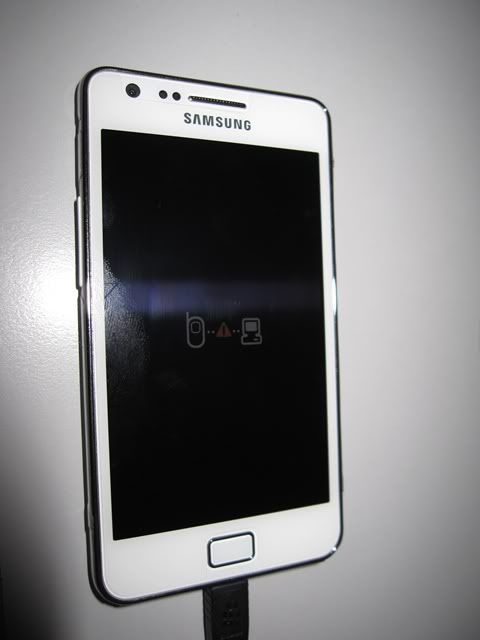
Just flash back the file that was intended to. FOr example....flash kernel....ODIN show fail -- red color... u pull the plug . press to restart the phone, this logo pc-phone comes out... follow my previous steps, can just try again to flash the same kernel.

Of course going back to stock also can. My first time I got hit, I tried re-partition and re-stock. So thanks for chipping in to help our friend here.


So many times soft brick, i hope i dont encounter hard brick. Then its time for Galaxy Note. He he he,


Added on December 13, 2011, 12:37 am
QUOTE(creezalird @ Dec 12 2011, 01:09 PM)
besides the new bootloader already limits the usb jig functionality a bit i think, i do own one, but i never stick it in the butt of my phone..lols
A bit odd. I bought my phone Oct 8. I think it was on 2.3.4, because since then I got 2 firmware upgrade thru KIES, DZKI1( 2.3.5) and DZKJ2 ( 2.3.6).

On my phone , i have done all kind of flash this , flash that, all the kung fu and karate of flashing. Everytime I stick my USB jig, any yellow triangle if any disappear and the binary counter shows this in download mode:

ODIN MODE
PRODUCT NAME: GT--I9100G
CUSTOM BINARY DOWNLOAD : NO
CURRENT BINARY: SAMSUNG_OFFICIAL.
ERASING DOWNLOAD INFORMATION SUCCEEDED.

Hmmmm... does it mean my phone have the old bootloader because everywhere i read people keep "warn" the new bootloader cannot erase binary counter, about the old *.sbl file and stuff.

I am just happy to use the USB jig. Cant leave home without it. biggrin.gif rclxm9.gif icon_rolleyes.gif tongue.gif


This post has been edited by premk71: Dec 13 2011, 12:37 AM

premk71
post Dec 13 2011, 01:45 PM

Getting Started
**
Junior Member
119 posts

Joined: Jul 2006


QUOTE(azomic @ Dec 13 2011, 11:56 AM)
anyway, the superROM did remove some of samsung application. i tried to restore using titanium backup, but it seems the process took waaayyyy too long. is it cause the ROM unable it to restore?
For titanium backup, try tick usb debugging first before try to restore.
premk71
post Dec 13 2011, 04:24 PM

Getting Started
**
Junior Member
119 posts

Joined: Jul 2006


QUOTE(azomic @ Dec 13 2011, 03:18 PM)
thanks for replying bro, learned a lot today. tongue.gif


Added on December 13, 2011, 4:14 pmI did tick the usb debugging,
application>developement>USB debugging

but the titanium backup still take a long time to restore. tried to restore for one app, but seems it can't be done. don't know what went wrong..
*
I suppose u tick and u restarted titanium backup and tried to restore from previous back up and still face problem.
If that's the case, then I am sorry, I dont know how to help.

I gave up on superRom 1.1 since missing many apps. I went back to superRom 1.0.

After a few days, i went back to stock+rooted with DoomLord.

So far I see SuperRom 1.0+ Super Kernel 1.1 is ok. Why dont u try that combination. SuperRom 1.1 is a very lite version.
premk71
post Dec 13 2011, 11:48 PM

Getting Started
**
Junior Member
119 posts

Joined: Jul 2006


QUOTE(azomic @ Dec 13 2011, 10:51 PM)
i want to flash back phone to stock rom using Odin.is it possible to use

DZKJ2 original firmware
superAtmos kernel (not stock root kernel)

and i still need to put pit file right?


Added on December 13, 2011, 10:52 pmi want to flash back phone to stock rom using Odin.is it possible to use

DZKJ2 original firmware
superAtmos kernel (not stock root kernel)

and i still need to put pit file right?
*
For safety and "clean" install. Put in pit and dzkj2 and flash. Phone becomes stock.
Then u can go flash the kernel . Do two step is ok as long as safe and guarantee no issuez.

Its noob proof .....almost .

6 Pages < 1 2 3 4 5 > » Top
 

Change to:
| Lo-Fi Version
0.0437sec    0.76    7 queries    GZIP Disabled
Time is now: 14th December 2025 - 05:50 AM