



Tp Link TL-MR3420 3G/3.75G router owner club V1
|
|
 Apr 3 2012, 06:12 AM Apr 3 2012, 06:12 AM
Return to original view | Post
#21
|
 
Senior Member
8,025 posts Joined: Feb 2005 From: Planet Boleland  
|
Icon505M have the best Ping and UPload on MR3420
|
|
|
|
|
|
Apr 3 2012, 08:21 PM
Return to original view | Post
#22
|
|
Senior Member
8,025 posts Joined: Feb 2005 From: Planet Boleland
|
QUOTE(chuahcs79 @ Apr 3 2012, 08:16 PM) finger cross, and hope all will be done,.. apple product wifi a bit fussy for sure,.. Chuah, care to compare speed with your E353 now?   peak hour rite? mine , raw ZTE MF691  |
|
|
Apr 4 2012, 01:11 AM
Return to original view | Post
#23
|
|
Senior Member
8,025 posts Joined: Feb 2005 From: Planet Boleland
|
QUOTE(fruitie @ Apr 4 2012, 01:08 AM) OK, two updates here which I'm really delighted for: 1) wat was the main problem/culprit?1) Looks like my data stuck issue is solved. Thank God for me to identify the culprit 2) I noticed that I can connect to company's VPN very promptly, it used to take more than 2 minutes on my Aztech now only takes about 30 seconds?  2) you setup your Co's VPN into this Router and surf/DL with 50Mbps? |
|
|
Apr 4 2012, 01:24 AM
Return to original view | Post
#24
|
|
Senior Member
8,025 posts Joined: Feb 2005 From: Planet Boleland
|
QUOTE(fruitie @ Apr 4 2012, 01:15 AM) 1) The idle time thingy So wat idle value u set?2) No la.  I connect to company's server using VPN to do work la, speed still retains Maxis' speed. I connect to company's server using VPN to do work la, speed still retains Maxis' speed.from where u access the idel value? i wan to check mine too |
|
|
Apr 4 2012, 01:58 AM
Return to original view | Post
#25
|
|
Senior Member
8,025 posts Joined: Feb 2005 From: Planet Boleland
|
QUOTE(fruitie @ Apr 4 2012, 01:47 AM) Yeah, then none of us will need to subscribe for high speed Internet and company doesn't even need to subsidize our broadband. This is how mine look, no wonder i dun have the prob that u are facing, btw, it came as default, i din do any settings to it.......  Err, I still need few days of observations before come to a conclusion. 0 because it means remain active at all times. By default it is 15 minutes.  Go to http://192.168.1.1 page then navigate to Network and collapse the branch out to 3G. From there, you can see it under Connection mode.  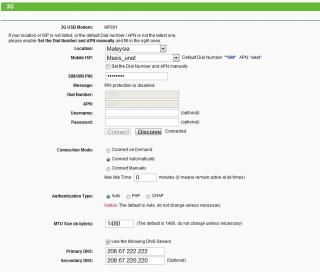
|
|
|
Apr 4 2012, 09:16 AM
Return to original view | Post
#26
|
|
Senior Member
8,025 posts Joined: Feb 2005 From: Planet Boleland
|
QUOTE(fruitie @ Apr 4 2012, 08:16 AM) OK, I take back my words. Looks like the problem still persists and now happens on my company's laptop also which is a DELL. The WiFi signal will lose somewhere. I really need to find out a solution. could it be network problem?Currently using Channel 9, any other thing that you guys can suggest? i was using direct connection just now, one minute it was blazing highspeed of >4Mbps, the next min, although it shows connected , there is "no internet access" when checked on the "IPv4 Connectivity" status now i am using MF600 and although the speed is much slower, atleast i am still "connected" with internet connectivity  could it be network issue that is affecting your connection and can your laptop surf when there is packet loss via MR3420 wifi to your iPAD? btw, abt flashing to OpenWRT firmware, where is kaskus ? |
|
|
|
|
|
Apr 10 2012, 07:18 PM
Return to original view | Post
#27
|
|
Senior Member
8,025 posts Joined: Feb 2005 From: Planet Boleland
|
QUOTE(Praetor @ Apr 10 2012, 05:40 PM) Hi, I just bought this router. Any idea where I can get the SIM/UIM PIN? I'm on Maxis Broadband with the 3G USB modem which is plug and play. So how do I find out about the SIM/UIM PIN? use the sim on a phone to disable the simcard pin , by default it should be 0123 for maxis and 1234 for celcomThanks |
|
|
Apr 12 2012, 11:16 AM
Return to original view | Post
#28
|
|
Senior Member
8,025 posts Joined: Feb 2005 From: Planet Boleland
|
Our fellow forumer is using his Huawei E367 (28.8Mbps modem) with this MR3420, has anyone use his Huawei E372 (DC-42Mbps modem) with this MR3420?
This post has been edited by digilife: Apr 12 2012, 11:17 AM |
|
|
Apr 12 2012, 11:42 PM
Return to original view | Post
#29
|
|
Senior Member
8,025 posts Joined: Feb 2005 From: Planet Boleland
|
something that you guys really want to knoe is shown below
i wont explain anything, ITS SELF EXPLANATORY  
|
|
|
Apr 13 2012, 07:51 AM
Return to original view | Post
#30
|
|
Senior Member
8,025 posts Joined: Feb 2005 From: Planet Boleland
|
QUOTE(maxcheam @ Apr 13 2012, 07:47 AM) Showing off your DC HSPA+ modem ya. thanks bro, using this kind of SSID, ppl just dun have the heart to hack your wifiI like your SSID too. btw, by using E372, i am just harnessing the DC offered by maxis  Added on April 13, 2012, 7:54 am QUOTE(maxcheam @ Apr 13 2012, 07:47 AM) Showing off your DC HSPA+ modem ya. thanks bro, using this kind of SSID, ppl just dun have the heart to hack your wifiI like your SSID too. btw, by using E372, i am just harnessing the DC offered by maxis This post has been edited by digilife: Apr 13 2012, 07:54 AM |
|
|
Apr 14 2012, 12:28 AM
Return to original view | Post
#31
|
|
Senior Member
8,025 posts Joined: Feb 2005 From: Planet Boleland
|
QUOTE(fruitie @ Apr 14 2012, 12:24 AM) Your MAC address is exposed. any harm , if yes to wat extend? |
|
|
Apr 14 2012, 01:42 PM
Return to original view | Post
#32
|
|
Senior Member
8,025 posts Joined: Feb 2005 From: Planet Boleland
|
QUOTE(johnlth93 @ Apr 14 2012, 12:17 PM) that mac is for the router so its not "harmful" to me if exposed ?not computer's |
|
|
Apr 14 2012, 04:58 PM
Return to original view | Post
#33
|
|
Senior Member
8,025 posts Joined: Feb 2005 From: Planet Boleland
|
QUOTE(wkkm007 @ Apr 14 2012, 04:20 PM) Lol yes, on stock FW too, din even update the FW or to Open WRT yetAdded on April 14, 2012, 4:21 pmLike show contact no. on fb Added on April 14, 2012, 4:23 pmTp link can support 42mbps? |
|
|
|
|
|
Apr 15 2012, 09:18 AM
Return to original view | Post
#34
|
|
Senior Member
8,025 posts Joined: Feb 2005 From: Planet Boleland
|
E372+MR3420, wifi only, no lan cable attached
 |
|
|
Apr 15 2012, 05:46 PM
Return to original view | Post
#35
|
|
Senior Member
8,025 posts Joined: Feb 2005 From: Planet Boleland
|
QUOTE(niksam @ Apr 15 2012, 05:36 PM) just bought a dlink dwm156 A6 usb modem for my tplink mr3420, but show unknow from the router. i checked all setting , all fill correctly n reboot but still unknown to the router. why dun u buy Huawei modem cause MR3420 support most Huawei modems including E372, (42mbps)how to make make usb modem support by my router , pls help. |
|
|
Apr 15 2012, 06:48 PM
Return to original view | Post
#36
|
|
Senior Member
8,025 posts Joined: Feb 2005 From: Planet Boleland
|
QUOTE(niksam @ Apr 15 2012, 06:23 PM) My mistake, recommended by the seller. Do u know how to make it support. I check compatibility list stated support If the documentations stated support, then i believe it will work, just that you need to be patience as sometimes it takes up to 5~10 mins to get it connected.1) does your PC shows that the MR3420 is connected or not ? if it does, meaning your MR3420 is in "proper order" 2) now comes to the modem part, is your simcard able to use or that there is no Broadband Plan activated. 3) do you have another modem to test? |
|
|
Apr 16 2012, 12:19 AM
Return to original view | Post
#37
|
|
Senior Member
8,025 posts Joined: Feb 2005 From: Planet Boleland
|
QUOTE(niksam @ Apr 15 2012, 10:00 PM) huawei e1550 n huawei e169 work properly only this dlink dwm156 cannot work. just found out in dlink website this dwm156 got version 6 n version 3. don know wat is the differences. anyway thanks for heip. how long and how much u bought the modem?if any more idea pls to let me know, thanks bro any link to that modem? |
|
|
Apr 16 2012, 05:41 PM
Return to original view | Post
#38
|
|
Senior Member
8,025 posts Joined: Feb 2005 From: Planet Boleland
|
QUOTE(niksam @ Apr 16 2012, 05:30 PM) bought it for rm120, who interested? to read its specifications wat do u mean , any link to the modem. |
|
|
Apr 16 2012, 08:25 PM
Return to original view | Post
#39
|
|
Senior Member
8,025 posts Joined: Feb 2005 From: Planet Boleland
|
E372 connects very fast , so is Icon505
 Mf691 and UMG, a tad slower. E220, lagi slow |
|
|
Apr 18 2012, 07:32 PM
Return to original view | Post
#40
|
|
Senior Member
8,025 posts Joined: Feb 2005 From: Planet Boleland
|
QUOTE(se3333 @ Apr 18 2012, 07:26 PM) Dear all, may I know can TL-MR3420 support U mobile 7.2mb and 42mb usb modem ? Today I check with 1 of the staff from viewnet and he said TL-MR3420 does not support both U mobile 7.2mb and 42mb usb modem.... is that true ? TQ i can confirm that MR3420 support Umobile 7.2Mbps modem ( the ZTE MF190 ) for the 42Mbps, Huawei E372 is supported ( Umobile earlier Bundled 42Mbps modem ) but this latest ZTE MF680, i am not sure. i have more than 30modems in my stable of modems, u can listen to me on this  dun ask me why i have so many modems, as i am a sial modem collector like ppl like to collect China Dolls and so on........... |
|
Topic ClosedOptions
|
| Change to: |  0.0278sec 0.0278sec
 0.43 0.43
 7 queries 7 queries
 GZIP Disabled GZIP Disabled
Time is now: 10th December 2025 - 01:59 PM |
 Quote
Quote