Outline ·
[ Standard ] ·
Linear+
Tp Link TL-MR3420 3G/3.75G router owner club V1
|
TSchuahcs79
|
 May 3 2012, 03:55 PM May 3 2012, 03:55 PM
|
Look at all my stars!!


|
QUOTE(kahleong888 @ May 3 2012, 01:34 AM) too bad  the problem came back again. took a few hour to go thru all the posts, nw changed to channel auto, wil take a day for observation. as wifi analyzer suggested channel is 11 (5stars in my area), but router auto channel is 4 (only 1 star in wifi analyzer). Which 1 more reliable? try both manually and see which one work for u  |
|
|
|
|
|
TSchuahcs79
|
May 8 2012, 05:59 PM
|
Look at all my stars!!
|
QUOTE(iRonTech @ May 8 2012, 05:10 PM) the mr3220v1_en_3_12_20_up( 120309) firmware has removed 3G modem signals status  [attachmentid=2830820][attachmentid=2830821] but modem connecting time to 3g is faster than previous  newer firmware ? wondering 3420 can use 3220 firmware. ? |
|
|
|
|
|
TSchuahcs79
|
May 9 2012, 05:06 AM
|
Look at all my stars!!
|
QUOTE(iRonTech @ May 8 2012, 06:23 PM) better don't mess up the firmware from different hardware, wait for the correct release else don't if current ver nothing wrong i upgraded mine from first version, the 3.12.20 version also lower the wifi dBm, b4 was between -26, -28, now -21, -23. well, either it working better, or it wont work, i guess some of the user is taking risk for trial experiment, |
|
|
|
|
|
TSchuahcs79
|
May 10 2012, 04:27 AM
|
Look at all my stars!!
|
QUOTE(rootlinux @ May 10 2012, 01:00 AM) I got my 2nd MR3420 today as I think I bricked my 1st MR3420 by performed a reset/reset to default in OpenWRT Backfire 10.03.1 version. I am using Huawei UMG1831 with MR3420. From booting up the MR3420 to connecting to Celcom 3G Broadband mLite, it took 4-5 minutes. Firmware is 3.12.8 Build 110418 Rel.43954n. I am getting this message below: - Get SIM PIN status failed, reset usb deviece. 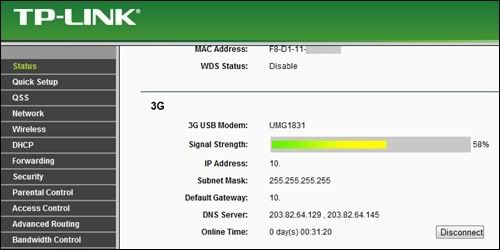 The QoS of Celcom 3G Broadband mLite is capped at 3.6Mbps download and 512kbps upload from MDMA.      sorry to hear u brick your first router, and your result not bad with UMG1831, almost max out your celcom M lite |
|
|
|
|
|
TSchuahcs79
|
May 11 2012, 07:16 PM
|
Look at all my stars!!
|
QUOTE(digilife @ May 11 2012, 06:16 AM) recently my MR3420 behave strangely, internet speed never exceed 3Mbps, mostly max out at 2Mbps frustrated, done a FW upgrade and after the upgrade, speed increased tremendously but i only upgrade the FW and din do Factory Default and Reboot to use back my previous settings  [attachmentid=2835212]  so it just refresh the firmware ? |
|
|
|
|
|
TSchuahcs79
|
May 11 2012, 07:59 PM
|
Look at all my stars!!
|
QUOTE(kizwan @ May 11 2012, 07:54 PM) Thanks for your link, just updated first post  |
|
|
|
|
|
TSchuahcs79
|
May 12 2012, 03:25 AM
|
Look at all my stars!!
|
QUOTE(xernix @ May 12 2012, 01:52 AM) This is where I usually get latest compiled version of Openwrt Trunk build: http://dss-international.org/openwrt/firmw...runk/unleashed/Currently at kernel 3.2.x Latest TL-MR3420 firmware is doing a lot better job, dialing E353 modem faster than old firmware  and wireless is much stable even though on auto channel  |
|
|
|
|
|
TSchuahcs79
|
May 12 2012, 05:30 PM
|
Look at all my stars!!
|
QUOTE(digilife @ May 12 2012, 05:24 PM) for E1762, use a cable that is not longer than 1meter (USB2.0) if its USB3.0 can use a 3 meter cable. but better dun use any usb cable but position the router N E W S and see which gives u a better signal , yea totally correct, position of your 3G router really make a different |
|
|
|
|
|
TSchuahcs79
|
May 12 2012, 06:36 PM
|
Look at all my stars!!
|
QUOTE(digilife @ May 12 2012, 05:40 PM) mine if facing E = 1.5Mbps and facing W = 6.8Mbps  facing W is good for u |
|
|
|
|
|
TSchuahcs79
|
May 12 2012, 10:04 PM
|
Look at all my stars!!
|
QUOTE(fruitie @ May 12 2012, 09:12 PM) Firmware Version: 3.12.19 Build 110617 Rel.39329n mine is the same as well |
|
|
|
|
|
TSchuahcs79
|
May 13 2012, 04:34 PM
|
Look at all my stars!!
|
QUOTE(Elvin7 @ May 13 2012, 10:58 AM) Can P1 or Yes USB modem support by this router? i dont think they will work |
|
|
|
|
|
TSchuahcs79
|
May 13 2012, 10:15 PM
|
Look at all my stars!!
|
Finally tweak until able to get 100% signal with E1762 and SE W 705 in my new place
[attachmentid=2838712]
[attachmentid=2838714]
|
|
|
|
|
|
TSchuahcs79
|
May 13 2012, 10:26 PM
|
Look at all my stars!!
|
oh, and icon 505 also can get 96%,.. [attachmentid=2838723] |
|
|
|
|
|
TSchuahcs79
|
May 14 2012, 02:06 AM
|
Look at all my stars!!
|
QUOTE(digilife @ May 14 2012, 02:01 AM) can teach how u tweak tweak? thanks like that i place my whole setup just replace the modem or SE phone only this is my set up with Yagi outside window hanging ( Huawei modem E353 + TP LINK 3G router TL-MR3420 + Cooler master X1 cooler pad + 3G yagi antenna 18dBi outside window ) [attachmentid=2839108] |
|
|
|
|
|
TSchuahcs79
|
May 14 2012, 02:17 AM
|
Look at all my stars!!
|
QUOTE(digilife @ May 14 2012, 02:11 AM) this time the Yagi is working for the E353?, becareful, dun let the antenna socket get ripped off........  if without the Yagi, how is the signal via MDMA? i mean how much the Yagi helped in the MDMA readings (RSSI) ? yes it work due to my Yagi is support UMTS2100 only, so is great match with E353 before Yagi RSSI with E353 = : - 77~85dBm after Yagi RSSI with E353 = : - 55~65dBm my yagi is hanging uotside window over the roof with 8 shape hanger, ( will upload photo tomorrow morning, sicne is dark now outside can't see well ) This post has been edited by chuahcs79: May 14 2012, 02:18 AM |
|
|
|
|
|
TSchuahcs79
|
May 14 2012, 02:28 AM
|
Look at all my stars!!
|
QUOTE(digilife @ May 14 2012, 02:23 AM) do u have to point the Yagi towards the tower or just simply point? Point directly to opposite hill mountain top base station, there is 4 base station, 3 is quite close together, so i point my Yagi towards 3 base station direction, LOL will upload detail pic tomorrow |
|
|
|
|
|
TSchuahcs79
|
May 14 2012, 05:46 PM
|
Look at all my stars!!
|
QUOTE(hsunl @ May 14 2012, 05:09 PM)  This is my latest speed with E372 modem. Same with my E1762. No different. Anyhow, i am having DC HSPA+ 2 bar but still not stable. Jumping up n down from 3G, WCDMA n DC HSPA+  complete set up [attachmentid=2840007] +[attachmentid=2840009] |
|
|
|
|
|
TSchuahcs79
|
May 17 2012, 02:50 AM
|
Look at all my stars!!
|
QUOTE(BladeRider88 @ May 17 2012, 02:42 AM) Hi Bro Chuah, how u make ur 3G USB modem stand up? using the Dlink DWM125 USB wifi L Stand Adapter that come with it, plug my E353 on that L stand ^^ This post has been edited by chuahcs79: May 17 2012, 02:50 AM |
|
|
|
|
|
TSchuahcs79
|
May 17 2012, 04:21 PM
|
Look at all my stars!!
|
QUOTE(BladeRider88 @ May 17 2012, 09:17 AM) Oh i see... thanks for the tips  i get the DWM 125 at RM20 only, so it is good bargain, |
|
|
|
|
|
TSchuahcs79
|
May 17 2012, 07:36 PM
|
Look at all my stars!!
|
of course it support, i try before and the TL-MR3420 web interface show UMG 1831 at modem model, only case my old places is stuck at UMTS instead of HSPA or HSPA+ with UMTS2100MHz band
|
|
|
|
|



 Quote
Quote
 0.0591sec
 0.61
0.61
 7 queries
 GZIP Disabled