Outline ·
[ Standard ] ·
Linear+
HP Pavillion DV6-6XXX series Owners Lounge V4, -162 owners. Y U NO INTEL + AMD CFX!!
|
chahupping
|
 Nov 7 2011, 11:59 PM Nov 7 2011, 11:59 PM
|
Getting Started


|
QUOTE(Acid_RuleZz @ Nov 7 2011, 11:55 PM) Done and done. Welcome to the club.  Any question regarding hardware/software can pm lee sifu. LOL What is ur definition of this 'nice"  Get from Hikari85 then... she's at Bagan Lalang, Penang. Or get N55SF-i5 version since it come with 2 years international warranty. HP only 1st year international. i nt sure, is just feel the sound is more solid while playing full? |
|
|
|
|
|
Ikmal91
|
Nov 8 2011, 12:18 AM
|
|
|
Alright will do. If got problem then I PM you 
Added on November 8, 2011, 1:47 amWOOHOO! ALL DONE. This post has been edited by Ikmal91: Nov 8 2011, 01:47 AM |
|
|
|
|
|
TSAcid_RuleZz
|
Nov 8 2011, 01:48 AM
|
|
|
@chahupping
I see. I think it just too loud to listen too at full volume and will get distorted when watching utube video.
@Ikmal91
No problem.
|
|
|
|
|
|
chahupping
|
Nov 8 2011, 01:54 AM
|
Getting Started
|
QUOTE(Acid_RuleZz @ Nov 8 2011, 02:48 AM) @chahupping I see. I think it just too loud to listen too at full volume and will get distorted when watching utube video. @Ikmal91 No problem. ok ar, i dun full blast normally, just half, or use speaker/ beats. but just now i tried full blast and it went pretty well. |
|
|
|
|
|
Ikmal91
|
Nov 8 2011, 01:56 AM
|
|
|
f***....why am I so happy with this laptop? Damn
|
|
|
|
|
|
lee_what2004
|
Nov 8 2011, 01:58 AM
|
*stare* ji--------

|
^good  |
|
|
|
|
|
TSAcid_RuleZz
|
Nov 8 2011, 02:18 AM
|
|
|
QUOTE(chahupping @ Nov 8 2011, 01:54 AM) ok ar, i dun full blast normally, just half, or use speaker/ beats. but just now i tried full blast and it went pretty well. Yeah.. some went well but some will get distorted in my case. Only for music tho.. went watching shows, dramas, animes, movies or playing games i usually on full blast. Sound pretty awesome. QUOTE(Ikmal91 @ Nov 8 2011, 01:56 AM) f***....why am I so happy with this laptop? Damn Wait until u get your 1st "Display driver stopped responding and has recovered". Btw, check these 2 guides when u have time to spare. 1. How to setup envyTouchPad for a basic gooding2. How to optimize your bootime and shaved couple of secs |
|
|
|
|
|
chahupping
|
Nov 8 2011, 02:38 AM
|
Getting Started
|
QUOTE(Acid_RuleZz @ Nov 8 2011, 03:18 AM) Yeah.. some went well but some will get distorted in my case. Only for music tho.. went watching shows, dramas, animes, movies or playing games i usually on full blast. Sound pretty awesome. Wait until u get your 1st "Display driver stopped responding and has recovered". Btw, check these 2 guides when u have time to spare. 1. How to setup envyTouchPad for a basic gooding2. How to optimize your bootime and shaved couple of secsLOL, i knw right, thats just so annoying, sometimes it just doesnt recovered.  EDITED: Off topic here, but im so happy! make it to the GOLD LEAGUE in us server! YES!!!! This post has been edited by chahupping: Nov 8 2011, 03:37 AM Attached thumbnail(s)
|
|
|
|
|
|
xD4rever
|
Nov 8 2011, 04:00 AM
|
Getting Started
|
how much dv6 latest price
|
|
|
|
|
|
lee_what2004
|
Nov 8 2011, 04:06 AM
|
*stare* ji--------
|
RM2899 and RM3999..
|
|
|
|
|
|
Ikmal91
|
Nov 8 2011, 09:57 AM
|
|
|
Which can I disable? 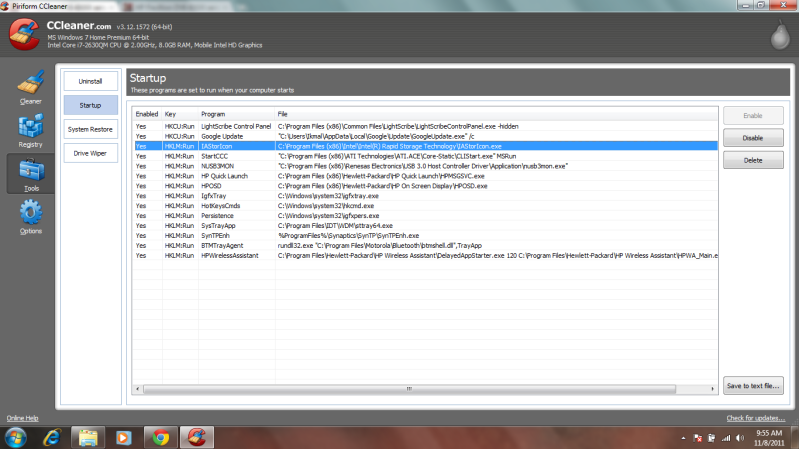 |
|
|
|
|
|
lee_what2004
|
Nov 8 2011, 10:01 AM
|
*stare* ji--------
|
Click the "Save to text file", then paste the content here. easier to select |
|
|
|
|
|
Ikmal91
|
Nov 8 2011, 10:06 AM
|
|
|
lol ok.
hold on.
Here...
Yes HKCU:Run LightScribe Control Panel C:\Program Files (x86)\Common Files\LightScribe\LightScribeControlPanel.exe -hidden
Yes HKCU:Run Google Update "C:\Users\Ikmal\AppData\Local\Google\Update\GoogleUpdate.exe" /c
Yes HKLM:Run IAStorIcon C:\Program Files (x86)\Intel\Intel® Rapid Storage Technology\IAStorIcon.exe
Yes HKLM:Run StartCCC "C:\Program Files (x86)\ATI Technologies\ATI.ACE\Core-Static\CLIStart.exe" MSRun
Yes HKLM:Run NUSB3MON "C:\Program Files (x86)\Renesas Electronics\USB 3.0 Host Controller Driver\Application\nusb3mon.exe"
Yes HKLM:Run HP Quick Launch C:\Program Files (x86)\Hewlett-Packard\HP Quick Launch\HPMSGSVC.exe
Yes HKLM:Run HPOSD C:\Program Files (x86)\Hewlett-Packard\HP On Screen Display\HPOSD.exe
Yes HKLM:Run IgfxTray C:\Windows\system32\igfxtray.exe
Yes HKLM:Run HotKeysCmds C:\Windows\system32\hkcmd.exe
Yes HKLM:Run Persistence C:\Windows\system32\igfxpers.exe
Yes HKLM:Run SysTrayApp C:\Program Files\IDT\WDM\sttray64.exe
Yes HKLM:Run SynTPEnh %ProgramFiles%\Synaptics\SynTP\SynTPEnh.exe
Yes HKLM:Run BTMTrayAgent rundll32.exe "C:\Program Files\Motorola\Bluetooth\btmshell.dll",TrayApp
Yes HKLM:Run HPWirelessAssistant C:\Program Files\Hewlett-Packard\HP Wireless Assistant\DelayedAppStarter.exe 120 C:\Program Files\Hewlett-Packard\HP Wireless Assistant\HPWA_Main.exe /hidden
|
|
|
|
|
|
lee_what2004
|
Nov 8 2011, 10:08 AM
|
*stare* ji--------
|
Can disable
Yes HKCU:Run LightScribe Control Panel C:\Program Files (x86)\Common Files\LightScribe\LightScribeControlPanel.exe -hidden
Yes HKCU:Run Google Update "C:\Users\Ikmal\AppData\Local\Google\Update\GoogleUpdate.exe" /c
Yes HKLM:Run IAStorIcon C:\Program Files (x86)\Intel\Intel® Rapid Storage Technology\IAStorIcon.exe
Yes HKLM:Run StartCCC "C:\Program Files (x86)\ATI Technologies\ATI.ACE\Core-Static\CLIStart.exe" MSRun
Yes HKLM:Run NUSB3MON "C:\Program Files (x86)\Renesas Electronics\USB 3.0 Host Controller Driver\Application\nusb3mon.exe"
Yes HKLM:Run IgfxTray C:\Windows\system32\igfxtray.exe
Yes HKLM:Run HotKeysCmds C:\Windows\system32\hkcmd.exe
Yes HKLM:Run Persistence C:\Windows\system32\igfxpers.exe
Yes HKLM:Run SysTrayApp C:\Program Files\IDT\WDM\sttray64.exe
Depends on preference:
Yes HKLM:Run HP Quick Launch C:\Program Files (x86)\Hewlett-Packard\HP Quick Launch\HPMSGSVC.exe
Yes HKLM:Run HPOSD C:\Program Files (x86)\Hewlett-Packard\HP On Screen Display\HPOSD.exe
Yes HKLM:Run HPWirelessAssistant C:\Program Files\Hewlett-Packard\HP Wireless
Yes HKLM:Run BTMTrayAgent rundll32.exe "C:\Program Files\Motorola\Bluetooth\btmshell.dll",TrayApp
Assistant\DelayedAppStarter.exe 120 C:\Program Files\Hewlett-Packard\HP Wireless Assistant\HPWA_Main.exe /hidden
keep:
Yes HKLM:Run SynTPEnh %ProgramFiles%\Synaptics\SynTP\SynTPEnh.exe
|
|
|
|
|
|
Ikmal91
|
Nov 8 2011, 10:19 AM
|
|
|
The HP Quick Launch is what? O.O
|
|
|
|
|
|
lee_what2004
|
Nov 8 2011, 10:21 AM
|
*stare* ji--------
|
Shortcut keys ?
|
|
|
|
|
|
Ikmal91
|
Nov 8 2011, 10:21 AM
|
|
|
Eh? What shortcut keys do I have? I don't see any. XD
|
|
|
|
|
|
lee_what2004
|
Nov 8 2011, 10:26 AM
|
*stare* ji--------
|
Can't see the keyboard  |
|
|
|
|
|
Ikmal91
|
Nov 8 2011, 10:27 AM
|
|
|
Uhhh....is it the play, pause, volume up, volume down button on the F1-F12 keys? O.O
|
|
|
|
|
|
lee_what2004
|
Nov 8 2011, 10:28 AM
|
*stare* ji--------
|
Try kill the quick launch from task manager, then try the keys on keyboard..
This post has been edited by lee_what2004: Nov 8 2011, 10:31 AM
|
|
|
|
|



 Quote
Quote


 0.0203sec
 0.39
0.39
 6 queries
 GZIP Disabled