

QUOTE(trustmeiamlegit @ Oct 20 2011, 11:40 PM)
maaaaaaaaybe ... to detect the lid, whehter it is closed or not...
maaaybe la.. not sure

yup.. i think so too... maaaybe la.. not sure

HP Pavillion DV6-6XXX series Owners Lounge V4, -162 owners. Y U NO INTEL + AMD CFX!!
|
|
 Oct 21 2011, 01:13 AM Oct 21 2011, 01:13 AM
|
 
Junior Member
131 posts Joined: Jun 2009 From: Selangor  
|
QUOTE(trustmeiamlegit @ Oct 20 2011, 11:40 PM) maaaaaaaaybe ... to detect the lid, whehter it is closed or not... yup.. i think so too... maaaybe la.. not sure |
|
|
|
|
|
Oct 21 2011, 02:25 AM
|

Junior Member
78 posts Joined: Oct 2010
|
hmm guys, how do i find what drivers do i need to update and where can i get them
|
|
|
Oct 21 2011, 08:18 AM
|
|
Junior Member
20 posts Joined: Oct 2011
|
QUOTE(anson-san @ Oct 20 2011, 08:53 PM) I don't facing any problem phone to laptop/laptop to phone, i noticed that when the laptop is turn on,sometimes the wireless assistant only will show wifi is enable but dont have the bluetooth...how to enable it manually ?  you want to transfer from laptop to phone or vice-versa? |
|
|
Oct 21 2011, 09:16 AM
|

Junior Member
114 posts Joined: Apr 2006
|
QUOTE(Vernon @ Oct 20 2011, 06:26 PM) anyone know why at the left bottom of the screen border there has magnet? what is that for? I didn't notice any magnet at the bottom left area. Could u take a snapshot of ur screen? |
|
|
Oct 21 2011, 12:22 PM
|

Senior Member
6,612 posts Joined: Jan 2003 From: Tomorrow
|
QUOTE(trustmeiamlegit @ Oct 20 2011, 11:40 PM) maaaaaaaaybe ... to detect the lid, whehter it is closed or not... maaaybe la.. not sure but the position is directly on top of the HSF.  QUOTE(spicediablo @ Oct 21 2011, 09:16 AM) I didn't notice any magnet at the bottom left area. Could u take a snapshot of ur screen? you can't see it. take a metal stuff and it hover around bottom left side area of the bezel. |
|
|
Oct 21 2011, 12:30 PM
|
|
Junior Member
114 posts Joined: Apr 2006
|
QUOTE(Acid_RuleZz @ Oct 21 2011, 12:22 PM) but the position is directly on top of the HSF. haha ok...ic you can't see it. take a metal stuff and it hover around bottom left side area of the bezel. |
|
|
|
|
|
Oct 21 2011, 12:41 PM
|
 
Elite
14,813 posts Joined: Nov 2006
|
That magnet is to trigger the sleep mechanism when you close the lid..
You can try by hovering magnet around the area on the body then the laptop will sleep.. |
|
|
Oct 21 2011, 01:16 PM
|
|
Senior Member
6,612 posts Joined: Jan 2003 From: Tomorrow
|
QUOTE(lee_what2004 @ Oct 21 2011, 12:41 PM) That magnet is to trigger the sleep mechanism when you close the lid.. You can try by hovering magnet around the area on the body then the laptop will sleep.. i see. but there is no magnet in the bottom cover. how it detect it?  |
|
|
Oct 21 2011, 01:24 PM
|
|
Elite
14,813 posts Joined: Nov 2006
|
|
|
|
Oct 21 2011, 02:31 PM
|

Junior Member
257 posts Joined: May 2008
|
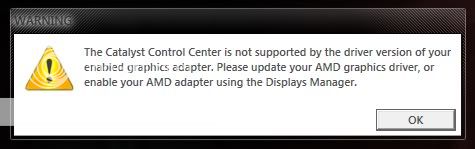 wat is this problem when i start up wif intel GC??? with battery without power adapter |
|
|
Oct 21 2011, 02:34 PM
|
|
Senior Member
6,612 posts Joined: Jan 2003 From: Tomorrow
|
QUOTE(louisfjh @ Oct 21 2011, 02:31 PM) wat is this problem when i start up wif intel GC??? with battery without power adapter which driver version and what your device manager show under display adapter? |
|
|
Oct 21 2011, 02:37 PM
|
|
Elite
14,813 posts Joined: Nov 2006
|
Disable CCC from startup ?
|
|
|
Oct 21 2011, 02:45 PM
|
|
Senior Member
6,612 posts Joined: Jan 2003 From: Tomorrow
|
QUOTE(lee_what2004 @ Oct 21 2011, 01:24 PM) i see, btw this is the contact area for the magnet.  |
|
|
|
|
|
Oct 21 2011, 02:49 PM
|
|
Elite
14,813 posts Joined: Nov 2006
|
Is there any other magnet on the lid ? or try use magnet on that area?
Mine in on the upper center of the lid, trigger is on the below the touchpad left button... |
|
|
Oct 21 2011, 03:58 PM
|
|
Junior Member
22 posts Joined: Jul 2008
|
can i ask something
i buy my hp at a reseller shop do i still need to fax my hp care pack registration form? or hp reseller shop will do it for me? |
|
|
Oct 21 2011, 04:03 PM
|
|
Junior Member
257 posts Joined: May 2008
|
QUOTE(Acid_RuleZz @ Oct 21 2011, 02:34 PM) which driver version and what your device manager show under display adapter? intel or radean driver??? |
|
|
Oct 21 2011, 04:11 PM
|
|
Senior Member
6,612 posts Joined: Jan 2003 From: Tomorrow
|
QUOTE(lee_what2004 @ Oct 21 2011, 02:49 PM) Is there any other magnet on the lid ? or try use magnet on that area? Mine in on the upper center of the lid, trigger is on the below the touchpad left button... failed to find magnet to test.  QUOTE(thyeun @ Oct 21 2011, 03:58 PM) can i ask something i buy my hp at a reseller shop do i still need to fax my hp care pack registration form? or hp reseller shop will do it for me? i think u still need to register and activate your carepack yourself. QUOTE(louisfjh @ Oct 21 2011, 04:03 PM) intel or radean driver??? hmm.. both? This post has been edited by Acid_RuleZz: Oct 21 2011, 04:15 PM |
|
|
Oct 21 2011, 04:13 PM
|
|
Junior Member
114 posts Joined: Apr 2006
|
QUOTE(Acid_RuleZz @ Oct 21 2011, 12:22 PM) but the position is directly on top of the HSF. Tested mine. It's bottom left.6114 owner here... you can't see it. take a metal stuff and it hover around bottom left side area of the bezel. |
|
|
Oct 21 2011, 11:04 PM
|
|
Newbie
0 posts Joined: Sep 2011
|
On the HP Support Assistant, do I need to update all the updates available? Or what would be recommended, update or not ?
|
|
|
Oct 22 2011, 12:26 AM
|
|
Senior Member
6,612 posts Joined: Jan 2003 From: Tomorrow
|
^ It is recommended to update everything.. what update available for you right now?
|
|
Topic ClosedOptions
|
| Change to: |  0.0279sec 0.0279sec
 0.54 0.54
 6 queries 6 queries
 GZIP Disabled GZIP Disabled
Time is now: 5th December 2025 - 07:54 PM |
 Quote
Quote