Ok, here we go... First, patience guys... I intend to take my time with this mod (and I do have a real job) so please excuse a lack of progress on the mod. Rest assured, progress will be documented and put up here. I'll put up the recommended retail price (RRP) for the stuff so I won't get the inevitible "How much ah?" on this thread. Please refrain from the equally inevetible "Wah, so much ah!". It irritates and adds nothing to the thread. TIA. Occasionally I may get some discounts of the RRP but I will not disclose that for obvious reasons of maintaining relations with the retailer. I work hard at building relationships with people. You should too.
So far I've got to the stage of assembling the required tools...

Considered getting the more easily available Black and Decker RTX. This retails for RM299 (I guess the RM1 is for the parking ticket) and the B&D Flexishaft for RM200. However, on modding boards when the two are discussed, I read a lot of early failures with the RTX. I intend to use this tool for a lot more than PC Modding and would hate to have to replace out of warranty so... The Dremel is available only from Jaya DIY in Jaya Shopping Centre's thrid floor. The proprieter: a Mr Eddy Ng is a very knowledgable and friendly guy and the shop is contactable at 03-79540509. They stock a wide range of Dremel acessories too.
The kit comes with all the acessories pictured and retails for RM599

. The Flexishaft is another RM214.
But I figure I'll be using this for a long time and power tools are just so sweet...

The only other kit that I have aqquired is the PSU. I've mulled over where to place it in this case. In the G5 hard drive bay where it would traditionally sit in a standard ATX PC box? Front? Rear? Standing up? Fans reversed?
Finally I decided that I should maintain the functional design of the G5 case. To divide the case into thermal compartments. For this I will use clear acrylic. True, hiding cables will be a bit of a challenge (but more fun). It will also be easier to cut.
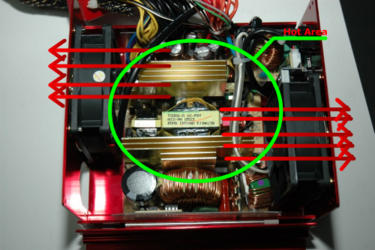
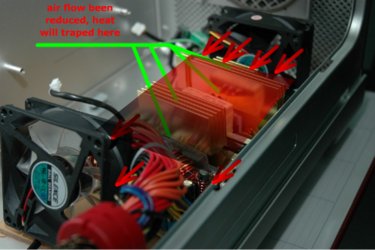
With this in mind, I'm putting the PSU at the bottom of the case. As there are no ventilation holes at the bottom my options were to either cut a hole or find a PSU with fans only at the front and rear. None at the bottom. Enter the Coolergiant...


The next question is how to fit the mobo... The Apple G5 case has mobo standoff screwholes that do not align to the traditional PC mobos. In addition, the backplate and PCI slots will not align. Most G5 PC mods that I've seen have cut the back of the case in order to fit a PC mobo. I am reluctant to do this because I don't want to ruin the design that is really very elegant. I've decided to mount mobo tray of clear acrylic which I will screw to the back of the case using the original Apple mobo standoff screws. I will then mount mobo standoffs on this acrylic plate in the regular PC position.

Next: How to position the mobo? Rightside up? Upside down?
I'm going with a "on the side" approach. This will mean that the backplate ports and the PCI slot connectors will exit out of the bottom of the case. I will be using a number of USB cord extenders, Network wire extenders and Monitor cable gender changers to accomplish this. The cords will then be sleeved together and a large trunk exits out the rear of the rig, rather like a tail.
Personally I feel that this would neaten the cable clutter normally seen at the rear of a PC and I could put the rig on the desk without it being too unsightly. I dunno, this requires some more thought.
Finally the thermal compartments. Clear Acrylic again, cut to fit the shape of the clear acrylic moulding of the G5 case. I will then have three compartments: The bottom one with the PSU, The middle one with the Mobo/Processor/RAM/PCIe/PCI cards and the top one with the drives.

Well, that's the plan for now. Thanks for your interest and encouragement. And I welcome suggestions/comments! Just don't get upset if I don't follow em!


 Oct 7 2005, 02:13 PM, updated 20y ago


 Quote
Quote

 And what did it cost lol..





 , so which is this for the the FX57 or x2????










 Am going to try and source for some sheets of acrylic to work with. Hopefully today.


 Well, destiny is DFI...























 0.0745sec
 0.87
0.87
 6 queries
 GZIP Disabled