

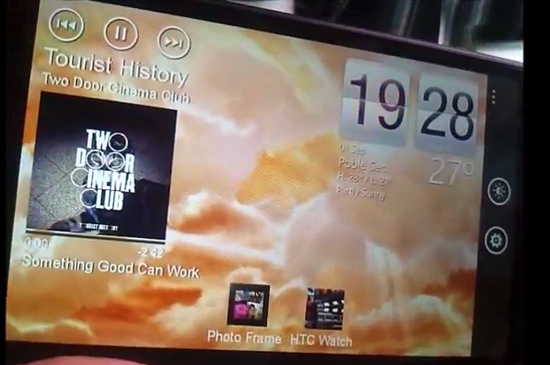
look cool for HD7 with kickstand and those with docking standing too.

http://www.wpcentral.com/htc-dock-mode-app...-sense-inspired
Official Windows Phone 7 Discussion Thread! V2, Latest Updated : Internet Sharing Enable
|
|
 Sep 30 2011, 12:46 PM Sep 30 2011, 12:46 PM
|
 
Senior Member
4,092 posts Joined: Feb 2006 From: PENANG  
|
check out the HTC Dock App dockmode from radar/titan which is availble now in Marketplace.
look cool for HD7 with kickstand and those with docking standing too. http://www.wpcentral.com/htc-dock-mode-app...-sense-inspired |
|
|
|
|
|
Sep 30 2011, 01:09 PM
|

Senior Member
6,774 posts Joined: Nov 2010
|
BTW guys, is there any task manager alike app that can kill or close those running program. I cant even check if there is application running at the back. It is very annoying cant check/close them especially when running music and seems no way to close them, can only restart phone to close them.
|
|
|
Sep 30 2011, 01:13 PM
|

Senior Member
8,472 posts Joined: Oct 2004
|
QUOTE(Human10 @ Sep 30 2011, 01:09 PM) BTW guys, is there any task manager alike app that can kill or close those running program. I cant even check if there is application running at the back. It is very annoying cant check/close them especially when running music and seems no way to close them, can only restart phone to close them. lol.... welcome to the new era of smartphone. u dont have to close the app. and open as many as u cant. overall. it wont slow down and hang ya device. dont worry... this is not droid. u dont need task manager..  This post has been edited by fulat: Sep 30 2011, 01:13 PM |
|
|
Sep 30 2011, 01:18 PM
|

Junior Member
433 posts Joined: Jan 2010 From: Kuching, Sarawak 
|
who wan my mozart? i wan get hd7. really miss the big screen.
 my mozart used 2 weeks, SIS 2 year warranty. brand new condition. |
|
|
Sep 30 2011, 01:27 PM
|
|
Senior Member
4,092 posts Joined: Feb 2006 From: PENANG
|
QUOTE(Human10 @ Sep 30 2011, 01:09 PM) BTW guys, is there any task manager alike app that can kill or close those running program. I cant even check if there is application running at the back. It is very annoying cant check/close them especially when running music and seems no way to close them, can only restart phone to close them. just like fulat said its not android,with WP7 you wont even have to worry about lag or hang. to check all apps running status just press hold the <--- (back button) will show you all running apps. |
|
|
Sep 30 2011, 01:32 PM
|
|
Senior Member
8,472 posts Joined: Oct 2004
|
QUOTE(syedakmal @ Sep 30 2011, 01:18 PM) who wan my mozart? i wan get hd7. really miss the big screen. give free ker? kekeke my mozart used 2 weeks, SIS 2 year warranty. brand new condition.  |
|
|
|
|
|
Sep 30 2011, 01:45 PM
|
|
Junior Member
433 posts Joined: Jan 2010 From: Kuching, Sarawak
|
QUOTE(fulat @ Sep 30 2011, 01:32 PM) give free ker? kekeke hahahaha cannot la fulat if free how i wan buy hd7. |
|
|
Sep 30 2011, 01:48 PM
|
|
Senior Member
4,092 posts Joined: Feb 2006 From: PENANG
|
QUOTE(syedakmal @ Sep 30 2011, 01:18 PM) who wan my mozart? i wan get hd7. really miss the big screen. remember, once you've use BIG Screen 4.3 never go back to 3.8. like i did earlier HD 1st Gen then i want to try simple phone so i go for Nokia E66!! only took me 1day to regret. my mozart used 2 weeks, SIS 2 year warranty. brand new condition.  |
|
|
Sep 30 2011, 01:51 PM
|

Senior Member
1,068 posts Joined: Aug 2011 From: Malaysia
|
Will our current windows phone 7 transform to windows 8 in the future?
|
|
|
Sep 30 2011, 02:08 PM
|

Senior Member
1,568 posts Joined: Sep 2010
|
QUOTE(JasonWilton @ Sep 30 2011, 01:51 PM) Will our current windows phone 7 transform to windows 8 in the future? Not really. Windows Phone will never get Windows 8. There is another version catered for phones, which is Windows Phone 8 codenamed Apollo. However, I doubt our first-gen phones will get Apollo. The most we get is Tango. This is technology and we have to deal with it. Heck, we don't even need dual core for Mango. I give Microsoft thumbs up to that. |
|
|
Sep 30 2011, 02:18 PM
|
|
Senior Member
6,774 posts Joined: Nov 2010
|
QUOTE(fulat @ Sep 30 2011, 02:13 PM) lol.... welcome to the new era of smartphone. u dont have to close the app. and open as many as u cant. overall. it wont slow down and hang ya device. dont worry... Not worrying at the slow down part but more to Power Consumption(and maybe RAM consumption)? this is not droid. u dont need task manager..  Added on September 30, 2011, 2:19 pm QUOTE(evilpuppy @ Sep 30 2011, 02:27 PM) just like fulat said its not android,with WP7 you wont even have to worry about lag or hang. to check all apps running status just press hold the <--- (back button) will show you all running apps. App like Music Player and so on isn't shown...  Also, how do I close them without restarting my phone? This post has been edited by Human10: Sep 30 2011, 02:19 PM |
|
|
Sep 30 2011, 02:38 PM
|
|
Senior Member
4,092 posts Joined: Feb 2006 From: PENANG
|
QUOTE(Human10 @ Sep 30 2011, 02:18 PM) Not worrying at the slow down part but more to Power Consumption(and maybe RAM consumption)? why you have to restart your device just to stop the music playing?? Added on September 30, 2011, 2:19 pm App like Music Player and so on isn't shown... Also, how do I close them without restarting my phone? why not, enabling the lockscreen " Show artist when playing music" so you could just on off then stop the music from the lockscreen. |
|
|
Sep 30 2011, 03:13 PM
|

Senior Member
6,904 posts Joined: Jan 2003
|
QUOTE(Human10 @ Sep 30 2011, 01:09 PM) BTW guys, is there any task manager alike app that can kill or close those running program. I cant even check if there is application running at the back. It is very annoying cant check/close them especially when running music and seems no way to close them, can only restart phone to close them. Press n hold the back button choose the app ...use back button untilit closes |
|
|
|
|
|
Sep 30 2011, 03:29 PM
|

Junior Member
151 posts Joined: Mar 2008 From: PJ
|
QUOTE(Human10 @ Sep 30 2011, 01:09 PM) BTW guys, is there any task manager alike app that can kill or close those running program. I cant even check if there is application running at the back. It is very annoying cant check/close them especially when running music and seems no way to close them, can only restart phone to close them. QUOTE(fulat @ Sep 30 2011, 01:13 PM) lol.... welcome to the new era of smartphone. u dont have to close the app. and open as many as u cant. overall. it wont slow down and hang ya device. dont worry... If you are still worrying about the running program...I think you can check it at: settings/application/background task.this is not droid. u dont need task manager.. Usually it will says that "you dont have any application running in the background".. Maybe this feature are for any 3rd party apps or their own future apps which will be able to run in the background. So you can close it here. |
|
|
Sep 30 2011, 03:37 PM
|
|
Senior Member
6,774 posts Joined: Nov 2010
|
QUOTE(lastlion @ Sep 30 2011, 04:29 PM) If you are still worrying about the running program...I think you can check it at: settings/application/background task. Again, music player doesn't even show up there.Usually it will says that "you dont have any application running in the background".. Maybe this feature are for any 3rd party apps or their own future apps which will be able to run in the background. So you can close it here. QUOTE(cruzzmz @ Sep 30 2011, 04:13 PM) Press n hold the back button choose the app ...use back button untilit closes LOL I did that for some cases. Press back over 50 times...QUOTE(evilpuppy @ Sep 30 2011, 03:38 PM) why you have to restart your device just to stop the music playing?? Not sure the details you talking bout but definitely I can pause/play the music but not close the player...why not, enabling the lockscreen " Show artist when playing music" so you could just on off then stop the music from the lockscreen. Paused the music but when i press volume up/down, the player is still running. This post has been edited by Human10: Sep 30 2011, 03:41 PM |
|
|
Sep 30 2011, 04:13 PM
|

Senior Member
4,222 posts Joined: Apr 2007 
|
QUOTE(Human10 @ Sep 30 2011, 03:37 PM) Again, music player doesn't even show up there. I doubt you're using mango.LOL I did that for some cases. Press back over 50 times... Not sure the details you talking bout but definitely I can pause/play the music but not close the player... Paused the music but when i press volume up/down, the player is still running. |
|
|
Sep 30 2011, 04:16 PM
|

Senior Member
3,390 posts Joined: Feb 2005
|
QUOTE(Human10 @ Sep 30 2011, 03:37 PM) Again, music player doesn't even show up there. The player isn't running per say, it's just showing the last position of the last song you played. LOL I did that for some cases. Press back over 50 times... Not sure the details you talking bout but definitely I can pause/play the music but not close the player... Paused the music but when i press volume up/down, the player is still running. Don't worry about it, if you're gonna worry about the power consumption of a paused song. You're gonna have a nervous breakdown over what the phone does to update information all the time. |
|
|
Sep 30 2011, 04:35 PM
|

Senior Member
1,797 posts Joined: Jan 2003
|
guys,
we still didn't get bing turn-by-turn navigation and local scout right? thanks. |
|
|
Sep 30 2011, 04:52 PM
|
|
Senior Member
6,904 posts Joined: Jan 2003
|
QUOTE(xphr3ak @ Sep 30 2011, 04:35 PM) guys, local scout ... nowe still didn't get bing turn-by-turn navigation and local scout right? thanks. bing turn by turn .... not sure but im using the nagivation turn by turn from the market & works just gr8 |
|
|
Sep 30 2011, 04:57 PM
|
|
Senior Member
4,092 posts Joined: Feb 2006 From: PENANG
|
QUOTE(cruzzmz @ Sep 30 2011, 04:52 PM) local scout ... no yup, Nagi Turn by turn good, very accurate route , but of course you need data bing turn by turn .... not sure but im using the nagivation turn by turn from the market & works just gr8 6.99 im going to buy this |
|
Topic ClosedOptions
|
| Change to: |  0.0181sec 0.0181sec
 0.45 0.45
 6 queries 6 queries
 GZIP Disabled GZIP Disabled
Time is now: 4th December 2025 - 08:44 PM |
 Quote
Quote