Welcome Guest ( Log In | Register )

Outline · [ Standard ] · Linear+

 Samsung Galaxy 5 - CyanogenMod 7.1 Thread

views
     
alexysc
post Nov 11 2011, 11:08 PM

Getting Started
**
Junior Member
60 posts

Joined: Jan 2011
QUOTE(vccy @ Nov 11 2011, 08:59 PM)
I would like to ask. every time we backup the rom, the rom is backup to which folder? plan to delete some of the old backup. Thanks


Added on November 11, 2011, 9:18 pm

this boot animation is really good. thanks  thumbup.gif
*
The backup is in the ClockWorkMod Folder in your sdcard.


Added on November 12, 2011, 5:06 pmHi Guys,

Nice MIUI Theme from http://forum.xda-developers.com/showthread.php?t=1189723

Just download the 'Transparent' zip file, extract it and install the .apk file.

This post has been edited by alexysc: Nov 12 2011, 05:06 PM
alexysc
post Nov 13 2011, 12:52 PM

Getting Started
**
Junior Member
60 posts

Joined: Jan 2011
QUOTE(Schuan @ Nov 13 2011, 08:52 AM)
Hi, Im just wondering, Is Papago M8 version can be supported in Galaxy 5?
*
Do you have the link to download? Thanks.
alexysc
post Nov 13 2011, 11:26 PM

Getting Started
**
Junior Member
60 posts

Joined: Jan 2011
QUOTE(kimimaro_kun @ Nov 13 2011, 07:44 PM)
bro, can u help me by sharing the apk file?
having prob download it from the site  doh.gif
*
I've uploaded the .apk file for you. Link : http://www.multiupload.com/WFD25FO3M4

Enjoy! tongue.gif
alexysc
post Nov 14 2011, 02:45 PM

Getting Started
**
Junior Member
60 posts

Joined: Jan 2011
QUOTE(vccy @ Nov 14 2011, 09:55 AM)
Wanna ask, does samsung galaxy S plus can use cyanogen rom? and all the bootmanager? cos my friend wanna try the rom after he saw my G5. LOL

btw alex, i cant dl the ramscript97 online from the link you share here last time. has it been removed?
*
Yes, Galaxy S can use Cyanogen Roms. But make very sure that the particular rom is meant for Galaxy S or else flashing the wrong roms will brick the phone. You can search around for Galaxy S Cyanogen Roms like samfirmware and follow the instructions.

97Ramscript - I think they have removed the download link. But don't worry, I have uploaded it for you and anyone who wants it.

Link - http://www.multiupload.com/USJ76JXMQ7

Enjoy bro! tongue.gif
alexysc
post Nov 14 2011, 03:17 PM

Getting Started
**
Junior Member
60 posts

Joined: Jan 2011
Hi Guys,

Circle Launcher :

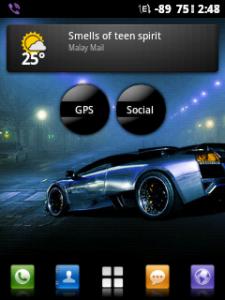
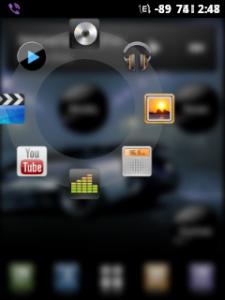
I'm using this circle launcher, which is actually a widget. It's neat and does not clutter the screens.

You can download the Circle Launcher Light version from the Market for free or the paid version (also free download here - http://www.mediafire.com/?voc22a6seg7lg20 ) tongue.gif

For icon packs you can download here :
http://www.4shared.com/android/8GSZIoSA/Ci...l?cau2=403tNull

You can name your widget (e.g. MAIN - for your most used apps like camera, browers, etc.; GPS - for all your apps concerning with GPS like Papago, GPS Test, Maps, etc ; SOCIAL - for social networking apps, like FB, Messenger, Twitter, etc..). There are many options which you can tweak the widget, like blur image when tapped (like mine), different icons (but I like this black round icon).

It saves the cluttering of the screens and you can use only a few screens ( I use only four screens).

I post here some of my phone's screenshots. I'm using Zeam Launcher with Circle Launcher Widget and MIUI theme plus 97ramscript and my phone is extremely responsive and fast!

Currently using CM v.1.7.2 + HF1.

Attached Image Attached Image Attached Image Attached Image Attached Image

This post has been edited by alexysc: Nov 14 2011, 03:27 PM
alexysc
post Nov 15 2011, 05:40 PM

Getting Started
**
Junior Member
60 posts

Joined: Jan 2011
QUOTE(vccy @ Nov 15 2011, 05:24 PM)
I dled papago from this thread and copy it to my G5 papago. But when i launch it. it said cant load map. Pls help.
*
You need to put the Map into the MAPS FOLDER in the NAVISEA FOLDER which is in the sdcard.
alexysc
post Nov 15 2011, 06:00 PM

Getting Started
**
Junior Member
60 posts

Joined: Jan 2011
QUOTE(vccy @ Nov 15 2011, 05:46 PM)
I did. but still said fail to load map.  sweat.gif
*
Check if you have the "MFM-PPG-110823C" folder in the NAVISEA folder.
alexysc
post Nov 15 2011, 06:24 PM

Getting Started
**
Junior Member
60 posts

Joined: Jan 2011
QUOTE(vccy @ Nov 15 2011, 06:07 PM)
i remove the malaysia folder and replace with the MFM-PPG-110823C oh. can ar?
*
No, don't remove the malaysia (map) folder.

In the NAVISEA folder, you should have these folders :

1) MagaNaviser -------> mine is empty
2) Maps -----------> this is where you put the malaysia (map) folder.
3) MFM-PPG-110823C
4) Organic
5) Photo --------> also empty
6) Save ------------> where you've saved your location, etc, etc.
7) Sounds

and these 2 scripts :

1) libpapago.so
2) morphemeXD.tbl


alexysc
post Nov 15 2011, 06:59 PM

Getting Started
**
Junior Member
60 posts

Joined: Jan 2011
QUOTE(vccy @ Nov 15 2011, 06:52 PM)
ok now it works. Thanks a lot alex.  notworthy.gif

my 1st  mistake is to extact the map to x5,x7 need to choose the option for X5 for android.  sweat.gif

2nd mistake is delete the malaysia map folder.  sweat.gif  sweat.gif

3rd one is place the MFM-PPG-110823C inside the map folder.  rclxub.gif
*
Great! You're welcome. rclxms.gif
alexysc
post Nov 16 2011, 12:44 PM

Getting Started
**
Junior Member
60 posts

Joined: Jan 2011
QUOTE(kimimaro_kun @ Nov 16 2011, 12:20 PM)
i dont think we need to put the MFM-PPG-XXXXXXC file in the NAVISEA folder.
i just dload and extract it in my pc. then i just copy the file to the maps folder in NAVISEA folder.
can save some space there.
*
IC...I've never tried removing the MFM-PPG-XXXXXXC file. But I have checked this file and it contains some
landmarks and buildings locations. I'm not sure, but I presume that this files gives some sort of 3D pictures
of those landmarks and buildings when using the Papago.

Does it work without this file? And do you get any 3D pictures when using it?

alexysc
post Nov 18 2011, 01:01 PM

Getting Started
**
Junior Member
60 posts

Joined: Jan 2011
QUOTE(kimimaro_kun @ Nov 18 2011, 12:01 PM)
check!
no 3d pictures.
*
Mine with MFM-PPG-XXXXXXC file have 3D pics. So this means this file is for rendering 3D pics in Papago.
alexysc
post Nov 18 2011, 03:21 PM

Getting Started
**
Junior Member
60 posts

Joined: Jan 2011
QUOTE(starz92 @ Nov 18 2011, 03:05 PM)
Guys, the Galaxy 5 thread is closed cause of exceeding post count.anyone want to open a new thread for it smile.gif
*
Hi Guys,

I've opened a new thread which is a continous thread for this.

http://forum.lowyat.net/topic/2114165

I'll be updating the first and second post.

This post has been edited by alexysc: Nov 18 2011, 03:23 PM
alexysc
post Nov 18 2011, 05:33 PM

Getting Started
**
Junior Member
60 posts

Joined: Jan 2011
QUOTE(kimimaro_kun @ Nov 18 2011, 05:22 PM)
mean you want to close this thread?
either 1 is ok with me  notworthy.gif
*
This thread has exceeded the posts count.
alexysc
post Nov 18 2011, 11:02 PM

Getting Started
**
Junior Member
60 posts

Joined: Jan 2011
QUOTE(vccy @ Nov 18 2011, 05:36 PM)
anyone canĀ  icon_question.gif me?
*
Try uninstall papago and install again.

EDIT : I'm uploading the Papago .apk and the NAVISEA (with the latest Malaysia Map) for you and others.

You may download them from the new thread in the "Useful Apps" spoiler after I've finished downloading.
It may take some time to upload as the NAVISEA file is 329MB size.

EDIT #2 : I've posted the links in the new thread. You can download from there and re-install.

This post has been edited by alexysc: Nov 19 2011, 02:34 AM

7 Pages « < 5 6 7Top
 

Change to:
| Lo-Fi Version
0.0248sec    0.59    7 queries    GZIP Disabled
Time is now: 1st December 2025 - 08:12 AM