

OpenHardwareMonitor should show you the CPU speed..
CPU-Z or ThrottleStop also can..
Official N45/N55 Club ♥ V2, Closed :)
Official N45/N55 Club ♥ V2, Closed :)
|
|
 Aug 24 2011, 01:51 AM Aug 24 2011, 01:51 AM
|
 
Elite
14,813 posts Joined: Nov 2006  
|
OpenHardwareMonitor should show you the CPU speed..
CPU-Z or ThrottleStop also can.. |
|
|
|
|
|
Aug 24 2011, 01:56 AM
|
 
Senior Member
6,612 posts Joined: Jan 2003 From: Tomorrow
|
I mean.. what is the CPU clockspeed while Prime95 is running?
|
|
|
Aug 24 2011, 01:58 AM
|

Junior Member
270 posts Joined: Jan 2011
|
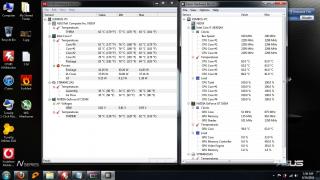
The SS when i run 2 test in the background for 20mins |
|
|
Aug 24 2011, 02:02 AM
|
|
Elite
14,813 posts Joined: Nov 2006
|
You mean 2 prime95 ?
hmm, prime95 doesn't seems stressing my temp much >< IntelBurnTest gives me 3C higher than Prime95.. This post has been edited by lee_what2004: Aug 24 2011, 02:28 AM |
|
|
Aug 24 2011, 02:03 AM
|
|
Junior Member
270 posts Joined: Jan 2011
|
Yea.i run 2 prime95 in the background.kind of accidentally.
|
|
|
Aug 24 2011, 02:03 AM
|

Senior Member
709 posts Joined: Apr 2008 From: Subang Ber-Jaya 
|
QUOTE(Sridev Pro Designer @ Aug 24 2011, 01:14 AM) Wahh helpp! My NFS Hot Pursuit is a little lagging my HP is also lagging.   but if you go to task manager and set the cpu affinity to CPU0 and CPU1 only. then it'll run smoother.  |
|
|
|
|
|
Aug 24 2011, 02:34 AM
|

Senior Member
1,801 posts Joined: Sep 2010
|
QUOTE(lakost @ Aug 24 2011, 01:58 AM)
The SS when i run 2 test in the background for 20mins  I see a Seagate HDD  im having the exact same model on my N53SN....and it slower than the WD HDD on other N53SN Added on August 24, 2011, 2:36 am QUOTE(Sridev Pro Designer @ Aug 24 2011, 01:14 AM) Wahh helpp! My NFS Hot Pursuit is a little lagging most prob because it run on Intel GPU.........cause by default it is. You have to change it. Follow my guide that Simon post on the 1st page to change to Nvdia GPUThis post has been edited by Trance4eva: Aug 24 2011, 02:47 AM |
|
|
Aug 24 2011, 02:48 AM
|

Senior Member
1,183 posts Joined: Dec 2009 From: Behind You 
|
My love for the Nx5 is dying lol. Now looking at other laptops de.
 |
|
|
Aug 24 2011, 02:51 AM
|
|
Senior Member
1,801 posts Joined: Sep 2010
|
QUOTE(lakost @ Aug 24 2011, 01:58 AM)
The SS when i run 2 test in the background for 20mins im having the exact model but i somehow have higher clock rate and why the hell your CPU load is 100% and mine is lower but im having a higher clock rate???? any sifu can explain 
try and run MSI Afterburner + Open Hardware Monitor + Furmark like mine. Have to check whether your CPU is also ok PS: this is how the GPU graph suppose to look like. This post has been edited by Trance4eva: Aug 24 2011, 02:56 AM |
|
|
Aug 24 2011, 02:51 AM
|
|
Junior Member
270 posts Joined: Jan 2011
|
QUOTE(Trance4eva @ Aug 24 2011, 02:34 AM) I see a Seagate HDD im having the exact same model on my N53SN....and it slower than the WD HDD on other N53SN Added on August 24, 2011, 2:36 am most prob because it run on Intel GPU.........cause by default it is. You have to change it. Follow my guide that Simon post on the 1st page to change to Nvdia GPU I prefer WD HDD just like the one i have in my 5750G. Its faster. |
|
|
Aug 24 2011, 02:54 AM
|
|
Elite
14,813 posts Joined: Nov 2006
|
QUOTE(Trance4eva @ Aug 24 2011, 02:51 AM) btw, did you set the Maximum processor speed to 100% or lower??? That one just running Furmark alone ?im having the exact model but i somehow have higher clock rate
PS: this is how the GPU graph suppose to look like |
|
|
Aug 24 2011, 02:55 AM
|
|
Junior Member
270 posts Joined: Jan 2011
|
QUOTE(Trance4eva @ Aug 24 2011, 02:51 AM) btw, did you set the Maximum processor speed to 100% or lower??? Processor speed is maximum when i run primer95 i guess.i dun touch anything lol.im having the exact model but i somehow have higher clock rate
PS: this is how the GPU graph suppose to look like If its lower maybe because i set my profile to run on entertainment mode. For the GPU yes i obtain the graph like u did but my GPU temp is max at 93degrees.Urs only 83. |
|
|
Aug 24 2011, 02:56 AM
|
|
Senior Member
1,801 posts Joined: Sep 2010
|
QUOTE(lakost @ Aug 24 2011, 02:51 AM) Yea its Seagate.I hate Seagate HDD to be honest. soooo true I prefer WD HDD just like the one i have in my 5750G. Its faster.  Added on August 24, 2011, 2:59 am QUOTE(lakost @ Aug 24 2011, 02:55 AM) Processor speed is maximum when i run primer95 i guess.i dun touch anything lol. why your CPU load is 100% and mine is lower but im having a higher clock rate???? any sifu can explainIf its lower maybe because i set my profile to run on entertainment mode. For the GPU yes i obtain the graph like u did but my GPU temp is max at 93degrees.Urs only 83. try and run MSI Afterburner + Open Hardware Monitor + Furmark like mine. Have to check whether your CPU is also ok also i got that clock rate when running both Entertainment mode and High performance my GPU is 83C cause i ran for 4 mins only This post has been edited by Trance4eva: Aug 24 2011, 02:59 AM |
|
|
|
|
|
Aug 24 2011, 02:59 AM
|
|
Junior Member
270 posts Joined: Jan 2011
|
i run the test again in performance mode.max procesor speed is 2594MHz this time
Added on August 24, 2011, 3:00 am QUOTE(Trance4eva @ Aug 24 2011, 02:56 AM) soooo true I run 4 mins my GPU already at 90+ degrees oo..heheAdded on August 24, 2011, 2:59 am why your CPU load is 100% and mine is lower but im having a higher clock rate???? any sifu can explain try and run MSI Afterburner + Open Hardware Monitor + Furmark like mine. Have to check whether your CPU is also ok also i got that clock rate when running both Entertainment mode and High performance my GPU is 83C cause i ran for 4 mins only This post has been edited by lakost: Aug 24 2011, 03:00 AM |
|
|
Aug 24 2011, 03:03 AM
|
|
Senior Member
1,801 posts Joined: Sep 2010
|
QUOTE(lakost @ Aug 24 2011, 02:59 AM) i run the test again in performance mode.max procesor speed is 2594MHz this time i still dunno how i got 2794MHz.....it stabilize at 2594MHzAdded on August 24, 2011, 3:00 am I run 4 mins my GPU already at 90+ degrees oo..hehe 4 mins and 90C+ they forgot put thermal paste izzit??? that's really hot in such short amount of time |
|
|
Aug 24 2011, 03:03 AM
|
|
Elite
14,813 posts Joined: Nov 2006
|
Furmark alone shouldn't cause the CPU that high temp..
This post has been edited by lee_what2004: Aug 24 2011, 03:05 AM |
|
|
Aug 24 2011, 03:05 AM
|
|
Senior Member
1,801 posts Joined: Sep 2010
|
QUOTE(lee_what2004 @ Aug 24 2011, 03:03 AM) Furmark alone shouldn't cause the CPU that high.. lollook at the taskbar and see what is running using FF 6.0 btw....seems abit buggy compare to 5.0 |
|
|
Aug 24 2011, 03:05 AM
|

Junior Member
18 posts Joined: Aug 2011
|
Just got through reading the 240 new posts since last night... =.=
|
|
|
Aug 24 2011, 03:07 AM
|
|
Elite
14,813 posts Joined: Nov 2006
|
QUOTE(Trance4eva @ Aug 24 2011, 02:51 AM) btw, did you set the Maximum processor speed to 100% or lower??? That one because he's running Prime95 which supposed to use 8 thread, and Turbo Boost is less likely to occur..im having the exact model but i somehow have higher clock rate and why the hell your CPU load is 100% and mine is lower but im having a higher clock rate???? any sifu can explain QUOTE(Trance4eva @ Aug 24 2011, 03:05 AM) lol Can try IntelBurnTest + Furmark at the same time? look at the taskbar and see what is running using FF 6.0 btw....seems abit buggy compare to 5.0 This post has been edited by lee_what2004: Aug 24 2011, 03:08 AM |
|
|
Aug 24 2011, 03:08 AM
|
|
Senior Member
1,801 posts Joined: Sep 2010
|
QUOTE(Asusta @ Aug 24 2011, 03:05 AM) Just got through reading the 240 new posts since last night... =.= this thread is really HOT |
|
Topic ClosedOptions
|
| Change to: |  0.0296sec 0.0296sec
 0.26 0.26
 6 queries 6 queries
 GZIP Disabled GZIP Disabled
Time is now: 6th December 2025 - 11:39 AM |
 Quote
Quote