

disable turbo, then press 'turn on' throttlestop since by default it still not running..
~Acer Aspire TimelineX 4830TG Club V2~, i5-2430M GeForce® GT 540M @ RM2499
~Acer Aspire TimelineX 4830TG Club V2~, i5-2430M GeForce® GT 540M @ RM2499
|
|
 Aug 15 2011, 10:54 PM Aug 15 2011, 10:54 PM
|
 
Elite
14,813 posts Joined: Nov 2006  
|
disable turbo, then press 'turn on' throttlestop since by default it still not running..
|
|
|
|
|
|
Aug 15 2011, 11:04 PM
|
 
Senior Member
583 posts Joined: Aug 2010
|
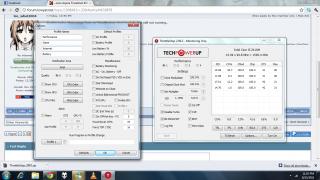
after tick the disable turbo and click the default?? and save it?? any pros or cons for this act? |
|
|
Aug 15 2011, 11:07 PM
|
|
Senior Member
583 posts Joined: Aug 2010
|
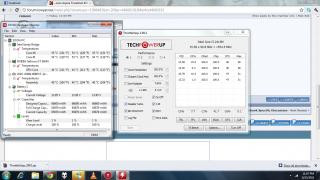
this is the result after i turn it on. |
|
|
Aug 15 2011, 11:09 PM
|
|
Elite
14,813 posts Joined: Nov 2006
|
It will disable TurboBoost, hence when you play game it should have lower temp with lower performance.
But try if this fix the lag or not.. |
|
|
Aug 15 2011, 11:10 PM
|

Senior Member
4,297 posts Joined: Jul 2009 
|
turn it on adi..
play dirt 3 now.... see how... |
|
|
Aug 15 2011, 11:12 PM
|
|
Senior Member
583 posts Joined: Aug 2010
|
hmm.. currently now my resolution is 1366x768. all the setting is low to medium... after turn on the throttle. it is still lag.
Added on August 15, 2011, 11:13 pmI thought if lower the performance d, the game will become even lag???? This post has been edited by remonx: Aug 15 2011, 11:13 PM |
|
|
|
|
|
Aug 15 2011, 11:14 PM
|
|
Elite
14,813 posts Joined: Nov 2006
|
Is your game lag from the beginning you start the game or suddenly lag after play a while ?
|
|
|
Aug 15 2011, 11:18 PM
|
|
Senior Member
583 posts Joined: Aug 2010
|
Previously it happened to be lag once i start the game. But i think there is no difference when i turn the throttle on. I think not because of the temperature problem. Hmm, this program lower down the excessive voltage on my lappy?
|
|
|
Aug 15 2011, 11:20 PM
|
|
Elite
14,813 posts Joined: Nov 2006
|
No, it cannot undervolt your processor.
This program can use to disable your TurboBoost, so your CPU at max run 2.3GHz only.. Have you updated the nVidia driver ? |
|
|
Aug 15 2011, 11:23 PM
|
|
Senior Member
583 posts Joined: Aug 2010
|
yup, i havent update the driver b4 since i bought this lappy.. It makes difference?
|
|
|
Aug 15 2011, 11:24 PM
|
|
Elite
14,813 posts Joined: Nov 2006
|
Might be, might not..
|
|
|
Aug 15 2011, 11:43 PM
|
|
Senior Member
4,297 posts Joined: Jul 2009
|
o gt a 2pid question..
u sure it is running on the nvidia gpu?? @@ |
|
|
Aug 16 2011, 12:07 AM
|

Junior Member
136 posts Joined: Feb 2009 From: Kuala Lumpur
|
QUOTE(remonx @ Aug 15 2011, 11:23 PM) yup, i havent update the driver b4 since i bought this lappy.. It makes difference? if ur on stock acer driver, u will DEFINITELY experince lagging when palying crysis 2 n dirt 3. update the driver will SIGNIFACNTLY improve the performance. im playing dirt 3 at HIGH 1366x768p reso. no problem   yes , i have to use throttlestop n limit da cpu to 2.0ghz. throttling thing. havent tried 2.3GHz yet. not time yes , i have to use throttlestop n limit da cpu to 2.0ghz. throttling thing. havent tried 2.3GHz yet. not time |
|
|
|
|
|
Aug 16 2011, 12:31 AM
|
|
Senior Member
583 posts Joined: Aug 2010
|
ok.. i go and update my driver first.. yes im using the discrete gpu!! @@
|
|
|
Aug 16 2011, 12:36 AM
|
|
Senior Member
4,297 posts Joined: Jul 2009
|
could be driver.. ^^
|
|
|
Aug 16 2011, 12:39 AM
|
|
Senior Member
583 posts Joined: Aug 2010
|
Is there any side effect using throttle program?
|
|
|
Aug 16 2011, 12:40 AM
|
|
Elite
14,813 posts Joined: Nov 2006
|
What you want to use it for ?
|
|
|
Aug 16 2011, 12:41 AM
|
|
Senior Member
583 posts Joined: Aug 2010
|
just lower down the temperature by disabling turbo boost???
|
|
|
Aug 16 2011, 12:43 AM
|
|
Elite
14,813 posts Joined: Nov 2006
|
Then it would just make it like Core i3
 You can just go to Power Option, change plan settings, change advanced settings, processor power management, maximum power state, change it 100% to 99% then TurboBoost is disabled.. |
|
|
Aug 16 2011, 12:46 AM
|
|
Senior Member
4,297 posts Joined: Jul 2009
|
or u can do like me..... set it so that if <85..... full turbo boost available.. >85.... shut down turbo bnoost... lidat u get the most of performance... while maintaning control over temperatures.. ^^
|
| Change to: |  0.0242sec 0.0242sec
 0.20 0.20
 6 queries 6 queries
 GZIP Disabled GZIP Disabled
Time is now: 25th December 2025 - 02:36 AM |
 Quote
Quote