Welcome Guest ( Log In | Register )

Bump Topic Topic Closed RSS Feed
123 Pages « < 5 6 7 8 > » Bottom

Outline · [ Standard ] · Linear+

 HP Pavillion DV6-6XXX series Owners Lounge V3, -130 owners. Refreshed! Aww Yeah!!

views
     
rurushu
post Aug 9 2011, 12:30 AM

Look at all my stars!!
*******
Senior Member
2,021 posts

Joined: Jun 2011
From: Shah Alam


QUOTE(arslow @ Aug 8 2011, 04:16 PM)
You really shud install version 1.9 as its the latest and more optimized version,and it enables you to run crysis 2 in DX11!!! flex.gif
*
I tried it just now, i installed my crysis 2 at D: drive, but when i run the v1.9 patch it said it cant locate my crysis 2 whereas for v.18 it can locate, LOL...


QUOTE(faridz7 @ Aug 8 2011, 11:06 PM)
thanks for the help rurushu, trying it now at this very second, lets hope it works....


Added on August 8, 2011, 11:24 pmhey guys, i had to restart the computer because it says that C:/ is being used and that minitool will restart and do the partitioning when the computer restarts...

its now at the startup, black screen and it says " 1 of 2 operations " and is stuck there for quite a bit...is that normal ?
*
QUOTE(faridz7 @ Aug 8 2011, 11:55 PM)
its been quite a while already....it says

1 of 2 operations...
Resize partition
partition letter C:
partition label
disk index: 1
partition index : 2
new partition starting: LBA: 409600
new partition size : 153601

- its just stuck on that..20 over mins now...

do you think i should just force restart the computer?
*
Did you keep C: drive as "Primary"??? Because the only time when i encounter the said black screen with those operations is the first time when i wrongly assigned the C: drive to "logical"
If you force restart like what i did, it will run the system recovery and fix something i know not, then you back into your windows.

faridz7
post Aug 9 2011, 12:33 AM

Getting Started
**
Junior Member
132 posts

Joined: May 2008


yup c: is at primary rurushu, thank you...

hmm but now my cd-rom is at E: and my blu-ray rom is at F:

my cd-rom is my Ultra-Iso drive...hmm cant find a way to switch the drive letter for it

This post has been edited by faridz7: Aug 9 2011, 12:36 AM
lee_what2004
post Aug 9 2011, 12:35 AM

*stare* ji--------
Group Icon
Elite
14,813 posts

Joined: Nov 2006


Virtual cd-rom or ?
faridz7
post Aug 9 2011, 12:38 AM

Getting Started
**
Junior Member
132 posts

Joined: May 2008


yup its a virtual cd-rom...sorry forgot to mention that

how do i change the drive letter for the virtual cd-rom
lee_what2004
post Aug 9 2011, 12:39 AM

*stare* ji--------
Group Icon
Elite
14,813 posts

Joined: Nov 2006


Just disable the virtual cd-rom, no setting for that ?
rurushu
post Aug 9 2011, 12:40 AM

Look at all my stars!!
*******
Senior Member
2,021 posts

Joined: Jun 2011
From: Shah Alam


QUOTE(faridz7 @ Aug 9 2011, 12:33 AM)
yup c: is at primary rurushu, thank you...

hmm but now my cd-rom is at E: and my blu-ray rom is at F:

my cd-rom is my Ultra-Iso drive...hmm cant find a way to switch the drive letter for it
*
Oh, meaning your partition succeeded?
the lettering of my drives also same case as yours, C: drive, D: drive, E:BD-ROM, F:Drive, G:HP_Tools
How to change?
lee_what2004
post Aug 9 2011, 12:41 AM

*stare* ji--------
Group Icon
Elite
14,813 posts

Joined: Nov 2006


^open diskmgmt.msc, right click the partition/dvd, change drive letter and path...

This post has been edited by lee_what2004: Aug 9 2011, 12:41 AM
rurushu
post Aug 9 2011, 12:43 AM

Look at all my stars!!
*******
Senior Member
2,021 posts

Joined: Jun 2011
From: Shah Alam


QUOTE(lee_what2004 @ Aug 9 2011, 12:41 AM)
^open diskmgmt.msc, right click the partition/dvd, change drive letter and path...
*
Erm sifu lee, that thing is what? Open at?
lee_what2004
post Aug 9 2011, 12:43 AM

*stare* ji--------
Group Icon
Elite
14,813 posts

Joined: Nov 2006


type on startmenu..
rurushu
post Aug 9 2011, 12:45 AM

Look at all my stars!!
*******
Senior Member
2,021 posts

Joined: Jun 2011
From: Shah Alam


QUOTE(lee_what2004 @ Aug 9 2011, 12:43 AM)
type on startmenu..
*
Oh, ok, opened. But cant find the optical drive wor... can only see the hdd ones....
lee_what2004
post Aug 9 2011, 12:47 AM

*stare* ji--------
Group Icon
Elite
14,813 posts

Joined: Nov 2006


Should be just below the hdd...
your optical drive got turned off ?
On device manager, it detected ?
rurushu
post Aug 9 2011, 12:49 AM

Look at all my stars!!
*******
Senior Member
2,021 posts

Joined: Jun 2011
From: Shah Alam


QUOTE(lee_what2004 @ Aug 9 2011, 12:47 AM)
Should be just below the hdd...
your optical drive got turned off ?
On device manager, it detected ?
*
Erm.. yeah, it is detected. Under the DVD/CD-ROM there got the hp BDDVDRW drive....
But it is not in the diskmgmt.msc window...
Edit: found already, when i enlarge the windows, can see already, at the bottom of the hdd sweat.gif
So sifu lee, lets say my drives are C, D, F, G with the E bd rom
if i want to rearrange the sequence, i need to rename the BDrom to H first, then only rename the others and in the end, rename back the H to G is it?

This post has been edited by rurushu: Aug 9 2011, 12:52 AM
lee_what2004
post Aug 9 2011, 12:52 AM

*stare* ji--------
Group Icon
Elite
14,813 posts

Joined: Nov 2006


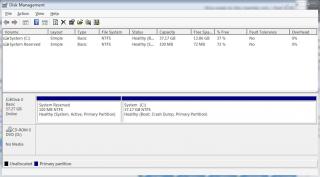
No cd-rom 0 like this ?


Attached thumbnail(s)
Attached Image
rurushu
post Aug 9 2011, 12:55 AM

Look at all my stars!!
*******
Senior Member
2,021 posts

Joined: Jun 2011
From: Shah Alam


QUOTE(lee_what2004 @ Aug 9 2011, 12:52 AM)
No cd-rom 0 like this ?
*
got got, saw already, so if i need to rename, do i do like what i've posted earlier?
faridz7
post Aug 9 2011, 12:58 AM

Getting Started
**
Junior Member
132 posts

Joined: May 2008


phew i managed to do it guys thanks

lol i took the easy way out and uninstalled my Ultra-Iso and just renamed all the drive letters to my liking
lee_what2004
post Aug 9 2011, 12:59 AM

*stare* ji--------
Group Icon
Elite
14,813 posts

Joined: Nov 2006


QUOTE(rurushu @ Aug 9 2011, 12:55 AM)
got got, saw already, so if i need to rename, do i do like what i've posted earlier?
*
Yup.

QUOTE(faridz7 @ Aug 9 2011, 12:58 AM)
phew i managed to do it guys thanks

lol i took the easy way out and uninstalled my Ultra-Iso and just renamed all the drive letters to my liking
*
I like use the Ultra-Iso portable version, just need to run it to mount ISO, after finish, close then all gone.
rurushu
post Aug 9 2011, 01:07 AM

Look at all my stars!!
*******
Senior Member
2,021 posts

Joined: Jun 2011
From: Shah Alam


QUOTE(lee_what2004 @ Aug 9 2011, 12:59 AM)
Yup.

*
ok, just now i tried to rename the drives, but when i wanted to rename the G:HP_Tools, it popped up a warning window that said it is current in use, if you change it, some programs may not run, do you wanna continue? So i didnt touch the G:HP_Tools and leave it be.

So in the end, my drives are C: drive, D: drive, E: drive and F: BD-ROM drive + the original unchanged G:HP_Tools drive

Thanks for your help sifu lee notworthy.gif
faridz7
post Aug 9 2011, 01:09 AM

Getting Started
**
Junior Member
132 posts

Joined: May 2008


QUOTE(lee_what2004 @ Aug 9 2011, 12:59 AM)
I like use the Ultra-Iso portable version, just need to run it to mount ISO, after finish, close then all gone.
*
yup yup...phew all allright already with the partitioning...thanks lee for the help !

can go off to sleep in peace now lol..nights everyone
louisfjh
post Aug 9 2011, 01:37 AM

Getting Started
**
Junior Member
257 posts

Joined: May 2008


actually hp_tool partition wat use?? when i bought my laptop, the stupid promoter help me delete it @@
zarakiken
post Aug 9 2011, 01:46 AM

Getting Started
**
Junior Member
58 posts

Joined: Jul 2009
From: Somewhere in Nendoroidian land...
who here have already changed their thermal paste for dv6-6114xt...? easy arr...?

123 Pages « < 5 6 7 8 > » Top
Topic ClosedOptions
 

Change to:
| Lo-Fi Version
0.0332sec    0.56    6 queries    GZIP Disabled
Time is now: 6th December 2025 - 02:07 PM