Outline ·
[ Standard ] ·
Linear+
>>Malaysia ThinkPad User Community<<, Post Pics of your Setup & Discussion
|
Ludwig.
|
 May 15 2019, 06:57 PM May 15 2019, 06:57 PM
|

|
QUOTE(ZM Fong @ May 15 2019, 05:59 PM) Not high IMO considering it has thin chassis and 8th gen ULV No need liquid metal. A good non-conductive paste will do. Will not void warranty unless you damage something Glad to hear! But there are some stickers and bar codes in the way of removing the copper heatsink. There's no other way in other than to tear these stickers. He's scared that if he tears the stickers, it'll be a telltale sign to Lenovo that he has disassembled the computer and thus void his warranty. Is this true? |
|
|
|
|
|
ZM Fong
|
May 15 2019, 07:58 PM
|
|
|
QUOTE(Ludwig. @ May 15 2019, 06:57 PM) Glad to hear! But there are some stickers and bar codes in the way of removing the copper heatsink. There's no other way in other than to tear these stickers. He's scared that if he tears the stickers, it'll be a telltale sign to Lenovo that he has disassembled the computer and thus void his warranty. Is this true? Not sure, this need to ask them Honestly speaking, for Ultrabook all you need to do is undervolt. Repaste is optional, not necessary |
|
|
|
|
|
Ludwig.
|
May 15 2019, 08:10 PM
|
|
|
QUOTE(ZM Fong @ May 15 2019, 07:58 PM) Not sure, this need to ask them Honestly speaking, for Ultrabook all you need to do is undervolt. Repaste is optional, not necessary hmm, i'll relay this over to him. ask him to give lenovo cs a call in the morning. in the meantime, hopefully undervolting will solve the issue a bit. thanks loads for the help! |
|
|
|
|
|
zaoldyeck
|
May 16 2019, 12:20 AM
|
|
|
Good deal now 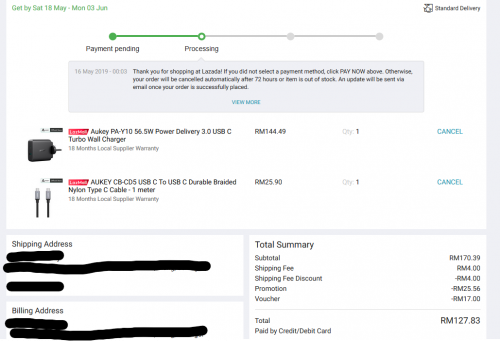 |
|
|
|
|
|
shauno
|
May 16 2019, 01:28 PM
|
Getting Started

|
QUOTE(zaoldyeck @ May 14 2019, 11:26 PM) ...and carbon finish. Welp the carbon is to die for. Not sure about the thermal performance got it. for the carbon finish, its an aesthetic thing? or is there a difference in the body's build quality? |
|
|
|
|
|
zaoldyeck
|
May 16 2019, 05:24 PM
|
|
|
QUOTE(shauno @ May 16 2019, 01:28 PM) got it. for the carbon finish, its an aesthetic thing? or is there a difference in the body's build quality? Yup aesthetically feels more premium. Build quality wise any T series have military spec, but plastic rubber build will get worn out like pic below  |
|
|
|
|
|
keyser soze
|
May 16 2019, 06:03 PM
|
|
|
QUOTE(Ludwig. @ May 15 2019, 05:34 PM) hey guys, my cousin just got an X1 carbon today and has been complaining about the high temperatures during idle (55c) and youtube playback (73c). he's thinking about repasting with liquid metal, but he's concerned about voiding the warranty. does lenovo allow user repasting? My X1C is using liquid metal since day one. About 10 deg C lower. If need to claim warranty only remove the liquid metal and use back the grey paste. Just few screw in less than 30 min job t re-paste. |
|
|
|
|
|
Ludwig.
|
May 16 2019, 06:21 PM
|
|
|
QUOTE(keyser soze @ May 16 2019, 06:03 PM) My X1C is using liquid metal since day one. About 10 deg C lower. If need to claim warranty only remove the liquid metal and use back the grey paste. Just few screw in less than 30 min job t re-paste. ohh nice! so repasting does not void the warranty then? |
|
|
|
|
|
moiskyrie
|
May 16 2019, 06:24 PM
|
|
|
For x1e, the ram any CL also can?
Want to get 8gb but some is CL19, CL15, etc...
|
|
|
|
|
|
ZM Fong
|
May 16 2019, 07:00 PM
|
|
|
QUOTE(Ludwig. @ May 16 2019, 06:21 PM) ohh nice! so repasting does not void the warranty then? Do at your own risk QUOTE(moiskyrie @ May 16 2019, 06:24 PM) For x1e, the ram any CL also can? Want to get 8gb but some is CL19, CL15, etc... Better stick with default - 2666MHZ CL19 This post has been edited by ZM Fong: May 16 2019, 07:00 PM |
|
|
|
|
|
prasys
|
May 16 2019, 07:40 PM
|
Heros Never Die

|
The 2nd generation is nice now you got a privacy camera , that's the biggest upgrade I see and looks like i9 + that form factor = thermal throttling
1650 vs 1050 is not a huge upgrade lol they should have included RX570....
|
|
|
|
|
|
keyser soze
|
May 17 2019, 10:44 PM
|
|
|
QUOTE(Ludwig. @ May 16 2019, 06:21 PM) ohh nice! so repasting does not void the warranty then? probably will if they find out. |
|
|
|
|
|
ZM Fong
|
May 18 2019, 12:53 AM
|
|
|
QUOTE(prasys @ May 16 2019, 07:40 PM) 1650 vs 1050 is not a huge upgrade lol they should have included RX570.... It is a noticeable upgrade |
|
|
|
|
|
prasys
|
May 18 2019, 07:27 AM
|
Heros Never Die
|
QUOTE(ZM Fong @ May 18 2019, 12:53 AM) It is a noticeable upgrade 70% faster. Probably closer to 1060 levels already.... |
|
|
|
|
|
Ludwig.
|
May 18 2019, 09:12 AM
|
|
|
QUOTE(keyser soze @ May 17 2019, 10:44 PM) probably will if they find out. my cousin called the cs and they said that repasting doesn't void the warranty as long as the user doesn't damage anything in the process. plus, any stickers that are in the way of the repasting process can be moved away and placed somewhere else on the laptop for a more convenient tear down process  . |
|
|
|
|
|
keyser soze
|
May 18 2019, 07:45 PM
|
|
|
QUOTE(Ludwig. @ May 18 2019, 09:12 AM) my cousin called the cs and they said that repasting doesn't void the warranty as long as the user doesn't damage anything in the process. plus, any stickers that are in the way of the repasting process can be moved away and placed somewhere else on the laptop for a more convenient tear down process . Wow great. Actually the black sticker around the processor should not be removed and it is good to prevent the liquid metal damage the board if flow out from the die. |
|
|
|
|
|
Ludwig.
|
May 18 2019, 09:22 PM
|
|
|
QUOTE(keyser soze @ May 18 2019, 07:45 PM) Wow great. Actually the black sticker around the processor should not be removed and it is good to prevent the liquid metal damage the board if flow out from the die. Indeed! But I'm not talking about the black sticker. There's actual bar and serial codes on white stickers that are just on top of the heatsink. |
|
|
|
|
|
prasys
|
May 18 2019, 10:04 PM
|
Heros Never Die
|
QUOTE(Ludwig. @ May 18 2019, 09:12 AM) my cousin called the cs and they said that repasting doesn't void the warranty as long as the user doesn't damage anything in the process. plus, any stickers that are in the way of the repasting process can be moved away and placed somewhere else on the laptop for a more convenient tear down process . Thinkpad is a business laptop , they allow IT Departments to service the laptop. That's why it's soo easy to replace them and a lot of DIY guides...you don't see any void warranty stickers.... |
|
|
|
|
|
Ludwig.
|
May 18 2019, 10:40 PM
|
|
|
QUOTE(prasys @ May 18 2019, 10:04 PM) Thinkpad is a business laptop , they allow IT Departments to service the laptop. That's why it's soo easy to replace them and a lot of DIY guides...you don't see any void warranty stickers.... I guess the logic is there. i guess my cousin just needed verbal confirmation from the cs people before he accidentally loses his 2 year warranty. better to be safe than sorry, it seems. |
|
|
|
|
|
prasys
|
May 19 2019, 09:11 PM
|
Heros Never Die
|
Okay - Thinkpad and gaming is bad
It's good if you put things in Medium and don't stress the laptop. Moment you crank things up High (with capable eGPU + CPU) , the laptop starts to throttle...real bad...i mean really bad (Despite using ThrottleStop).
It's like Lenovo wants the temperature to be at 80C-85C for CPU when graphics is being used. The problem is I am not using my built-in GeForce 1050 Ti - but my external GPU. However , the damn internal GPU is on (just in case if opps happens and it will pick up the slack/displaying desktop)
So yeah...those who are using eGPU - yes you can game decently but don't expect to get desktop like performance ......probably in their gaming laptop they are bit more relaxed...but in thinkpad - they are stricter
|
|
|
|
|





 Quote
Quote







 0.0321sec
 0.22
0.22
 6 queries
 GZIP Disabled